
Nadview
The TELESIN Phone Camera Master Grip Kit is designed to enhance your mobile photography experience with the Samsung Galaxy S26 Ultra. This kit offers seamless hardware-software integration, professional filters, and dynamic OTA calibration to unlock your phone’s full camera potential. It features an ergonomic handle with premium textured leather and retro camera styling for a comfortable and stable grip, along with a magnetic quick-release design for easy installation and removal.
Zawartość opakowania
- TELESIN Master Grip for S26 Ultra x1
- Magnetic Flash for S26 Ultra x1
- Multifunctional Magnetic Phone Case for S26 Ultra x1
- Magnetic ND16 Filter for S26 Ultra x1
- Pasek na nadgarstek x1
- Kabel ładujący x1
- Instrukcja obsługi x1

Image: All components of the TELESIN Master Grip Kit, including the grip, phone case, flash, ND16 filter, wrist strap, charging cable, and user manual, neatly arranged on a surface.
Product Components & Features
TELESIN Master Grip
The master grip provides professional control settings, featuring a mechanical shutter and a smooth zoom dial that perfectly matches the dual telephoto lenses of the Samsung S26 Ultra. This design ensures stable control across focal lengths and significantly reduces shake. An ergonomic thumb rest, made of CNC-machined aluminum alloy with a non-slip finish, prevents accidental screen taps. Customizable Fn keys and a physical dial offer pro-level shooting flexibility. The grip supports Type-C charging and has a built-in 3200mAh battery, enabling magnetic wireless charging for the Samsung S26 Ultra when paired with the phone case. A 1/4” threaded mount at the bottom allows for attaching tripods and other accessories, and a lanyard hole supports wrist straps for added convenience.

Image: A user holding a Samsung Galaxy S26 Ultra with the TELESIN Master Grip attached, showcasing the ergonomic design and camera-like feel.

Obraz: szczegółowy view of the TELESIN Master Grip's control buttons, including the mechanical shutter, zoom dial, and customizable Fn keys.

Image: An illustration showing the TELESIN Master Grip magnetically attached to the phone case, wirelessly charging the Samsung Galaxy S26 Ultra, highlighting its 3200mAh battery capacity.
Magnetic Flash
The Magnetic Flash functions as a 2-in-1 flash and fill light. When paired with the “Reef Color” App, it enables a pre-flash function that automatically adjusts for optimal exposure, providing brightness up to 10 times that of a standard phone flash. It also allows for free adjustment of color temperature and brightness to suit diverse shooting needs.

Image: The TELESIN Magnetic Flash is shown attached to the Samsung Galaxy S26 Ultra, illuminating a scene for improved photography in low light conditions.
Multifunctional Magnetic Phone Case
The multifunctional magnetic phone case effectively resists impacts and provides comprehensive protection for your phone. It features a hidden stand for added convenience and ventilation holes to help dissipate heat. The phone case also includes a lanyard hole for attaching wrist or shoulder straps.

Image: A Samsung Galaxy S26 Ultra phone is shown in its TELESIN magnetic phone case, utilizing its integrated kickstand for hands-free viewing.
Magnetic ND16 Filter
The package includes an ND16 filter that attaches magnetically to the lens rail on the phone case. This filter effectively reduces glare, allowing you to easily capture professional-grade long-exposure shots even under harsh sunlight.
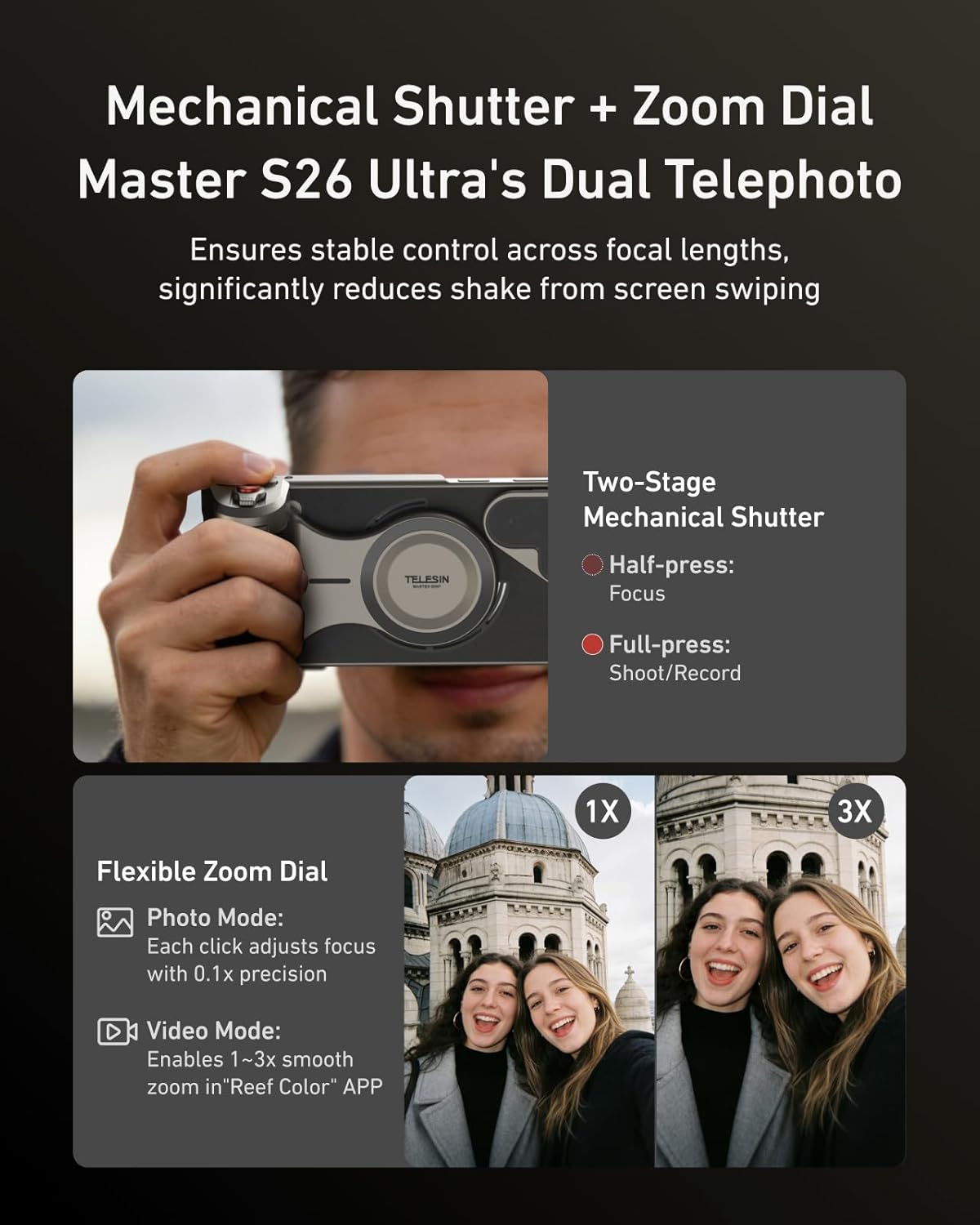
Image: A close-up of the TELESIN Magnetic ND16 Filter mounted on the lens rail of the Samsung Galaxy S26 Ultra phone case.
Konfiguracja i obsługa
Connecting the Master Grip
- Ensure your Samsung Galaxy S26 Ultra is in the multifunctional magnetic phone case.
- Attach the TELESIN Master Grip magnetically to the back of the phone case.
- Turn on Bluetooth on your Samsung S26 Ultra.
- Open the "Reef Color" App (download from your app store if not already installed).
- In the app, connect to "Telesin_S26" grip and "TELESIN_JT03" flash via Bluetooth.
- Check if the flash firmware is up to date in the "Reef Color" App.
- Select "iCam model (no-filter)" in APP shooting page and try to shoot.
Using the Magnetic Flash
The Magnetic Flash attaches to the phone case. Use the “Reef Color” App to enable pre-flash functionality and adjust color temperature and brightness as needed for optimal lighting in your photos and videos.
Using the ND16 Filter
The Magnetic ND16 Filter attaches magnetically to the lens rail on the phone case. This filter is ideal for reducing glare and enabling long-exposure photography in bright conditions.
Filmy operacyjne
Video: A user guide demonstrating the setup and basic functions of the TELESIN Phone Camera Master Grip for Samsung S26 Ultra.
Video: This video illustrates the coordination method for using the TELESIN Flashlight and Grip with the Samsung S26 Ultra, showing how to attach and operate the flash.
Specyfikacje
| Marka | TELESIN |
| Numer modelu | TXSM-P5-MCS-15-TSX-AU |
| Tworzywo | Aluminum, Leather |
| Pojemność baterii | 3200mAh |
| Typ ładowania | Typ C |
| Ładowanie bezprzewodowe | Yes (for Samsung S26 Ultra with phone case) |
| Cechy specjalne | Flash + Fill Light 2-in-1, Hardware & Software Synergy, Multifunctional Magnetic Phone Case, Professional Photography Grip |
Gwarancja i wsparcie
This product comes with a 365-day quality assurance. For any questions or support, please contact our online customer support via Amazon Messages only. Please refer to the user manual or on-page operation video for setup assistance.