
1. Koniec produktuview
1.1 Wprowadzenie
The LongPlus CLK2-W1X8 is a versatile wireless security camera designed for both indoor and outdoor use. It features 2K QHD video resolution, dual-mode night vision, AI motion detection, two-way audio, and flexible storage options. This manual provides detailed instructions for setting up, operating, and maintaining your camera to ensure optimal performance.

Image: LongPlus Smart Wireless Security Camera overview.
1.2 Główne cechy
- Rozdzielczość wideo 2K QHD: Zapewnia wyraźny i szczegółowy obraz nadzorutage.
- Podwójny tryb widzenia nocnego: Offers both full-color and infrared night vision up to 33ft.
- Wykrywanie ruchu AI: Accurately distinguishes between people, vehicles, pets, and packages.
- Rozmowa dwukierunkowa: Wbudowany mikrofon i głośnik umożliwiające komunikację w czasie rzeczywistym.
- Siren Alarm & Flashing Light: Deter intruders with audible and visual alerts.
- Konstrukcja bezprzewodowa: Rechargeable battery for flexible placement without power cords.
- Odporność na warunki atmosferyczne IP65: Zapewnia niezawodną pracę w różnych warunkach pogodowych.
- Przechowywanie lokalne i w chmurze: Supports Micro SD card (up to 128GB) and cloud storage options.
- VicoHome App & Alexa Integration: Remote monitoring and voice control.

Image: LongPlus camera highlighting key features such as 4K HD, 5200mAh battery, multi-user share, 2-way talk, human/car detection, SD/cloud storage, sound/light alarm, and color/infrared night vision.
1.3 Zawartość pudełka
Po rozpakowaniu sprawdź, czy wszystkie elementy są obecne:
- LongPlus Security Camera
- Uchwyt montażowy
- Kabel ładujący USB
- Śruby montażowe i kotwy ścienne
- Instrukcja obsługi (ten dokument)
2. Konfiguracja i instalacja
2.1 Ładowanie kamery
Before initial use, fully charge the camera's built-in rechargeable battery. Connect the provided USB charging cable to the camera's charging port and a standard 5V USB power adapter (not included). The charging indicator light will show the charging status.

Image: Illustration of the camera's wire-free, battery-powered design, emphasizing the 5200mAh battery capacity.
2.2 Pobieranie aplikacji i tworzenie konta
Pobierz VicoHome app from the Apple App Store or Google Play Store. Follow the on-screen instructions to create an account and log in.
2.3 Łączenie z Wi-Fi
Open the VicoHome app and follow the prompts to add your new camera. The camera supports both 2.4GHz and 5GHz Wi-Fi networks. Ensure your smartphone is connected to the same Wi-Fi network you intend to use for the camera during the setup process.

Image: The camera supports both 2.4GHz and 5GHz Wi-Fi for flexible connectivity.
2.4 Montaż kamery
Select a suitable location for your camera, ensuring good Wi-Fi signal strength and an unobstructed view. Use the included mounting bracket, screws, and wall anchors to securely attach the camera to a wall or ceiling. The IP65 rating ensures it can withstand outdoor elements.

Image: A hand attaching the camera to its wall-mounted bracket, demonstrating easy installation.
2.5 Wkładanie karty SD
To enable local storage, insert a Micro SD card (up to 128GB, not included) into the designated slot on the camera. Ensure the camera is powered off before inserting or removing the SD card. Format the SD card via the VicoHome app after insertion for proper functionality.

Image: Close-up of the camera showing the Micro SD card slot, indicating support for up to 512GB (note: product specifications state 128GB).
3. Obsługa aparatu
3.1 Na żywo View i nagrywanie
Uzyskaj dostęp do aplikacji VicoHome, aby view live 2K QHD video footage from your camera anytime, anywhere. The camera supports 24/7 recording when in Always-On Power mode, with retention time depending on your SD card size or cloud plan. You can also review past recordings through the app.

Image: Demonstrates the camera's 4K Ultra HD clarity with 8X zoom, 8 million pixels, and F1.6 lens aperture.

Image: Illustrates the 24/7 recording and live view capabilities, showing day and night monitoring.
3.2 Detekcja ruchu i alerty
The camera utilizes advanced AI to detect and differentiate between people, vehicles, pets, and packages. Its sensitive PIR sensor triggers real-time alerts, sending instant notifications to your phone via the VicoHome app. You can adjust detection sensitivity within the app to minimize false alarms. In case of an unwanted presence, activate the loud siren and flashing white light directly from the app to deter intruders.
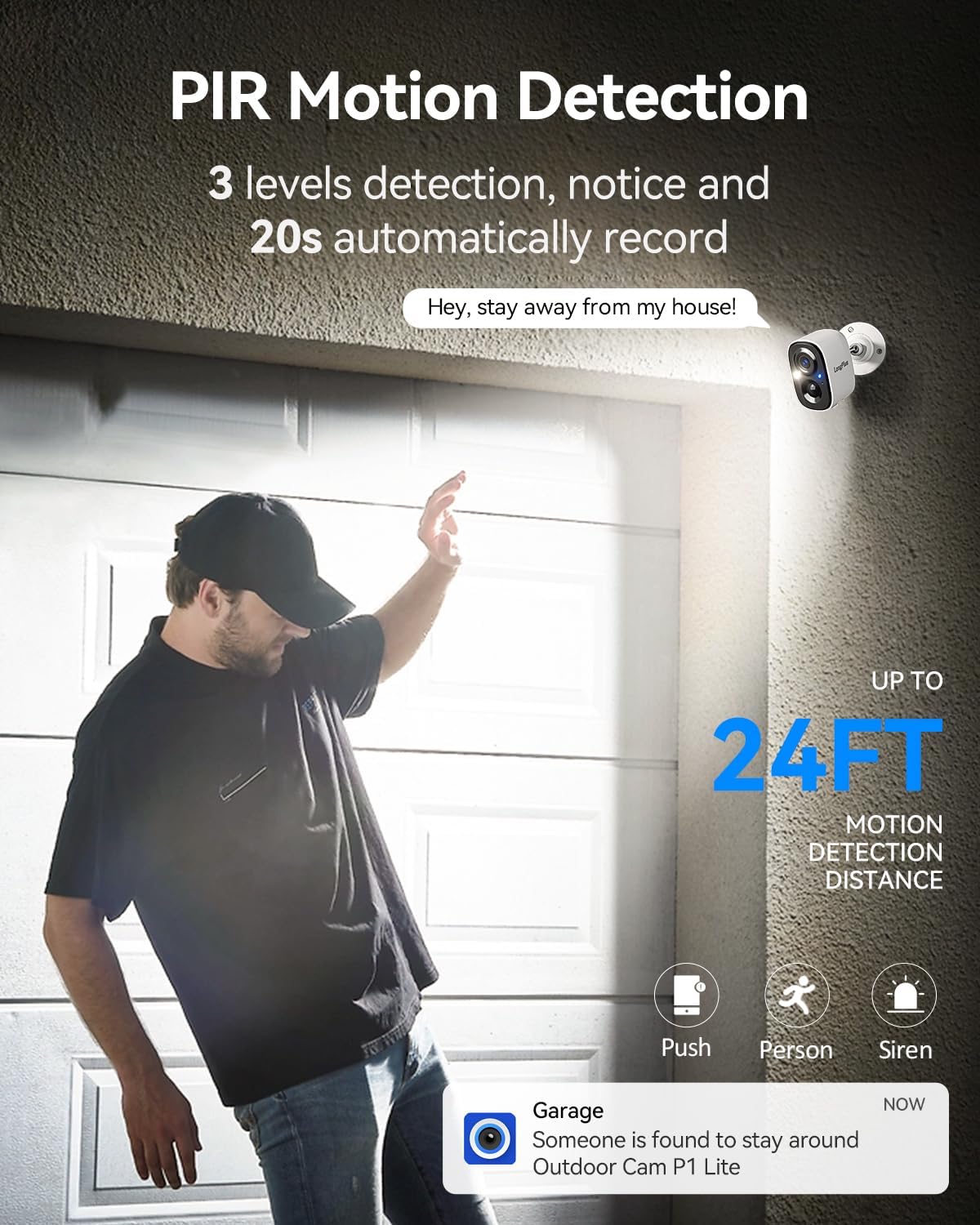
Image: Depicts PIR motion detection with a person triggering an alert, showing a notification on a smartphone and the camera's motion detection range.
3.3 Dwukierunkowa komunikacja audio
Engage in real-time conversations using the camera's built-in microphone and speaker. Through the VicoHome app, you can speak to visitors, delivery personnel, or warn off potential intruders directly from your smartphone.

Image: Illustrates the two-way talk feature, showing a person at the door and a user communicating via the VicoHome app.
3.4 Tryby widzenia nocnego
The camera offers dual-mode night vision. Choose between full-color night vision, which utilizes supplemental lighting for a clearer, more detailed view, or infrared night vision for discreet monitoring in complete darkness. Both modes provide coverage up to 33ft.
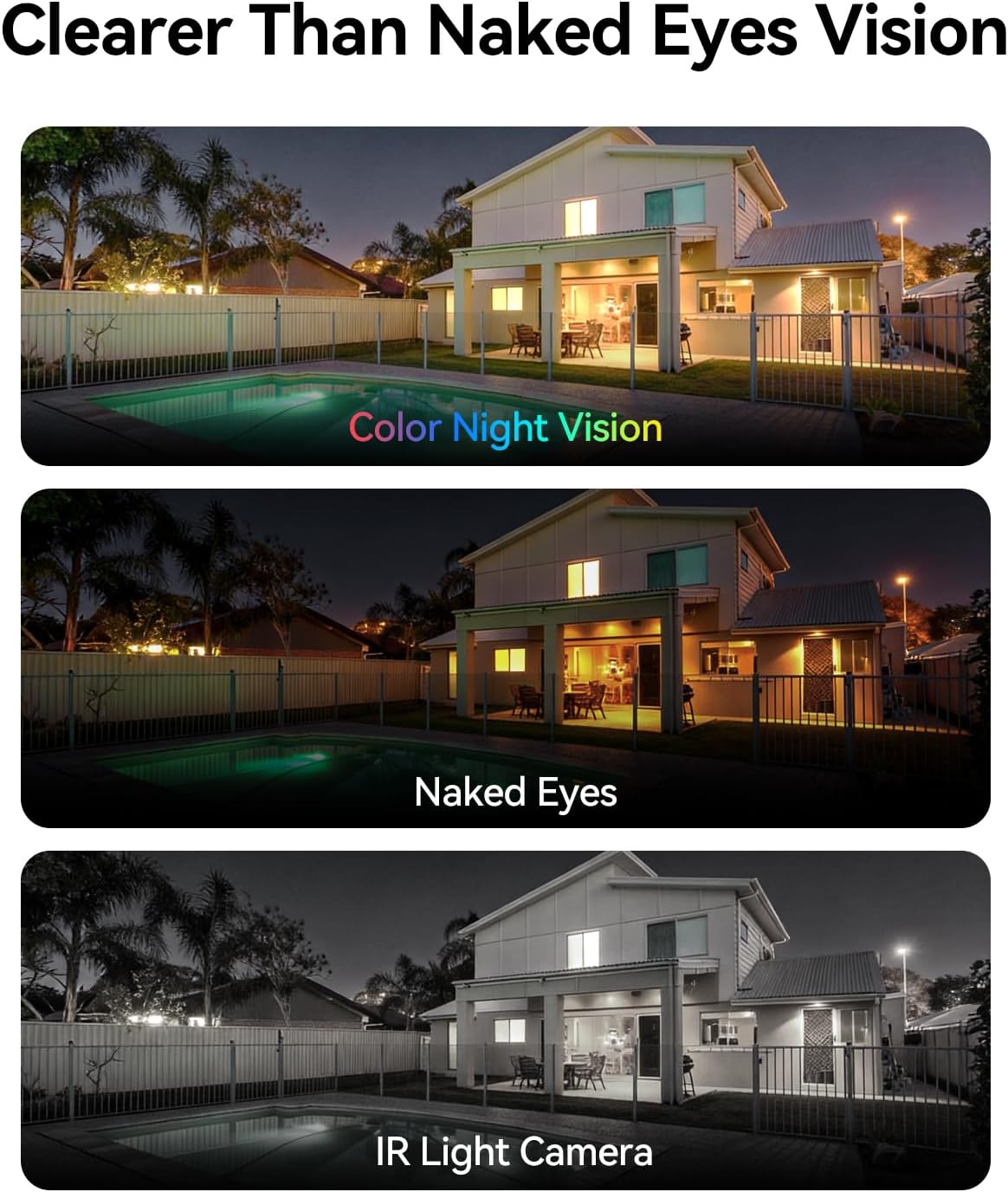
Image: Comparison of color night vision, standard vision, and infrared (IR) light camera vision at night.
3.5 Opcje przechowywania (karta SD i chmura)
Rekord footage locally onto a Micro SD card (up to 128GB) or securely to the cloud. All users receive complimentary 3-day rolling cloud storage without a subscription. A free 30-day trial is available to unlock advanced capabilities, including AI recognition, extended cloud history, and custom detection zones. Premium cloud plans are available after the trial.

Image: Visual representation of both SD card and cloud storage options for the camera.
3.6 Udostępnianie dostępu do kamery
You can share access to your camera's live feed and recordings with multiple users through the VicoHome app, allowing for seamless multi-person monitoring of your property.

Image: Depicts multiple family members simultaneously viewing the camera feed on their devices.
3.7 Personalized Working Time
Configure the camera's operating schedule to optimize battery life and recording preferences. Choose between 'Always-On Power Mode' for continuous 24/7 recording or 'Power-Saving Mode' where you can select specific AI detection times to reduce battery drain.
4. Konserwacja
4.1 Zarządzanie baterią
To ensure continuous operation, regularly check the battery level via the VicoHome app and recharge the camera as needed. Battery life can vary based on usage, motion detection frequency, and environmental conditions.
4.2 Czyszczenie aparatu
Okresowo czyść obiektyw i obudowę aparatu miękką,amp cloth to remove dust and dirt. Avoid using harsh chemicals or abrasive materials that could damage the camera's finish or lens.
4.3 aktualizacji oprogramowania sprzętowego
Keep your camera's firmware updated to the latest version through the VicoHome app. Firmware updates often include performance improvements, new features, and security enhancements.
5. Rozwiązywanie Problemów
5.1 Typowe problemy i rozwiązania
- Kamera nie łączy się z siecią Wi-Fi:
Ensure your Wi-Fi network is 2.4GHz or 5GHz and has a strong signal. Verify the Wi-Fi password is correct. Try restarting your router and the camera. - Krótka żywotność baterii:
Częste zdarzenia wykrywania ruchu, ciągły obraz na żywo viewing, or extreme temperatures can reduce battery life. Adjust motion detection sensitivity, reduce live view time, or switch to Power-Saving Mode. Ensure the camera is fully charged. - Alerty ruchu pojawiają się zbyt często lub nie są uruchamiane:
Adjust the motion detection sensitivity settings in the VicoHome app. Ensure the detection zone is correctly configured. Check for obstructions in the camera's field of view. - Karta SD nie nagrywa:
Ensure the SD card is correctly inserted and formatted within the VicoHome app. Check if the SD card is full or corrupted. Replace the SD card if necessary. - Słaba jakość wideo:
Sprawdź siłę sygnału Wi-Fi. Upewnij się, że obiektyw aparatu jest czysty i nie ma w nim żadnych przeszkód. - Dwukierunkowa transmisja dźwięku nie działa:
Ensure microphone and speaker permissions are enabled for the VicoHome app on your smartphone. Check the volume settings on both your phone and within the app.
6. Specyfikacje produktu
| Funkcja | Specyfikacja |
|---|---|
| Nazwa modelu | Battery Security Camera (CLK2-W1X8) |
| Zalecane zastosowania | Indoor/Outdoor Surveillance |
| Technologia łączności | Wireless (Wi-Fi 2.4GHz/5GHz) |
| Rozdzielczość przechwytywania wideo | 4K (efektywna rozdzielczość zdjęć 3 MP) |
| Cechy specjalne | 2-Way Audio, Motion Sensor, Color Night Vision |
| Stopień wodoodporności | IP65 |
| Źródło zasilania | Zasilany bateryjnie (5200mAh) |
| Składowanie | Micro SD (do 128 GB), przechowywanie w chmurze |
| Viewing kąt | 110 stopni |
| Kompatybilne urządzenia | Smartphone (VicoHome App), Amazon Alexa |
| Wymiary przedmiotu | 4 x 2 x 5 cala |
| Waga przedmiotu | 0.36 kilograma |
7. Gwarancja i obsługa klienta
7.1 Informacje o gwarancji
LongPlus products are covered by a limited warranty from the date of purchase. Please refer to the warranty card included with your product or visit the official LongPlus webSzczegółowe warunki gwarancji można znaleźć na naszej stronie.
7.2 Obsługa klienta
If you encounter any issues or have questions regarding your LongPlus CLK2-W1X8 camera, please contact our customer support team. You can find contact information on the LongPlus official website or within the VicoHome app's 'Help' section.
Wsparcie online: Odwiedzać www.longplus.com/support (byłyample link, proszę zweryfikować faktyczne wsparcie URL).
Wsparcie e-mailowe: support@longplus.com (byłyample email, please verify actual support email).