
1. Wprowadzenie
This manual provides detailed instructions for the setup, operation, maintenance, and troubleshooting of your GMKtec G3 Pro Mini PC. Please read this guide thoroughly before using your device to ensure optimal performance and longevity.
The GMKtec G3 Pro is a compact desktop computer designed for various applications, including office work, business, multimedia, and online learning. It features an Intel Core i3-10110U processor, 16GB DDR4 RAM, and a 512GB PCIe M.2 SSD, offering efficient performance in a small form factor.
2. Co znajduje się w pudełku
Sprawdź, czy w opakowaniu znajdują się wszystkie elementy:
- GMKtec Nucbox G3 Pro Mini PC (16GB RAM, 512GB SSD)
- Kabel HDMI
- Zasilacz
- Instrukcja obsługi
- Mocowanie VESA ze śrubami

3. Koniec produktuview
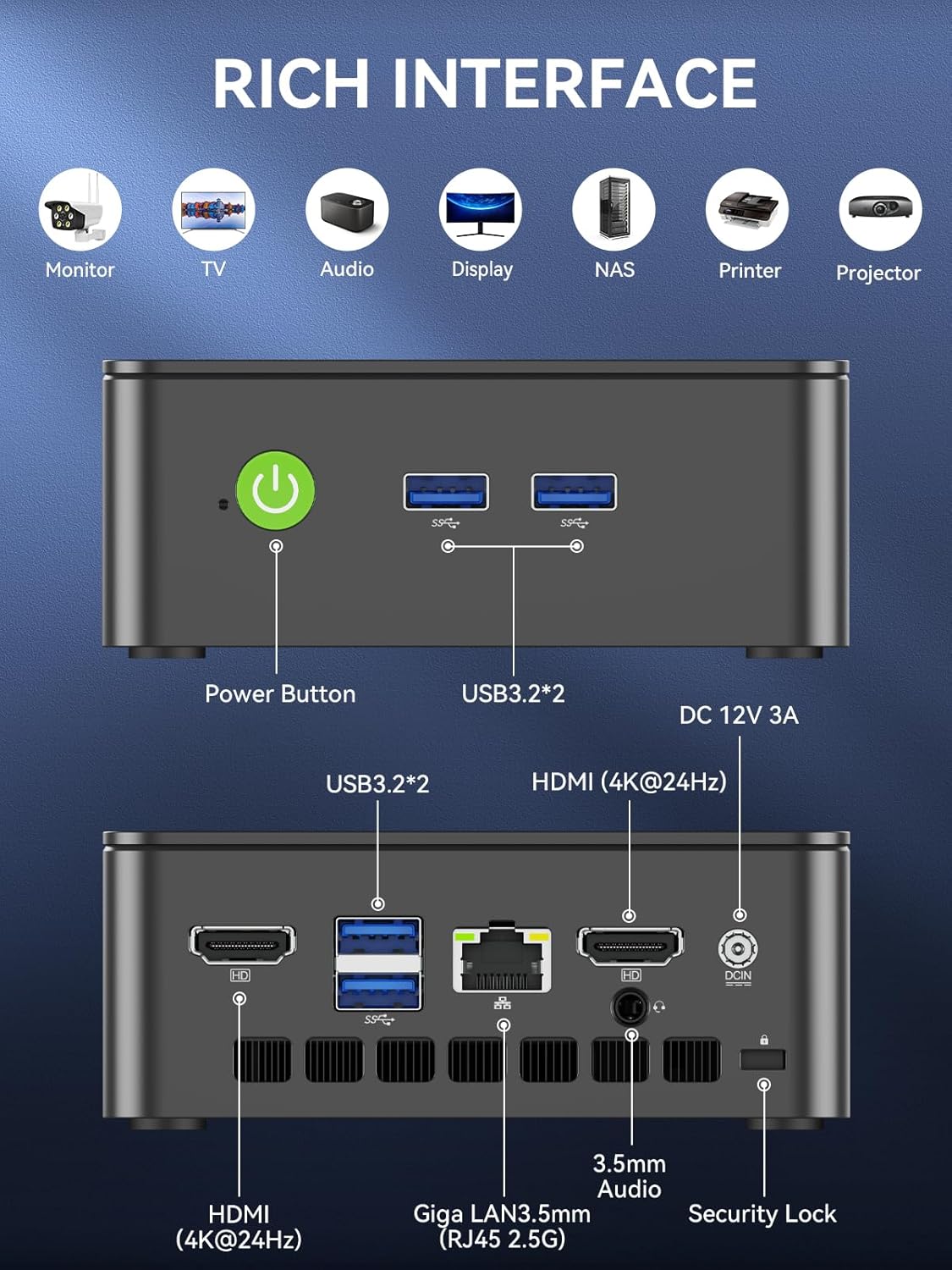
The GMKtec G3 Pro Mini PC is designed for compact and efficient computing. It features a robust set of ports and internal components to support various tasks.
Panel przedni
- Przycisk zasilania: Aby włączyć/wyłączyć urządzenie.
- USB 3.2 x 2: For connecting peripherals such as keyboards, mice, or external storage devices.
Panel tylny
- HDMI (4K@60Hz) x 2: Do podłączania wyświetlaczy obsługujących dwa wyjścia 4K.
- USB 3.2 x 2: Dodatkowe porty dla urządzeń peryferyjnych.
- Gniazdo audio 3.5 mm: Do podłączenia słuchawek lub głośników zewnętrznych.
- Giga LAN (RJ45 2.5GbE): Do przewodowego połączenia sieciowego.
- DC IN: Port wejściowy zasilania.
- Gniazdo blokady bezpieczeństwa: For securing the device to a desk.
Komponenty wewnętrzne
- Dual DDR4 RAM Slots: Supports up to 64GB RAM.
- M.2 2280 PCIe Gen3*4 Slot: For NVMe SSDs, supporting up to 8TB.
- M.2 2242 SATA3.0 Slot: For SATA SSDs, supporting up to 1TB.
- Cooling Fan & Vents: Integrated cooling system to maintain optimal operating temperatures.

4. Przewodnik konfiguracji
Wykonaj poniższe kroki w celu wstępnej konfiguracji:
- Podłącz urządzenia peryferyjne: Connect your keyboard, mouse, and any other necessary USB devices to the available USB 3.2 ports.
- Podłącz wyświetlacz: Use an HDMI cable to connect your monitor(s) to the HDMI ports on the rear panel. The device supports dual 4K@60Hz displays.
- Podłącz zasilanie: Plug the power adapter into the DC IN port on the mini PC, then plug the adapter into a power outlet.
- Włączanie: Naciśnij przycisk zasilania na panelu przednim, aby włączyć mini PC.
- Początkowa konfiguracja systemu operacyjnego: Postępuj zgodnie z instrukcjami wyświetlanymi na ekranie, aby dokończyć konfigurację systemu Windows 11 Pro.
- Połączenie internetowe: For faster setup, avoid connecting to a wired LAN initially. Connecting LAN might trigger long updates, delaying desktop access. Connect to Wi-Fi 6 or connect to the 2.5GbE LAN port after initial setup is complete.

5. Instrukcja obsługi
Włączanie/wyłączanie zasilania
- Włączanie: Naciśnij przycisk zasilania raz.
- Aby wyłączyć: W systemie operacyjnym wybierz opcję „Wyłącz”. Możesz również nacisnąć i przytrzymać przycisk zasilania przez 5 sekund, aby wymusić wyłączenie (używaj tego tylko w razie potrzeby).
BIOS Settings and Performance Modes
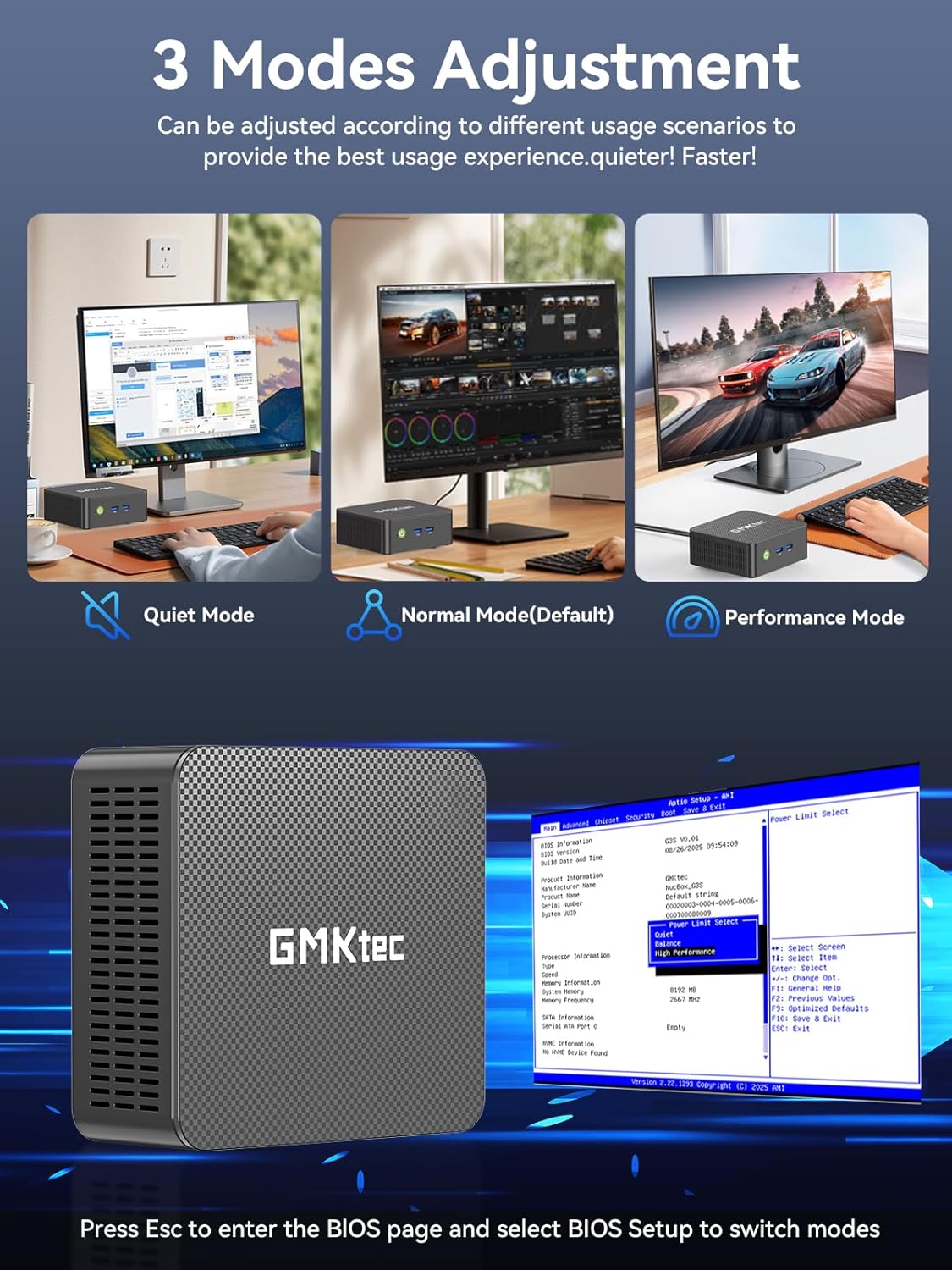
The GMKtec G3 Pro supports different performance modes that can be adjusted via the BIOS settings to optimize for quiet operation, normal use, or maximum performance.
- Dostęp do BIOS-u: Press the 'Esc' key repeatedly during startup to enter the BIOS page.
- Tryby regulacji: Navigate to the BIOS Setup and select your desired mode (Quiet Mode, Normal Mode, Performance Mode) based on your usage scenario.
6. Rozszerzenie pamięci
The GMKtec G3 Pro offers flexible storage expansion options:
- M.2 2280 NVMe PCIe Slot: Supports high-speed NVMe SSDs up to 8TB for primary storage or additional high-performance storage.
- M.2 2242 SATA Slot: Supports SATA SSDs up to 1TB for additional storage capacity.
To install or upgrade storage, refer to the detailed instructions in the full user manual or consult a qualified technician.
7. Łączność
The Mini PC provides comprehensive connectivity options:
- Wi-Fi 6 (802.11ax): Offers high-speed wireless internet access up to 600Mbps.
- Bluetooth 5.2: For connecting wireless devices such as keyboards, mice, and headphones.
- 2.5GbE Ethernet (RJ45): Provides ultra-fast wired network speeds, up to 2.5 times faster than standard Gigabit Ethernet.

8. Konfiguracja podwójnego wyświetlacza
The GMKtec G3 Pro supports connecting two 4K@60Hz displays simultaneously via its two HDMI 2.0 ports. This allows for an extended desktop experience, enhancing productivity for multitasking, content creation, or entertainment.
Simply connect two monitors using HDMI cables to the respective ports on the rear of the mini PC. The operating system will automatically detect the displays, and you can configure their arrangement and resolution through the display settings.

9. Układ chłodzenia
The GMKtec G3 Pro is equipped with a smart quiet cooling fan and strategically placed cooling vents to ensure efficient heat dissipation. This design allows for ultra-quiet operation, typically below 38dB, even under load, providing a comfortable working environment.

10. Specyfikacje
| Funkcja | Specyfikacja |
|---|---|
| Marka | GMKtec |
| Nazwa modelu | G3 Pro |
| System operacyjny | Windows 11 Pro |
| Model procesora | Intel Core i3-10110U |
| Prędkość procesora | Do 4.1 GHz |
| Koprocesor graficzny | Karta graficzna Intel UHD 1200 MHz |
| Zainstalowana pamięć RAM | 16 GB DDR4 (Dual Channel) |
| Maksymalny rozmiar pamięci RAM | 64 GB |
| Opis dysku twardego | 512 GB M.2 2280 PCIe Gen3*2 + 1*M.2 2242 SATA |
| Technologia łączności | Bluetooth 5.2, WiFi 6, Ethernet (2.5GbE), HDMI (4K@60Hz) |
| Wyjście wideo | HDMI x 2 |
| Maksymalna rozdzielczość wyświetlacza | 4096 × 2160 pikseli |
| Łączna liczba portów USB | 4 (USB 3.2) |
| Pobór mocy | 6 W (typowo) |
| Cechy specjalne | Wake On LAN, rozruch PXE, budzenie RTC, automatyczne włączanie |
11. Konserwacja
To ensure the longevity and optimal performance of your GMKtec G3 Pro Mini PC, consider the following maintenance tips:
- Zachowaj czystosc: Regularly clean the exterior of the mini PC with a soft, dry cloth. Ensure cooling vents are free from dust and obstructions.
- Aktualizacje oprogramowania: Aby zwiększyć bezpieczeństwo i wydajność, aktualizuj system operacyjny i sterowniki do najnowszych wersji.
- Prawidłowe wyłączenie: Zawsze wyłączaj minikomputer prawidłowo za pomocą systemu operacyjnego, aby zapobiec uszkodzeniu danych.
- Warunki środowiskowe: Operate the mini PC in a well-ventilated area, away from direct sunlight, excessive heat, and moisture.
12. Rozwiązywanie Problemów
If you encounter issues with your GMKtec G3 Pro Mini PC, try the following basic troubleshooting steps:
- Brak zasilania: Upewnij się, że zasilacz jest prawidłowo podłączony zarówno do minikomputera, jak i do sprawnego gniazdka elektrycznego. W razie potrzeby wypróbuj inne gniazdko.
- Brak wyświetlacza: Verify that the HDMI cables are securely connected to both the mini PC and the monitor(s). Ensure monitors are powered on and set to the correct input source.
- Brak połączenia z internetem: For Wi-Fi, check your router and network settings. For wired Ethernet, ensure the cable is properly connected and the network adapter is enabled in the operating system.
- Niska wydajność: Close unnecessary applications, check for background processes, and ensure sufficient free storage space. Consider adjusting performance modes in BIOS.
- Problemy z urządzeniami peryferyjnymi: Try connecting USB devices to different ports. Ensure drivers are installed correctly for specialized peripherals.
For more complex issues, refer to the comprehensive troubleshooting section in the full user manual or contact customer support.
13. Gwarancja i wsparcie
Your GMKtec G3 Pro Mini PC comes with a 1-roczna ograniczona gwarancja od daty zakupu, obejmując wady konstrukcyjne i wykonawcze.
For any questions, technical assistance, or warranty claims, please utilize the following support channels:
- Wsparcie e-mailowe: Contact the professional after-sales team at support@gmktec.com.
- Wsparcie online: Visit the GMKtec store on Amazon or the official GMKtec webStrona z odpowiedziami na często zadawane pytania i dodatkowymi zasobami.
- Wsparcie klienta 24/7: Dedicated support is available to assist you with your needs.