
1. Wprowadzenie
The LAUNCH X431 CRP919EBT is a professional automotive diagnostic scanner designed for comprehensive vehicle system analysis. This device features bi-directional control, advanced ECU coding capabilities, and over 35 special service functions. It supports a wide range of vehicle makes and models, offering both wireless Bluetooth and wired USB connectivity for the VCI (Vehicle Communication Interface) adapter.
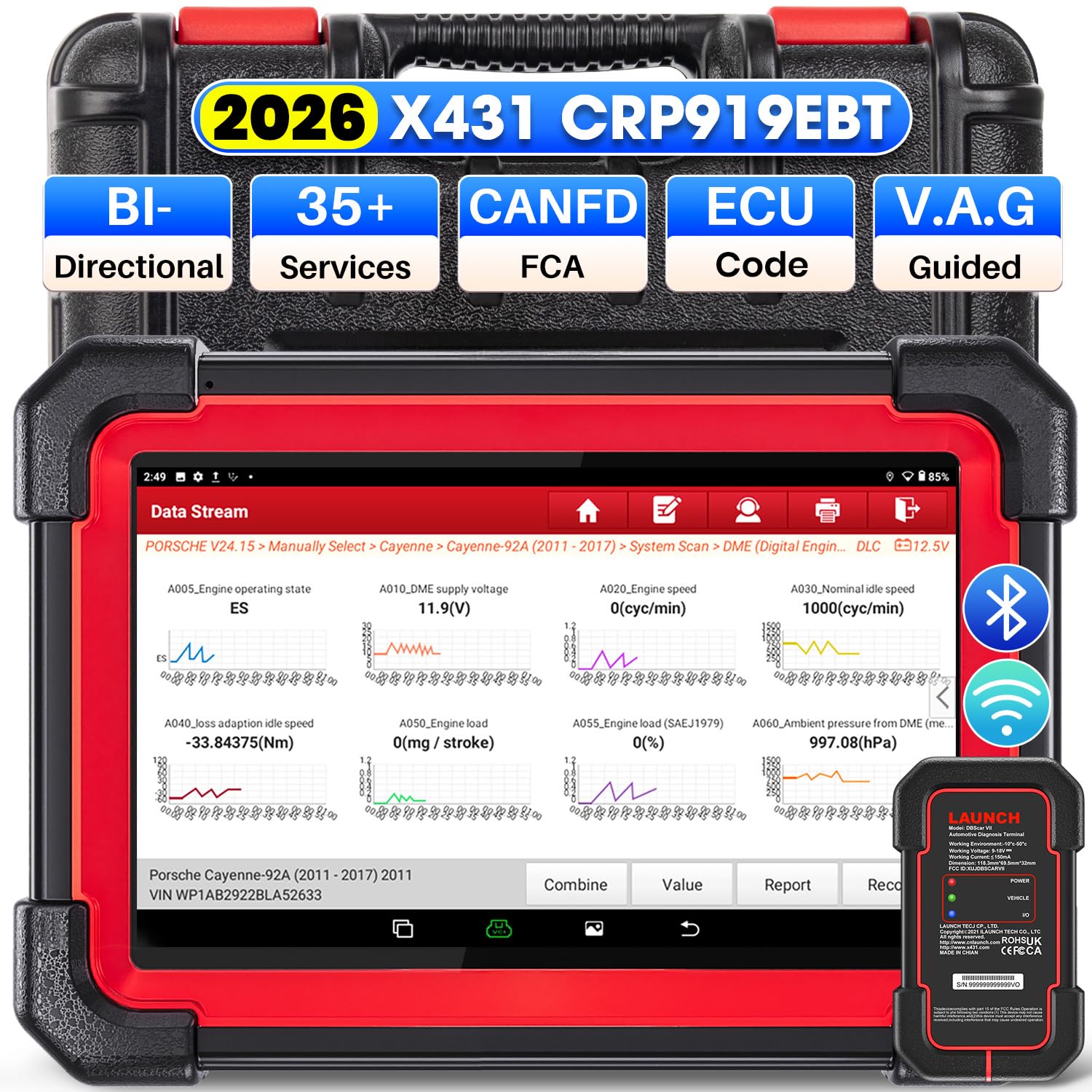
Image 1.1: LAUNCH X431 CRP919EBT Diagnostic Scanner main unit and VCI adapter.
2. Co znajduje się w pudełku
Ostrożnie rozpakuj zawartość i upewnij się, że wszystkie elementy są obecne:
- LAUNCH X431 CRP919EBT Main Unit (Tablet)
- DBSCAR VII VCI Connector
- Diagnostic Cable (OBD-II)
- Zasilacz
- Kabel USB typu A do typu C
- Instrukcja obsługi / Skrócona instrukcja obsługi
- Etui do przechowywania

Obraz 2.1: Koniecview of the LAUNCH X431 CRP919EBT package contents, including the main unit, VCI, cables, and power adapter.
3. Konfiguracja
3.1 Pierwsze ładowanie
Before first use, fully charge the CRP919EBT main unit using the provided power adapter. Connect the adapter to the device's charging port and plug it into a power outlet. The charging indicator will show the charging status.
3.2 VCI Connection to Vehicle
- Znajdź port diagnostyczny OBD-II pojazdu, zazwyczaj znajdujący się pod deską rozdzielczą po stronie kierowcy.
- Plug the DBSCAR VII VCI connector into the vehicle's OBD-II port. Ensure a secure connection.
- Once connected, the VCI's MOC indicator will illuminate solid red. The POJAZD indicator will illuminate green and flash when communicating with the vehicle.
3.3 VCI Connection to Main Unit
The DBSCAR VII VCI adapter supports both wireless (Bluetooth) and wired (USB) connections to the CRP919EBT main unit.
- Połączenie Bluetooth: The VCI will automatically attempt to pair with the main unit via Bluetooth. The Wejście/Wyjście indicator on the VCI will illuminate blue when wirelessly communicating with the tablet. This allows for a diagnostic range of 33-67 feet (10-20 meters).
- Połączenie USB: For a wired connection, use the provided Type-A to Type-C USB cable to connect the VCI to the main unit. The Wejście/Wyjście indicator on the VCI will illuminate red when connected via USB cable.
Image 3.1: DBSCAR VII VCI Connector showing power, vehicle, and I/O indicators, along with USB and Bluetooth connectivity options.
4. Instrukcja obsługi
4.1 Vehicle Selection and AutoVIN
- Turn on the CRP919EBT main unit.
- Z menu głównego wybierz opcję „Diagnozuj”.
- Choose 'AutoVIN' to automatically identify the vehicle's make, model, and year. Alternatively, select 'Manual Choose Model & Year' if AutoVIN is not successful.
4.2 Pełna diagnostyka systemu
This function allows for a comprehensive scan of all available electronic control modules (ECMs) in the vehicle, including Engine, ABS, SRS, Transmission, TPMS, and more.
- Po zidentyfikowaniu pojazdu wybierz opcję „Pełne skanowanie systemu”.
- Narzędzie przeskanuje wszystkie systemy i wyświetli wszystkie wykryte kody usterek diagnostycznych (DTC).
- You can then select a specific system to view detailed information, read/clear fault codes, and access live data streams.
- The device supports 8-in-1 live data streams, allowing for simultaneous monitoring of multiple parameters.

Image 4.1: Display illustrating the full system diagnostic process and bi-directional control capabilities.
4.3 Sterowanie dwukierunkowe (testy aktywne)
Bi-directional control allows the diagnostic tool to send commands to vehicle ECUs to perform specific tests and functions, verifying component functionality without using the vehicle's controls. This includes activating components like fuel pumps, cycling ABS solenoids, or performing injector tests.
- From the diagnostic menu for a specific system, select 'Active Test' or 'Bi-directional Control'.
- Choose the component or system you wish to test.
- Follow the on-screen prompts to execute the test and observe the component's response.
4.4 Funkcje specjalne (Resetowanie serwisowe)
The CRP919EBT offers over 35 special service functions for various maintenance and reset procedures. These functions are typically found under 'Special Functions' within a specific vehicle system.
- Reset oleju
- Reset hamulca
- Kalibracja SAS (czujnika kąta skrętu)
- Krwawienie z ABS
- Resetowanie baterii
- Kodowanie wtryskiwaczy
- Adaptacja przepustnicy
- Resetowanie TPMS
- Regeneracja DPF
- Dopasowanie skrzyni biegów
Note: The availability and specific procedures for these functions vary by vehicle make, model, and year. Always confirm compatibility before performing any service.

Image 4.2: Visual representation of various special service functions available on the diagnostic tool.
4.5 ECU Coding Functions
The device supports advanced ECU coding capabilities, allowing for customization and maintenance of electronic control units.
- Kodowanie online: Supported for VW, Audi, Skoda, and Seat vehicles.
- Kalibracja online: Do precyzyjnych regulacji.
- Online Account Service Login: For accessing manufacturer-specific functions.
- ECU Replacement/Recode/Matching: For adapting new or replacement ECUs.
- Funkcja PMI: Allows transferring data from an original module to a new unit for module replacement (specific to Ford, Lincoln, Mazda).
- Odblokuj ukryte funkcje: Access and activate dormant features in certain vehicles.

Image 4.3: Illustration of various ECU coding and component matching functions.
4.6 Advanced Protocols and Features
- CANFD & DOIP: Compatible with newer vehicle communication protocols, including GM (2019+), Volvo (2018+), BMW (2017+), Land Rover (2017+), and Jaguar (2017+).
- FCA AutoAuth: Supports secure access to FCA (Fiat Chrysler Automobiles) vehicles from 2018-2026 (Fiat, Chrysler, Alfa Romeo, Dodge, Jeep, etc.) via registered AutoAuth.
- Funkcja sterowana przez VAG: Provides step-by-step instructions for performing complex functions on VW, Audi, Seat, and Skoda vehicles.

Obraz 4.4: Koniecview of advanced protocol support and guided functions for various car brands.
5. Konserwacja
5.1 Aktualizacje oprogramowania
The CRP919EBT includes 2 years of free software updates. Regular updates ensure access to the latest vehicle coverage, bug fixes, and new features. Connect the device to a Wi-Fi network and navigate to the 'Software Update' section in the main menu to check for and install updates.
5.2 Czyszczenie i przechowywanie
- Wyczyść ekran i obudowę urządzenia miękką szmatką.amp szmatką. Unikaj środków czyszczących o działaniu ściernym i rozpuszczalników.
- Keep the VCI connector clean and free of debris.
- Store the device and its accessories in the provided storage case in a cool, dry place when not in use.
5.3 Pielęgnacja baterii
To prolong battery life, avoid fully discharging the device frequently. Charge the device regularly, especially if it will be stored for an extended period.
6. Rozwiązywanie Problemów
If you encounter issues with your CRP919EBT, refer to the following common troubleshooting tips:
- Urządzenie się nie włącza: Ensure the device is fully charged. Connect it to the power adapter and try again.
- VCI nie łączy się z pojazdem: Verify the VCI is securely plugged into the OBD-II port. Check the vehicle's ignition status (usually needs to be ON).
- VCI not connecting to main unit (Bluetooth): Ensure Bluetooth is enabled on the main unit. Try re-pairing the VCI in the device settings. Ensure the VCI is within the 33-67 feet range.
- Brak komunikacji z pojazdem: Check all connections. Ensure the vehicle's battery is adequately charged. Verify the vehicle's make, model, and year selection is correct.
- Problemy z oprogramowaniem: Wykonaj aktualizację oprogramowania, aby mieć pewność, że masz najnowszą wersję.
For persistent issues or advanced technical support, please contact LAUNCH customer service.
7. Specyfikacje
The following table outlines the key specifications of the LAUNCH X431 CRP919EBT diagnostic scanner:

Image 7.1: Comparison chart highlighting the specifications of the CRP919EBT model.
| Funkcja | Specyfikacja |
|---|---|
| Marka | POCZĄTEK |
| Model | CRP919EBT |
| System operacyjny | Android 10.0 |
| Edytor | 4-Core High-efficiency Processor |
| Pamięć RAM/ROM | 4 GB pamięci RAM / 64 GB pamięci ROM |
| Rozmiar ekranu | 7 cali |
| Pojemność baterii | 6300mAh |
| Łączność | Bluetooth (DBSCAR VII VCI), USB |
| Wi-Fi | 5G & 2.4 GHz Dual WiFi |
| Kamera | Tylny aparat 8MP |
| Pokrycie pojazdu | 150+ Brands (1996-2026) |
| Funkcje specjalne | 35+ Service Resets |
| Okres aktualizacji | 2 lata bezpłatnej aktualizacji |
| Obsługiwane protokoły | CANFD, DOIP, OBDII/EOBD |
| Języki | 23+ języków |
8. Gwarancja i wsparcie
8.1 Aktualizacje oprogramowania
The LAUNCH X431 CRP919EBT includes 2 years of free software updates from the date of activation. After this period, updates may be available for purchase.
8.2 Optional Extension Modules
The CRP919EBT supports integration with various optional extension modules to expand its functionality:
- VSP600 Endoscope
- Tester baterii BST360
- iTPMS/TSGUN TPMS Tool
- X-PROG3 Tool
8.3 Wsparcie techniczne
For technical assistance, product inquiries, or warranty claims, please refer to the contact information provided in your product packaging or visit the official LAUNCH webwitryna zawierająca zasoby pomocy.