
Wstęp
This manual provides detailed instructions for the setup, operation, and maintenance of your AT&T DECT 6.0 Cordless Phone, model BL108-3. Please read this guide thoroughly to ensure proper use and to take full advantage of all features, including Smart Call Blocker, Bluetooth Connect to Cell, and the digital answering machine.
Zawartość opakowania
Sprawdź, czy w przesyłce znajdują się następujące elementy:
- Jednostka bazowa
- 3 słuchawek bezprzewodowych
- 3 zasilacze
- 2 Chargers (for additional handsets)
- Przewód telefoniczny
- 6 ogniw baterii
- Szybki przewodnik
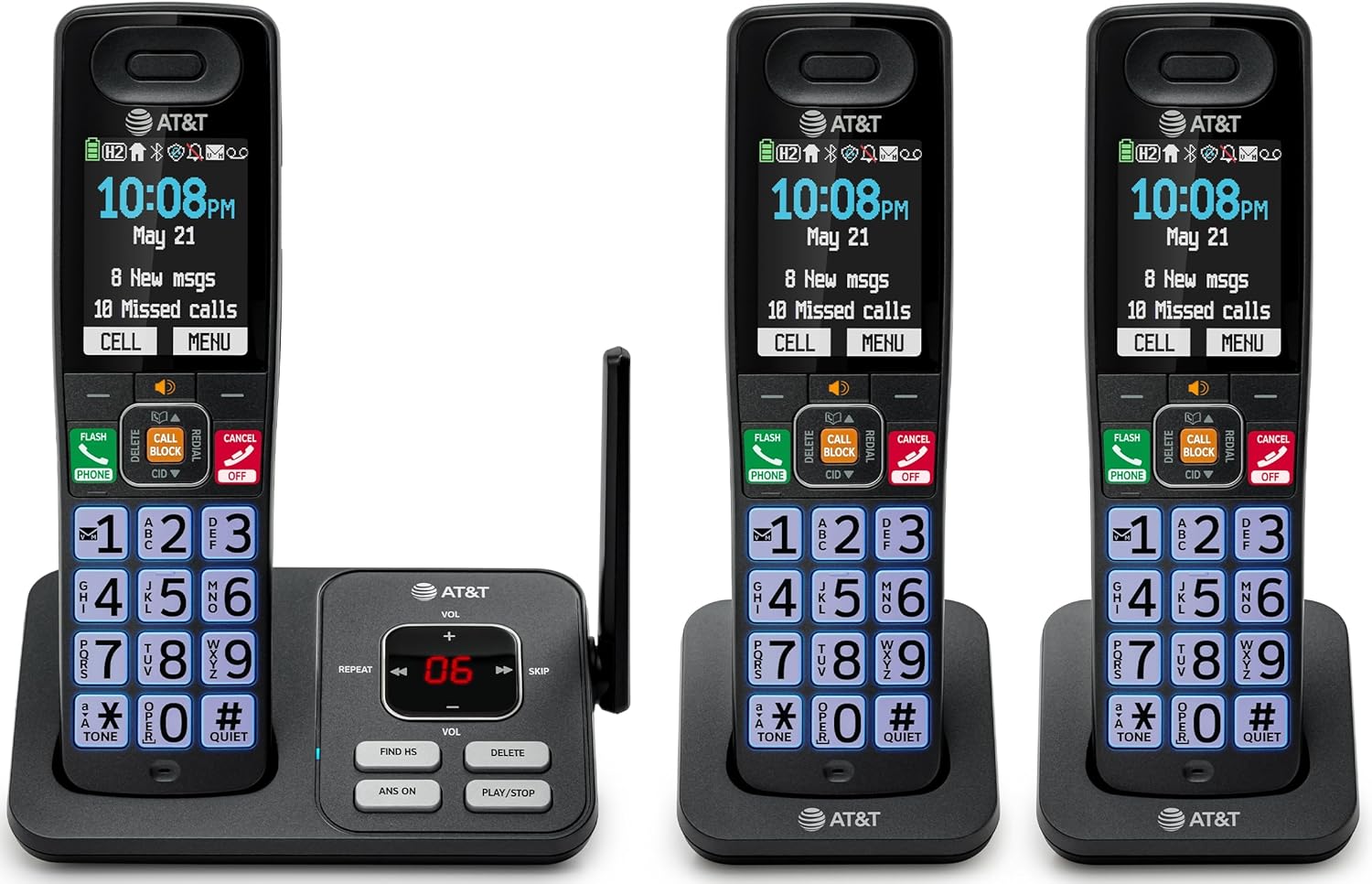
Image: The complete AT&T BL108-3 cordless phone system, showing the base unit and three handsets.
Organizować coś
1. Base Unit and Power Connection
- Umieść jednostkę bazową na płaskiej i stabilnej powierzchni.
- Podłącz jeden koniec przewodu telefonicznego do gniazda TEL LINE w jednostce bazowej.
- Podłącz drugi koniec przewodu telefonicznego do gniazdka telefonicznego w ścianie.
- Plug one power adapter into the POWER jack on the base unit.
- Plug the other end of the power adapter into an electrical outlet not controlled by a wall switch.
2. Instalacja i ładowanie baterii słuchawki
- Otwórz pokrywę komory baterii z tyłu każdego telefonu.
- Insert the provided battery cells, ensuring correct polarity (+ and -).
- Zamknij pokrywę komory baterii.
- Place each handset in its respective charger or the base unit cradle. The CHARGE light on the handset will illuminate.
- Przed pierwszym użyciem należy ładować słuchawki przez co najmniej 10 godzin.
3. Additional Charger Setup
- Plug the power adapters for the additional chargers into electrical outlets not controlled by a wall switch.
- Place the additional handsets into these chargers to charge.
Instrukcja obsługi
Wykonywanie i odbieranie połączeń
- Aby wykonać połączenie: Naciśnij TELEFON, a następnie wybierz numer.
- Aby odebrać połączenie: Naciśnij TELEFON lub dowolnego klawisza wybierania numeru.
- Aby zakończyć połączenie: Naciśnij WYŁĄCZ/ANULUJ lub odłóż słuchawkę na widełki.
Inteligentne blokowanie połączeń
The Smart Call Blocker feature automatically filters out robocalls. You can also manually block unwanted numbers.
- To block a number during a call: Press the dedicated ZADZWOŃ BLOK klawisz.
- The block directory can store up to 1,000 entries.

Image: A close-up of the handset displaying the "Smart Call Block" screen, with the "CALL BLOCK" button highlighted on the base unit.
Połączenie Bluetooth z komórką
Pair your smartphone with the BL108-3 system to make and receive mobile calls through any of the cordless handsets.
- Na jednostce bazowej naciśnij MENU, then navigate to "Bluetooth" and select "Pair Cell".
- Włącz Bluetooth w swoim smartfonie i wyszukaj dostępne urządzenia.
- Select the AT&T phone from the list on your smartphone to pair.
- Once paired, mobile calls can be made and received using the cordless handsets.

Image: A visual representation of the "Connect to Cell" feature, showing a handset on a nightstand wirelessly connected to a smartphone.
Video: Demonstrates the seamless Bluetooth connection to a cell phone, allowing calls to be made and received through the AT&T cordless handset.
Cyfrowa sekretarka automatyczna
The integrated digital answering system records up to 22 minutes of messages.
- Aby odtworzyć wiadomości: Naciśnij ODTWÓRZ/ZATRZYMAJ on the base unit or handset.
- To skip messages: Press POMINĄĆ.
- To delete messages: Press USUWAĆ.

Image: The phone's base unit and handset displaying an incoming message on the answering system, with a visual of a message being left.
Ogłoszenie identyfikatora dzwoniącego
The handset speaks the caller's name aloud, allowing you to screen calls without picking up the phone.
- Ensure Caller ID service is subscribed through your telephone service provider.
- The feature is active by default.

Image: The handset and base unit showing a call coming in, with a speech bubble indicating "Call from Johnson" to illustrate the Caller ID Announce feature.
Interkom między słuchawkami
You can use the handsets to communicate with each other, or transfer calls.
- Aby rozpocząć połączenie interkomowe: Naciśnij AWIOFON on a handset, then select the desired handset number.
- To transfer a call: During an external call, press AWIOFON, select the handset, and then hang up after the other handset answers.

Image: Two handsets, one on the base and one on a charger, with arrows indicating communication between them, illustrating the intercom feature.
Książka telefoniczna
Możesz zapisać w książce telefonicznej do 1500 nazw i numerów, aby mieć możliwość szybkiego wybierania numerów.
- Aby dodać wpis: Naciśnij MENU, navigate to "Phonebook", then "Add New Entry".
- Aby wybrać numer z książki telefonicznej: Naciśnij TELEFON, Następnie DYREKTOR, select the entry, and press TELEFON Ponownie.

Image: The handset screen showing a phonebook list with alphabetical navigation, demonstrating the phonebook directory feature.
Głośnik z funkcją pełnego dupleksu
Allows both parties to speak and be heard simultaneously during a speakerphone call.
- To activate speakerphone during a call: Press GŁOŚNIK.
- To switch back to handset mode: Press TELEFON.

Image: A person using the handset in speakerphone mode while working on a laptop, with speech bubbles indicating a two-way conversation.
Tryb cichy
Temporarily silences all handset and base unit ringers for a set period.
- To activate: Press and hold #CICHY na słuchawce.
- Aby dezaktywować: Naciśnij i przytrzymaj #CICHY Ponownie.

Image: The handset screen showing "Quiet mode on" with a sleeping person in the background, illustrating the Quiet Mode feature.
Tryb ekologiczny
Reduces power consumption for optimal battery performance.
- ECO mode is typically enabled by default to conserve energy.
- Refer to the full user manual for options to adjust or disable this feature if needed.

Image: The handset and base unit in a setting with wind turbines in the background, and the screen showing "ECO mode", symbolizing energy efficiency.
Wbudowana latarka
For safety at night or in emergencies, the handset includes a built-in flashlight.
- To activate the flashlight: Locate the flashlight button on the side of the handset and press it.

Image: A close-up of the handset's side, showing the flashlight beam and the "FLASHLIGHT" label, indicating its location and function.
Konserwacja
- Czyszczenie: Wyczyść telefon i jednostkę bazową miękką szmatką.amp ściereczką. Nie używaj sprayów czyszczących ani silnych środków chemicznych.
- Pielęgnacja baterii: For optimal battery life, fully charge the handsets for 10 hours before first use. If the phone will be unused for an extended period, remove the batteries.
- Warunki środowiskowe: Unikaj wystawiania telefonu na działanie ekstremalnych temperatur, bezpośredniego światła słonecznego i wilgoci.
Rozwiązywanie problemów
| Problem | Rozwiązanie |
|---|---|
| Brak sygnału wybierania |
|
| Słuchawka się nie ładuje |
|
| Słaba jakość połączeń lub zakłócenia |
|
| Cannot make/receive Bluetooth calls |
|
Specyfikacje
| Funkcja | Szczegół |
|---|---|
| Marka | AT&T |
| Numer modelu | BL108-3 |
| Typ telefonu | Bezprzewodowy (DECT 6.0) |
| Kolor | Czarny |
| W zestawie słuchawki | 3 |
| Wyświetlacz | 2.4" Color Backlit Display |
| Typ systemu odbierającego | Cyfrowy (do 22 minut nagrywania) |
| Blokada połączeń | Inteligentna blokada połączeń (do 1,000 wpisów) |
| Bluetooth | Connect to Cell (smartphone pairing) |
| Czas czuwania telefonu | 6 dni |
| Identyfikator dzwoniącego | Yes, with Announce feature |
| Pojemność książki telefonicznej | Do 1500 nazw i numerów |
| Głośnik | Głośnik z funkcją pełnego dupleksu |
| Wymiary (jednostka bazowa) | 5.63 x 2.99 x 7.4 cali (dł. x szer. x wys.) |
| Źródło zasilania | Elektryczny przewodowy |
| Tworzywo | Plastikowy |
| UPC | 650530034121 |

Image: Diagram showing the dimensions of the AT&T BL108-3 base unit and a handset.
Informacje o gwarancji
Your AT&T BL108-3 Cordless Phone comes with a 1-roczna ograniczona gwarancja. Please retain your purchase receipt as proof of purchase. For detailed warranty terms and conditions, refer to the full user manual or contact AT&T customer support.
Wsparcie
For further assistance, technical support, or to order replacement parts, please visit the official AT&T support website or contact their customer service. You can often find FAQs and additional resources online.
- Wsparcie online: Odwiedzać AT&T Wireless Support (or search for AT&T Landline Phone Support).
- Obsługa klienta: Refer to your Quick Start Guide for specific contact numbers.


