
1. Wprowadzenie
Thank you for choosing the COOAU 4G LTE Solar Powered Outdoor Security Camera, Model AR-W607. This manual provides essential information for the proper installation, operation, and maintenance of your new security camera. Please read it thoroughly before use and keep it for future reference.
This advanced outdoor security camera offers complete wireless freedom, eliminating the need for Wi-Fi or external power sources. It operates on 4G LTE cellular networks and is powered by an integrated solar panel, ensuring continuous surveillance in various outdoor environments.
2. Zawartość opakowania
Sprawdź, czy w przesyłce znajdują się wszystkie wymienione poniżej elementy. Jeśli brakuje któregokolwiek z nich lub jest on uszkodzony, skontaktuj się z obsługą klienta.
- COOAU 4G LTE Security Camera Body
- Stojak montażowy
- Panel słoneczny
- Instrukcja obsługi
- Śruby montażowe i kotwy
- Karta SIM (wbudowana lub dołączona)
3. Główne cechy
- Łączność 4G LTE: Operates independently without Wi-Fi, providing surveillance in remote areas. Includes a free 100MB data SIM card for immediate use.
- Zasilane energią słoneczną: Equipped with a high-efficiency monocrystalline solar panel (up to 19.5% conversion rate) for continuous, eco-friendly power.
- Wideo o wysokiej rozdzielczości 3 MP: Captures clear and detailed images at 1296p resolution, allowing for precise identification even from a distance.
- 360-Degree Pan/Tilt/Zoom (PTZ): Zdalne sterowanie kamerą viewing angle with 350° horizontal pan and 90° vertical tilt for comprehensive coverage. Features 8x digital zoom.
- 24-Hour Full-Color Night Vision: Four LED lights enable vivid color recording at night, enhancing security and identification capabilities.
- Detekcja ruchu człowieka PIR: Advanced human and motion detection with customizable detection zones. Receive instant push notifications with photos to your smartphone.
- Built-in 64GB Micro SD Card: Automatically records detected events to the internal 64GB Micro SD card. Supports up to 128GB.
- Dwukierunkowy dźwięk: Communicate directly through the camera using your smartphone app, allowing for real-time interaction or deterrence.
- Udostępnianie rodzinne: Easily share camera access with family and friends via QR code. Supports simultaneous viewing by up to 4 users.
- Odporność na warunki atmosferyczne IP65: Designed for outdoor use, resistant to dust and water, operating reliably in temperatures from -10°C to 55°C.
4. Przewodnik konfiguracji
4.1 Pierwsze ładowanie
Before first use, fully charge the camera's internal battery using a standard USB charger. This ensures sufficient power for initial setup and operation.
4.2 Instalacja karty SIM i karty Micro SD
The camera comes with a pre-installed or included SIM card and a 64GB Micro SD card. Ensure they are properly seated in their respective slots. The SIM card enables 4G LTE connectivity, and the Micro SD card stores recordings.

Obraz: Zbliżenie view of the camera's SIM card and Micro SD card slot, indicating where to insert the cards.
4.3 Pobieranie aplikacji i tworzenie konta
Download the 'CloudEdge' app from your smartphone's app store (available for iOS and Android). Follow the in-app instructions to create a new account or log in if you already have one.
4.4 Parowanie kamery
- Open the 'CloudEdge' app and tap 'Add Device'.
- Wybierz model aparatu z listy.
- Follow the on-screen prompts to scan the QR code on the camera or manually enter its ID.
- The app will guide you through connecting the camera to the 4G LTE network.
4.5 Montaż kamery
Wybierz odpowiednią lokalizację na zewnątrz, która odbiera ample sunlight for the solar panel and provides the desired viewing angle. Use the provided mounting stand, screws, and anchors to securely attach the camera and solar panel. Ensure the solar panel is positioned to maximize sun exposure.

Image: The COOAU camera mounted on a pillar with its solar panel, illustrating its 350-degree pan and 90-degree tilt capabilities.

Image: The camera mounted on a tree, demonstrating its IP65 weather resistance in rainy conditions.
5. Instrukcja obsługi
5.1 Na żywo View i sterowanie PTZ
Open the 'CloudEdge' app and select your camera to access the live video feed. Use the on-screen controls to pan (350°), tilt (90°), and digitally zoom (8x) the camera to adjust your viewObszar objęty badaniem.

Image: A smartphone displaying the live feed from the camera, with options for remote control and two-way communication.
5.2 Dźwięk dwukierunkowy
Na żywo view, tap the microphone icon in the app to enable two-way audio. You can speak through your phone, and your voice will be projected through the camera's speaker. This feature is useful for communicating with visitors or deterring intruders.
5.3 Detekcja ruchu i alerty
The camera uses PIR (Passive Infrared) technology for human motion detection. When motion is detected in the configured area, the camera will automatically start recording and send a push notification with a snapshot to your smartphone.

Image: A person walking on a street, highlighted by the camera's motion detection zone, with a push notification indicating an alert.
5.4 Tryby widzenia nocnego
The camera supports both infrared (black and white) and full-color night vision. The four built-in LED lights provide illumination for color night vision. You can switch between modes or set it to automatically adjust based on ambient light conditions within the app.
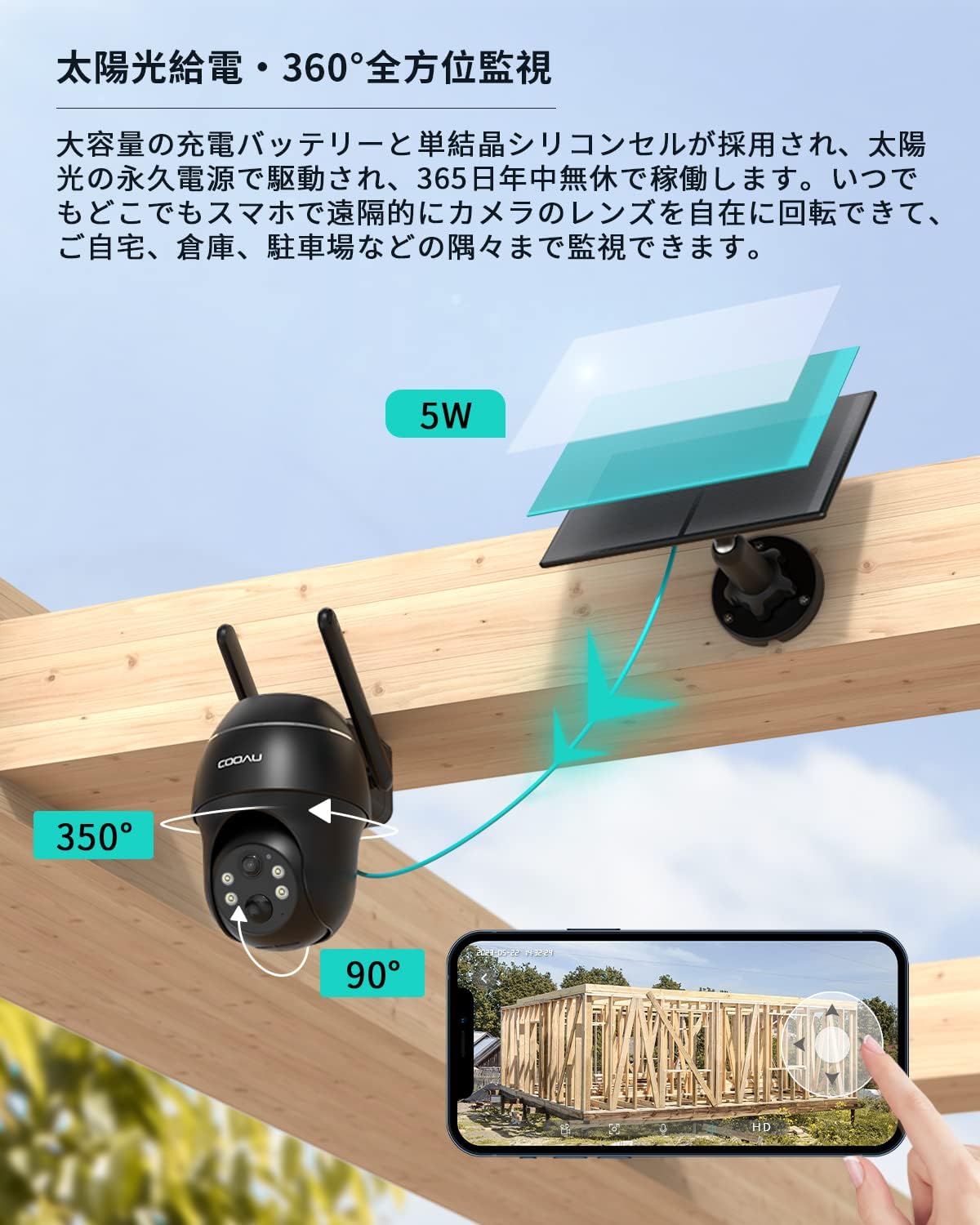
Image: A split image demonstrating the difference between color night vision (left, with LEDs on) and infrared night vision (right, black and white) from the camera.
5.5 Nagrywanie i odtwarzanie
All detected events are recorded to the built-in 64GB Micro SD card. You can access recorded footage through the 'CloudEdge' app. The app allows you to view recordings by date and time, making it efficient to review konkretne wydarzenia.
6. Konserwacja
6.1 Czyszczenie panelu słonecznego
Regularly clean the surface of the solar panel to ensure optimal charging efficiency. Dust, dirt, and debris can reduce its performance. Use a soft, damp ściereczką delikatnie przetrzeć panel.
6.2 aktualizacji oprogramowania sprzętowego
Periodically check the 'CloudEdge' app for available firmware updates. Keeping your camera's firmware up-to-date ensures optimal performance, security, and access to new features.
6.3 Zarządzanie kartami SD
The camera's built-in 64GB Micro SD card will automatically overwrite older footage when full. If you wish to manually manage recordings or replace the card, refer to the app settings for formatting options or physical access to the card slot.
7. Rozwiązywanie Problemów
- Camera not connecting to 4G LTE: Ensure the SIM card is correctly inserted and activated. Check for network coverage in the installation area. Restart the camera.
- No recordings or motion alerts: Verify that motion detection is enabled in the app settings. Check the Micro SD card status (ensure it's not full or corrupted). Ensure the camera's battery is charged.
- Słaba jakość obrazu: Wyczyść obiektyw aparatu. Upewnij się, że w polu widzenia aparatu nie ma żadnych przeszkód. view. Check network signal strength for live view jakość.
- Panel słoneczny nie ładuje się: Ensure the solar panel is clean and receives direct sunlight for several hours daily. Check the connection cable between the solar panel and the camera.
- Problemy z dwukierunkową transmisją dźwięku: Sprawdź ustawienia mikrofonu i głośnika w smartfonie. Upewnij się, że mikrofon i głośnik aparatu nie są zasłonięte.
For further assistance, please refer to the FAQ section within the 'CloudEdge' app or contact COOAU customer support.
8. Specyfikacje
| Marka | KOOOAU |
| Nazwa modelu | AR-W607 |
| Technologia łączności | Bezprzewodowa (4G LTE) |
| Cechy specjalne | Solar charging, Motion sensor, Night vision, Rainproof (IP65) |
| Do użytku wewnątrz/na zewnątrz | Plenerowy |
| Kompatybilne urządzenia | Smartfony, tablety |
| Źródło zasilania | Zasilany energią słoneczną |
| Protokół łączności | Mobile line (4G LTE) |
| Typ kontrolera | COOAU CAM, Cloud Edge |
| Rozdzielczość czujnika obrazu | 3 MP |
| Stopień wodoodporności | IP65 |
| Rozdzielczość wideo | 1296p |
| Szybkość klatek | 30 klatek na sekundę |
| Pole View | 110 stopnia |
| Brzęczenie | 8-krotny zoom cyfrowy |
| Składowanie | MicroSD (up to 128 GB) |
| Wymiary produktu | Wymiary 16 x 15 x 9 cm |
9. Gwarancja i wsparcie
The COOAU 4G LTE Solar Powered Outdoor Security Camera comes with a 24-miesięczna gwarancja from the date of purchase. This product is TELEC certified, ensuring compliance with technical standards.
If you encounter any issues or have questions regarding your product, please contact COOAU customer support through your Amazon order history. Our support team is dedicated to providing prompt and helpful assistance.