
1. Wprowadzenie
The Generic CM300 is a versatile 9-function digital multimeter designed for accurate electrical measurements in various environments. It features a 6000-count backlit LCD for clear readings, Non-Contact Voltage (NCV) detection for safety, and a CAT III 600V safety rating. This manual provides instructions for safe and effective use of your CM300 multimeter.
2. Informacje dotyczące bezpieczeństwa
OSTRZEŻENIE: Always adhere to safety precautions when using electrical testing equipment. Failure to do so may result in injury or damage to the meter.
- The CM300 is rated for CAT III 600V. Do not exceed these voltagi limity.
- Always inspect test leads for damage before use. Replace if insulation is compromised.
- Upewnij się, że przełącznik funkcji znajduje się w odpowiedniej pozycji dla wykonywanego pomiaru.
- Nie próbuj mierzyć objtage or current on circuits exceeding the meter's maximum ratings.
- Use caution when working with live circuits. Avoid contact with bare wires or terminals.
- Trzymaj palce za osłonami sond pomiarowych.
- Aby zapewnić dokładne odczyty, należy niezwłocznie wymienić baterie, gdy tylko pojawi się wskaźnik niskiego poziomu naładowania.
3. Koniec produktuview
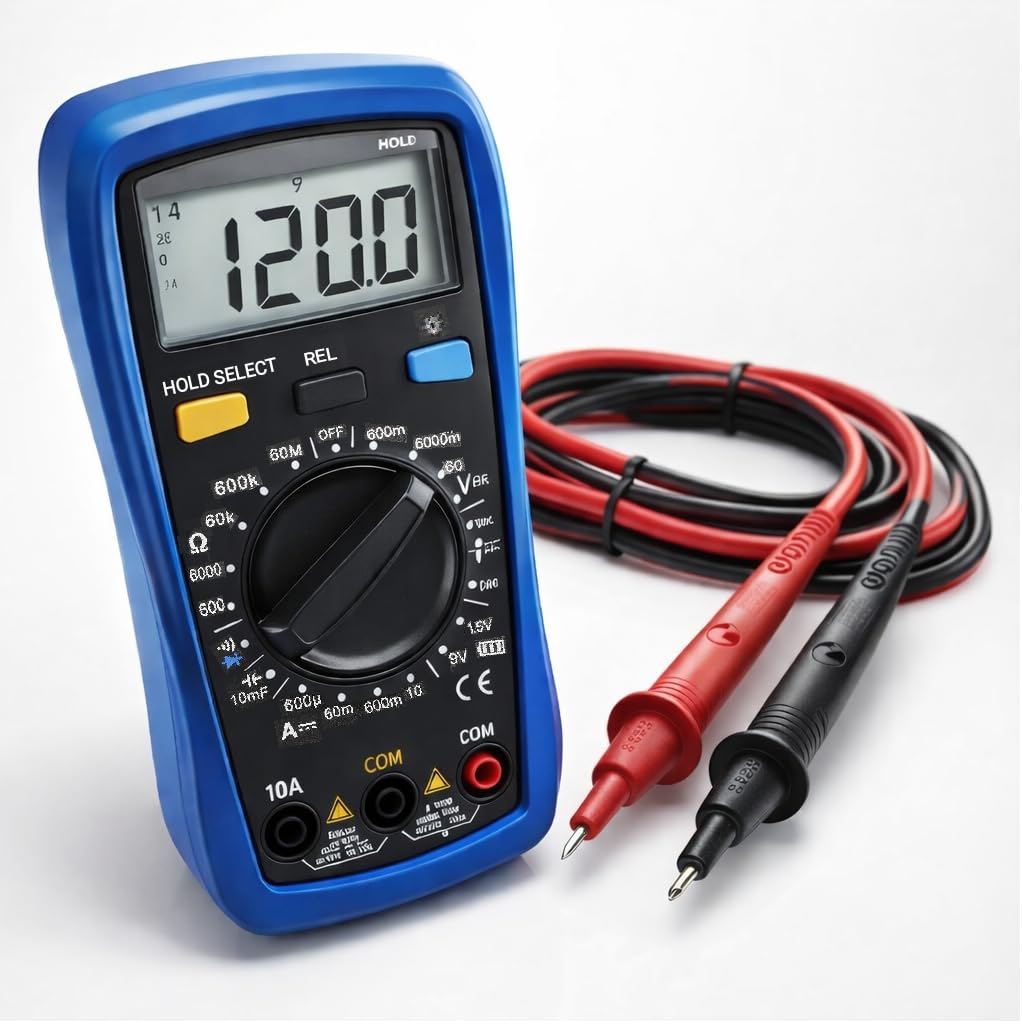
The CM300 Digital Multimeter includes the main unit and two 42-inch test probes (one red, one black).

Figure 3.1: CM300 Multimeter Rotary Dial and Display
Na tym zdjęciu widać szczegółowy view of the CM300 multimeter's central rotary dial, which is used to select different measurement functions. The backlit LCD display is visible above the dial, and various input jacks are located at the bottom of the device.
3.1 Składniki
- Wyświetlacz LCD: 6000-count backlit display for clear readings.
- Przełącznik obrotowy funkcji: Wybiera tryby pomiaru.
- Gniazda wejściowe: For connecting test probes (COM, VΩmA, 10A).
- Test Probes: Red (positive) and Black (common/negative).
- Czujnik NCV: Located at the top of the meter for non-contact voltage wykrywanie.
- Pikolak: HOLD/SELECT, REL, BACKLIGHT.
4. Konfiguracja
4.1 Instalacja baterii
- Upewnij się, że multimetr jest wyłączony.
- Znajdź komorę baterii z tyłu miernika.
- Za pomocą śrubokręta otwórz pokrywę komory baterii.
- Włóż dwie baterie AAA, zwracając uwagę na prawidłową biegunowość (+/-).
- Załóż pokrywę komory baterii i zabezpiecz ją śrubą.
4.2 Podłączanie sond testowych
- Włóż czarny przewód pomiarowy do gniazda „COM” (wspólnego).
- Dla większości pomiarów (objętośćtage, resistance, continuity, capacitance, diode, battery test), insert the red test lead into the "VΩmA" jack.
- Do pomiaru prądu (do 10A) włóż czerwony przewód pomiarowy do gniazda „10A”.
5. Instrukcja obsługi
Before each measurement, ensure the test leads are correctly connected and the function switch is set to the appropriate range.
Rysunek 5.1: Pomiar objętości prądu przemiennegotage with CM300
This image illustrates the CM300 multimeter in use, displaying a voltage reading. A person is holding the blue multimeter while the red and black test probes are inserted into a standard wall outlet, demonstrating an AC voltagpomiar.
5.1 Włączanie/wyłączanie zasilania
Rotate the function switch from "OFF" to any desired measurement function to power on the meter. Rotate it back to "OFF" to power off.
5.2 AC/DC objtage Measurement (V~ / V--)
- Set the function switch to the "V~" (AC Voltage) or "V--" (DC Voltage) stanowisko.
- Podłącz sondy pomiarowe równolegle do obwodu lub elementu, który chcesz zmierzyć.
- Przeczytaj tomtage wartość na wyświetlaczu LCD.
5.3 DC Current Measurement (A--)
- OSTRZEŻENIE: Ensure the red test lead is in the "10A" jack for current measurements up to 10A, or "VΩmA" for lower current ranges.
- Set the function switch to the "A--" position.
- Otwórz obwód, w którym będziesz mierzyć prąd i podłącz miernik szeregowo.
- Odczytaj aktualną wartość na wyświetlaczu LCD.
5.4 Pomiar rezystancji (Ω)
- Set the function switch to the "Ω" position.
- Przed pomiarem rezystancji należy upewnić się, że obwód jest odłączony od napięcia.
- Podłącz sondy pomiarowe do mierzonego elementu.
- Odczytaj wartość rezystancji na wyświetlaczu LCD.
5.5 Diode Test (->|-)
- Set the function switch to the "->|-" (Diode) position.
- Podłącz czerwoną sondę do anody, a czarną sondę do katody diody.
- Tom do przodutage drop will be displayed. Reverse the probes; an open circuit (OL) should be displayed for a good diode.
5.6 Capacitance Measurement (10mF)
- Set the function switch to the "10mF" (Capacitance) position.
- OSTRZEŻENIE: Discharge capacitors before testing to prevent electric shock or damage to the meter.
- Podłącz sondy pomiarowe do zacisków kondensatora.
- Odczytaj wartość pojemności na wyświetlaczu LCD.
5.7 Audible Continuity ()))
- Set the function switch to the ")))" (Continuity) position.
- Upewnij się, że obwód jest odłączony od napięcia.
- Podłącz sondy pomiarowe do obwodu lub elementu.
- Jeżeli rezystancja jest mniejsza niż około 50Ω, rozlegnie się sygnał dźwiękowy wskazujący ciągłość.
5.8 Battery Test (1.5V / 9V)
- Set the function switch to the "1.5V" or "9V" battery test position.
- Podłącz czerwoną sondę do dodatniego bieguna akumulatora, a czarną sondę do ujemnego bieguna akumulatora.
- Wyświetlacz pokaże pojemność bateriitage.
5.9 tom bez kontaktutage (NCV)
- Set the function switch to the "NCV" position.
- Move the top of the meter near a live conductor.
- The meter will beep and the NCV indicator will light up when AC voltage zostało wykryte.
5.10 Przytrzymanie danych (HOLD)
Press the "HOLD" button to freeze the current reading on the display. Press it again to release and resume live readings.
5.11 Relative Mode (REL)
Press the "REL" button to store the current reading as a reference value. Subsequent measurements will be displayed as the difference from this reference. Press again to exit relative mode.
5.12 Podświetlenie
Press the "BACKLIGHT" button to turn on the display backlight for better visibility in dim conditions. Press again to turn it off.
6. Konserwacja
6.1 Czyszczenie
Wytrzyj licznik reklamąamp Ściereczką i łagodnym detergentem. Nie używaj środków ściernych ani rozpuszczalników. Przed użyciem upewnij się, że miernik jest suchy.
6.2 Wymiana baterii
Refer to Section 4.1 for battery installation instructions. Replace batteries when the low battery indicator appears on the display.
6.3 Wymiana bezpiecznika
If the current measurement function stops working, the fuse may need replacement. This procedure should only be performed by qualified personnel. Contact support for assistance.
7. Rozwiązywanie Problemów
| Problem | Możliwa przyczyna | Rozwiązanie |
|---|---|---|
| Miernik się nie włącza. | Rozładowane lub nieprawidłowo zainstalowane baterie. | Sprawdź biegunowość baterii; wymień baterie. |
| Wyświetla się komunikat „OL” (Przeciążenie). | Input value exceeds selected range or meter's maximum. | Select a higher range or ensure input is within meter's limits. |
| Niedokładne odczyty. | Low battery, incorrect function selected, or damaged test leads. | Replace batteries, verify function switch, inspect and replace test leads if damaged. |
| Brak sygnału dźwiękowego. | Circuit resistance too high, or open circuit. | Check the circuit for breaks; ensure resistance is below 50Ω. |
8. Specyfikacje
| Funkcja | Specyfikacja |
|---|---|
| Model | CM300 |
| Wyświetlacz | 6000-Count Backlit LCD |
| AC/DC Objętośćtage Zakres | 1mV – 600V |
| Zakres prądu stałego | Do 10A |
| Zakres oporu | Do 60MΩ |
| Zakres pojemności | Up to 10,000 µF |
| Ocena bezpieczeństwa | CAT III 600V, ETL Certified |
| Źródło zasilania | 2 baterie AAA |
| Zawarte komponenty | CM300 Digital Multimeter, two 42 in. test probes |
| Wymiary | 8 x 4 x 2.5 cala |
| Waga | 4 funtów |
| Cechy specjalne | NCV, Data Hold, Relative Mode, Backlight, Audible Continuity, Diode Test, Battery Test |
9. Gwarancja i wsparcie
The Generic CM300 Digital Multimeter comes with a 30-day return policy. For technical support or warranty inquiries, please contact your retailer or the manufacturer.