
1. Wprowadzenie
Dziękujemy za zakupasing the Sharp PS-916 Bluetooth Party Speaker System. This system includes two identical portable Bluetooth speakers designed to deliver powerful audio with versatile connectivity options. Please read this manual carefully before using the product to ensure proper operation and to maximize your listening experience.
Zawartość opakowania:
- 2 x Sharp PS-916 Party Speakers
- 1 x kabel ładujący
- 1 x Pilot zdalnego sterowania
- 1 x Instrukcja obsługi

Image: The Sharp PS-916 system includes two speakers for a complete stereo experience.
2. Konfiguracja
2.1 Ładowanie głośników
The PS-916 speakers are equipped with rechargeable batteries, providing up to 12 hours of playback. Before initial use, fully charge both speakers.
- Connect the charging cable to the DC IN port on the rear of each speaker.
- Plug the other end of the charging cable into a suitable power adapter (not included) or USB power source.
- Zaświeci się kontrolka ładowania. Po zakończeniu ładowania zmieni kolor lub zgaśnie.
2.2 Włączanie/wyłączanie
To power on or off each speaker, press and hold the ON/STAND BY INPUT przycisk znajdujący się na panelu sterowania.
2.3 Parowanie Bluetooth (pojedynczy głośnik)
- Ensure the speaker is powered on and in Bluetooth mode. The Bluetooth indicator will flash, indicating it is ready for pairing.
- Na swoim urządzeniu mobilnym włącz Bluetooth i wyszukaj dostępne urządzenia.
- Select "Sharp PS-916" from the list of devices.
- Po nawiązaniu połączenia wskaźnik Bluetooth przestanie migać i będzie świecić światłem ciągłym.
2.4 Prawdziwe bezprzewodowe parowanie stereo (TWS) (dwa głośniki)
TWS allows you to connect two PS-916 speakers wirelessly for a stereo sound experience.
- Power on both PS-916 speakers.
- Ensure neither speaker is currently connected to a Bluetooth device.
- Na jednym z głośników (będzie to głośnik główny) naciśnij TWS przycisk. Głośnik przejdzie w tryb parowania TWS.
- The primary speaker will automatically search for the secondary speaker. Once connected, you will hear an audible confirmation, and the TWS indicator lights on both speakers will illuminate.
- Teraz połącz urządzenie mobilne z głównym głośnikiem przez Bluetooth, jak opisano w punkcie 2.3. Dźwięk będzie odtwarzany przez oba głośniki w stereo.
3. Obsługa
3.1 Panel sterowania ponadview

Image: Main control panel for the Sharp PS-916 speaker.
- ON/STAND BY INPUT: Power on/off, switch input modes (Bluetooth, USB, TF, AUX, FM).
- PLAY/PAUSE (►/∕∕): Odtwórz lub wstrzymaj odtwarzanie dźwięku.
- POPRZEDNI (◀◀): Przejdź do poprzedniego utworu.
- DALEJ (▶▶): Przejdź do następnego utworu.
- POKRĘTŁO GŁOŚNOŚCI: Obróć, aby dostosować głośność główną.
- TWS: Initiate or disconnect True Wireless Stereo pairing.
- WYRÓWNYWACZ: Cycle through preset equalizer modes.
- GITARA BASOWA: Activate or deactivate bass boost.
- ŚWIATŁO: Change or turn off the LED light effects.
- MIC CONTROL: Adjust microphone volume or echo (if applicable).
3.2 portów wejściowych
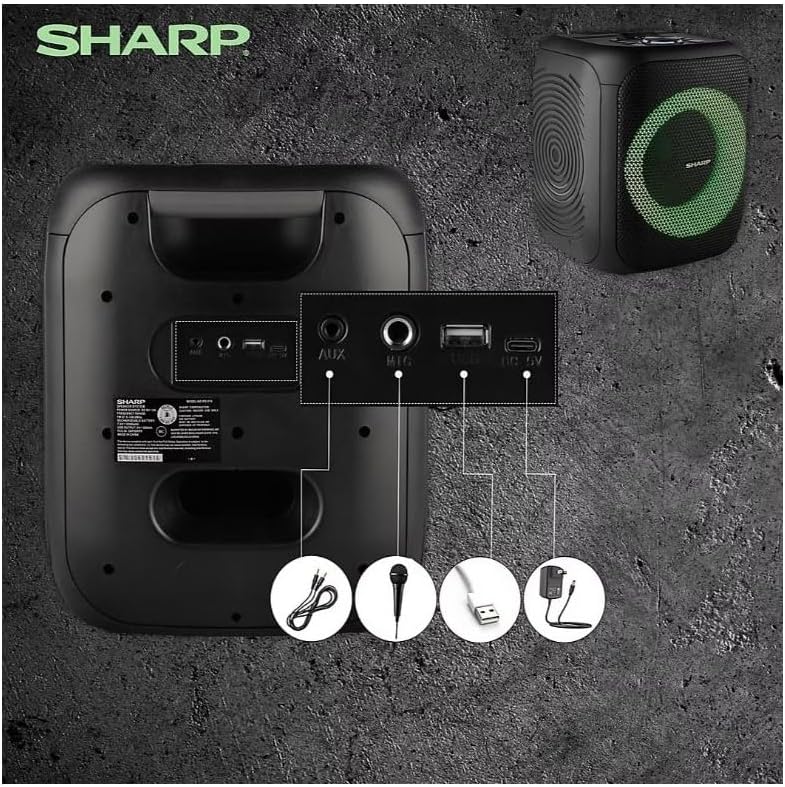
Image: Rear panel with various input and charging ports.
- WEJŚCIE AUX: Podłącz zewnętrzne urządzenia audio za pomocą kabla audio 3.5 mm.
- WEJŚCIE MIKROFONOWE: Connect a microphone (sold separately) for karaoke or announcements.
- USB: Podłącz dysk flash USB, aby odtwarzać dźwięk.
- KARTA TF: Włóż kartę TF (microSD), aby odtwarzać dźwięk.
- DC IN: Connect the charging cable to power and charge the speaker.
3.3 Playing Audio from USB/TF Card
- Insert a USB flash drive or TF card into the corresponding port.
- Naciśnij ON/STAND BY INPUT button repeatedly until the display shows the USB or TF mode.
- Odtwarzanie rozpocznie się automatycznie. Użyj ODTWÓRZ/PAUZA, POPRZEDNI, I NASTĘPNY przyciski do sterowania odtwarzaniem.
3.4 Korzystanie z wejścia AUX
- Connect one end of a 3.5mm audio cable to the AUX IN port on the speaker.
- Podłącz drugi koniec do gniazda słuchawkowego lub wyjścia audio w urządzeniu zewnętrznym.
- Naciśnij ON/STAND BY INPUT button repeatedly until the display shows AUX mode.
- Steruj odtwarzaniem i głośnością z urządzenia zewnętrznego.
3.5 Obsługa radia FM

Image: The PS-916 features an integrated FM Tuner.
- Naciśnij ON/STAND BY INPUT button repeatedly until the display shows FM mode.
- Naciśnij i przytrzymaj ODTWÓRZ/PAUZA przycisk umożliwiający automatyczne skanowanie i zapisywanie dostępnych stacji FM.
- Użyj POPRZEDNI I NASTĘPNY przyciski do poruszania się po zapisanych stacjach.
3.6 Efekty świetlne LED
Naciśnij ŚWIATŁO button to cycle through different LED light modes or to turn the lights off.
4. Konserwacja
4.1 Czyszczenie
- Przed czyszczeniem należy zawsze wyłączyć głośnik i odłączyć go od źródła zasilania.
- Do wycierania powierzchni zewnętrznych należy używać miękkiej, suchej ściereczki.
- Nie należy używać płynnych środków czyszczących, aerozoli ani rozpuszczalników, gdyż mogą one uszkodzić wykończenie lub wewnętrzne elementy.
4.2 Przechowywanie
- Przechowuj głośniki w chłodnym, suchym miejscu, z dala od bezpośredniego światła słonecznego i ekstremalnych temperatur.
- Jeśli akumulator będzie przechowywany przez dłuższy okres, należy ładować go do około 50% co kilka miesięcy, aby zachować jego sprawność.
5. Rozwiązywanie Problemów
If you encounter issues with your Sharp PS-916 speakers, please refer to the following common problems and solutions:
| Problem | Możliwe rozwiązanie |
|---|---|
| Głośnik nie włącza się. | Upewnij się, że bateria jest naładowana. Podłącz kabel ładujący i spróbuj ponownie. |
| Brak dźwięku z głośnika. | Sprawdź poziom głośności zarówno głośnika, jak i podłączonego urządzenia. Upewnij się, że wybrano prawidłowy tryb wejściowy. |
| Nie można sparować urządzenia Bluetooth. | Ensure the speaker is in Bluetooth pairing mode (indicator flashing). Move your device closer to the speaker. Disconnect from other Bluetooth devices. |
| Parowanie TWS nie powiodło się. | Ensure both speakers are powered on and not connected to any other Bluetooth devices. Try initiating TWS pairing again. |
| Zniekształcony dźwięk. | Reduce the volume on both the speaker and your connected device. Ensure the audio source is not distorted. |
6. Specyfikacje
| Funkcja | Szczegół |
|---|---|
| Marka | Ostry |
| Nazwa modelu | PS-916 |
| Konfiguracja głośników | 8" Woofer, 1" Tweeter (per speaker) |
| Moc wyjściowa szczytowa | 400 Watts (per speaker) |
| Moc wyjściowa RMS | 40 Watts (per speaker) |
| Technologia łączności | Bluetooth |
| Dodatkowe wejścia | USB, TF Card, 3.5mm AUX, Microphone Input |
| Żywotność baterii | Do 12 godzin |
| Cechy specjalne | True Wireless Stereo (TWS) Pairing, Bass Boost, LED Light Effects, FM Tuner |
| Kolor | Czarny |
| Waga przedmiotu | 6.5 funta (na głośnik) |
| UPC | 728434122111 |
| GTIN | 728434122111 |
7. Gwarancja i pomoc techniczna
7.1 Informacje o gwarancji
This Sharp PS-916 product comes with a 90-day limited warranty. This warranty covers manufacturing defects under normal use. It does not cover damage caused by misuse, accidents, unauthorized modifications, or normal wear and tear.
7.2 Obsługa klienta
For technical assistance, warranty claims, or further inquiries, please refer to the contact information provided with your purchase documentation or visit the official Sharp support webstrona.