
1. Koniec produktuview
The Active Pixel G16 is a 4G solar-powered outdoor security camera system featuring a 4MP resolution and a triple-lens setup with 10X optical zoom. It operates via a 4G LTE SIM card, eliminating the need for Wi-Fi, making it suitable for remote locations. The system includes two fixed-angle lenses and one 360° pan-tilt-zoom (PTZ) lens for comprehensive coverage. Integrated solar panels and a built-in battery ensure continuous operation. Key features include motion detection, two-way audio, and IP66 weather resistance.
Zawartość opakowania
- 1x Active Pixel G16 Camera Unit
- 1x Zasilacz
- 1x Instrukcja obsługi
- 1x Screw Kit for Installation

2. Przewodnik konfiguracji
2.1 Instalacja karty SIM
- Locate the SIM card slot on the camera unit. This is typically protected by a waterproof cover.
- Carefully open the cover using a small screwdriver if necessary.
- Insert a activated 4G LTE SIM card into the designated slot. Ensure the SIM card is correctly oriented according to the diagram near the slot.
- Securely close the waterproof cover to prevent water ingress.
2.2 Fizyczna instalacja
- Choose a mounting location that provides optimal sunlight exposure for the solar panels and a clear view pożądanego obszaru nadzoru.
- Use the provided screw kit to securely mount the camera bracket to a wall or pole. Ensure the mounting surface is stable.
- Attach the camera unit to the mounted bracket. Adjust the angle of the solar panels to maximize sun exposure throughout the day.
- Connect the solar panel cable to the camera unit's power input.

2.3 Pierwsze uruchomienie i połączenie z aplikacją
- Ensure the camera has sufficient battery charge or is receiving sunlight.
- Download the official Active Pixel mobile application from your device's app store (iOS or Android).
- Register an account and follow the in-app instructions to add your new camera. This typically involves scanning a QR code on the camera or manually entering its device ID.
- Po połączeniu możesz uzyskać dostęp do transmisji na żywo view and configure camera settings.
3. Instrukcja obsługi
3.1 Na żywo View i sterowanie PTZ
From the mobile application, select your camera to access the live video feed. You can switch between the two fixed-angle lenses and the PTZ lens. For the PTZ lens, use the on-screen controls to pan (horizontal rotation), tilt (vertical movement), and zoom (10X optical zoom) the camera to adjust its viewkąt.

3.2 Dźwięk dwukierunkowy
Kamera obsługuje dwukierunkową komunikację audio. Podczas transmisji na żywo view, tap the microphone icon to speak through the camera's speaker, and tap the speaker icon to listen to audio from the camera's vicinity. This feature can be used for communication or as an alarm deterrence.

3.3 Detekcja ruchu i alerty
Configure motion detection settings within the app. You can set detection zones, sensitivity levels, and schedule times for alerts. When motion is detected, the camera will record footage and send push notifications to your mobile device.
3.4 Nagrywanie i przechowywanie wideo
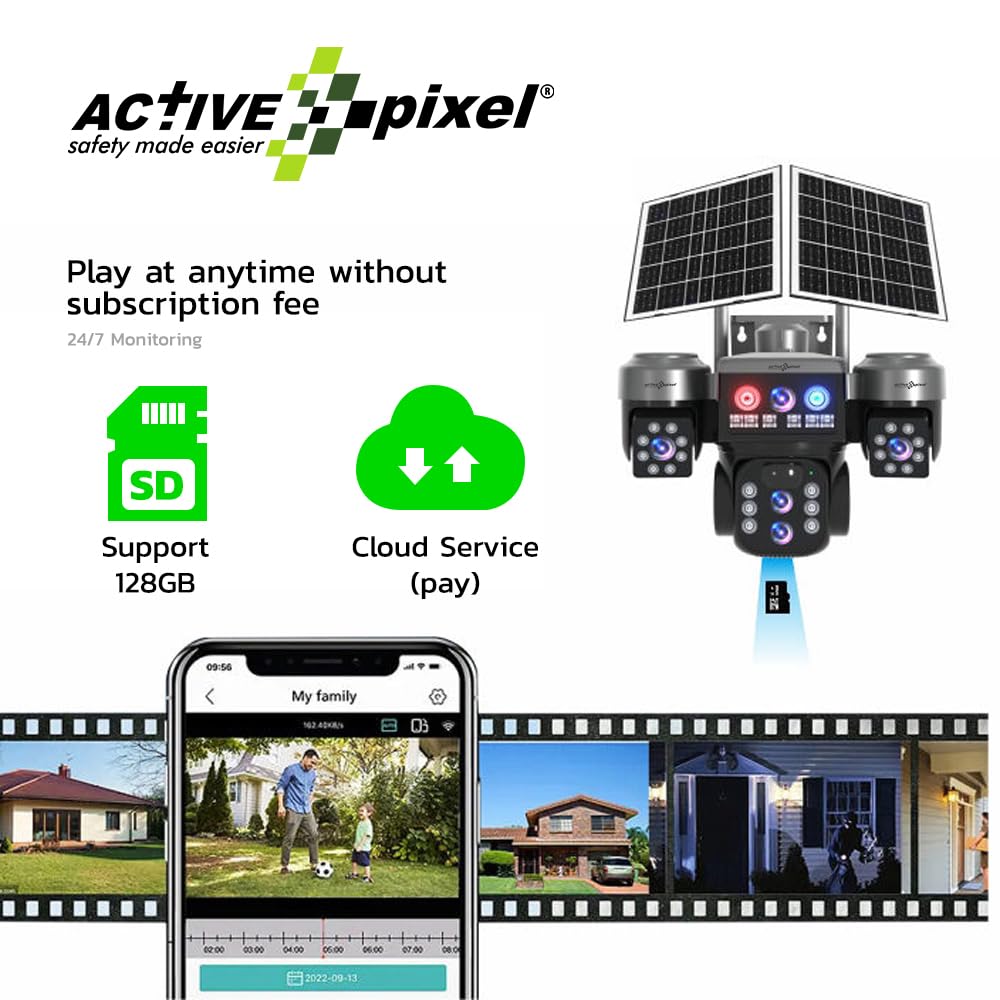
The camera supports local storage via a microSD card (up to 128GB) and cloud storage (subscription may be required). Recorded footagmożna uzyskać do niego dostęp i ponownieviewed through the mobile application.
4. Konserwacja
4.1 Czyszczenie
- Regularnie czyść obiektywy aparatu i panele słoneczne miękką, miękką szmatką.amp szmatką, aby zapewnić optymalną wydajność i przejrzystość obrazu.
- Unikaj stosowania silnych środków chemicznych i materiałów ściernych, które mogą porysować powierzchnie.
4.2 Pielęgnacja baterii
- Ensure the solar panels receive adequate direct sunlight daily to maintain battery charge.
- In prolonged periods of low sunlight, the camera may require charging via the included power adapter.
4.3 aktualizacji oprogramowania sprzętowego
- Check the mobile application periodically for available firmware updates.
- Install updates as recommended to ensure the camera operates with the latest features and security enhancements.
5. Rozwiązywanie Problemów
| Problem | Możliwa przyczyna | Rozwiązanie |
|---|---|---|
| Kamera się nie włącza. | Low battery; solar panels not charging; power connection issue. | Ensure solar panels are in direct sunlight. Charge the camera using the power adapter. Check all power connections. |
| Brak połączenia z siecią 4G. | SIM card not activated; incorrect SIM insertion; poor network coverage. | Verify SIM card activation with your provider. Reinsert SIM card correctly. Relocate camera to an area with better 4G signal. |
| Unable to connect to the camera via app. | Camera offline; incorrect device ID; app malfunction. | Check camera power and 4G status. Re-add the device in the app. Restart the app or your mobile device. |
| Niska jakość obrazu. | Brudny obiektyw, słabe warunki oświetleniowe, problemy z przepustowością sieci. | Clean the camera lenses. Ensure adequate lighting. Check 4G signal strength. |
| Wykrywanie ruchu nie działa. | Incorrect settings; detection zone too small; environmental factors. | Review motion detection settings in the app. Adjust sensitivity and detection zones. |
6. Specyfikacje techniczne
| Funkcja | Specyfikacja |
|---|---|
| Nazwa modelu | G16 |
| Rozdzielczość przechwytywania wideo | 4 MP (2560x1440) |
| Brzęczenie | 10-krotny zoom optyczny |
| Technologia łączności | Sieć komórkowa 4G LTE |
| Zastosowanie wewnątrz/na zewnątrz | Plenerowy |
| Odporność na warunki atmosferyczne | Wodoodporność IP66 |
| Typ montażu | Montaż ścienny |
| Opcje przechowywania | MicroSD Card (up to 128GB), Cloud Storage (optional) |
| Audio | Dźwięk dwukierunkowy |
| Źródło zasilania | Solar Powered with Built-in Battery |
| Wymiary produktu | Wymiary 20 x 20 x 15 cm |
| Waga przedmiotu | 1.35 gramów |
| Producent | Aktywny piksel |
| Kraj pochodzenia | Chiny |
7. Gwarancja i wsparcie
7.1 Informacje o gwarancji
This Active Pixel G16 camera system comes with a 1-year manufacturer's warranty from the date of purchase. The warranty covers defects in materials and workmanship under normal use. It does not cover damage caused by misuse, accidents, unauthorized modifications, or natural disasters. Please retain your proof of purchase for warranty claims.
7.2 Obsługa klienta
For technical assistance, troubleshooting, or warranty inquiries, please contact Active Pixel customer support:
- Obsługa klienta: 9321367328
- Importer/Pakowacz: Glorious Digital Solution Pvt Ltd, Mumbai, India