1. Koniec produktuview
The PowMr 5000W Hybrid Solar Inverter is a pure sine wave inverter designed to convert 48VDC to 110V/120VAC. It features a built-in 80A MPPT charge controller and advanced digital voltage/current double closed-loop control with SPWM technology, ensuring high charging efficiency and reliable performance. This inverter supports solar, utility, and generator triple-input charging, offering versatile power solutions for homes and offices. It is compatible with both 48V lead-acid (Sealed, AGM, Gel, Flooded) and lithium batteries.
Główne cechy:
- Moc wyjściowa czystej fali sinusoidalnej 5000 W: Provides stable and clean AC power for sensitive electronics.
- Kontroler ładowania MPPT 80A: Maximizes solar power harvesting with up to 99.9% charging efficiency.
- Triple-Input Charging: Supports charging from solar, utility grid, and generators.
- Szeroki zakres wejściowy PV: Accommodates 120-500Vdc PV input with a maximum power of 5500W.
- Wyświetlacz LCD i wskaźniki LED: Offers real-time system data, status monitoring, and fault code display for easy troubleshooting.
- Multiple Charging & Output Modes: Four optional battery charging modes (Only Solar, Utility Priority, Solar Priority, Utility + Solar Hybrid) and three configurable output modes (PV Priority, Utility Priority, Inverter Mode).
- Kompatybilność baterii: Works with 48V lead-acid (Sealed, AGM, Gel, Flooded) and lithium batteries.
- Kompleksowa ochrona: Includes current limiting, anti-reverse charge, over-voltage, pod objętościątage, short circuit, overload, radiator overtemperature, and bypass overcurrent protection.
- Inteligentne chłodzenie: Features an intelligent variable speed fan that adjusts based on ambient temperature and environmental conditions.
Zawartość pudełka:
- PowMr 5000W Hybrid Solar Inverter (POW-LVM5K-48V) x 1
- Instrukcja obsługi x 1
- Karta gwarancyjna x 1
- Screw Accessories (for mounting and connections)
- Terminals (for battery connections)
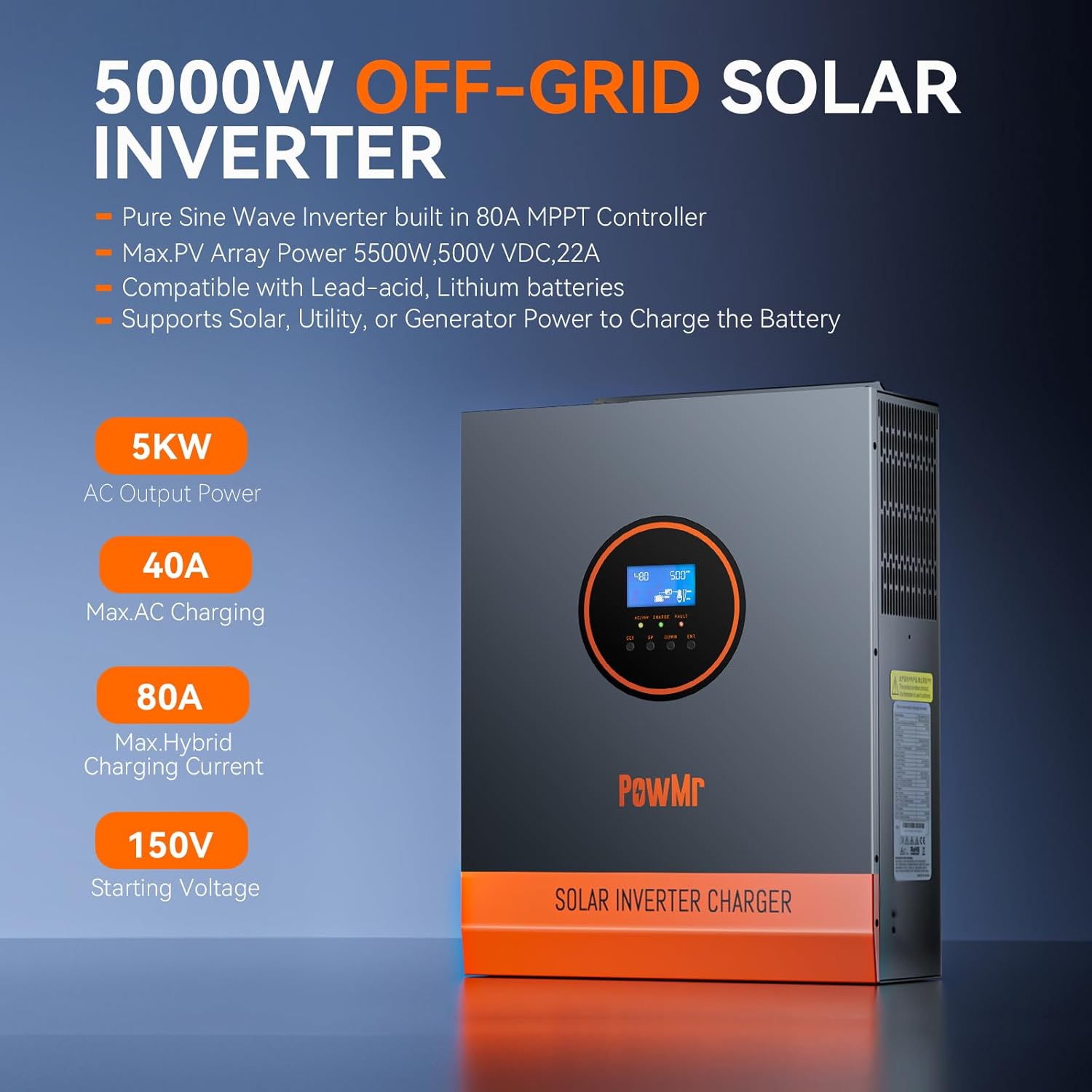
Figure 1.1: PowMr 5000W Hybrid Solar Inverter with key features highlighted.

Figure 1.2: Inverter's LCD HD Display Screen for real-time monitoring of photovoltaic system operating data.

Rysunek 1.3: Koniecview of the inverter's Power Smart Protection features, including short circuit, overvoltage, overload, and reverse connection protection.

Figure 1.4: The inverter features an intelligent variable speed fan that adjusts its rotation speed based on ambient temperature and environmental conditions for optimal cooling.

Figure 1.5: Diagram illustrating the four safe charging modes (solar charging, utility charge, solar priority, solar+utility charging) and three output modes (PV priority, utility priority, inverter priority) of the PowMr 5000W Hybrid Solar Inverter.

Figure 1.6: The inverter supports expandable capacity up to 51.2V 400Ah, 20480Wh energy, with various combinations for solar modules, MPPT solar controllers, LiFePO4 battery systems, and inverters.
2. Informacje dotyczące bezpieczeństwa
Please read and understand all safety instructions before installing, operating, or maintaining the inverter. Failure to follow these instructions may result in electrical shock, fire, serious injury, or death. Keep this manual for future reference.
- Instalacja musi być przeprowadzona przez wykwalifikowany personel.
- Ensure all power sources are disconnected before any wiring or maintenance.
- Nie wystawiać falownika na działanie deszczu, śniegu ani płynów.
- Nie rozmontowuj falownika. Wewnątrz nie ma żadnych części, które mogłyby zostać naprawione przez użytkownika.
- Zapewnij prawidłowe uziemienie urządzenia.
- Use appropriate overcurrent protection devices for all circuits.
- Verify battery polarity before connecting to the inverter.
- This product is for indoor use only. It is forbidden to use it outdoors.
3. Specyfikacje
| Funkcja | Specyfikacja |
|---|---|
| Nazwa modelu | POW-LVM5K-48V |
| Cotage | 5000 watów |
| Moc szczytowa | 10000VA |
| Źródło zasilania | Zasilany energią słoneczną i baterią |
| Maksymalna moc wejściowa PV | 5500 W |
| PV Cztage Zakres | 120–500 V DC |
| Maksymalny prąd wejściowy PV | 22A |
| Maksymalny prąd ładowania | 80A |
| Objętość wejścia ACtage | 90–140V |
| Objętość wyjściatage | 100/105/110Vac (±5%) |
| Start PV, objtage | >150Vdc |
| Wymiary produktu | 12 x 4 x 16 cala |
| Waga przedmiotu | 26 funta |
4. Konfiguracja i instalacja
Follow these steps for safe and proper installation of your PowMr Hybrid Solar Inverter.
4.1 Fizyczna instalacja
- Montowanie: Secure the inverter to a wall or suitable vertical surface using appropriate screws. Ensure the mounting location is well-ventilated and protected from direct sunlight, moisture, and extreme temperatures.
- Terminal Cover Removal: Unscrew and remove the terminal cover located at the bottom of the inverter to access the wiring connections.
Video 4.1: POW-LVM5K-48V-N Unboxing and First Look Review. This video provides a visual guide to unboxing the inverter and its components.
Video 4.2: POW-LVM5K-48V-N Quick Install & Wiring Video. This video demonstrates the physical installation and wiring process for the inverter.
4.2 połączeń przewodów
Before making any electrical connections, ensure all power sources (solar, utility, battery) are disconnected and turned off. Improper wiring can cause damage to the inverter and connected devices, and poses a risk of electric shock.
- Podłączenie akumulatora: Connect the 48V battery bank to the BAT+ and BAT- terminals on the inverter. Ensure correct polarity. Use the provided terminals and appropriate gauge wiring.
- Solar Array Connection: Connect the solar panel array to the PV+ and PV- terminals. Ensure the PV input voltage and current are within the inverter's specified limits (120-500Vdc, Max 5500W, 22A).
- Podłączenie wyjściowe prądu przemiennego: Connect your AC loads (e.g., household appliances) to the AC OUT terminals.
- Podłączenie wejściowe prądu przemiennego (sieć/generator): Connect the utility grid or generator power to the AC IN terminals.
- Grunt: Connect the inverter to a reliable earth ground using the designated grounding lug.
- Reattach Terminal Cover: Once all connections are secure, reattach the terminal cover.

Figure 4.1: Detailed wiring diagram for the PowMr 5000W Hybrid Solar Inverter, showing connections for solar panels, battery, AC input (utility/generator), and AC output.

Figure 4.2: Labeled diagram of the inverter's components, including LCD buttons, mounting holes, LCD screen, LED indicators, AC input breaker, dry contact port, RS485 communication ports, USB debugging port, AC output terminal, cooling fans, PV input terminal, main On/Off power switch, battery input terminal, and grounding lug.
5. Instrukcja obsługi
Once the inverter is installed and wired correctly, you can proceed with operation.
5.1 Włączanie
- Ensure all circuit breakers for the battery, solar array, and AC input/output are in the 'OFF' position.
- Turn on the battery circuit breaker first.
- Turn on the solar array circuit breaker.
- Turn on the AC input (utility/generator) circuit breaker.
- Finally, turn on the main ON/OFF power switch on the inverter. The LCD screen will light up, and the inverter will begin its startup sequence.
5.2 Wyświetlacz LCD i ustawienia
The intuitive LCD screen and LED indicators provide real-time system data and status. Use the 'SET', 'UP', 'DOWN', and 'ENT' buttons to navigate menus and configure settings.
- Monitorowanie: View ilość PVtage, prąd, moc, pojemność bateriitage, current, state of charge (SOC), load active power, AC input/output voltage, częstotliwość i inne.
- Configurable Modes:
- Tryby ładowania baterii: Select from Only Solar, Utility Priority, Solar Priority, and Utility + Solar Hybrid to optimize battery charging based on your energy needs.
- Tryby wyjściowe: Choose between PV Priority, Utility Priority, and Inverter Mode to determine the primary power source for your loads.
- Wybór typu baterii: Configure the inverter for your specific 48V battery type (e.g., Sealed, AGM, Gel, Flooded lead-acid, or Lithium).
- Inne parametry: Adjust various parameters such as maximum charge current, AC input voltage range, and alarm settings.
Video 5.1: POW-LVM5K-48V-N Host Computer Communication Guide. This video demonstrates how to connect the inverter to a computer and use the PC software for monitoring and configuration.
6. Konserwacja
Regularna konserwacja gwarantuje długowieczność i optymalną wydajność falownika solarnego PowMr Hybrid.
- Czyszczenie: Periodically clean the inverter's exterior and ventilation openings to prevent dust accumulation, which can hinder cooling. Use a dry, soft cloth. Do not use liquids or abrasive cleaners.
- Kontrola połączeń: Annually inspect all electrical connections (battery, PV, AC input/output, grounding) for tightness and corrosion. Tighten any loose connections and clean any corrosion.
- Wentylacja: Ensure that the inverter's ventilation areas are not blocked. Maintain adequate clearance around the unit for proper airflow.
- Warunki środowiskowe: Monitor the operating environment to ensure it remains within the specified temperature and humidity ranges.
- Aktualizacje oprogramowania układowego: Sprawdź oficjalne informacje PowMr webodwiedź naszą witrynę, aby uzyskać dostęp do aktualizacji oprogramowania sprzętowego i mieć pewność, że Twój falownik ma najnowsze funkcje i poprawki błędów.
7. Rozwiązywanie Problemów
The inverter's LCD display will show fault codes to assist in troubleshooting. Refer to the detailed user manual for a complete list of fault codes and their corresponding solutions. Below are some common issues and general troubleshooting steps:
- Brak zasilania/wyłączony wyświetlacz:
- Check if the main ON/OFF switch is in the 'ON' position.
- Sprawdź połączenia akumulatora i upewnij się, że akumulator jest odpowiednio naładowany.
- Check all circuit breakers (battery, PV, AC input) to ensure they are not tripped.
- Brak wyjścia prądu przemiennego:
- Sprawdź wyłącznik obwodu wyjściowego prądu przemiennego.
- Ensure the inverter is not in a fault state (check LCD for fault codes).
- Verify that the selected output mode is appropriate for your power source.
- Ładowanie przy niskim napięciu fotowoltaicznym:
- Sprawdź połączenia paneli słonecznych i upewnij się, że są czyste i nie tworzą cienia.
- Sprawdź objętość wejściową PVtage i prąd na wyświetlaczu LCD.
- Ensure the MPPT controller is operating correctly.
- Communication Issues with PC Software:
- Double-check the USB A-to-B device configuration cable connection between the inverter and the computer.
- Ensure the correct COM port is selected in the iPower application. If unsure, unplug and reconnect the cable while observing the COM port options in the software.
- Try restarting the iPower application or your computer.
- Ensure the USB driver is correctly installed (refer to Video 5.1).
8. Gwarancja i wsparcie
Your PowMr Hybrid Solar Inverter comes with a warranty. Please refer to the included Warranty Card for details regarding coverage, terms, and conditions. For technical assistance, troubleshooting, or any other inquiries, please contact our technical support team.
For additional support, please refer to the comprehensive PowMr user manual (included in the package) or contact our technical team via the contact information provided on the PowMr official webstrona.
E-mail: support@powmr.com
Możesz również odwiedzić Sklep PowMr na Amazonie Aby uzyskać więcej informacji o produkcie i zasobów.