
Wstęp
Thank you for choosing the Stealth Cam QS24 Trail Camera. This manual provides essential information for setting up, operating, and maintaining your camera to ensure optimal performance. The QS24 is designed for reliable outdoor monitoring, capturing high-resolution images and video with its advanced features.
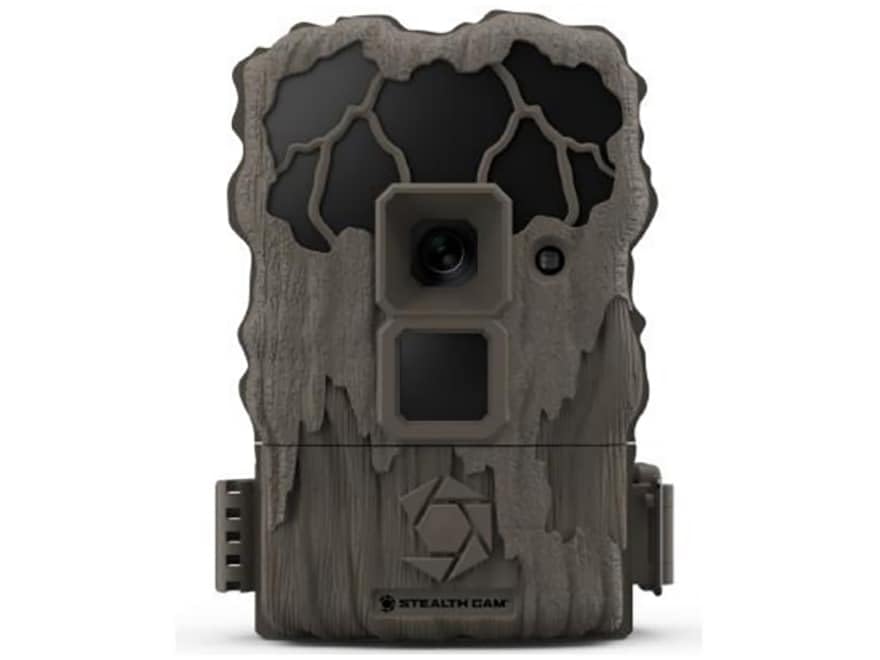
This image shows the compact design of the Stealth Cam QS24 trail camera, suitable for discreet outdoor placement.
Organizować coś
1. Instalacja baterii
- Open the battery compartment latch, typically located on the side or bottom of the camera.
- Insert the required number of AA batteries (not included), ensuring correct polarity (+/-) as indicated inside the compartment.
- Close the battery compartment securely to maintain the camera's weather resistance.
2. Instalacja karty SD
- Znajdź gniazdo karty SD, zazwyczaj w pobliżu komory baterii lub z boku urządzenia.
- Insert a formatted SD card (up to 32GB, not included) with the metal contacts facing the camera. Push until it clicks into place.
- Aby wyjąć kartę, wciśnij ją ponownie, aż wysunie się.
3. Montaż kamery
The QS24 is designed for tree mounting. Use the included strap or a compatible mounting accessory.
- Select a sturdy tree or post at the desired height, typically 3-6 feet off the ground.
- Przeciągnij pasek montażowy przez przeznaczone do tego otwory z tyłu aparatu.
- Securely fasten the camera to the tree, ensuring it is stable and pointed towards the desired detection area.
- Adjust the camera angle as needed to optimize the field of view.
Instrukcja obsługi
1. Włączanie/wyłączanie zasilania
- To power on, slide the power switch to the 'ON' position. The camera will perform a self-check.
- Aby wyłączyć urządzenie, przesuń wyłącznik zasilania do pozycji „WYŁ.”.
2. Setting Up Basic Functions
Access the camera's menu via the internal display and control buttons to configure settings.
- Wybór trybu: Choose between Photo (24MP), Video (720p at 30 FPS), or Photo+Video modes.
- Opóźnienie wyzwalania: Set the delay between detections. The QS24 features an ultra-fast 0.8-second trigger speed.
- Zasięg wykrywania: The camera has an 80-foot LoGlo infrared detection range. Adjust sensitivity if available in settings.
- Data i godzina: Set the current date and time for accurate stamping on images and videos.
- Faza Księżyca: The camera automatically records moon phase data with each capture.
3. Retrieving Images and Videos
- Wyłącz aparat.
- Wyjmij kartę SD z gniazda.
- Włóż kartę SD do kompatybilnego czytnika kart podłączonego do komputera lub innego urządzenia. viewurządzenie.
- Uzyskaj dostęp do filena karcie SD do view or transfer your captured media.
An official video from Stealth Cam showcasing the features and applications of their trail cameras, including the QS24 model.
Konserwacja
1. Czyszczenie
- Gently wipe the camera lens and IR array with a soft, lint-free cloth to remove dirt, dust, or moisture.
- Wyczyść korpus aparatu za pomocąamp szmatką. Unikaj silnych środków chemicznych i materiałów ściernych.
- Ensure all seals and gaskets are free of debris to maintain weather resistance.
2. Pielęgnacja baterii
- Check battery levels regularly, especially before long deployments.
- Replace all batteries at the same time with new, high-quality batteries. Do not mix old and new batteries or different battery types.
- Remove batteries if the camera will be stored for an extended period to prevent leakage.
3. Przechowywanie
- Przechowuj kamerę w chłodnym, suchym miejscu, z dala od bezpośredniego światła słonecznego i ekstremalnych temperatur.
- Ensure the camera is clean and dry before storage.
Rozwiązywanie problemów
- Kamera nie włącza się:
- Check battery installation and ensure correct polarity.
- Replace with fresh batteries.
- Ensure the power switch is firmly in the 'ON' position. - Brak zdjęć/filmów:
- Verify the SD card is properly inserted and formatted.
- Check if the SD card is full; delete or replace if necessary.
- Ensure the camera is in an active mode (Photo, Video, or Photo+Video).
- Adjust camera placement to ensure subjects pass within the detection zone. - Słaba jakość obrazu/wideo:
- Clean the camera lens and IR array.
- Ensure there are no obstructions in front of the lens or IR sensors.
- Check battery levels; low batteries can affect performance. - Fałszywe wyzwalacze:
- Reduce the camera's sensitivity setting if available.
- Avoid placing the camera where moving branches or tall grass might trigger it.
- Ensure the camera is not facing direct sunlight or heat sources that could cause false detections.
Specyfikacje
| Numer modelu | STC-QS24 |
| Rozdzielczość obrazu | 24 megapiksela |
| Rozdzielczość wideo | 720p HD at 30 FPS |
| Szybkość wyzwalania | 0.8 sekund |
| Zasięg wykrywania | 80 ft (LoGlo Infrared) |
| Zasięg IR | 80 stóp |
| Źródło zasilania | Battery Powered (AA batteries, not included) |
| Łączność | Bezprzewodowy, Bluetooth |
| Zastosowanie wewnątrz/na zewnątrz | Plenerowy |
| Typ mocowania | Drzewo Góra |
| Wymiary przedmiotu | 13 x 2.6 x 6 cala |
| Kolor | Dębnik |
| UPC | 198954003410 |
Gwarancja i wsparcie
For detailed warranty information, please refer to the documentation included with your product or visit the official Stealth Cam webWarunki gwarancji zazwyczaj obejmują wady produkcyjne przez określony czas od daty zakupu.
For technical support, troubleshooting assistance, or to inquire about replacement parts, please contact Stealth Cam customer service directly. Contact information can usually be found on the manufacturer's webmiejscu lub w opakowaniu produktu.