
1. Wprowadzenie
Thank you for choosing the TOPTRO TP3 4K Google TV Portable Projector. This manual provides essential information for setting up, operating, and maintaining your projector. Please read it thoroughly before use to ensure optimal performance and safety.
The TOPTRO TP3 is designed to deliver a versatile and immersive viewing experience, featuring integrated Google TV, AI-powered image adjustments, and comprehensive connectivity options. Enjoy your content at home, outdoors, or on the go.
2. Koniec produktuview
2.1 Główne cechy
- Integrated Google TV: Access over 10,000 official streaming applications, including Netflix, Prime Video, and YouTube, without additional devices.
- Google Voice Control: Use the remote control's voice assistant button to search for content, adjust settings, and control playback hands-free.
- AI-Powered Image Adjustment: Features automatic focus, automatic keystone correction, obstacle avoidance, and automatic screen adjustment for a perfectly aligned and clear image within seconds.
- Natywna rozdzielczość 1080P z dekodowaniem 4K: Delivers sharp, detailed images and natural colors, supporting 4K video decoding.
- Stosunek rzutu krótkiego (0.8:1): Projects a 60-inch image from just one meter distance, ideal for small spaces.
- 90-Degree Rotating Stand: Allows for flexible projection angles, including ceiling projection.
- Zaawansowana łączność: Equipped with dual-band WiFi 6, Bluetooth 5.3, HDMI ARC, USB, and a 3.5mm audio jack for wide device compatibility.
- Przenośna konstrukcja: Weighing only 1.2 kg (2.6 lbs) with a hidden carry handle, making it easy to transport.
2.2 Zawartość opakowania
Sprawdź, czy w przesyłce znajdują się wszystkie elementy:
- Projektor TOPTRO TP3
- Zdalne sterowanie
- Kabel HDMI
- Zasilacz
- Instrukcja obsługi
3. Konfiguracja
3.1 Początkowe umiejscowienie
Place the projector on a stable, flat surface. The 90-degree rotating stand allows for various projection angles, including wall, ceiling, or tabletop. For optimal image quality, ensure the projection surface is smooth and light-colored.

Image: The TOPTRO TP3 projector can be used in diverse environments, from living rooms to outdoor camping, showcasing jego zdolności adaptacyjnych.
3.2 Połączenie zasilania
- Podłącz zasilacz do gniazda zasilania projektora.
- Plug the power adapter into a suitable electrical outlet (220V).
- Naciśnij przycisk zasilania na projektorze lub pilocie, aby go włączyć.
3.3 Połączenie sieciowe
Upon first startup, follow the on-screen prompts to connect to your Wi-Fi network. The projector supports dual-band WiFi 6 for a fast and stable connection.
3.4 Konfiguracja Google TV
After connecting to Wi-Fi, sign in with your Google account to access Google TV and download applications from the Google Play Store. This step is crucial for utilizing the integrated streaming services.

Image: The projector's interface showing integrated Google TV with direct access to popular streaming applications.
4. Instrukcja obsługi
4.1 Podstawowa obsługa
- Włączanie/wyłączanie: Naciśnij przycisk zasilania na pilocie lub projektorze.
- Nawigacja: Use the directional buttons on the remote to navigate menus.
- Wybór: Aby potwierdzić wybór, naciśnij przycisk „OK”.
- Regulacja głośności: Użyj przycisków głośności na pilocie.
4.2 Regulacja obrazu
The TOPTRO TP3 features AI-powered automatic image adjustments:
- Auto Focus: Projektor automatycznie dostosowuje ostrość obrazu.
- Automatyczna korekcja trapezu: Automatically corrects distorted images to a rectangular shape.
- Unikanie przeszkód: Wykrywa i dostosowuje obraz w celu uniknięcia obiektów na powierzchni projekcyjnej.
- Auto Screen Adjustment: Optymalizuje obraz tak, aby pasował do obszaru ekranu.
These adjustments occur automatically within seconds of powering on or repositioning the projector. Manual digital zoom (80-100%) is also available for fine-tuning image size.

Image: Visual representation of the projector's AI-powered automatic image adjustment features, ensuring a clear and aligned picture.
4.3 Sterowanie głosowe Google
Press the dedicated voice assistant button on your remote control and speak your command. For example, say "Open YouTube" or "Play music." The projector will respond to your voice commands for quick access to functions and content.
4.4 Screen Mirroring (Google Cast)
Utilize Google Cast technology to wirelessly mirror content from your smartphone or tablet to the projector. For iPhone users, download the "AirScreen" application from the Google Play Store on the projector for wireless screen mirroring.
4.5 Rotating Stand Usage
The integrated 90-degree rotating stand allows you to easily adjust the projection angle. Simply pivot the projector to direct the image onto a wall, screen, or ceiling. This feature is particularly useful for bedroom viewing or creative setups.
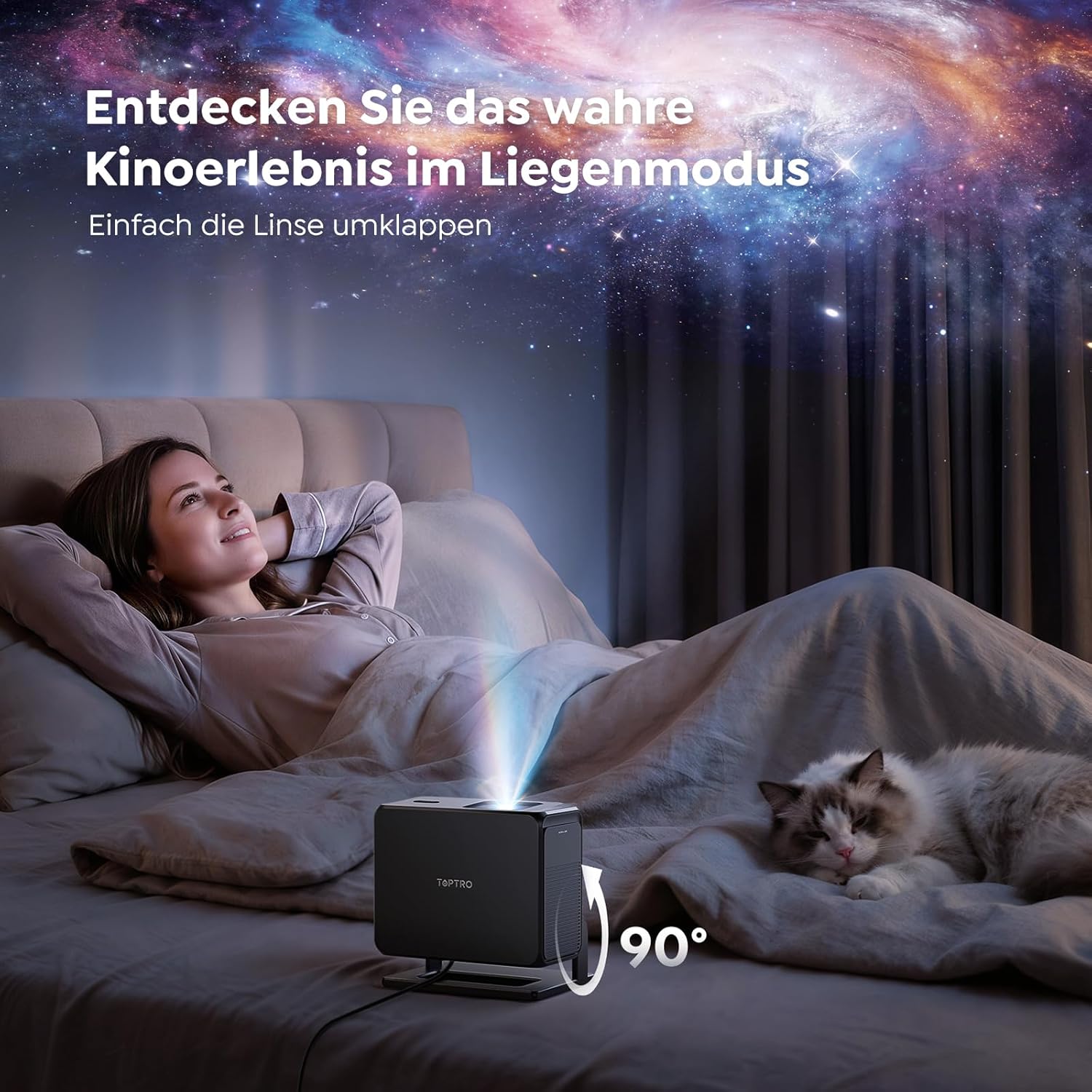
Image: The TOPTRO TP3 projector rotated 90 degrees to project content onto a bedroom ceiling, offering a unique viewzdobywania doświadczenia.
5. Łączność
5.1 Połączenia przewodowe
- HDMI ARC/CEC: Connect external devices like laptops, gaming consoles (Xbox/PlayStation 5), or Blu-ray players. The ARC feature allows audio to be sent back to a compatible sound system.
- USB: Podłącz dyski USB w celu odtwarzania multimediów.
- Gniazdo audio 3.5 mm: Podłącz zewnętrzne przewodowe głośniki lub słuchawki.
5.2 Połączenia bezprzewodowe
- Wi-Fi 6: Provides faster and more stable wireless connectivity for streaming and online content.
- Bluetooth 5.3: Podłącz słuchawki lub głośniki Bluetooth, aby uzyskać lepsze wrażenia dźwiękowe.
6. Konserwacja
6.1 Czyszczenie obiektywu
Gently clean the projector lens with a soft, lint-free cloth designed for optical surfaces. Avoid using abrasive cleaners or excessive force, as this can scratch the lens.
6.2 Ogólne czyszczenie
Przetrzyj zewnętrzną część projektora miękką, suchą ściereczką. Nie używaj płynnych środków czyszczących bezpośrednio na urządzeniu.
6.3 Przechowywanie
Gdy projektor nie jest używany, należy go przechowywać w chłodnym, suchym miejscu, z dala od bezpośredniego światła słonecznego i ekstremalnych temperatur. Aby zapobiec gromadzeniu się kurzu i uszkodzeniom, należy używać oryginalnego opakowania lub etui ochronnego.
7. Rozwiązywanie Problemów
7.1 Brak wyświetlanego obrazu
- Sprawdź, czy projektor jest włączony i podłączony do źródła zasilania.
- Check all cable connections (HDMI, USB) to external devices.
- Sprawdź, czy źródło sygnału wejściowego wybrane w projektorze jest zgodne z podłączonym urządzeniem.
- Confirm the lens cap is removed.
7.2 Rozmazany obraz
- Allow the auto-focus function to complete its adjustment.
- Upewnij się, że powierzchnia projekcyjna jest płaska i projektor stoi stabilnie.
- Clean the projector lens if smudges or dust are visible.
7.3 Brak dźwięku
- Sprawdź poziom głośności projektora i podłączonego urządzenia źródłowego.
- Ensure external speakers or headphones are properly connected (wired or Bluetooth).
- If using HDMI ARC, verify your sound system is compatible and correctly configured.
7.4 Pilot zdalnego sterowania nie działa
- Wymień baterie w pilocie.
- Upewnij się, że nie ma żadnych przeszkód między pilotem a odbiornikiem podczerwieni projektora.
For further assistance, refer to the detailed troubleshooting section in the full user manual or contact customer support.
8. Specyfikacje
| Funkcja | Specyfikacja |
|---|---|
| Marka | TOPTRO |
| Nazwa modelu | TP3 |
| Rozdzielczość natywna | 1920x1080 (1080P) |
| Obsługa dekodowania wideo | 4K |
| Typ wyświetlacza | PROWADZONY |
| Cechy specjalne | Auto Focus, Auto Keystone Correction, Obstacle Avoidance, Auto Screen Adjustment, Google TV, Google Voice Control |
| Technologia łączności | HDMI, USB, Bluetooth 5.3, Wi-Fi 6 |
| Interfejs sprzętowy | HDMI ARC/CEC, USB, 3.5mm Audio |
| Wymiary produktu (dł. x szer. x wys.) | Wymiary 19.4 x 15.8 x 14.1 cm |
| Waga przedmiotu | 1.2 kilogramów |
| Współczynnik kształtu | Przenośny |
| Typ montażu | Ceiling Mount, Tabletop, Wall |
| Minimalny rozmiar obrazu | 40 cali |
| Maksymalny rozmiar obrazu | 120 cali |
| Maksymalna odległość rzutu | 2.13 metrów |
| Tomtage | 220 wolty |
| Zawarte komponenty | Kabel HDMI |
| Kolor | Czarny |
| Typ kontrolera | Zdalne sterowanie |
| Kompatybilne urządzenia | Xbox/PlayStation 5, Smartphone, Tablet, Laptop, Speaker, Notebook |
| Zalecane zastosowania | Gaming, Business, Home Cinema, Education |
9. Gwarancja i wsparcie
9.1 Informacje o gwarancji
Szczegółowe warunki gwarancji znajdują się w karcie gwarancyjnej dołączonej do produktu. Zachowaj dowód zakupu na wypadek roszczeń gwarancyjnych.
9.2 Obsługa klienta
If you encounter any issues or have questions regarding your TOPTRO TP3 projector, please contact our customer service team. We provide prompt, professional, and effective support to ensure a smooth user experience.
Dane kontaktowe można zazwyczaj znaleźć na naszej oficjalnej stronie webmiejscu lub na karcie gwarancyjnej.