
Wstęp
Thank you for choosing the Yosoo Digital Alarm Clock. This device is designed to provide reliable timekeeping, dual alarm functions, a customizable timer, and versatile reminder options including vibration and music. Its compact design and backlight feature make it suitable for various uses, including as a travel alarm or for individuals with hearing impairments. Please read this manual carefully to ensure proper use and maintenance of your alarm clock.
Produkt ponadview
Familiarize yourself with the components and controls of your Yosoo Digital Alarm Clock.
Elementy sterujące i wyświetlacz na panelu przednim

Obraz: Przód i tył view of the Yosoo Digital Alarm Clock with labeled buttons and features. The front shows the digital display, SET, UP, and ST/SP buttons. The back shows TIMER, ALARM, CLOCK mode buttons, vibration/music option switch, lock button, horn, and battery compartment.
- Wyświetlacz cyfrowy: Shows time, alarm status, and timer information.
- Kontrolka: A red light illuminates when an alarm is ringing.
- Przycisk SET: Used to enter setting modes for time, alarm, and timer.
- Przycisk W GÓRĘ: Used to adjust values (increase numbers) during setting.
- Przycisk ST/SP: Used to start/stop the timer or confirm settings. Also activates backlight.
Elementy sterujące i funkcje panelu tylnego
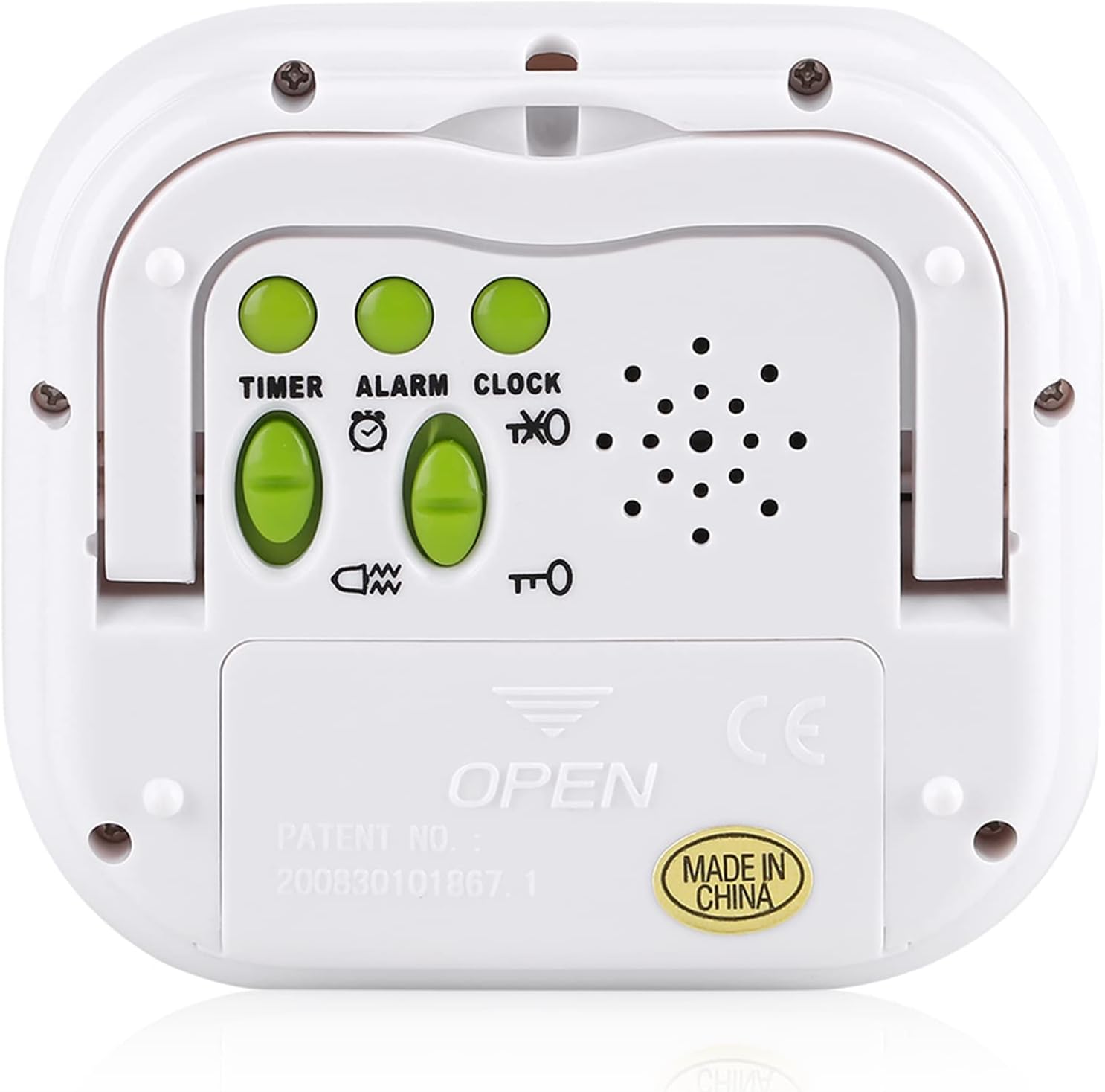
Obraz: Tył view of the Yosoo Digital Alarm Clock showing the control switches and battery compartment. The switches are labeled TIMER, ALARM, and CLOCK, along with a vibration/music option switch and a lock button.
- Mode Switches (TIMER, ALARM, CLOCK): Slide switches to select the desired operating mode.
- Vibration/Music Option Switch: Selects between vibration or music for alarm/timer alerts.
- Przycisk blokady: Disables all buttons to prevent accidental operation.
- Klakson: Speaker for music alerts.
- Uchwyt składany: Allows the clock to stand upright.
- Komora baterii: Holds 2 x AAA batteries.
Organizować coś
Instalacja baterii
- Znajdź komorę baterii z tyłu budzika.
- Przesuń pokrywę komory baterii w dół, aby ją otworzyć.
- Włóż 2 nowe baterie AAA, zwracając uwagę na prawidłową biegunowość (+ i -), zgodnie ze wskazaniami wewnątrz komory.
- Zamknij pokrywę komory baterii, przesuwając ją do góry, aż zatrzaśnie się na swoim miejscu.
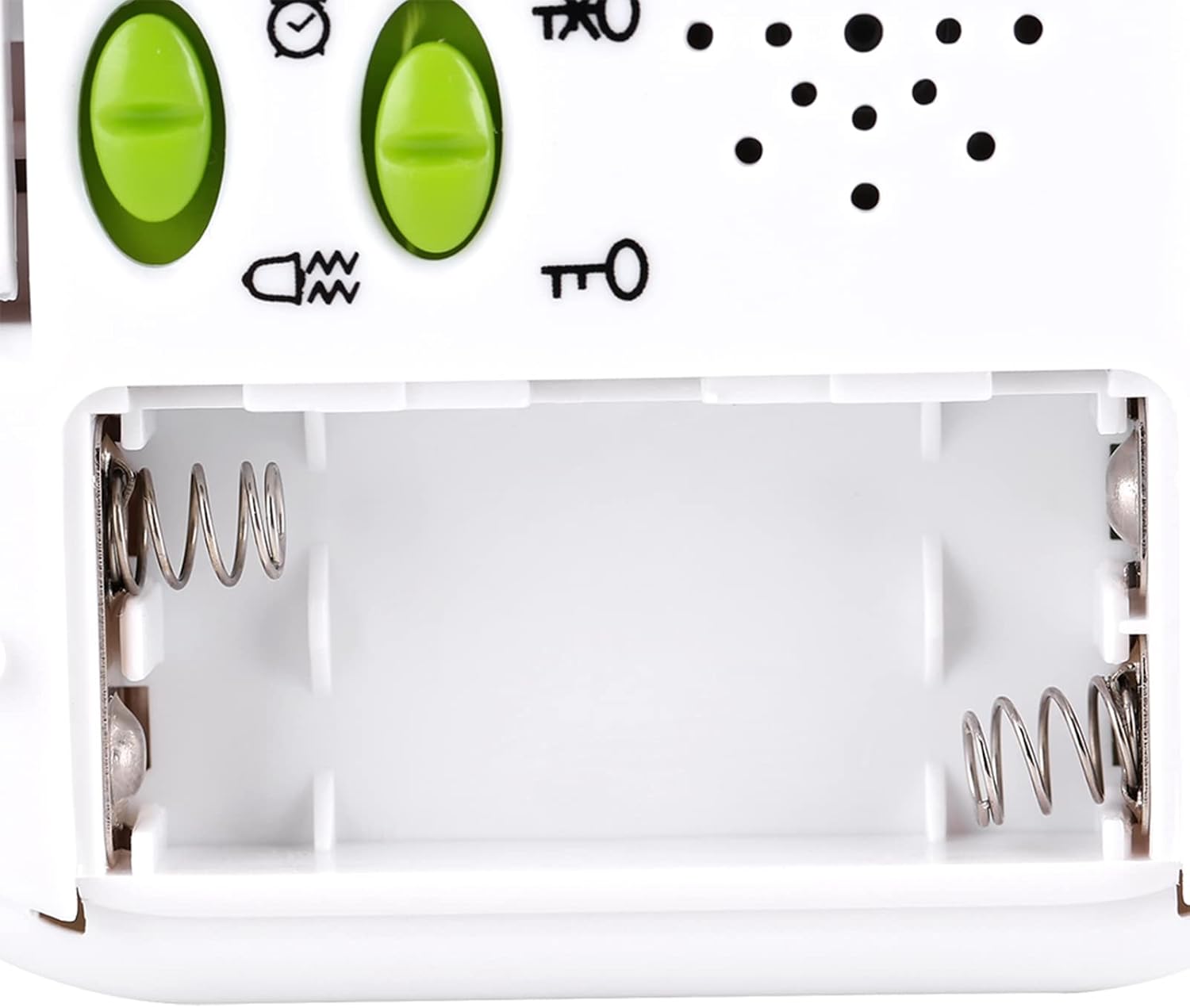
Obraz: Open battery compartment of the Yosoo Digital Alarm Clock, showing the two AAA battery slots with spring contacts.
The clock will power on automatically once batteries are installed. If the display is blank, check battery orientation or replace with fresh batteries.
Instrukcja obsługi
Ustawianie czasu
- Slide the rear mode switch to the ZEGAR pozycja.
- Naciśnij i przytrzymaj USTAWIĆ button on the front panel until the hour digits begin to flash.
- Naciśnij UP przycisk, aby ustawić godzinę.
- Naciśnij USTAWIĆ Naciśnij przycisk ponownie, aby przejść do ustawienia minut.
- Naciśnij UP przycisk, aby ustawić minuty.
- Naciśnij USTAWIĆ button a third time to select 12-hour or 24-hour format. Use the UP button to toggle between formats.
- Naciśnij USTAWIĆ button one last time or wait a few seconds for the setting to be saved automatically.

Obraz: Close-up of the Yosoo Digital Alarm Clock's front buttons: SET, UP, and ST/SP. These buttons are used for setting time, alarms, and timer functions.
Setting Alarms (AL1 and AL2)
The clock features two independent alarms, AL1 and AL2.
- Slide the rear mode switch to the ALARM pozycja.
- Naciśnij USTAWIĆ button once to set AL1. The AL1 icon and hour digits will flash.
- Użyj UP button to adjust the AL1 hour.
- Naciskać USTAWIĆ again to adjust AL1 minutes using the UP przycisk.
- Naciskać USTAWIĆ a third time to enable/disable AL1. Use UP przełączać.
- Naciskać USTAWIĆ a fourth time to set AL2. The AL2 icon and hour digits will flash.
- Repeat steps 3-5 for AL2.
- Naciskać USTAWIĆ one last time or wait for the settings to be saved.
To choose between vibration or music for the alarm, use the Vibration/Music Option Switch on the rear panel. The alarm will sound/vibrate for 60 seconds.
Korzystanie z funkcji timera
The timer can be set for up to 99 hours, 59 minutes, and 59 seconds.
- Slide the rear mode switch to the REGULATOR CZASOWY pozycja.
- Naciśnij i przytrzymaj USTAWIĆ Naciskaj przycisk, aż zaczną migać cyfry godziny.
- Użyj UP button to set the desired hours.
- Naciskać USTAWIĆ aby przejść do minut, następnie użyj UP ustawić minuty.
- Naciskać USTAWIĆ to move to seconds, then use UP aby ustawić sekundy.
- Naciskać USTAWIĆ ponownie, aby potwierdzić ustawienia timera.
- Naciśnij ST/SP przycisk, aby rozpocząć odliczanie.
- Naciskać ST/SP ponownie, aby wstrzymać/wznowić odliczanie.
- When the timer reaches zero, the alarm (vibration or music, depending on the rear switch) will activate for 60 seconds.
- To stop the alarm, press any button. To reset the timer, press USTAWIĆ while the timer is paused or after it has finished.
Funkcja podświetlenia
The clock features a built-in orange backlight for easy vieww warunkach słabego oświetlenia.

Obraz: Yosoo Digital Alarm Clock with its orange backlight activated, showing the time 12:02 PM. The backlight illuminates the display for 1-2 seconds.
To activate the backlight, simply press any button on the front panel (SET, UP, or ST/SP). The backlight will illuminate for approximately 1-2 seconds and then turn off automatically to conserve battery life.
Funkcja blokady
To prevent accidental button presses, especially when carrying the clock or placing it under a pillow, slide the Przycisk blokady on the rear panel to the locked position. This will disable all front panel buttons. Slide it back to the unlocked position to resume normal operation.
Konserwacja
- Czyszczenie: Przetrzyj zegar miękką, suchą ściereczką. Nie używaj środków czyszczących ani rozpuszczalników o działaniu ściernym.
- Wymiana baterii: Replace batteries when the display becomes dim or functions become erratic. Always use 2 new AAA batteries.
- Składowanie: If storing the clock for an extended period, remove the batteries to prevent leakage. Store in a cool, dry place.
- Wodoodporność: To urządzenie nie jest wodoodporne. Unikaj narażenia na działanie wody i wysokiej wilgotności.
Rozwiązywanie problemów
| Problem | Możliwa przyczyna | Rozwiązanie |
|---|---|---|
| Wyświetlacz jest pusty lub przyciemniony. | Baterie są rozładowane lub nieprawidłowo zainstalowane. | Wymień baterie na nowe AAA, zwracając uwagę na prawidłową biegunowość. |
| Przyciski nie reagują. | Funkcja blokady jest włączona. | Slide the Lock Button on the rear panel to the unlocked position. |
| Alarm nie wydaje dźwięku/nie wibruje. | Alarm is not set or enabled; volume/vibration switch is off. | Ensure alarm is set and enabled (AL1/AL2 icon visible). Check the Vibration/Music Option Switch on the rear. |
| Czas jest nieprawidłowy. | Czas nie został ustawiony prawidłowo lub wyjęto baterie. | Re-set the time following the "Setting the Time" instructions. |
Specyfikacje
- Model: Yosoortil5pfa01
- Tworzywo: ABS
- Kolor: Biały
- Kolor podświetlenia: Pomarańczowy
- Budzik: Dual (AL1/AL2)
- Wyświetlacz czasu: Format 12 / 24H
- Funkcja timera: Do 99 godzin, 59 minut, 59 sekund
- Reminder Type: Vibration or Music (selectable)
- Czas trwania alertu: 60 sekund
- Źródło zasilania: 2 baterie AAA (brak w zestawie)
- Wymiary produktu: Około 85 x 78 x 22 mm (3.3 x 3.1 x 0.9 cala)
- Waga: Około 101 g (bez baterii)
- Typ wyświetlacza: PROWADZONY

Obraz: Dimensions of the Yosoo Digital Alarm Clock: 8.5cm (3.3in) wide, 7.8cm (3.1in) high, and 2.2cm (0.9in) deep. This image provides a visual reference for the product's size.
Gwarancja i wsparcie
Aby uzyskać informacje o gwarancji lub pomocy technicznej, zapoznaj się z opakowaniem produktu lub skontaktuj się ze sprzedawcą. Zachowaj paragon jako dowód zakupu.