
1. Wprowadzenie
The MESTEK IR05B is a professional high-temperature infrared thermometer designed for accurate non-contact temperature measurement. It also features a K-type probe for contact measurements, offering versatility for various industrial and domestic applications. This device is equipped with dual laser pointers for precise targeting, adjustable emissivity, and multiple measurement modes including MIN, MAX, AVG, and DIF. It is ideal for use in environments such as high-end ovens, pizza ovens, smelting, casting, metal melting, alloy processing, ceramics, welding, and asphalt applications. Please note, this device is not suitable for measuring human or animal body temperature.
Safety Information: Always exercise caution when using the laser function. Do not point the laser directly at eyes or reflective surfaces. Keep the device away from children.

Image: The MESTEK IR05B thermometer being used in various high-temperature industrial settings, including smelting, ovens, and HVAC systems.
2. Zawartość opakowania
Sprawdź, czy w przesyłce znajdują się wszystkie elementy wymienione poniżej:
- 1 x MESTEK IR05B Infrared Thermometer
- 1 x K-Type Probe
- 2 baterie AA 1.5 V
- 1 x Instrukcja obsługi
- 1 x Torba do przechowywania

Image: A visual representation of the MESTEK IR05B thermometer, K-type probe, batteries, user manual, and storage bag included in the product package.
3. Koniec produktuview
Familiarize yourself with the components of your MESTEK IR05B Infrared Thermometer:
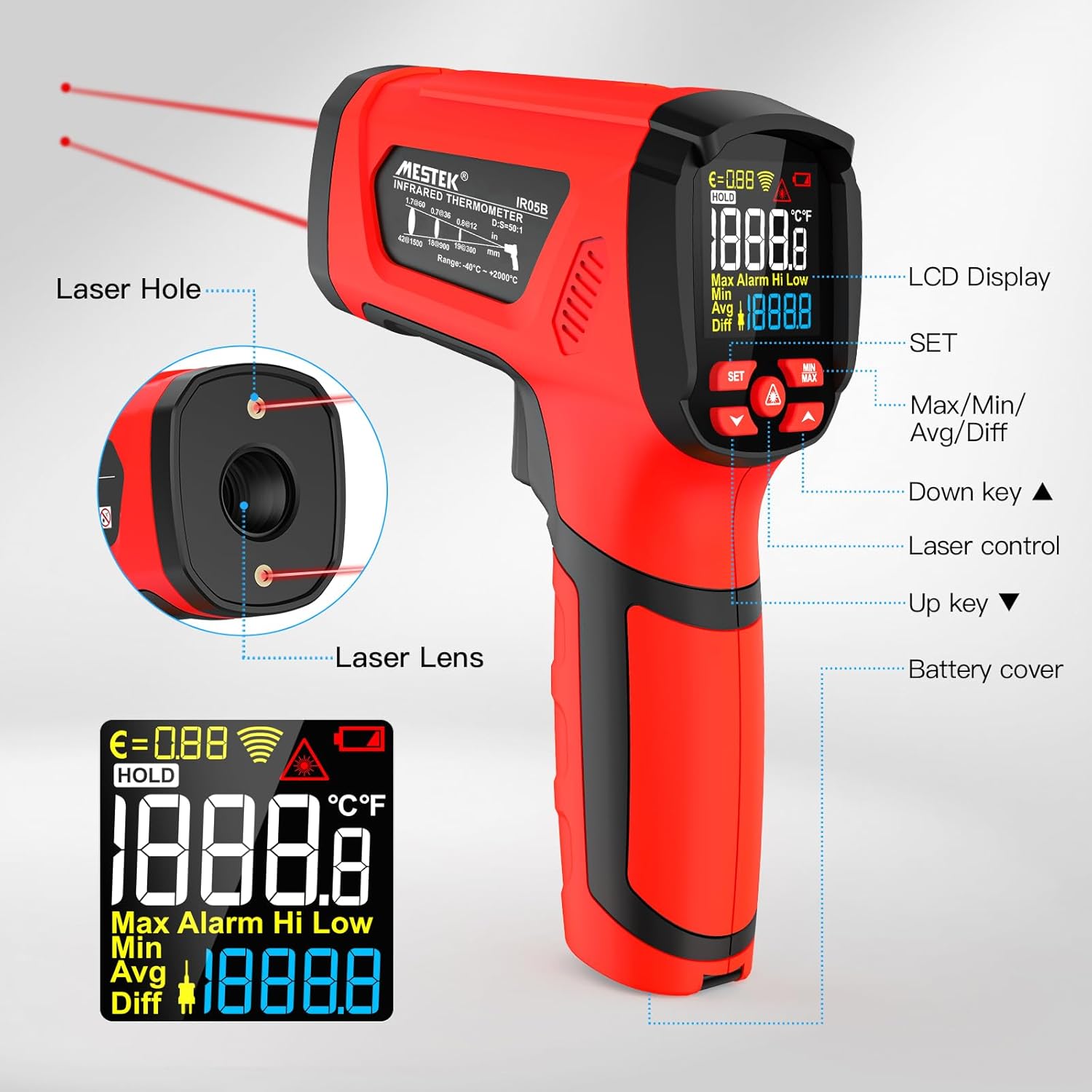
Image: A detailed diagram of the MESTEK IR05B thermometer, highlighting key components such as the Laser Hole, Laser Lens, LCD Display, SET button, Max/Min/Avg/Diff buttons, Up/Down keys, Laser control, and Battery cover.
- Laser Hole: Emits the laser for targeting.
- Soczewka laserowa: Infrared sensor for non-contact temperature measurement.
- Wyświetlacz LCD: Shows temperature readings, modes, and settings.
- Przycisk SET: Accesses settings and emissivity adjustment.
- Max/Min/Avg/Diff Button: Przełącza między trybami pomiaru.
- Klawisze góra/dół: Adjust values in settings or navigate menus.
- Laser Control: Activates/deactivates the laser pointers.
- Pokrywa baterii: Dostęp do komory baterii.
4. Konfiguracja
4.1 Instalacja baterii
- Znajdź pokrywę baterii na dole uchwytu.
- Otwórz pokrywę baterii.
- Włóż dwie baterie AA 1.5 V, zwracając uwagę na prawidłową biegunowość (+/-).
- Dokładnie zamknij pokrywę baterii.

Obraz: Zbliżenie view of the MESTEK IR05B thermometer's handle, showing the battery compartment with two AA batteries inserted.
5. Instrukcja obsługi
5.1 Włączanie/wyłączanie zasilania
Press the trigger to power on the device. The thermometer will automatically power off after approximately 35 seconds of inactivity to conserve battery life.

Image: The MESTEK IR05B thermometer display with an indicator for the 35-second auto-off feature, demonstrating power-saving functionality.
5.2 Non-Contact (Infrared) Measurement
- Point the thermometer's laser lens towards the target object.
- Press and hold the trigger. The dual laser pointers will indicate the measurement area.
- Odczyt temperatury pojawi się na wyświetlaczu LCD w ciągu 0.5 sekundy.
- Release the trigger to hold the reading on the display.
The device has a Distance to Spot Ratio (D:S) of 50:1, meaning it can accurately measure a 1-inch spot from 50 inches away. This allows for safe measurement of high-temperature or hard-to-reach objects.
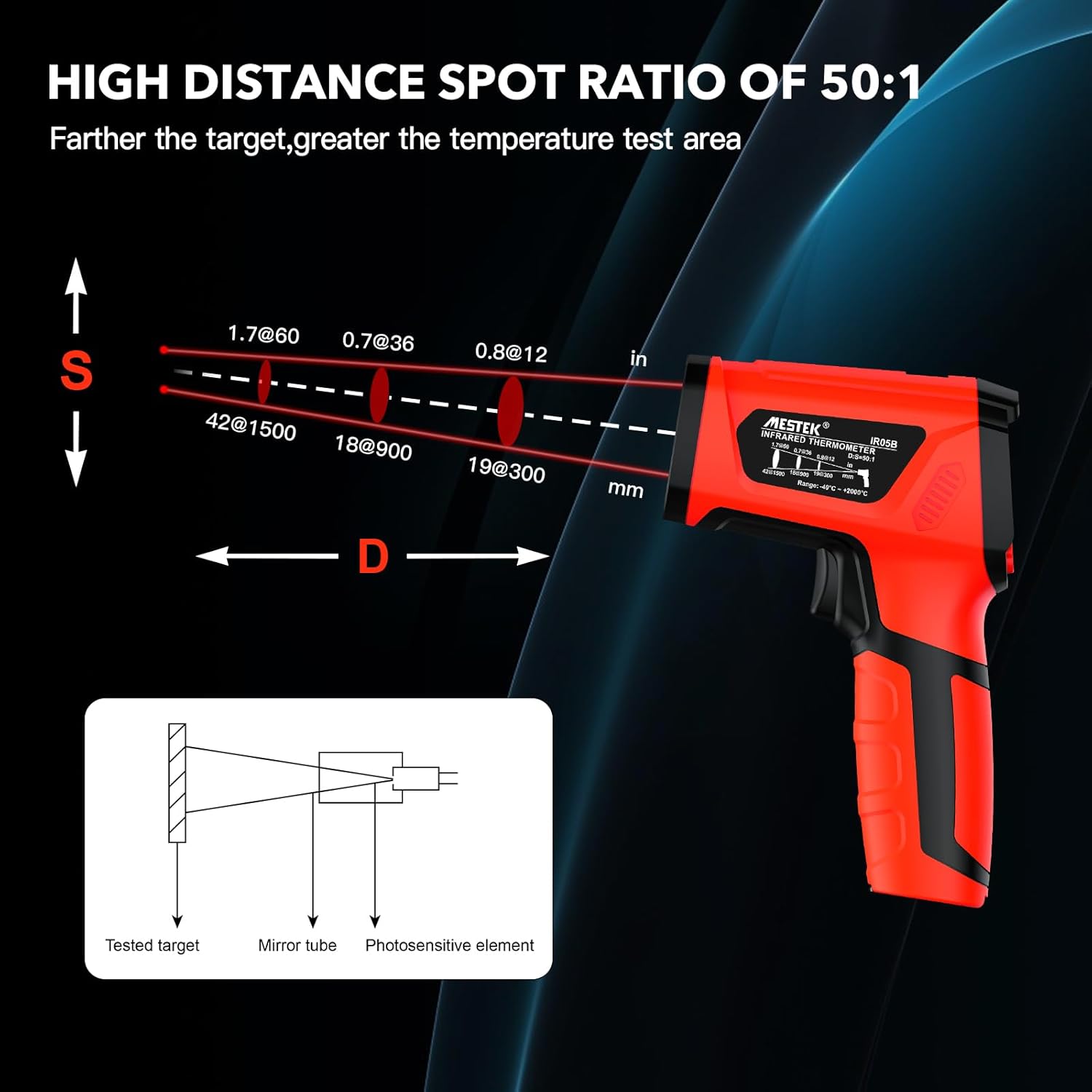
Image: A diagram showing the MESTEK IR05B thermometer and its 50:1 Distance to Spot Ratio, illustrating how the measurement spot size increases with distance from the target.

Image: The MESTEK IR05B thermometer's display indicating a measurement speed of less than 0.5 seconds, highlighting its rapid response time.
5.3 Contact (K-Type Probe) Measurement
- Insert the K-type probe into the designated port on the thermometer.
- Place the tip of the K-type probe in direct contact with the object whose temperature you wish to measure.
- Odczyt temperatury z sondy zostanie wyświetlony na ekranie.
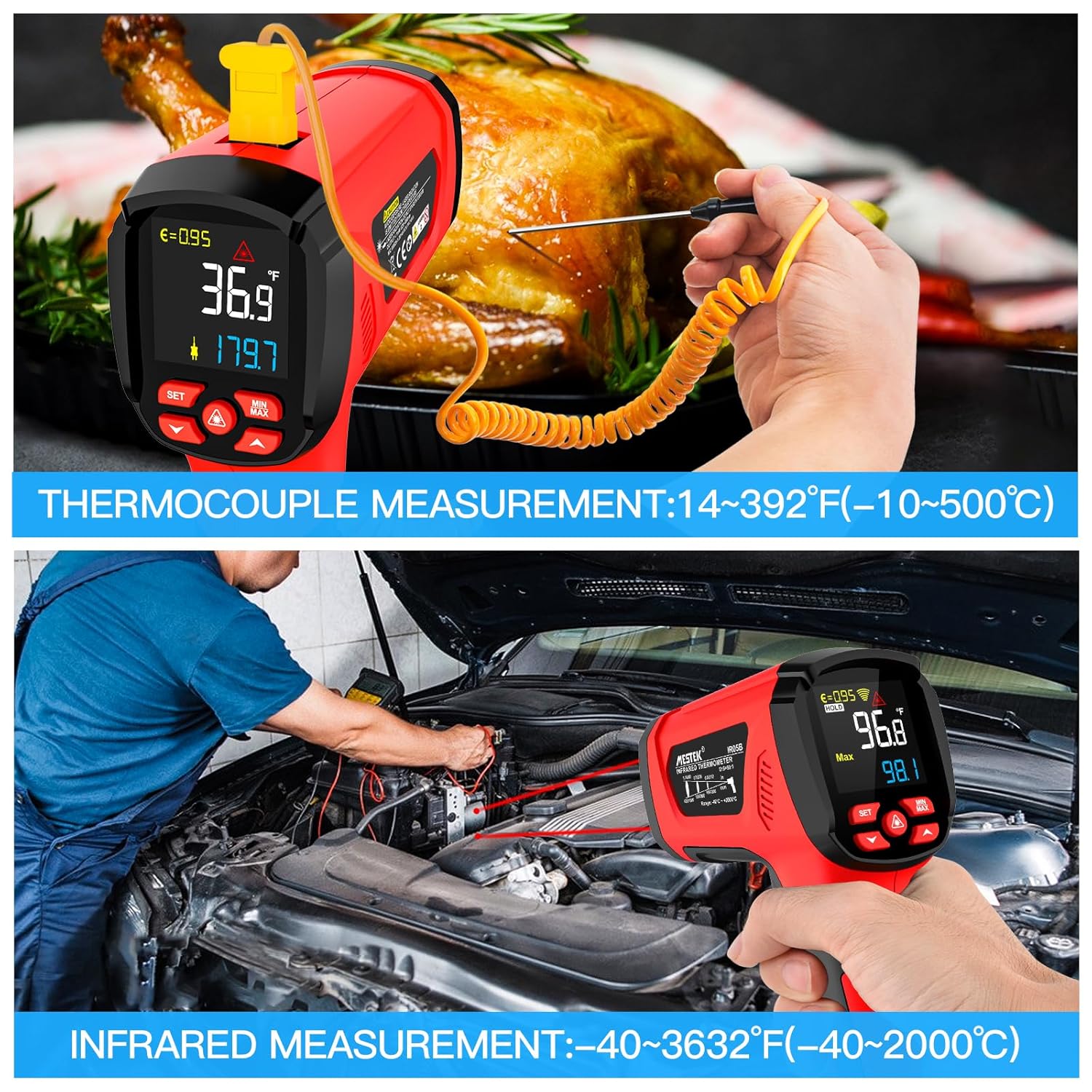
Image: The MESTEK IR05B thermometer demonstrating both non-contact infrared measurement and contact measurement using the K-type thermocouple probe, showing its dual functionality.
5.4 Regulacja emisyjności
Emissivity (ε) is crucial for accurate infrared temperature measurement. Different materials have different emissivity values. The MESTEK IR05B allows adjustment from 0.1 to 1.0.
- Press the 'SET' button to enter the settings menu.
- Use the Up/Down keys to navigate to the emissivity setting (ε).
- Adjust the value using the Up/Down keys according to the material being measured. Refer to the emissivity table for common materials.
- Press 'SET' again to confirm and exit.
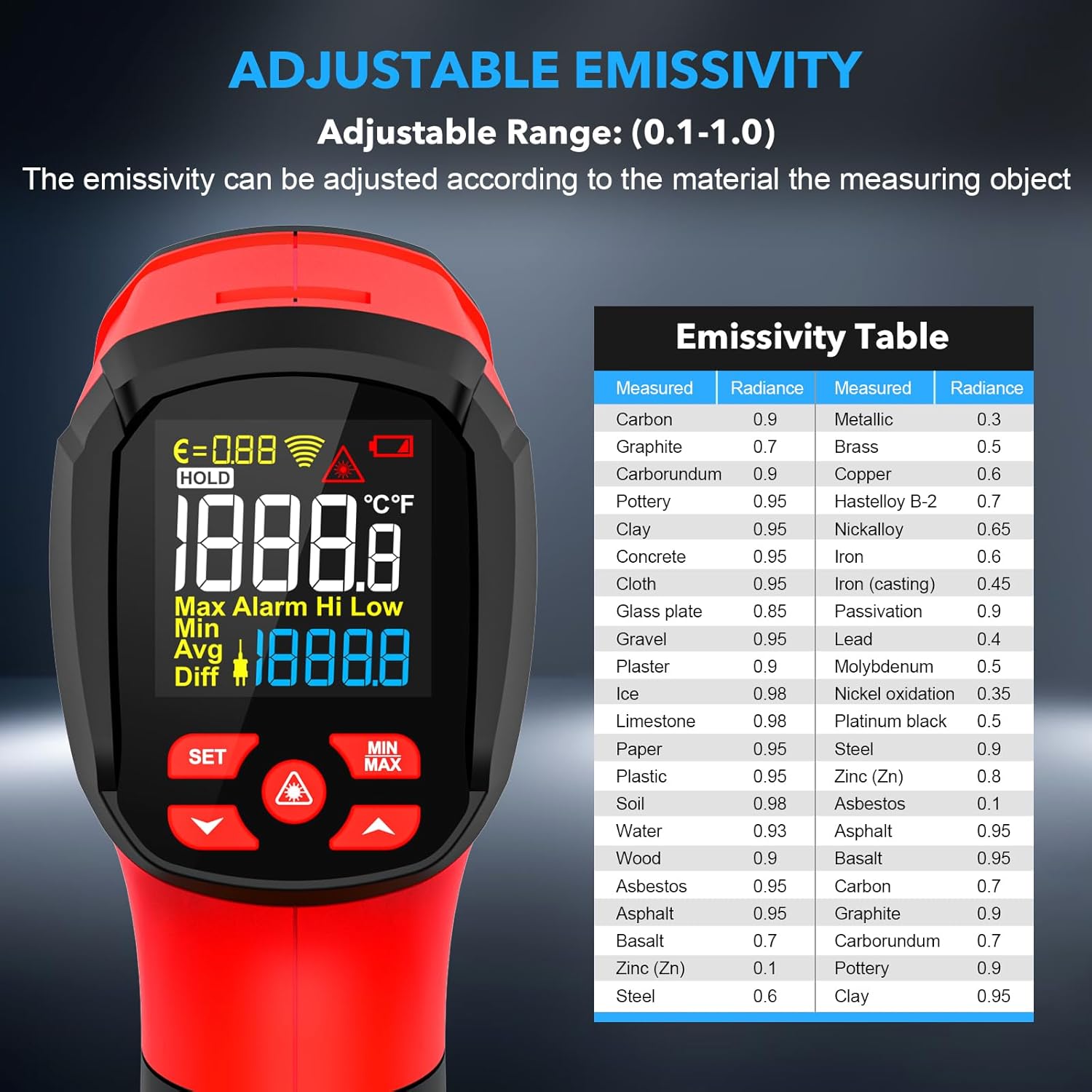
Image: The MESTEK IR05B thermometer's display showing the emissivity setting and an accompanying table listing emissivity values for various materials like carbon, brass, iron, and wood.
5.5 Measurement Modes (MIN/MAX/AVG/DIF)
Press the 'MAX/MIN/AVG/DIF' button to cycle through the following measurement modes:
- MAKS.: Displays the maximum temperature recorded during a continuous measurement.
- MIN: Displays the minimum temperature recorded during a continuous measurement.
- AVG: Displays the average temperature recorded during a continuous measurement.
- RóŻNICA: Wyświetla różnicę między maksymalną i minimalną zanotowaną temperaturą.
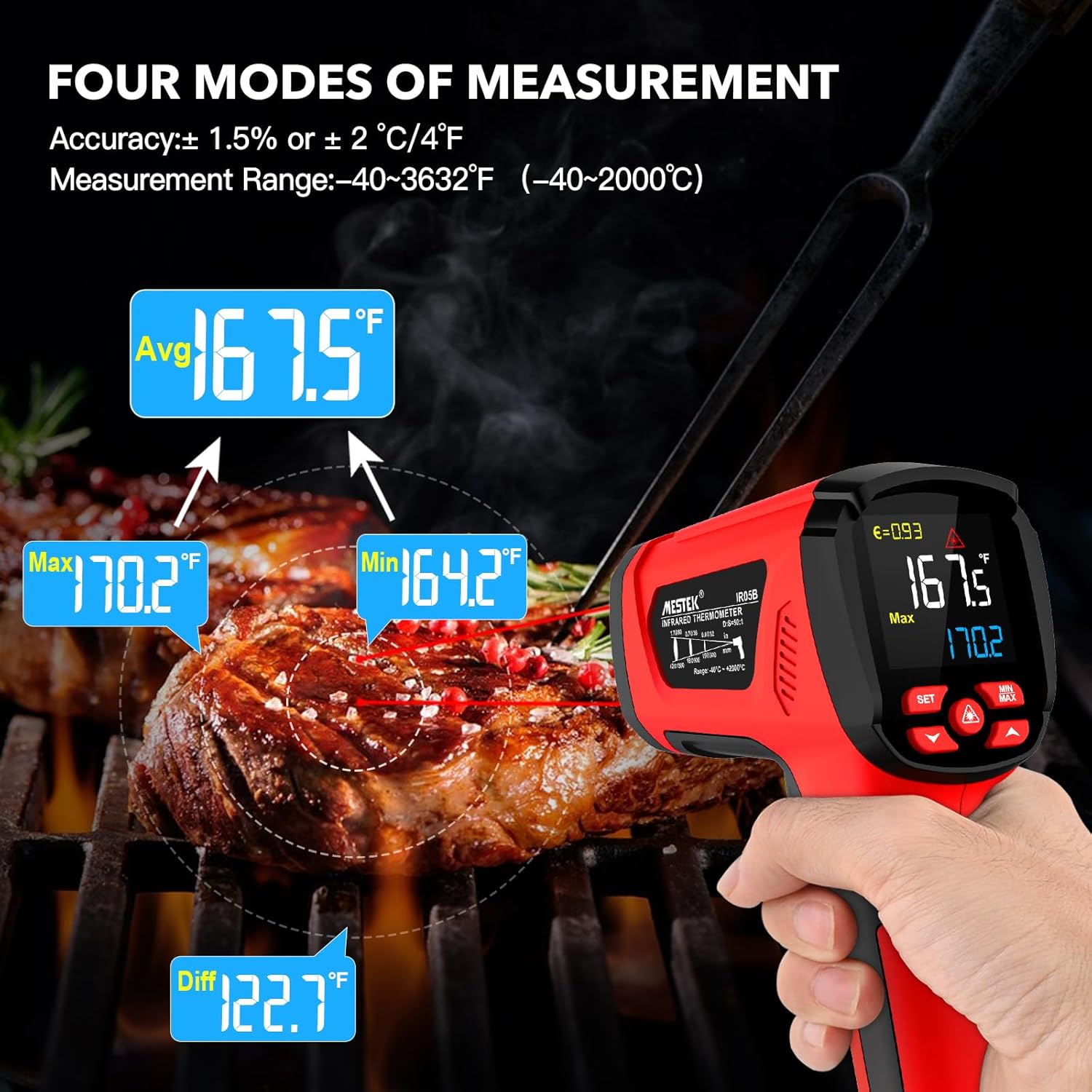
Image: The MESTEK IR05B thermometer displaying readings for Max, Min, Avg, and Diff modes, illustrating its multi-functional measurement capabilities, shown while measuring a grilled steak.
5.6 Alarmy wysokiej/niskiej temperatury
The thermometer can be set to alert you if the measured temperature exceeds or falls below a specified threshold.
- Press the 'SET' button to enter the settings menu.
- Use the Up/Down keys to navigate to the High Alarm (HAL) or Low Alarm (LAL) settings.
- Adjust the desired temperature threshold using the Up/Down keys.
- Press 'SET' to confirm and exit. An audible and/or visual alarm will activate if the temperature goes outside the set range.
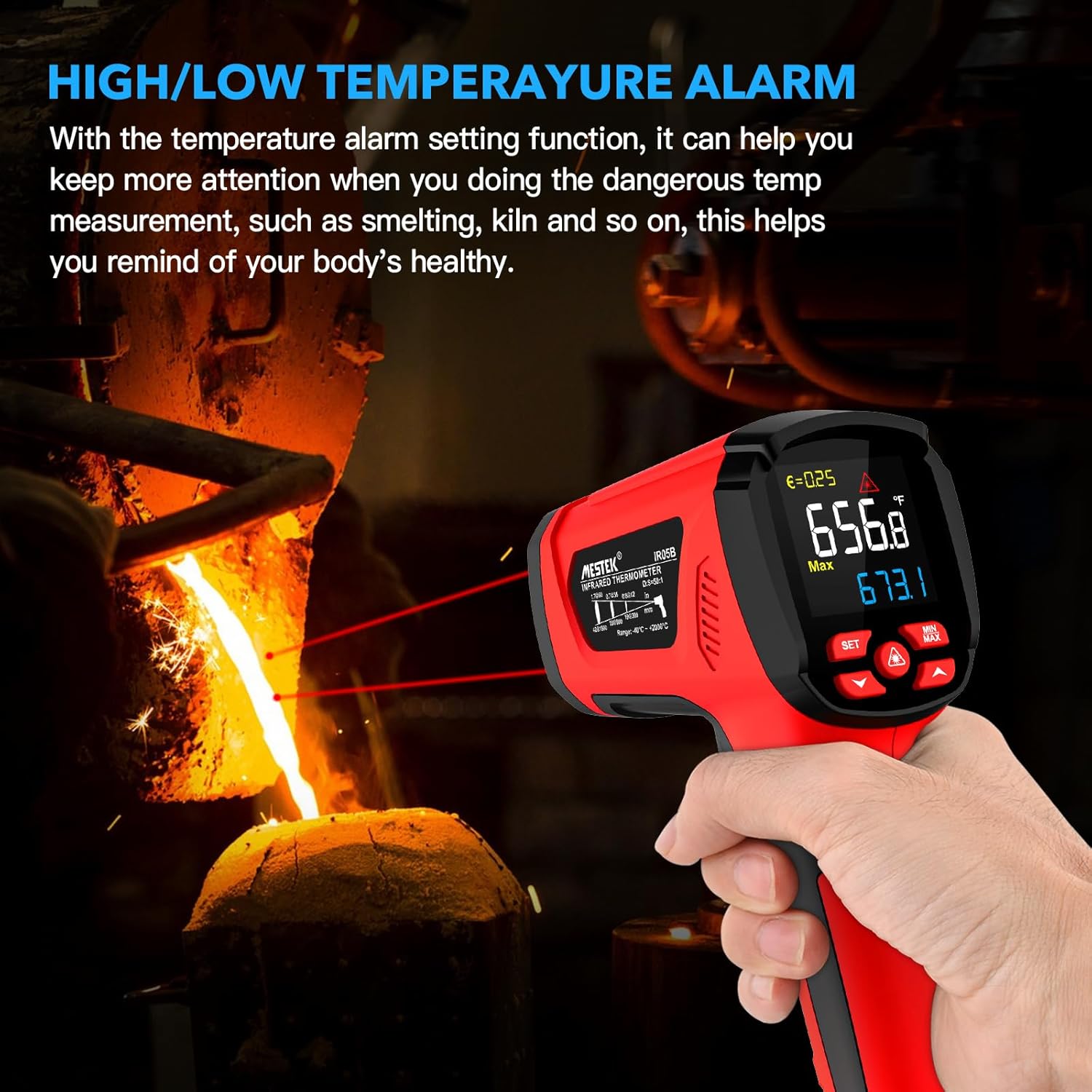
Image: The MESTEK IR05B thermometer displaying a high temperature reading with an alarm indicator, demonstrating its high/low temperature alarm function in a smelting application.
5.7 Konwersja jednostek (°C/°F)
Aby przełączyć się między stopniami Celsjusza i Fahrenheita:
- With the device powered on, press the 'SET' button.
- Use the Up/Down keys to find the unit setting.
- Press 'SET' to toggle between °C and °F.

Image: A close-up of the MESTEK IR05B thermometer's display, illustrating the unit conversion function between Celsius (°C) and Fahrenheit (°F) by pressing the SET button.
6. Konserwacja
6.1 Czyszczenie
- Wyczyść urządzenie casing z reklamąamp ściereczką i łagodnym mydłem. Nie używaj ściernych środków czyszczących ani rozpuszczalników.
- Carefully clean the infrared lens with a soft, clean cloth or cotton swab. Avoid scratching the lens.
- Przed przechowywaniem upewnij się, że urządzenie jest suche.
6.2 Przechowywanie
- Store the thermometer in its protective bag when not in use.
- Aby zapobiec wyciekowi baterii, wyjmij je, jeśli urządzenie nie będzie używane przez dłuższy czas.
- Przechowywać w chłodnym, suchym miejscu, z dala od bezpośredniego światła słonecznego i ekstremalnych temperatur.
7. Rozwiązywanie Problemów
| Problem | Możliwa przyczyna | Rozwiązanie |
|---|---|---|
| Urządzenie nie włącza się | Niski poziom naładowania baterii lub rozładowane baterie; nieprawidłowa instalacja baterii. | Wymień baterie, zwracając uwagę na prawidłową biegunowość. |
| Niedokładne odczyty | Incorrect emissivity setting; dirty lens; target too far or too small; ambient temperature fluctuations. | Adjust emissivity for the material; clean the lens; ensure D:S ratio is appropriate; allow device to stabilize in new environment. |
| Laser nie działa | Laser function deactivated; device malfunction. | Activate laser via control button; if problem persists, contact support. |
| Display shows 'ERR' | Pomiar poza zakresem; błąd czujnika. | Ensure target temperature is within specified range; restart device. If error persists, contact support. |
8. Specyfikacje
| Funkcja | Specyfikacja |
|---|---|
| Model | IR05B |
| Zakres temperatur w podczerwieni | -40°C do 2000°C (-40°F do 3632°F) |
| K-Type Probe Temperature Range | -10°C do 500°C (14°F do 932°F) |
| Dokładność podczerwieni | ±2% or ±2°C/4°F (whichever is greater) |
| K-Type Probe Accuracy | ±1.5% or ±1.5°C/3°F (whichever is greater) |
| Stosunek odległości do punktu (D:S) | 50:1 |
| Emisyjność | Regulowany od 0.1 do 1.0 |
| Czas reakcji | < 0.5 sekund |
| Odpowiedź widmowa | 8-14µm |
| Typ lasera | Class II, <1mW, 620-690nm |
| Wyświetlacz | Kolorowy wyświetlacz LCD z podświetleniem |
| Tryby pomiaru | MAX/MIN/ŚREDNIA/RÓŻNICA |
| Funkcja alarmu | Alarm wysokiej/niskiej temperatury |
| Konwersja jednostek | ° C / ° F |
| Automatyczne wyłączanie zasilania | Około. 35 sekund |
| Zasilacz | 2 baterie AA 1.5 V. |
| Wymiary | Około 180 mm x 120 mm x 60 mm (7.1 x 4.7 x 2.3 cala) |
| Waga | Około 272g |
| Certyfikaty | CE, EMC, FCC, RoHS |
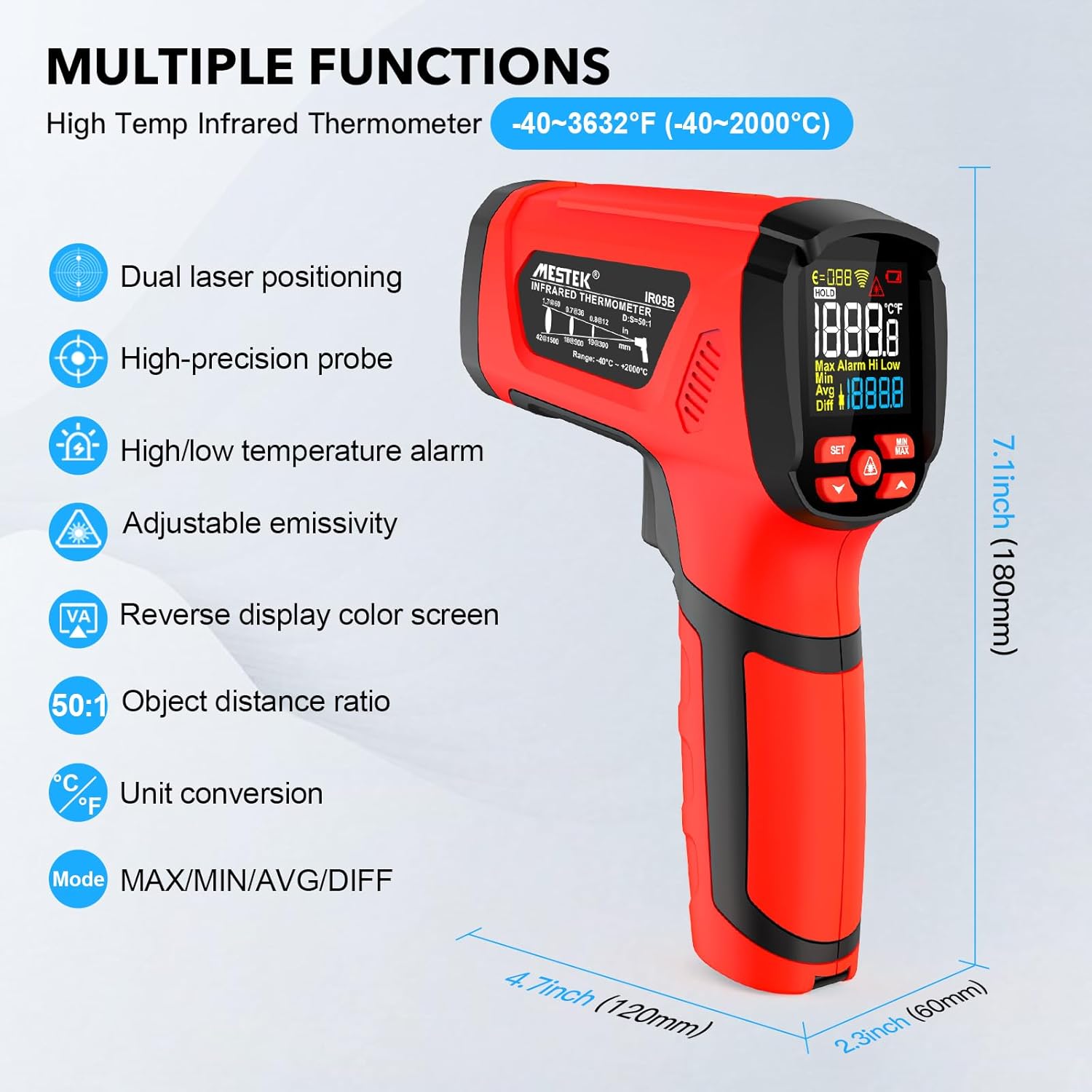
Image: The MESTEK IR05B thermometer displaying its key features and physical dimensions, including dual laser positioning, high-precision probe, and adjustable emissivity.
9. Gwarancja i wsparcie
9.1 Informacje o gwarancji
MESTEK products are manufactured to high-quality standards. This product is covered by a standard manufacturer's warranty against defects in materials and workmanship. Please refer to the warranty card included in your package for specific terms and conditions, including the warranty period and coverage details.
9.2 Obsługa klienta
If you encounter any technical issues, have questions about the product's operation, or require assistance, please contact MESTEK customer support. Contact information can typically be found on the MESTEK official website or through the retailer where the product was purchased. You may also visit the MESTEK Brand Store Aby uzyskać więcej informacji.