
1. Wprowadzenie
The GESKS O Kam Pro CS621FR is an advanced 8MP 4-lens security camera designed for comprehensive outdoor surveillance. It features a revolutionary quad-lens design, including one pan & tilt lens and three manually adjustable lenses, providing a complete 360° visual coverage.
Główne cechy obejmują:
- Quad-Lens Design: One pan & tilt lens with 270° horizontal and 90° vertical rotation, plus three manually adjustable lenses with 180° rotation each, ensuring 360° visual coverage.
- Active Deterrence System: Real-time sound and light alarms activate upon motion detection, featuring powerful white LED lights and an audible siren to deter intruders. Instant push notifications are sent via the O-KAM Pro app.
- Nagrywanie w wysokiej rozdzielczości: Captures 20MP screenshots and 2MP video with colorful night vision capability for clear footagdniem i nocą.
- Łączność sieciowa: Supports both 2.4GHz WiFi and RJ-45 Ethernet Cable for stable connection.
- Smart Tracking Features: Equipped with human and pet tracking technology and two-way audio communication for remote interaction.
2. Przewodnik konfiguracji
2.1 Zawartość opakowania
Sprawdź, czy w opakowaniu znajdują się wszystkie komponenty:
- GESKS O Kam Pro CS621FR Camera
- Zasilacz
- Śruby montażowe i kotwy
- Instrukcja obsługi
2.2 Instalacja aplikacji
- Pobierz O-KAM Pro aplikację ze sklepu z aplikacjami na Twoim smartfonie (iOS App Store lub Google Play Store).
- Zarejestruj konto i zaloguj się.
2.3 Instalacja kamery
- Choose a suitable outdoor location for mounting the camera, ensuring a clear view of the desired surveillance area and access to a power source.
- Use the provided mounting screws and anchors to securely attach the camera to a wall or ceiling.
- Connect the power adapter to the camera and plug it into an electrical outlet.
- For wired network connection, connect an RJ-45 Ethernet cable to the camera's network interface. For wireless connection, ensure your WiFi network is 2.4G.
2.4 Konfiguracja początkowa
- Open the O-KAM Pro app and follow the on-screen instructions to add your new device.
- Select the appropriate connection method (WiFi or wired) and complete the network setup.
- Manually adjust the three fixed lenses to cover your desired areas. Each fixed lens offers 180° horizontal/vertical rotation.

3. Instrukcja obsługi
3.1 Na żywo View and Multi-Screen Display
Access the live feed from your camera through the O-KAM Pro app. The app supports simultaneous display of all four camera views on a single screen, allowing for comprehensive monitoring.

3.2 Sterowanie obrotem i pochyleniem
The bottom tracking lens can be remotely controlled via the app. Use the directional controls within the O-KAM Pro app to pan (270° horizontal) and tilt (90° vertical) the lens to adjust its viewkąt.
3.3 Zoom cyfrowy
The app allows for 5X digital zoom on the live footage, enabling closer inspection of details within the monitored area.
3.4 Detekcja ruchu i alarmy
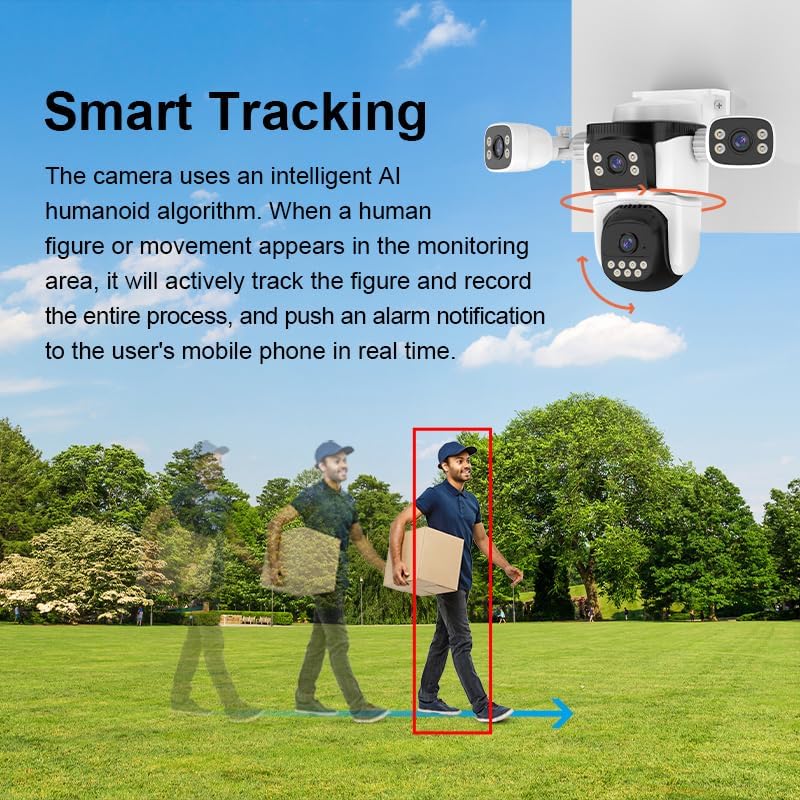
The camera utilizes intelligent AI algorithms for human and pet detection. You can customize specific detection zones within the app. When an alarm is triggered, the camera will activate its sound and light alarm system and send real-time push notifications to your mobile device.
3.5 Tryby widzenia nocnego
The CS621FR offers various night vision modes:
- Czarno-biała wizja nocna: Standardowa noktowizja w podczerwieni.
- Pełnokolorowa wizja nocna: Utilizes white LED lights to provide color images even in low-light conditions.
- Inteligentna wizja nocna: Automatically switches between black and white and full-color modes based on detected motion or light conditions.
3.6 Dźwięk dwukierunkowy
The built-in microphone and speaker enable real-time two-way voice communication through the O-KAM Pro app. This allows you to interact with visitors or deter potential intruders remotely.
3.7 Opcje przechowywania
The camera supports local storage via a T-Flash card (up to 256GB) and cloud storage services (subscription may be required).
4. Konserwacja
4.1 Czyszczenie
Regularnie czyść obiektywy i obudowę aparatu miękką, miękką szmatką.amp ściereczką, aby zapewnić optymalną przejrzystość obrazu. Unikaj stosowania silnych środków chemicznych i materiałów ściernych.
4.2 Odporność na warunki atmosferyczne
The camera is IP66 weatherproof, designed to withstand various outdoor conditions including wind and rain. However, avoid directing high-pressure water jets directly at the camera.
4.3 aktualizacji oprogramowania sprzętowego
Periodically check the O-KAM Pro app for available firmware updates. Keeping the camera's firmware up-to-date ensures optimal performance, security, and access to new features.
5. Rozwiązywanie Problemów
5.1 No Live View / Offline Camera
- Sprawdź, czy kamera jest włączona i czy zasilacz jest prawidłowo podłączony.
- Check your internet connection and ensure the 2.4G WiFi network is stable.
- Verify the camera is within range of your WiFi router.
- Uruchom ponownie kamerę i router.
5.2 Alarm nie uruchamia się
- Check the detection zone settings in the O-KAM Pro app to ensure they cover the desired area.
- Zmień ustawienia czułości ruchu w aplikacji.
- Upewnij się, że powiadomienia aplikacji są włączone na Twoim smartfonie.
5.3 Słaba jakość obrazu
- Wyczyść obiektywy aparatu, aby usunąć wszelkie zabrudzenia i smugi.
- Ensure there is adequate lighting in the monitored area, especially for color night vision.
- Check your network bandwidth; a poor connection can affect streaming quality.
6. Specyfikacje
| Funkcja | Szczegół |
|---|---|
| System operacyjny | Linux |
| Aplikacja | O-KAM Pro |
| Procesor | Ingenic |
| Pamięć | 512 MB |
| Konfiguracja obiektywu | 4mm+4mm+4mm+4mm (4 lenses) |
| Czujnik obrazu | 1/3" 1080p progressive scan CMOS sensor |
| Min. oświetlenie | 0.5Lux (color mode), 0.1Lux (b&w mode) |
| Wizja nocna | Black and white, full-color, intelligent night vision (20-50 meters) |
| Viewing kąt | 91° for each lens |
| Rezolucja | 1080P (1920x1080/12FPS) |
| Kompresja wideo | H.264 główny zawódfile/Ruch-JPEG/JPEG |
| Wejście audio | Wbudowany mikrofon -38dB |
| Wyjście audio | Built-in 8Ω1W speaker |
| Obrót Pan/Tilt | Panoramowanie: 270°, Pochylenie: 90° |
| Interfejs sieciowy | 10Mbps/100Mbps Ethernet |
| Sieć bezprzewodowa | IEEE802.11b/g/n (2.4G) |
| Składowanie | External TF card (up to 256GB), Cloud storage |
| Wykrywanie alarmów | Motion detection, human detection, human framing, human tracking, siren alarm, area set |
| Znamionowa objętośćtage | Prąd stały 12 V ± 5% |
| Pobór mocy | 8.64W (0.72A) / Max: 11.16W (0.93A) |
| Temperatura pracy | -10~55 ℃ |
| Wilgotność robocza | <90% |
| Wymiary (dł. x szer. x wys.) | 9 x 7 x 5.8 cala |
| Waga | 1.4 funtów |
| Kolor | Biały |
| Producent | Shenzhen Vstarcam Technology Ltd |
7. Demonstracja wideo
Ten film przedstawia wizualny przeglądview of the CS621FR 4-Lens PTZ Camera, demonstrating its features such as the quad-lens design, pan-tilt capabilities, smart tracking, and two-way audio communication. It showcases the camera's appearance and various functionalities in an outdoor setting.
8. Gwarancja i wsparcie
For warranty information and technical support, please refer to the documentation provided with your purchase or visit the official GESKS webZachowaj paragon jako dowód zakupu na wypadek reklamacji.