
1. Wprowadzenie
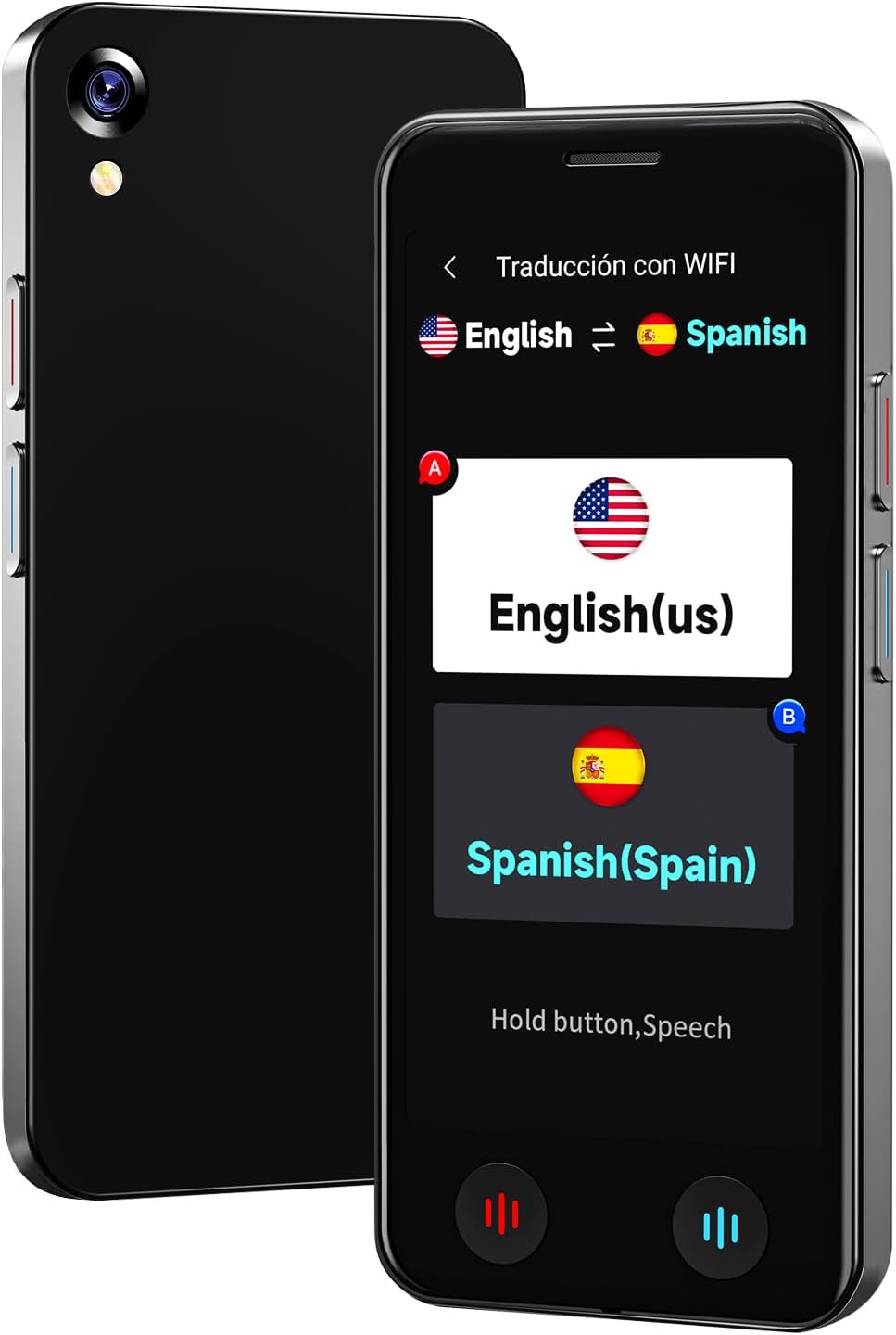
The VORMOR A20 AI Language Translator Device is a portable, real-time two-way translation tool designed to facilitate communication across language barriers. Featuring advanced AI technology, it supports online translation for 150 languages and accents, offline translation for 21 commonly used languages, and photo translation for up to 74 languages. Its compact design, long battery life, and integration with features like ChatGPT make it an ideal companion for international travel, business, and language learning.
2. Co znajduje się w pudełku
- 1 x VORMOR A20 AI Language Translator Device
- Kabel ładujący 1 x USB-C
- 1 x Smycz
- 1 x Clear Protective Case
- 1 x Instrukcja obsługi
3. Konfiguracja
- Ładowanie urządzenia: Connect the provided USB-C charging cable to the device and a power adapter (not included). A full charge takes approximately 1-2 hours.
- Włączanie/wyłączanie: Aby włączyć lub wyłączyć urządzenie, naciśnij i przytrzymaj przycisk zasilania (zazwyczaj umieszczony z boku) przez kilka sekund.
- Początkowy wybór języka: Upon first use, follow the on-screen prompts to select your preferred system language.
- Połączenie Wi-Fi: For online translation and downloading offline language packages, navigate to the 'Settings' menu and connect to a stable Wi-Fi network.
- Attach Protective Case and Lanyard: For added protection and portability, carefully fit the clear protective case onto the device. Attach the lanyard to the designated loop hole on the device or case.
4. Instrukcja obsługi
The VORMOR A20 features a 5-inch HD touch screen and intuitive physical buttons for ease of use.
4.1. Tłumaczenie głosowe online (150 języków)
This mode requires an active internet connection (Wi-Fi or mobile data). It offers real-time, two-way translation with 98% accuracy and a response time of 0.5 seconds.
- From the main menu, select 'Online Translation' (Traducción con WIFI).
- Tap on the language displayed on the left to select your source language.
- Tap on the language displayed on the right to select your target language.
- Press and hold the corresponding physical button (red for source language, blue for target language) while speaking. Release the button to hear the translation.

4.2. Tłumaczenie głosowe offline (21 języków)
The device supports offline translation for 21 languages, allowing use without an internet connection. Ensure necessary language packages are downloaded in advance.
- From the main menu, select 'Offline Translation' (Traducción sin).
- To download packages: Go to 'Offline Package Management' in settings, connect to Wi-Fi, and select the languages you wish to download.
- Select your source and target languages from the available offline options.
- Press and hold the corresponding physical button while speaking. Release to translate.

4.3. Photo Translation (74 Online / 40 Offline Languages)
Utilize the built-in 8-megapixel camera and OCR technology to translate text from images.
- From the main menu, select 'Photo Translation' (Traducción de fotos).
- Point the camera at the text you wish to translate. Ensure the text is well-lit (use flash if needed).
- Wybierz język źródłowy i docelowy.
- Tap the capture button to take a photo. The device will process and display the translated text.

4.4 Integracja ChatGPT
Access the ChatGPT application for intelligent conversations and information retrieval.
- Select 'AI XiaoBei' from the main menu.
- Follow the on-screen instructions to interact with ChatGPT.
4.5. Inne funkcje
- Inteligentne nagrywanie: Record conversations and translate them later.
- Konwersja jednostek: Konwersja różnych jednostek miary.
- Konwersja walut: Get real-time currency exchange rates.
- Zegar Światowy: View czasy w różnych strefach czasowych.
- Tłumaczenie grupowe: Facilitate multi-person conversations (refer to on-screen instructions for setup).
5. Konserwacja
- Czyszczenie: Do czyszczenia urządzenia używaj miękkiej, suchej ściereczki. Unikaj płynnych środków czyszczących i materiałów ściernych.
- Pielęgnacja baterii: To prolong battery life, avoid extreme temperatures and do not leave the device fully discharged for extended periods. The 2000mAh battery provides 6-8 hours of continuous use and 7 days of standby.
- Aktualizacje oprogramowania: The device supports OTA (Over-The-Air) updates. Periodically check for and install updates via Wi-Fi to ensure optimal performance and access to the latest features.
- Składowanie: Przechowuj urządzenie w chłodnym, suchym miejscu, gdy nie jest używane.
6. Rozwiązywanie Problemów
- Urządzenie nie włącza się: Ensure the device is fully charged. If the issue persists, try a different charging cable or adapter.
- Translation Inaccurate/Slow:
- For online translation, check your Wi-Fi connection strength.
- Upewnij się, że wybrałeś właściwy język źródłowy i docelowy.
- Mów wyraźnie i w umiarkowanym tempie.
- Offline Translation Not Working: Verify that the required language packages have been successfully downloaded. This requires an initial internet connection.
- Photo Translation Issues: Ensure adequate lighting and clear focus on the text. The text should be within the frame and not blurry.
- Urządzenie zawiesza się/nie odpowiada: Naciśnij i przytrzymaj przycisk zasilania, aby wymusić ponowne uruchomienie.
7. Specyfikacje
| Marka | BSTBOO (VORMOR) |
| Numer modelu | A20 |
| Rozmiar ekranu | 5-calowy ekran dotykowy HD |
| Pojemność baterii | Bateria litowa 2000mAh |
| Ciągły czas pracy | 6-8 godziny |
| Czas czuwania | 7 dni |
| Czas ładowania | 1-2 godziny |
| Kamera | 8 Million Pixel Rear Camera |
| Waga przedmiotu | 0.22 kilograma |
| Mikrofon | Built-In with Noise Cancellation, Speech Recognition |
| Gniazdo słuchawkowe | Brak gniazda słuchawkowego |
8. Gwarancja i wsparcie
Gwarancja: This VORMOR A20 AI Language Translator Device comes with a 1-year manufacturer's warranty from the date of purchase, covering defects in materials and workmanship.
Wsparcie: For technical assistance, troubleshooting, or warranty claims, please contact our customer support team:
- E-mail: support@vormor.cn
- WhatsApp: +8618820461144
- Zasoby internetowe: Follow "VORMOR" on social media or visit vormor.co aby uzyskać aktualizacje i dodatkowe informacje.