
1. Wprowadzenie
Welcome to the OPPO Reno15c 5G user manual. This guide provides essential information to help you set up, operate, maintain, and troubleshoot your new smartphone. The OPPO Reno15c 5G combines advanced technology with a durable design, offering a seamless user experience.

Rycina 1.1: Przód view of the OPPO Reno15c 5G smartphone.

Rysunek 1.2: Tył view of the OPPO Reno15c 5G smartphone, showcasing the camera module and 'Dancing Aurora Design'.
2. Co znajduje się w pudełku
Upon unboxing your OPPO Reno15c 5G, please ensure all the following items are present:
- OPPO Reno15c 5G Smartphone
- Zasilacz (80 W SuperVOOC)
- Kabel USB (Typ C)
- Etui na telefon
- Wysuwacz tacy na kartę SIM
- Szybki przewodnik (ten dokument)
- Informacje dotyczące bezpieczeństwa
3. Konfiguracja
3.1. Wkładanie karty SIM
- Znajdź tackę na kartę SIM znajdującą się z boku urządzenia.
- Włóż narzędzie do wyjmowania tacki karty SIM w mały otwór obok tacki i delikatnie naciśnij, aż tacka wyskoczy.
- Place your Nano-SIM card(s) into the designated slots on the tray. Ensure the gold contacts face downwards. The device supports Dual SIM.
- Ostrożnie włóż tackę karty SIM z powrotem do telefonu, aż zatrzaśnie się na miejscu.

Rysunek 3.1: Strona view of the OPPO Reno15c 5G, showing the SIM card tray location.
3.2. Pierwsze włączenie i podstawowa konfiguracja
- Naciśnij i przytrzymaj przycisk zasilania (znajdujący się po prawej stronie), aż pojawi się logo OPPO.
- Postępuj zgodnie z instrukcjami wyświetlanymi na ekranie, aby wybrać język i region, a następnie nawiązać połączenie z siecią Wi-Fi.
- Zaloguj się na swoje konto Google lub utwórz nowe, aby uzyskać dostęp do usług Google i Sklepu Play.
- Set up your preferred security methods, such as fingerprint recognition, face unlock, PIN, or pattern.
3.3. Ładowanie urządzenia
Before first use, it is recommended to fully charge your device. Use the provided 80W SuperVOOC Power Adapter and USB Cable for optimal charging speed.
- Podłącz kabel USB do zasilacza.
- Podłącz zasilacz do gniazdka ściennego.
- Connect the USB Type-C end of the cable to the charging port at the bottom of your phone.
- Na ekranie pojawi się wskaźnik ładowania.

Figure 3.2: Visual representation of the 7000mAh battery and 80W SuperVOOC Flash Charge capabilities.
4. Obsługa urządzenia
4.1. Wyświetlacz i interfejs użytkownika
The OPPO Reno15c 5G features a 120Hz Smart Adaptive OLED screen, providing a smooth and vibrant visual experience. The display also incorporates 2160Hz PWM dimming for eye protection.

Figure 4.1: The 120Hz Smart Adaptive OLED display of the OPPO Reno15c 5G.
The device runs on ColorOS 16, based on Android 15, offering a smooth, smart, and secure user interface. The All-New Trinity Engine optimizes performance for lasting fluidity.

Figure 4.2: ColorOS 16 interface highlighting smooth performance.
4.2. Funkcje aparatu
The OPPO Reno15c 5G is equipped with an advanced camera system for vivid photography and videography.
- 50MP Ultra-Clear Main Camera: Capture detailed images in various lighting conditions.
- 50MP Ultra Wide Selfie Camera: Features a 100° FOV, ideal for group selfies.
- AI Flash Photography 2.0: Utilizes a dual flash system for clear shots in low light.
- Poświata portretu AI: Allows professional relighting of photos after capture.
- 4K Ultra-Clear Video: Record high-resolution videos with stability.
- Podwójny-View Wideo: Record simultaneously with both front and rear cameras.

Rysunek 4.3: Example of a wide-angle selfie captured with the 50MP Ultra Wide Selfie Camera.
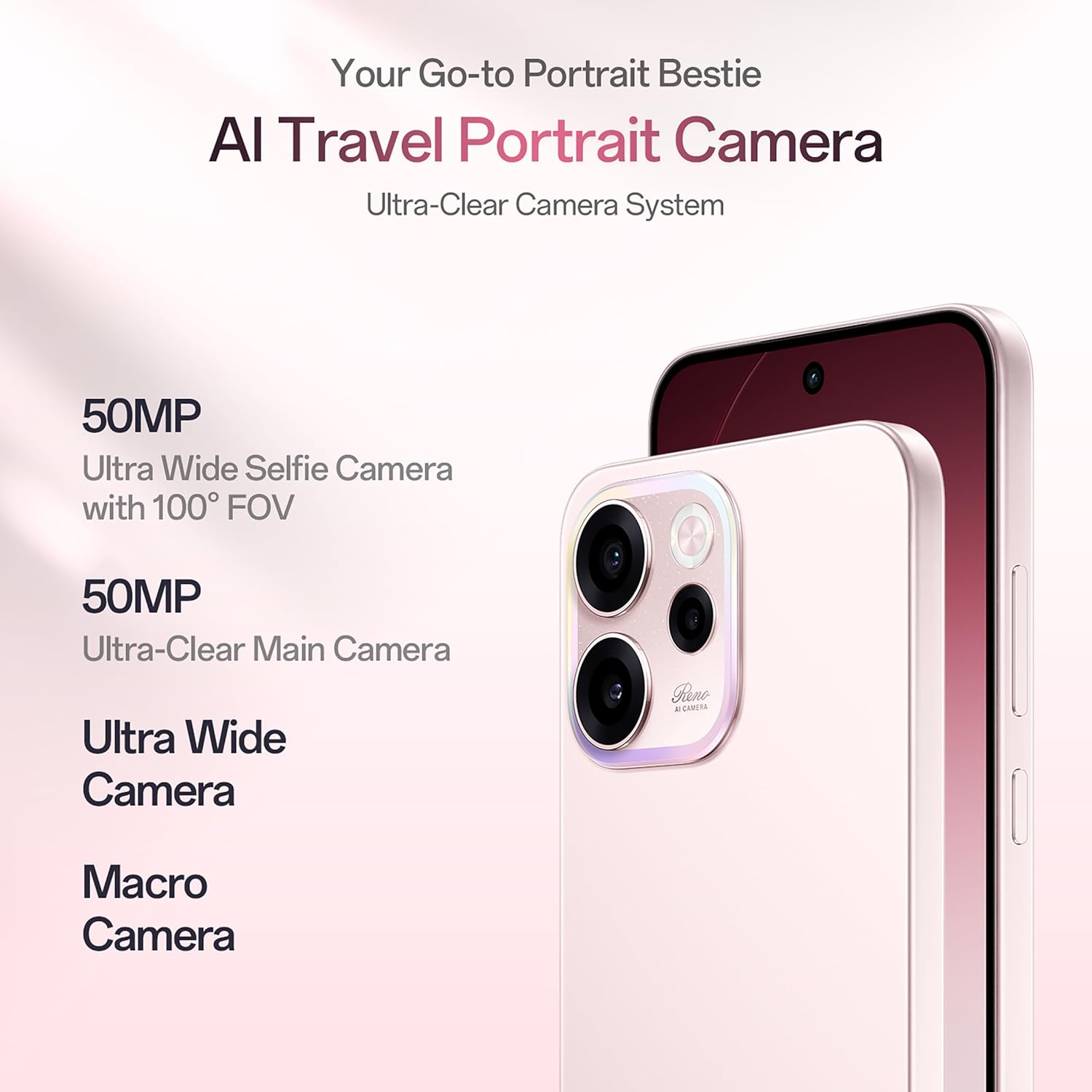
Figure 4.4: Demonstrating 4K Ultra-Clear Video recording on the OPPO Reno15c 5G.
4.3. Wydajność i bateria
Powered by the 4nm Snapdragon 6 Gen 1 platform and AI HyperBoost 2.0, the Reno15c 5G ensures stable and cool performance for gaming and multitasking. The 7000mAh battery, combined with 80W SuperVOOC flash charge, provides extended usage and rapid recharging.

Rysunek 4.5: Koniecview of the Snapdragon 6 Gen 1 Mobile Platform and its performance enhancements.
4.4. Connectivity and AI Features
The device supports 5G connectivity and features AI LinkBoost 3.0 for enhanced network performance, including AI Gaming Antenna System Acceleration, AI Super Wi-Fi Booster, and AI Network Booster for Teamfights.

Figure 4.6: Explanation of AI LinkBoost 3.0 for optimized connectivity.
Integrated AI Super Tools include real-time AI Translate for conversations and photos, AI Call Summary, VoiceScribe for notes, and AI Mind Space for organizing digital content. Deep Gemini integration and Circle to Search further enhance AI capabilities.

Figure 4.7: AI Mind Space for intelligent organization and recall of screen content.
4.5. Security and Durability
The Reno15c 5G is built with IP69 All-Weather Armour, providing resistance against hot water jets and submersion up to 2 meters. Its All-Round Armour architecture offers superior drop protection. Security features include OPPO Lock for anti-theft and military-grade Private Computing Cloud (PCC) with end-to-end hardware encryption.

Figure 4.8: The OPPO Reno15c 5G demonstrating its IP69 water and dust resistance.
5. Konserwacja
5.1. Czyszczenie urządzenia
- Do delikatnego przecierania ekranu i obudowy telefonu należy używać miękkiej, niepozostawiającej włókien ściereczki.
- Unikaj stosowania silnych środków chemicznych, materiałów ściernych i aerozoli.
- W przypadku uporczywych plam delikatnieampPrzetrzyj ściereczkę wodą lub specjalnym środkiem do czyszczenia ekranów przeznaczonym do urządzeń elektronicznych.
5.2. Aktualizacje oprogramowania
Regularnie sprawdzaj dostępność aktualizacji oprogramowania i instaluj je, aby mieć pewność, że Twoje urządzenie ma najnowsze funkcje, poprawki zabezpieczeń i udoskonalenia wydajności.
- Idź do Ustawienia > O urządzeniu > ColorOS version.
- Stuknij w Sprawdź aktualizacje.
- If an update is available, follow the on-screen instructions to download and install it. Ensure your device has sufficient battery and a stable internet connection.
5.3. Zarządzanie magazynem
Aby zachować optymalną wydajność, regularnie zarządzaj pamięcią masową urządzenia.
- Usuń niepotrzebne files, aplikacje i media.
- Wyczyść dane pamięci podręcznej dla aplikacji w Ustawienia > Aplikacje > Zarządzanie aplikacjami > [Wybierz aplikację] > Storage usage > Wyczyść pamięć podręczną.
- Wykorzystaj usługi przechowywania danych w chmurze do tworzenia kopii zapasowych zdjęć i filmów.
6. Rozwiązywanie Problemów
This section addresses common issues you might encounter with your OPPO Reno15c 5G.
| Problem | Możliwe rozwiązanie |
|---|---|
| Urządzenie się nie włącza | Ensure the battery is charged. Connect the charger and wait a few minutes before attempting to power on. If it still doesn't turn on, perform a force restart by holding the Power button and Volume Up button simultaneously for about 10 seconds. |
| Bateria szybko się rozładowuje | Check for background apps consuming power. Reduce screen brightness, disable unnecessary features like GPS or Bluetooth when not in use. Review battery usage in Settings to identify power-hungry apps. |
| Aplikacje ulegają awarii lub zawieszają się | Clear the app's cache (Settings > Apps > App management > [App Name] > Storage usage > Clear cache). If the issue persists, try reinstalling the app. Ensure your device software is up to date. |
| Nie można połączyć się z siecią Wi-Fi/danymi mobilnymi | Restart your phone and the Wi-Fi router. Check if Airplane Mode is off. Verify SIM card insertion and mobile data settings. Reset network settings (Settings > System settings > Back up and reset > Reset phone > Reset network settings). |
| Czujnik odcisku palca nie działa | Ensure your finger is clean and dry. Re-register your fingerprints in Settings > Password & security > Fingerprint. If the issue persists, ensure the screen is clean and free from damage. |
If you encounter issues not listed here or if the suggested solutions do not resolve your problem, please contact OPPO customer support.
7. Specyfikacje
Key technical specifications for the OPPO Reno15c 5G:
| Funkcja | Szczegół |
|---|---|
| Marka | OPPO |
| Model | Reno15c 5G |
| System operacyjny | Android 15 (ColorOS 16) |
| Pamięć RAM | 12 GB |
| Pojemność magazynowa | 256 GB |
| Rozmiar ekranu | 6.57 cali |
| Typ wyświetlacza | AMOLED, 120Hz Smart Adaptive |
| Kolor | Afterglow Pink |
| Gniazdo karty SIM | Podwójna karta SIM |
| Typ złącza | USB typu C |
| Bezpieczeństwo biometryczne | Rozpoznawanie odcisków palców |
| Poziom wodoodporności | Wodoodporność IP69 |
| Moc baterii | 7000 mAh |
| Waga przedmiotu | 196 gram |
| Wymiary przedmiotu | 15.8 x 7.5 x 0.7 centymetrów |
| Technologia komórkowa | 5G |
| Dostawca usług bezprzewodowych | Odblokowany dla wszystkich przewoźników |
| Rok modelowy | 2026 |
8. Gwarancja i wsparcie
8.1. Informacje o gwarancji
Your OPPO Reno15c 5G comes with a limited warranty:
- Słuchawka: 12 miesiące
- Adapter & Cable: 6 miesiące
Prosimy zachować dowód zakupu na wypadek roszczeń gwarancyjnych. Gwarancja obejmuje wady produkcyjne i nie obejmuje uszkodzeń spowodowanych niewłaściwym użytkowaniem, wypadkami lub nieautoryzowanymi naprawami.
8.2. Obsługa klienta
Aby uzyskać pomoc techniczną, serwis lub zadać dalsze pytania, skontaktuj się z obsługą klienta OPPO:
- Producent: OPPO MOBILES INDIA PVT LTD.
- Adres: 5. PIĘTRO, Wieża B, BUDYNEK, N-8, DLF Cyber City, DLF faza 2, Gurugram, Haryana 122002
- Numer bezpłatny: 18001032777
Możesz również odwiedzić oficjalną stronę OPPO website for more support resources, FAQs, and service center locations.