
1. Wprowadzenie
Welcome to the user manual for your new Bigme B7 Pro Android 14 Tablet. This guide provides essential information on setting up, operating, and maintaining your device to ensure optimal performance and user experience. Please read this manual thoroughly before using your tablet.
2. Koniec produktuview
The Bigme B7 Pro is a 7-inch color E-Paper display tablet designed for reading, productivity, and communication. It features a powerful Dimensity 1080 octa-core processor, ample memory, and 4G global connectivity.
2.1 Główne cechy
- Wysoka wydajność: Dimensity 1080 octa-core 2.6GHz CPU with 8GB RAM and 256GB internal storage.
- Color E-Paper Display: 7-inch eye-comfort color E-Ink screen.
- Globalna łączność: Supports worldwide 4G calling and data.
- Otwarty system Android 14: Allows installation of third-party applications.
- Borderless Handwriting: Enhanced note-taking experience with included stylus.
- Smart Call Tools: Call recording with real-time transcription and AI summarization.
- Długotrwała bateria: Wyposażony w baterię o pojemności 3000mAh umożliwiającą dłuższe użytkowanie.
2.2 Zawartość opakowania
- Bigme B7 Pro E-Paper Tablet
- Igła
- Kabel ładujący (USB-C)
- Szybki przewodnik
3. Konfiguracja
3.1 Pierwsze ładowanie
Before first use, fully charge your Bigme B7 Pro tablet. Connect the provided USB-C cable to the tablet's charging port and the other end to a compatible USB power adapter (not included) or a computer's USB port. The charging indicator will show the charging status.
3.2 Włączanie/wyłączanie
- Włączanie: Press and hold the Power button until the Bigme logo appears on the screen.
- Aby wyłączyć: Naciśnij i przytrzymaj przycisk zasilania, aż pojawi się menu opcji zasilania. Wybierz „Wyłącz” i potwierdź.
- Zrestartować: Naciśnij i przytrzymaj przycisk zasilania, aż pojawi się menu opcji zasilania. Wybierz „Uruchom ponownie” i potwierdź.
3.3 SIM Card Installation (for 4G Connectivity)
The Bigme B7 Pro supports 4G global connectivity. To use cellular data and calling features, you need to install a Nano-SIM card.
- Znajdź tackę na kartę SIM z boku tabletu.
- Insert the SIM ejector tool (not included) into the small hole next to the tray and push gently until the tray pops out.
- Umieść kartę Nano-SIM w przeznaczonym do tego slocie na tacce, złotymi stykami skierowanymi w dół.
- Ostrożnie włóż tackę z powrotem do tabletu, aż zatrzaśnie się na swoim miejscu.
3.4 MicroSD Card Installation (for Storage Expansion)
Expand your tablet's storage up to 2TB using a MicroSD card (not included).
- Locate the MicroSD card slot, often combined with the SIM card tray.
- Insert the MicroSD card into the designated slot on the tray with the gold contacts facing down.
- Ostrożnie włóż tackę z powrotem do tabletu, aż zatrzaśnie się na swoim miejscu.

Image: The Bigme B7 Pro supports up to 2TB MicroSD card for expanded storage.
4. Instrukcja obsługi
4.1 Podstawowa nawigacja (Android 14)
Your Bigme B7 Pro runs on the Android 14 operating system, offering a familiar and intuitive interface. Use touch gestures to navigate:
- Uzyskiwać: Wybierz element lub otwórz aplikację.
- Trzepnąć: Przewijaj ekrany, listy i strony.
- Powiększanie za pomocą szczypania: Powiększ lub zmniejsz treść.
- Długie naciśnięcie: Uzyskaj dostęp do menu kontekstowych i przenieś ikony.

Image: The Bigme B7 Pro runs on an open Android 14 system, allowing for diverse app installations.
4.2 E-reading Experience
The 7-inch color E-Paper display provides a comfortable reading experience, reducing eye strain compared to traditional LCD screens. Use your preferred e-reading applications to access books, documents, and other content.
4.3 Borderless Handwriting with Stylus
The included stylus enables a natural and unrestrained note-taking experience. The borderless handwriting feature allows you to write freely across the screen without being restricted by margins.

Image: The capacitive pen provides a writing experience similar to a traditional pen on the Bigme B7 Pro.

Image: The tablet offers comprehensive note-taking tools including Wiki, Dictionary, and Translation.
4.4 4G Global Connectivity and Smart Call Tools
With 4G connectivity, your tablet functions as a communication device, allowing you to make and receive calls globally. The integrated smart call tools enhance your communication and productivity:
- Nagrywanie rozmów: Record important conversations.
- Transkrypcja w czasie rzeczywistym: Convert spoken words into text during calls.
- Podsumowanie AI: Automatically generate summaries of recorded calls.

Image: The Bigme B7 Pro supports global 4G connectivity for seamless communication.
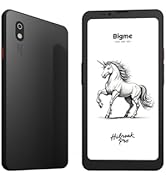
Image: Streamline communication with call recording to text, including live transcription and AI summary.
4.5 App Installation and Productivity
Leverage the open Android 14 system to install a wide range of third-party applications from the Google Play Store or other trusted sources. Enhance your productivity with features such as:
- External Bluetooth Keyboard Support: Connect a Bluetooth keyboard for efficient typing and document creation.
- 5 MP tylny aparat: Utilize the camera for voice calls, Optical Character Recognition (OCR) text recognition, and document scanning.

Image: Connects to an external Bluetooth keyboard for enhanced office efficiency.

Image: The 5MP rear camera supports voice calls, OCR text recognition, and document scanning.
5. Konserwacja
- Czyszczenie: Do czyszczenia ekranu i obudowy tabletu używaj miękkiej, niepozostawiającej włókien ściereczki. Unikaj środków czyszczących o właściwościach ściernych i rozpuszczalników.
- Pielęgnacja baterii: To prolong battery life, avoid extreme temperatures and do not let the battery fully discharge frequently. Charge the device regularly.
- Aktualizacje oprogramowania: Regularly check for and install system updates to ensure your tablet has the latest features and security enhancements.
- Zarządzanie pamięcią masową: Okresowo usuwaj niepotrzebne filei aplikacji w celu utrzymania optymalnej wydajności.
6. Rozwiązywanie Problemów
If you encounter issues with your Bigme B7 Pro, refer to the following common solutions:
- Urządzenie nie włącza się: Ensure the battery is charged. Connect the tablet to a charger for at least 30 minutes before attempting to power it on again.
- Niska wydajność: Close unused applications, clear cache, or restart the device. Consider uninstalling rarely used apps or moving large files do pamięci zewnętrznej.
- Problemy z łącznością (Wi-Fi/4G): Check if Wi-Fi or 4G is enabled in settings. Restart your router for Wi-Fi issues. For 4G, ensure the SIM card is correctly inserted and your plan is active.
- Ekran nie reaguje: Wykonaj wymuszone ponowne uruchomienie, przytrzymując przycisk zasilania przez około 10–15 sekund.
If problems persist, please contact Bigme customer support for further assistance.
7. Specyfikacje
| Funkcja | Szczegół |
|---|---|
| Nazwa modelu | US-B7 Pro |
| Edytor | Dimensity 1080 Octa-core 2.6GHz |
| BARAN | 8 GB |
| Pamięć wewnętrzna | 256 GB |
| Możliwość rozbudowy pamięci masowej | Do 2 TB za pomocą karty MicroSD |
| System operacyjny | Android 14 |
| Rozmiar ekranu | 7 cali |
| Typ wyświetlacza | Color E-Paper Display |
| Rozdzielczość wyświetlacza | 4424 x 5880 pikseli |
| Łączność | 4G Komórkowy, Wi-Fi, Bluetooth |
| Pojemność baterii | 3000mAh |
| Żywotność baterii | Up to 9 Hours (usage dependent) |
| Kamera tylna | 5MP (supports voice call, OCR, document scanning) |
| Wymiary produktu | 5.46 x 6.17 x 0.23 cala |
| Waga przedmiotu | 6.2 uncji |
| Zawarte komponenty | E-Paper Tablet, Stylus |

Obraz: Szczegółowy view of the Dimensity 1080 processor and memory configuration.

Image: The 3000mAh battery combined with low-power E-Ink ensures long-lasting performance.

Image: The ultra-slim profile (5.8mm, 215g) of the Bigme B7 Pro for portability.
8. Gwarancja i wsparcie
For warranty information, technical support, or service inquiries, please refer to the warranty card included with your product or visit the official Bigme website. You can also contact Bigme customer service through the contact details provided on their webstrona.
Zasoby internetowe: Visit the Bigme Store on Amazon