
Wstęp
This manual provides detailed instructions for the DUDUPET Automatic Cat Feeder with Water, Model F13. This 2-in-1 smart pet feeder and water dispenser is designed to automate your pet's feeding and hydration needs, offering convenience and ensuring a balanced diet. It features a 4L food storage capacity, a 3L water tank, 5G/2.4G WiFi connectivity for app control, voice recording, and precise portion control. Please read this manual thoroughly before use to ensure proper setup and operation.
Zawartość opakowania
Przed przystąpieniem do instalacji sprawdź, czy w opakowaniu znajdują się wszystkie elementy:
- DUDUPET Automatic Cat Feeder and Water Dispenser Unit
- Power Adapter & Charge Cable
- Filtr wody
- Stainless Steel Bowls (2 included)
- Torebka pochłaniająca wilgoć (wstępnie zainstalowana lub dołączona osobno)
- Instrukcja obsługi (ten dokument)
Instrukcje konfiguracji
1. Placement and Power Supply
Place the feeder on a flat, stable surface indoors, away from direct sunlight or heat sources.

Opis obrazu: The image shows the DUDUPET feeder in two modes: "Power Cord Mode" on the left, where it is plugged into a wall outlet, and "Emergency Mode" on the right, showing the feeder operating on battery power. This illustrates the dual power supply feature.
- Podłącz zasilacz do zasilacza i do gniazdka ściennego.
- Do nieprzerwanej pracy podczas wyłączenia zasilaniatages, install 3 D-cell batteries (not included) into the battery compartment at the bottom of the unit. Note that remote control features are not available in battery-only mode, but scheduled feedings will continue.
2. Instalacja aplikacji i połączenie Wi-Fi
Download the DUDUPET app from your smartphone's app store (iOS or Android).
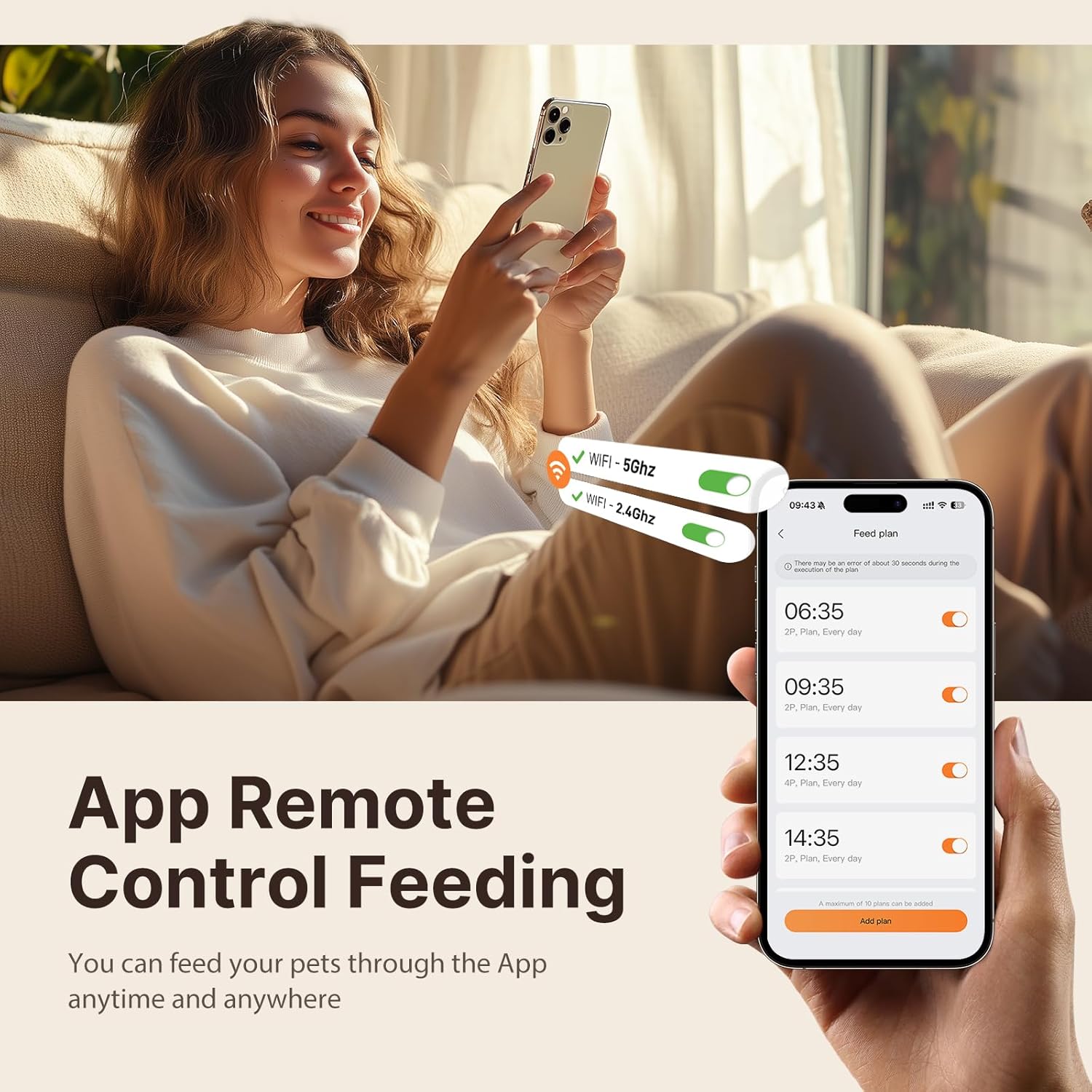
Opis obrazu: A person is shown comfortably using a smartphone with the DUDUPET app interface visible. The app displays options for 5G and 2.4G WiFi connectivity and a feeding schedule, highlighting the remote control capability.
- Otwórz aplikację i załóż konto lub zaloguj się.
- Follow the in-app instructions to add your DUDUPET feeder. Ensure your phone is connected to a 2.4GHz or 5GHz WiFi network during the pairing process.
- The feeder will connect to your home WiFi, enabling remote control and monitoring.
3. Filling Food and Water

Opis obrazu: This image highlights the 2-in-1 design of the DUDUPET feeder, clearly showing the separate 4L food storage compartment and the 3L water dispenser. It also indicates the equivalent capacities in cups and ounces.
- Żywność: Open the lid of the food storage compartment. Pour dry pet food into the 4L container. Ensure the food kibble size is appropriate (up to 0.55 inches / 14mm in diameter) to prevent clogging. Close the lid securely to maintain freshness.
- Woda: Remove the water tank from the base. Fill the 3L tank with clean water. Ensure the water filter is properly installed in the tank. Reattach the water tank to the base, ensuring it is seated correctly for the gravity siphon system to function.
4. Desiccant Installation

Opis obrazu: A three-step visual guide demonstrating how to ensure freshness protection. Step 1 shows folding down a handle, Step 2 shows holding and pressing the lid firmly, and Step 3 shows pushing the silicone ring inward. This process secures the desiccant bag and ensures a tight seal.
The feeder includes a built-in desiccant box to keep food fresh and crispy. If not already installed, place the desiccant bag into its designated compartment under the lid. Ensure the 360° sealed silicone ring is properly positioned around the lid for optimal freshness. Replace the desiccant bag periodically (e.g., monthly) for best results.
Instrukcja obsługi
1. Planowanie posiłków za pomocą aplikacji

Opis obrazu: An orange cat is shown eating from the DUDUPET feeder. In the background, a graphic displays a smartphone screen with a "Customized Feeding Schedule," indicating meal times and portion settings (1-10 meals, 1-15 portions per meal).
Use the DUDUPET app to program your pet's feeding schedule:
- You can schedule up to 10 meals per day.
- Each meal can be set with 1 to 15 portions. Adjust portion sizes based on your pet's dietary needs and veterinarian recommendations.
- The app allows for real-time monitoring of food dispensing and provides alerts for low food levels or dispensing errors.
2. Voice Recording Feature
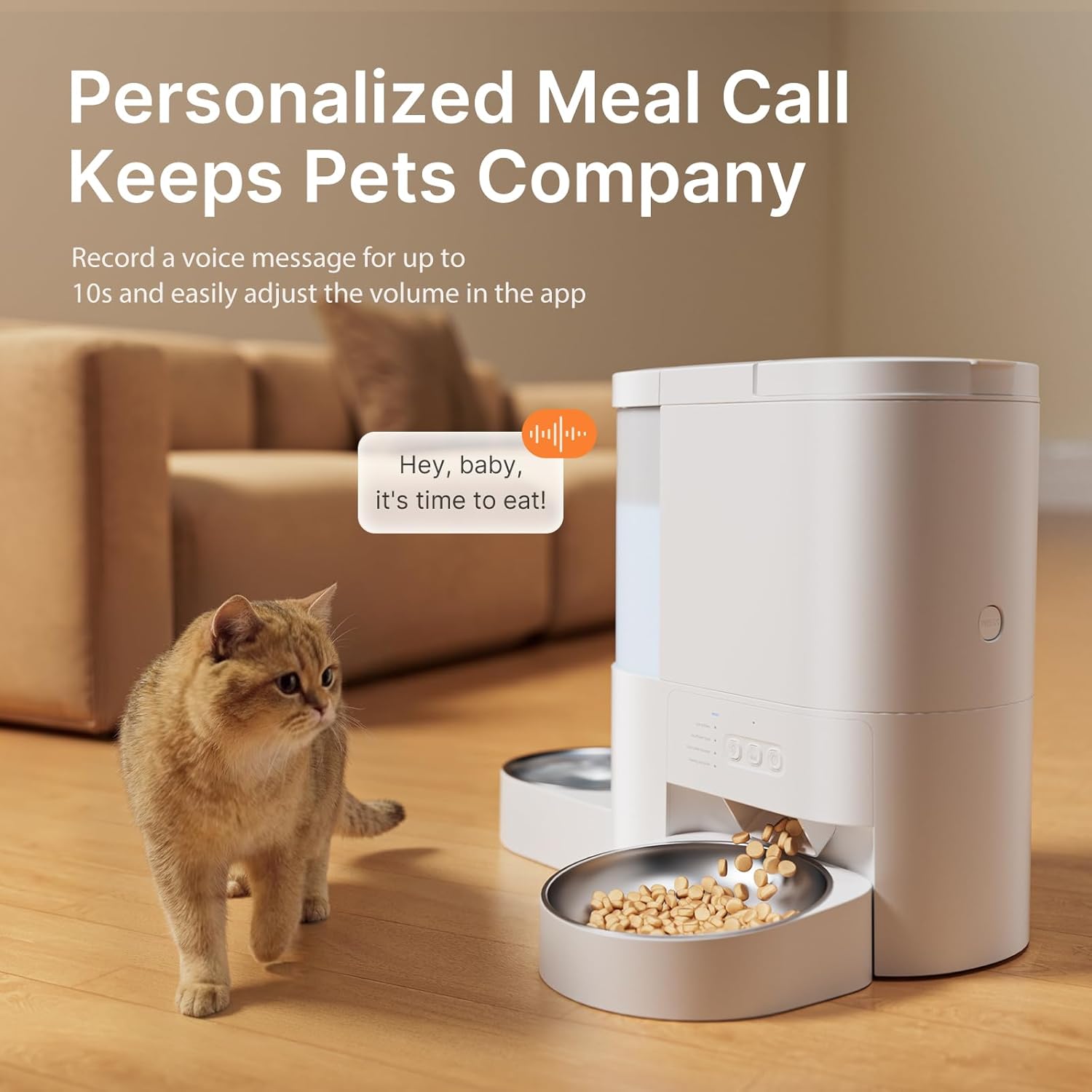
Opis obrazu: A cat is shown attentively looking at the DUDUPET feeder as kibble dispenses. A speech bubble graphic above the feeder indicates a personalized voice message, "Hey, baby, it's time to eat!", highlighting the voice recording feature.
Record a personalized voice message (up to 10 seconds) through the app. This message will play at scheduled meal times to call your pet to eat. You can easily adjust the volume of the voice playback within the app settings.
3. Karmienie ręczne
To dispense food immediately outside of the scheduled times, use the manual feed option available in the DUDUPET app. This allows you to provide an extra meal or snack as needed.
Konserwacja
1. Cleaning the Feeder and Water Dispenser

Opis obrazu: A person is shown hand-washing the removable stainless steel bowl and other detachable components of the DUDUPET feeder in a kitchen sink. A text overlay reminds users that the main base unit should not be submerged or cleaned with water.
- Food Feeder: The food storage tank and dispensing components are hand-wash only. Separate the tank from the base, rinse with cold water, and dry thoroughly before reassembling. Do not submerge the main base unit in water or place it in a dishwasher.
- Dystrybutor wody: The water tank can be separated and rinsed with cold water.
- Miski ze stali nierdzewnej: The two included stainless steel bowls are dishwasher-safe for easy cleaning.
- Regular cleaning ensures a hygienic feeding environment for your pet.
2. Wymiana filtra wody
The water dispenser includes a filter to improve water quality. Replace the filter regularly (e.g., every 2-4 weeks, depending on water quality and usage) to ensure optimal filtration. Replacement filters can be purchased separately.
Rozwiązywanie problemów
1. Food Dispensing Issues
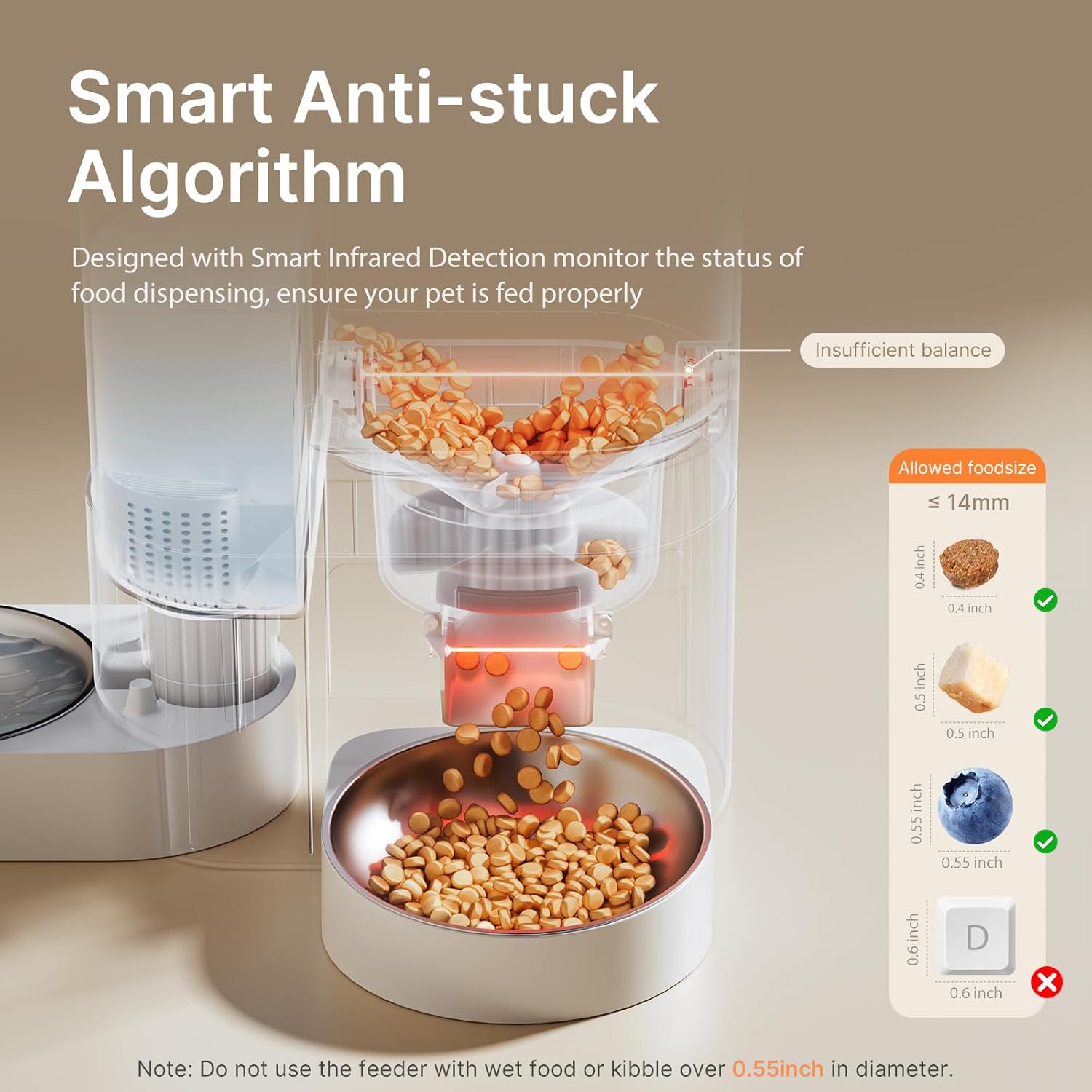
Opis obrazu: A cutaway diagram of the DUDUPET feeder illustrates its "Smart Anti-stuck Algorithm" with infrared detection. It shows the path of food dispensing and provides a visual guide for allowed kibble sizes (up to 14mm or 0.55 inches), warning against larger kibble.
- Zatykanie: Ensure the kibble size does not exceed 0.55 inches (14mm). Larger kibble or wet food can cause blockages. The feeder has a smart infrared detection system to monitor dispensing and alert you to abnormal conditions.
- No Food Dispensed: Check if the food hopper is empty. Verify that the feeder is powered on and connected to WiFi. Check the app for any error notifications (e.g., "Dispensing Error").
- Incorrect Portions: Review your feeding schedule settings in the app to ensure the correct portion sizes are programmed.
2. WiFi Connection Problems
- Nie można połączyć: Ensure your home WiFi network is 2.4GHz or 5GHz. Check your router and internet connection. Try restarting the feeder and your router.
- Aplikacja nie odpowiada: Close and reopen the DUDUPET app. Ensure your smartphone has a stable internet connection.
3. Problemy z zasilaniem
- Feeder Not Turning On: Verify the power adapter is securely plugged into both the feeder and a working wall outlet. If using batteries, ensure they are correctly installed and not depleted.
- Scheduled Feedings Not Working in Battery Mode: Remote app control is not available in battery-only mode, but scheduled feedings will continue. If scheduled feedings are not occurring, check battery levels.
Specyfikacje
| Funkcja | Specyfikacja |
|---|---|
| Nazwa modelu | F13 |
| Pojemność przechowywania żywności | 4 litra (ok. 17 szklanek) |
| Pojemność zbiornika na wodę | 3 Liters (approx. 101 oz) |
| Łączność | 5G/2.4G WiFi App Controlled |
| Posiłki dziennie | Do 10 |
| Porcje na posiłek | 1-15 porcje |
| Rejestrator głosu | Do 10 sekund |
| Zasilacz | 5V DC Adapter (included), 3 x D-cell Batteries (not included) |
| Wymiary (dł. x szer. x wys.) | 7 x 9 x 11 cala |
| Waga przedmiotu | 1.5 funta (0.68 kilograma) |
| Instrukcje pielęgnacji | Hand Wash Only (feeder unit), Dishwasher Safe (stainless steel bowls) |
Gwarancja i wsparcie
Informacje o gwarancji
The DUDUPET Automatic Cat Feeder with Water (Model F13) comes with a Roczna gwarancja od daty zakupu. Niniejsza gwarancja obejmuje wady produkcyjne i usterki powstałe w wyniku normalnego użytkowania. Prosimy zachować dowód zakupu na wypadek roszczeń gwarancyjnych.
Obsługa klienta
For technical assistance, troubleshooting, or warranty inquiries, please contact DUDUPET customer support. Refer to the DUDUPET official website or your purchase platform for the most current contact information.
Ważne informacje dotyczące bezpieczeństwa
- To urządzenie jest przeznaczone wyłącznie do użytku wewnątrz pomieszczeń.
- Do not use with wet food or kibble larger than 0.55 inches (14mm) in diameter.
- Przechowywać poza zasięgiem dzieci i zwierząt domowych, gdy nie są używane lub podczas czyszczenia.
- Przed czyszczeniem należy zawsze odłączyć podajnik od zasilania.
- Do not immerse the main base unit in water.
- Ensure the power cord is not chewed by pets.
Zasoby wideo
No official product videos from the seller were found in the provided data. For visual guides, please refer to the DUDUPET official webwitrynę lub kanały wsparcia.