
1. Koniec produktuview
The Philips 55MLED610/94 is a 55-inch 4K Ultra HD QLED Smart QD-Mini LED Google TV. It features advanced display technology, smart connectivity, and integrated audio solutions for an enhanced viewzdobywania doświadczenia.

Przód view of the Philips 55MLED610/94 55-inch 4K QD-Mini LED Google TV.
Główne cechy:
- Wyświetlacz: 4K QD-Mini LED Panel, Philips Halo Control Technology, Dolby Vision, Local Dimming, 120 Hz Motion Clarity HSR, HDR 10+, 178 Degree Wide Viewing Angle, MEMC, ALLM.
- Smart TV: Google TV operating system, 2GB RAM, 32GB ROM, Quad Core Processor, Dual band WIFI 5, Hands-Free Voice Control, Screen Mirroring, Google Assistant compatibility.
- Audio: 36 Watts Output, Dolby Atmos, Dolby Audio.
- Łączność: 3 HDMI Ports (including HDMI 2.1), 2 USB Ports, 1 LAN Port, 1 Antenna Input, 1 Satellite Input, 1 Digital Audio Out (Optical), 1 AV-IN, 1 Earphone port.
2. Konfiguracja i instalacja
2.1 Rozpakowanie i zawartość
Carefully unpack the television and ensure all components are present.
- 1N TV Unit
- 2N Stand Bases
- Szybki przewodnik 1N
- Karta gwarancyjna 1N
- Pilot zdalnego sterowania 1N
- 2 baterie AAA (do pilota)
- Przewód zasilający 1N
- 4N Screws (for stand/mount)
- 1N AV Converting Cable

Illustration showing the TV unit and its included accessories for setup.
2.2 Montaż na stojaku lub na ścianie
The television supports both table-top stand installation and wall mounting.
- Montaż na stole: Attach the provided stand bases to the bottom of the TV unit using the included screws. Ensure the stand is stable on a flat surface.
- Mocowanie ścienne: For wall mounting, use a compatible VESA wall mount (not included) and follow the instructions provided with the wall mount. Refer to the TV's back panel for mounting points.

Tył view of the television, highlighting the mounting points and various input/output ports.
2.3 Podłączanie urządzeń peryferyjnych
Connect your external devices such as set-top boxes, gaming consoles, and audio systems to the TV using the appropriate ports.
- HDMI: Use HDMI ports for high-definition video and audio from devices like Blu-ray players or gaming consoles. HDMI 2.1 supports advanced features.
- USB: Podłącz dyski USB w celu odtwarzania multimediów lub jako pamięć zewnętrzną.
- LAN: Dla stabilnego przewodowego połączenia internetowego.
- Antena/Satelita: Podłącz antenę lub talerz satelitarny do odbioru telewizji naziemnej.
- Cyfrowe wyjście audio (optyczne): Do podłączenia do zewnętrznych systemów dźwiękowych.
- Wejście AV: Dla starszych urządzeń wykorzystujących sygnał wideo kompozytowy i dźwięk stereo.
- Słuchawka: Do prywatnego słuchania.

Szczegółowy view of the television's input and output ports, including HDMI, USB, LAN, and audio connections.
3. Instrukcja obsługi
3.1 Pierwsze włączenie i konfiguracja Google TV
After connecting the power cord, press the power button on the remote control or TV. Follow the on-screen instructions to complete the initial setup, including language selection, network connection (Wi-Fi or LAN), and Google account sign-in.

The Google TV interface, showing various streaming applications and content recommendations.
3.2 Funkcje zdalnego sterowania
The provided remote control uses both IR and Bluetooth technology. Insert the two AAA batteries as indicated.

The remote control for the Philips 55MLED610/94 TV, featuring dedicated buttons for streaming services and Google Assistant.
- Przycisk zasilania: Włącza lub wyłącza telewizor.
- Panel nawigacyjny: Do nawigacji po menu i dokonywania wyborów.
- Przycisk Asystenta Google: Aktywuje sterowanie głosowe poleceniami i wyszukiwaniem.
- Przyciski głośności/kanału: Adjusts volume and changes channels.
- Przyciski skrótów aplikacji: Bezpośredni dostęp do popularnych serwisów streamingowych, takich jak Netflix i Prime Video.
3.3 Smart TV Features and Applications
The Google TV platform provides access to a wide range of applications and services.
- Zainstalowane aplikacje: Access popular streaming services such as Prime Video, Netflix, Hotstar, Zee5, YouTube, Eros Now, Hungama, JioCinema, and SonyLiv.
- Asystent Google: Use hands-free voice control to search for content, control smart home devices, and get information.
- Dublowanie ekranu (Miracast): Cast content from compatible mobile devices to the TV screen.
- Web Przeglądarka: Przeglądaj Internet bezpośrednio na ekranie telewizora.
3.4 Ustawienia wyświetlania i dźwięku
Dostosuj ustawienia obrazu i dźwięku, aby zoptymalizować viewi wrażenia słuchowe.
- Tryby obrazu: Select from various picture modes (e.g., Standard, Vivid, Movie, Game) or customize settings like brightness, contrast, color, and sharpness.
- Dolby Vision i HDR10+: The TV automatically detects and optimizes content for Dolby Vision and HDR10+ for enhanced dynamic range and color.
- Tryby dźwięku: Choose sound modes (e.g., Standard, Music, Movie) or adjust equalizer settings. Dolby Atmos provides immersive audio.
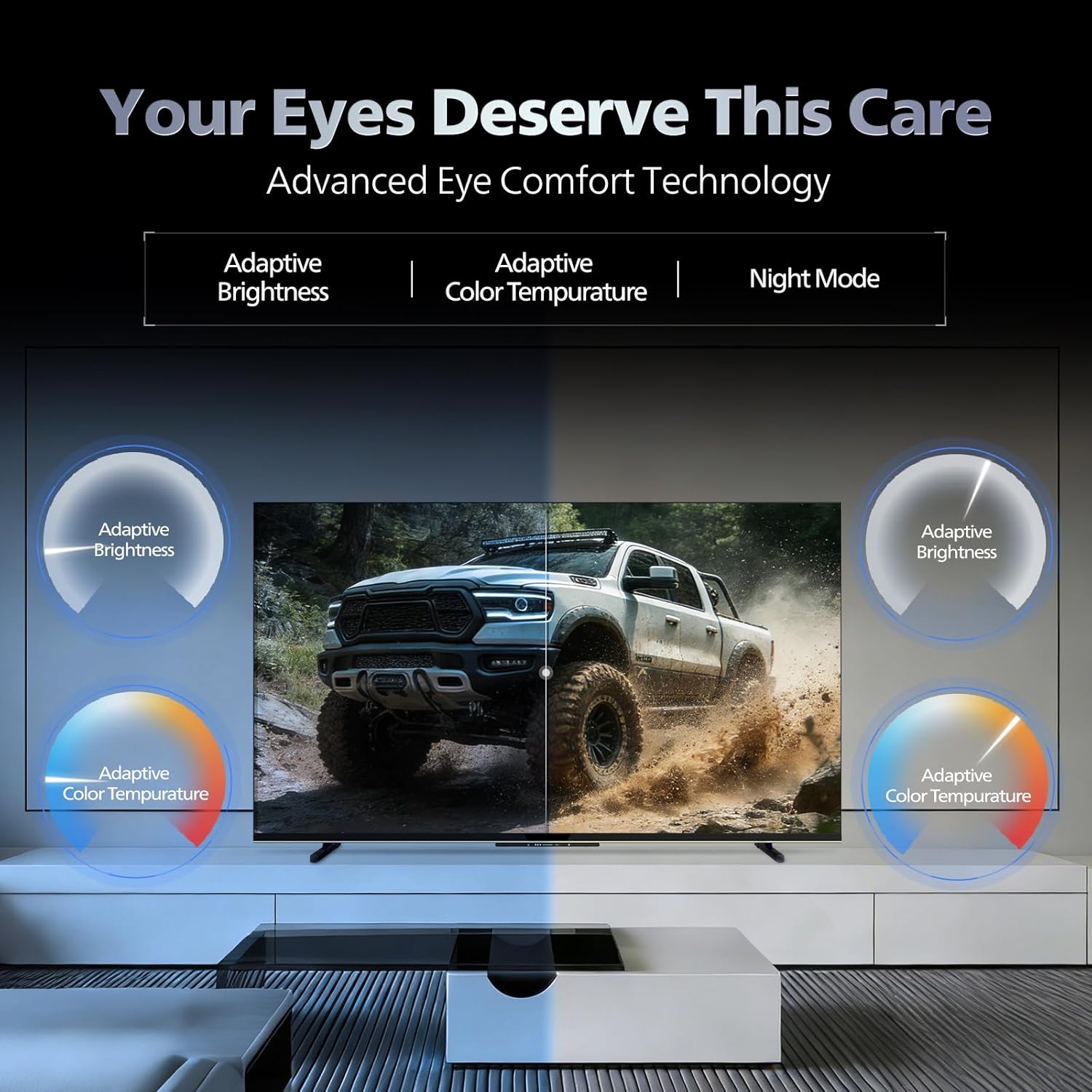
- Technologia komfortu oczu: Features like Adaptive Brightness, Adaptive Color Temperature, and Night Mode are available to reduce eye strain.

Visual representation of the TV's advanced eye comfort technology, including adaptive brightness and color temperature.

A visual demonstrating the immersive multi-dimensional audio experience provided by Dolby Atmos on the television.
4. Konserwacja
4.1 Czyszczenie telewizora
To clean the screen and cabinet, first unplug the power cord. Use a soft, lint-free cloth. For stubborn marks, lightly dampPrzetrzyj ściereczkę wodą lub delikatnym, nieściernym środkiem do czyszczenia ekranów. Nigdy nie spryskuj bezpośrednio ekranu środkiem czyszczącym.
Ważny: The television is nie jest wodoodporny. Avoid exposing it to liquids.
4.2 Aktualizacje oprogramowania
Ensure your TV's software is up to date for optimal performance and security. The TV will typically prompt you for available updates. You can also manually check for updates in the settings menu.
5. Rozwiązywanie Problemów
If you encounter issues with your television, try the following basic troubleshooting steps before contacting support.
- Brak zasilania: Upewnij się, że przewód zasilający jest prawidłowo podłączony zarówno do telewizora, jak i do sprawnego gniazdka elektrycznego. Spróbuj użyć innego gniazdka.
- Brak obrazu/dźwięku: Check all cable connections (HDMI, AV, Antenna). Ensure the correct input source is selected on the TV.
- Pilot nie działa: Wymień baterie w pilocie. Upewnij się, że między pilotem a czujnikiem podczerwieni telewizora nie ma żadnych przeszkód.
- Problemy z łącznością internetową: Restart your Wi-Fi router. Check the TV's network settings and ensure it's connected to the correct network. Try a wired LAN connection if possible.
- Problemy z jakością obrazu: Dostosuj ustawienia obrazu (jasność, kontrast, ostrość). Upewnij się, że źródło treści jest wysokiej jakości.
The television displaying a fast-paced gaming scene, highlighting its 120Hz refresh rate and gaming optimization features.
6. Specyfikacje
| Funkcja | Szczegół |
|---|---|
| Numer modelu | 55MLED610/94 |
| Rozmiar ekranu | 55 cala (138 cm) |
| Technologia wyświetlania | Dioda LED QD-Mini |
| Rezolucja | Rozdzielczość 4K Ultra HD (3840 x 2160) |
| Częstotliwość odświeżania | 120 Hz HSR |
| Obsługiwany format HDR | HDR10+, Dolby Vision |
| Viewing kąt | 178 stopni |
| Wyjście dźwięku | 36 watów |
| Kodowanie dźwięku | Dolby Atmos, Dolby Audio |
| System operacyjny | Telewizja Google |
| BARAN | 2 GB |
| ROM | 32 GB |
| Łączność | Wi-Fi (Dual band WIFI 5), Bluetooth 5.1, 3 HDMI (1x HDMI 2.1 eARC), 2 USB, 1 LAN, 1 Antenna, 1 Satellite, 1 Digital Audio Out (Optical), 1 AV-IN, 1 Earphone |
| Wymiary produktu (Gł. x Szer. x Wys.) | 8D x 144.5W x 84H centymetrów |
| Item Weight Without Stand | 9.4 kilograma |
| Pobór mocy | 130 watów |
| Klasa energetyczna | 3 gwiazdek |
| Roczne zużycie energii | 182 kWh/rok |
| Zawarte komponenty | TV Unit, Stand Bases, Quick Start Guide, Warranty Card, Remote, Batteries, Power cord, Screws, AV Converting Cable |

Dimensional drawing of the Philips 55MLED610/94 TV, showing height, width, and depth measurements.
7. Gwarancja i wsparcie
7.1 Informacje o gwarancji
A 1-year warranty is provided by the manufacturer from the date of purchase. Warranty claims can be processed using your Amazon e-invoice.
The warranty covers manufacturing defects but does not cover spares.
7.2 Obsługa klienta
For assistance, contact the brand's toll-free number: 18004256396. Please provide the product's model name (55MLED610/94) and seller's details from your invoice. The service center will schedule a convenient service slot.
Producent: Radiant Appliances And Electronics Private Limited
Survey No. 111, 112, S-2 A 1, Ecity, Fabcity, Maheshwaram Mandal Raviryala Village, Ranga Reddy, Telangana- 501141
Importer: TPV Technology India Private Limited
Unit No. 307-308 3rd Floor, SEWA Corporate Park MG Road Gurugram Haryana 122002