
1. Koniec produktuview
The NexTool Knight K30 is a compact and versatile 11-in-1 multitool folding pocket knife designed for everyday carry (EDC), camping, hiking, and survival. It features a durable 14C28N steel blade, a secure Axis Lock mechanism for safe operation, and a comfortable G10 handle. This manual provides essential information for the proper use and maintenance of your K30 multitool.

Image: NexTool Knight K30 Multitool with main blade extended, highlighting key features like the 14C28N blade, Axis Lock, G10 handle, and deep pocket clip.
2. Funkcje produktu
The NexTool Knight K30 integrates 11 essential tools into a single, portable design:
- Nóż: 2.76" 14C28N steel blade with high hardness (58-60 HRC) for excellent sharpness and corrosion resistance.
- Serrated Scissors: Full-size scissors with serrated blades for powerful, non-slip cutting.
- Dual Head Screwdriver: Includes both Phillips and flathead screwdriver bits.
- Pinceta: Precision tweezers for small tasks.
- File: For smoothing edges or light grinding.
- Otwieracz do butelek: Zintegrowane dla wygody.
- Awl with Hole: For piercing and reaming.
- Bit Socket: For interchangeable screwdriver bits.
- Crowbar: Small pry tool for various applications.
- Deep Pocket Clip: For secure and discreet carry.
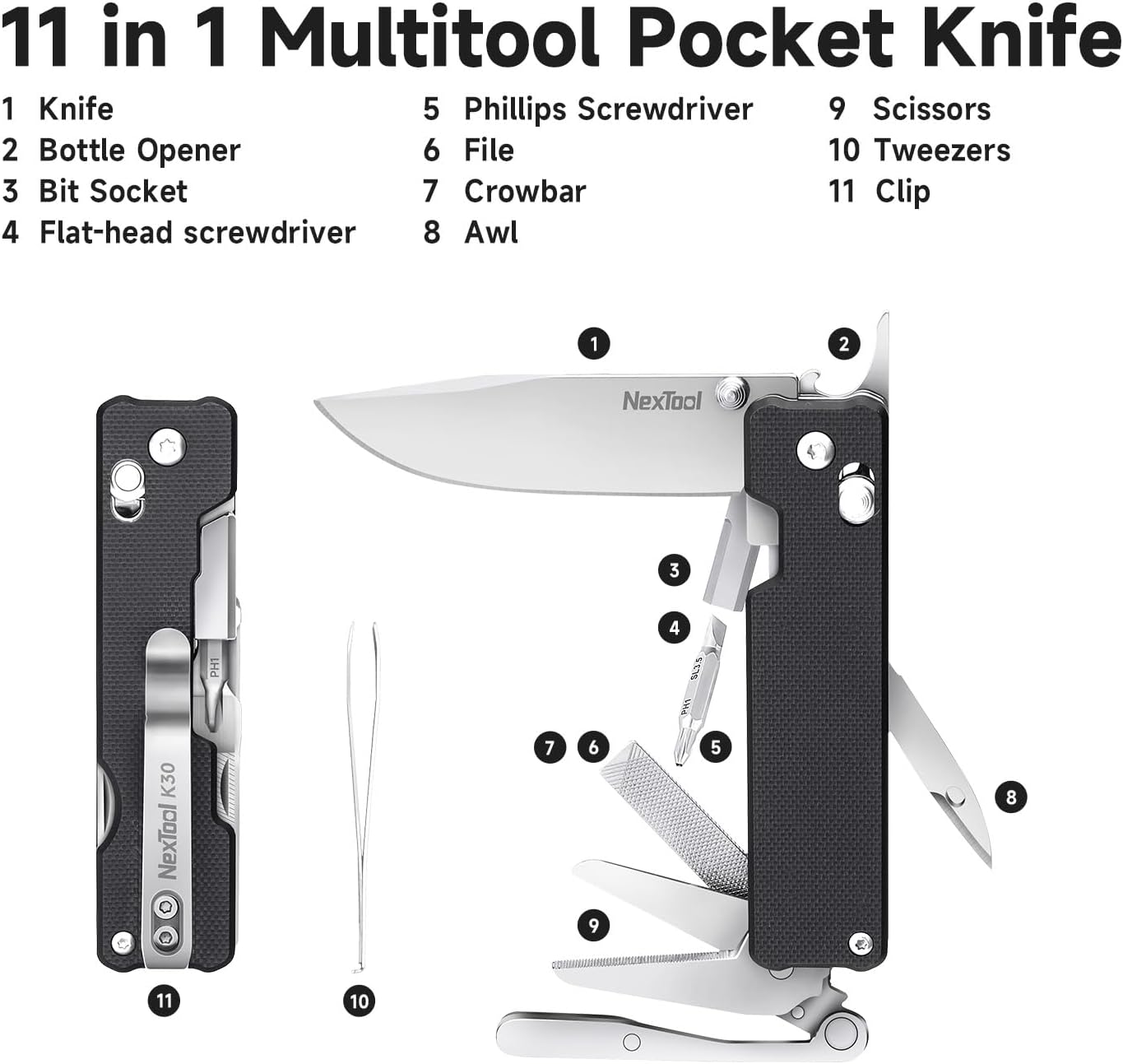
Obraz: Wybuch view diagram of the NexTool Knight K30 Multitool, labeling each of its 11 functions.
3. Instrukcja konfiguracji i obsługi
Familiarize yourself with the tools and their deployment mechanisms before use.
3.1. Deploying the Main Blade
- Hold the multitool firmly in one hand.
- Locate the Axis Lock (Crossbar Lock) buttons on both sides of the handle.
- Press both Axis Lock buttons simultaneously and use your thumb to push the blade outwards until it locks into the open position.
- To close the blade, press both Axis Lock buttons again and gently fold the blade back into the handle. Ensure fingers are clear of the blade path.

Image: A hand demonstrating the quick, one-handed deployment of the main blade by pressing the Axis Lock buttons.
3.2. Using the Serrated Scissors
- Locate the scissors tool and carefully pivot it out from the multitool body until it locks into place.
- The scissors are spring-loaded for ease of use. Place the material to be cut between the serrated blades and squeeze the handles.
- To fold the scissors back, press the release mechanism (if present) or gently push the tool back into its housing.
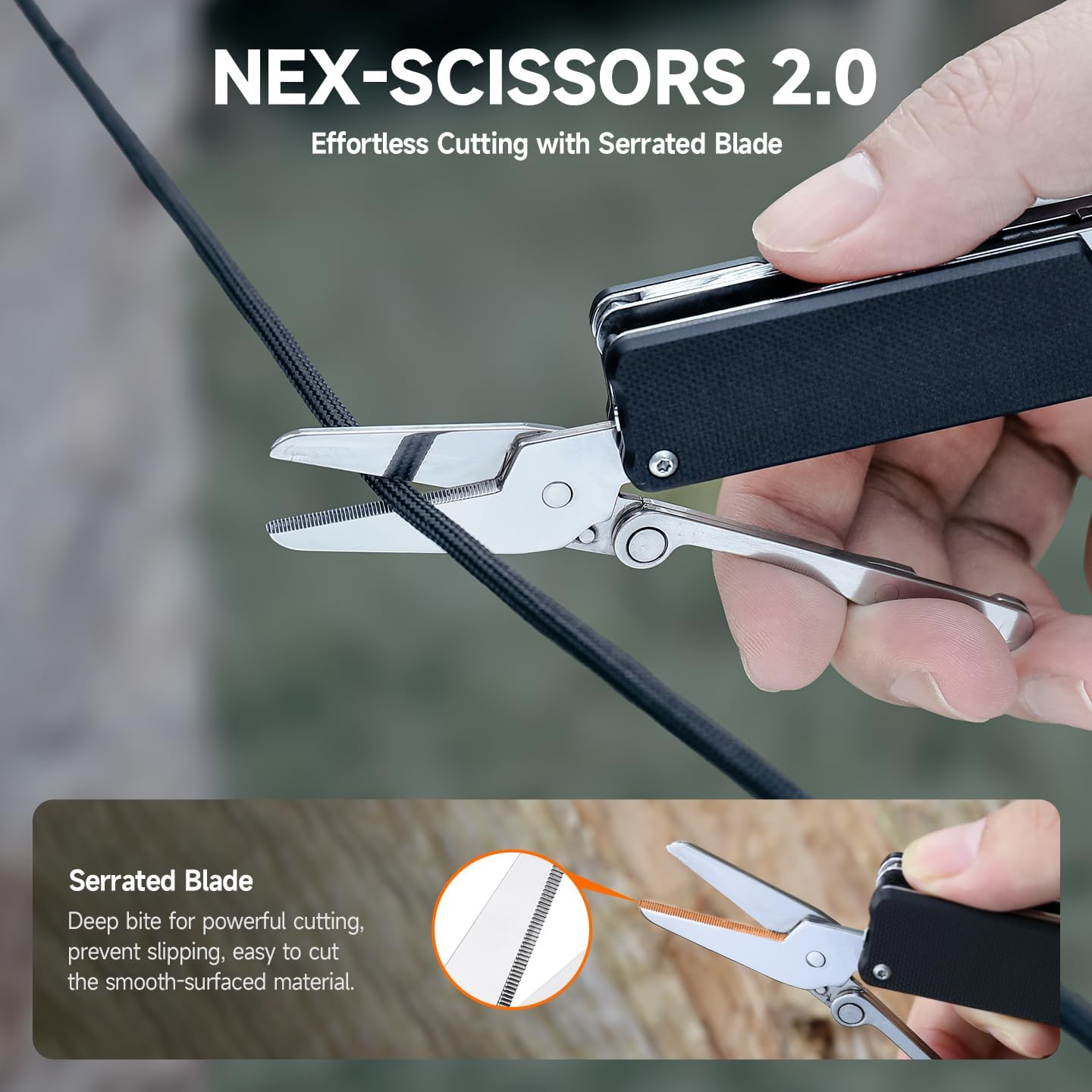
Image: A close-up of the NexTool Knight K30's serrated scissors in action, demonstrating their cutting capability on a piece of rope.
3.3. Accessing Other Tools
All other tools (screwdrivers, tweezers, file, bottle opener, awl, bit socket, crowbar) can be pivoted out from the multitool body. Some tools may have a slip-joint mechanism, while others might lock into place. Always ensure tools are fully deployed and stable before applying force.
Video: Official NexTool K30 Multitool demonstration, showcasing the deployment and use of various tools including the main blade, scissors, screwdrivers, and other integrated functions.
4. Konserwacja
Regular maintenance ensures the longevity and optimal performance of your NexTool Knight K30.
- Czyszczenie: After each use, especially in wet or dirty conditions, clean the multitool with a damp cloth. For stubborn dirt, use a small brush and mild soap. Rinse thoroughly and dry completely.
- Smarowanie: Periodically apply a small amount of light machine oil to the pivot points of the blade and other moving tools to ensure smooth operation and prevent corrosion.
- Ostrzenie: The 14C28N blade is designed for superior edge retention but will eventually require sharpening. Use a quality sharpening system appropriate for knife blades.
- Składowanie: Store the multitool in a dry environment to prevent rust. Keep it out of reach of children.
5. Rozwiązywanie Problemów
If you encounter issues with your NexTool Knight K30, consider the following:
- Narzędzia sztywne: If tools are difficult to deploy or fold, they may require cleaning and lubrication. Follow the maintenance steps above.
- Blade Play: Minor blade play can sometimes be adjusted by tightening the pivot screw. Use appropriate tools and avoid over-tightening. If significant play persists, contact customer support.
- Rdza/Korozja: If rust appears, it can often be removed with fine abrasive pads and a rust remover, followed by thorough cleaning and lubrication. Preventative maintenance is key.
6. Specyfikacje
| Funkcja | Szczegół |
|---|---|
| Numer modelu | NE20413 |
| Tworzywo | Stainless Steel, G10 Handle |
| Materiał ostrza | 14C28N Steel |
| Blade Hardness | 58-60 HRC |
| Długość ostrza | 2.76 cala (70 mm) |
| Wymiary po złożeniu (dł. x szer. x wys.) | 3.58 x 0.87 x 0.87 cala (91 mm x 22 mm x 22 mm) |
| Waga przedmiotu | 5.3 uncji (150 g) |
| Zawarte komponenty | Knife, Scissor, Screwdriver, Tweezers, File, Bottle Opener, Awl, Bit Socket, Crowbar |
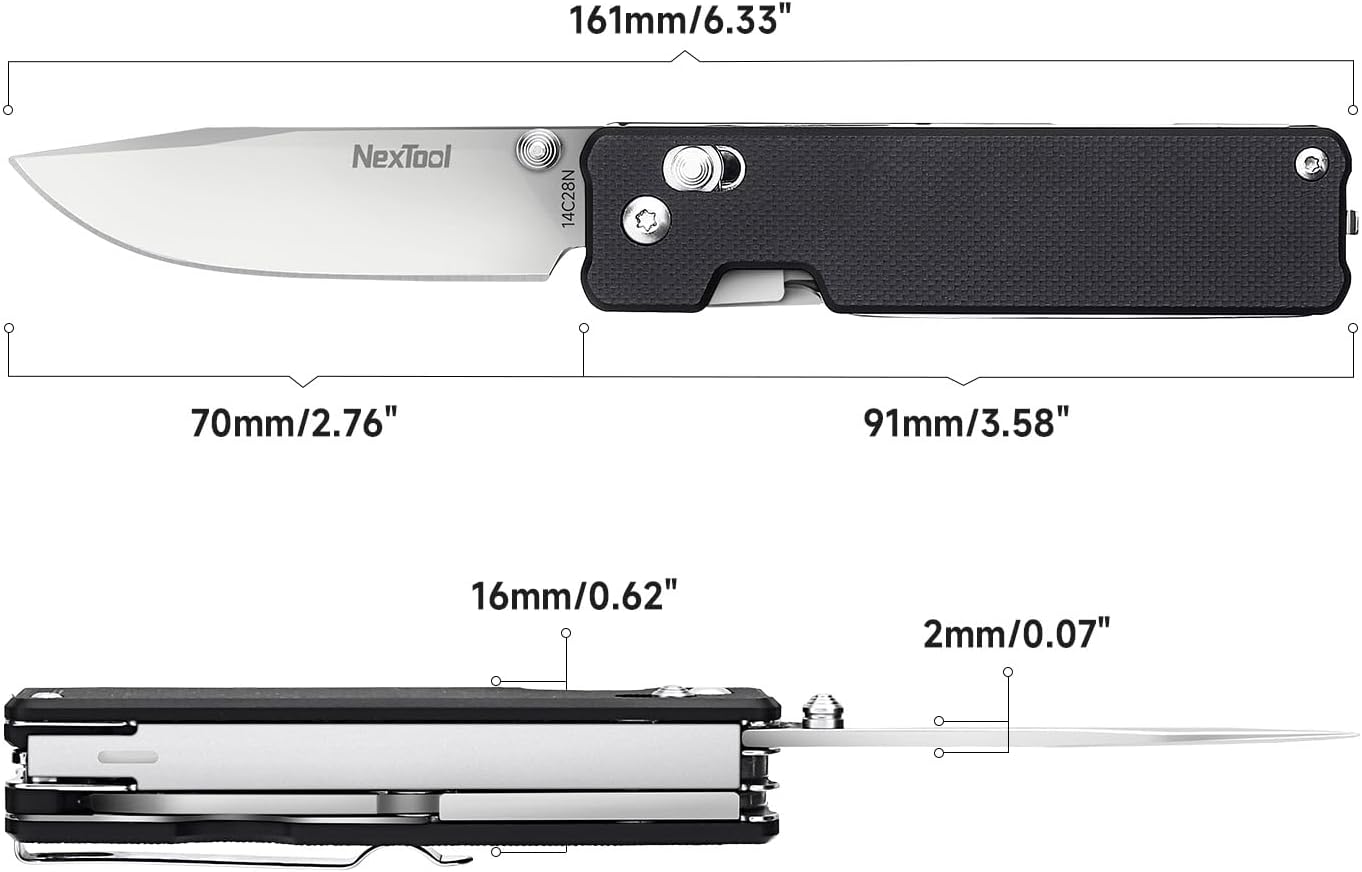
Image: Technical drawing illustrating the precise dimensions of the NexTool Knight K30 Multitool in both folded and open states, including blade length and handle thickness.
7. Gwarancja i wsparcie
The NexTool Knight K30 is backed by a 10-letnia gwarancja producenta. For warranty claims, technical support, or any inquiries regarding your product, please contact the NexTool Official Store or refer to the contact information provided with your purchase.


