
1. Wprowadzenie
Dziękujemy za zakupasing the ULTIMEA Aura A60 U2621 7.1ch Dolby Atmos Soundbar System. This manual provides essential information for setting up, operating, and maintaining your new sound system. Please read this manual thoroughly before use to ensure proper functionality and to maximize your audio experience.

Figure 1.1: Immersive audio experience with the ULTIMEA Aura A60 system.
2. Informacje dotyczące bezpieczeństwa
To reduce the risk of electric shock, fire, or damage to your device, please observe the following safety precautions:
- Nie wystawiaj urządzenia na deszcz lub wilgoć.
- Nie należy stawiać na urządzeniu przedmiotów wypełnionych płynami, np. wazonów.
- Zapewnij odpowiednią wentylację. Nie blokuj żadnych otworów wentylacyjnych.
- Nie należy instalować w pobliżu źródeł ciepła, takich jak grzejniki, kratki wentylacyjne, piece lub inne urządzenia (w tym amp(lifiers) wytwarzające ciepło.
- Chroń przewód zasilający przed deptaniem i przytrzaśnięciem, zwłaszcza przy wtyczkach, gniazdkach i miejscach, w których wychodzi z urządzenia.
- Stosować wyłącznie dodatki/akcesoria wskazane przez producenta.
- Odłączaj urządzenie od zasilania podczas burzy z piorunami lub jeśli nie używasz go przez dłuższy czas.
- Wszelkie prace serwisowe należy powierzać wykwalifikowanemu personelowi.
3. Zawartość opakowania
Sprawdź, czy wszystkie przedmioty są obecne i w dobrym stanie:
- ULTIMEA Aura A60 Soundbar
- Wireless Subwoofer (4-inch, BassMX Technology)
- 4 x Surround Speakers (2 front, 2 rear)
- Zdalne sterowanie
- Kabel HDMI
- Power Adapter/Cables
- Instrukcja obsługi (ten dokument)
4. Koniec produktuview
The ULTIMEA Aura A60 U2621 is a 7.1ch Dolby Atmos soundbar system designed to deliver an immersive home theater audio experience. It features a main soundbar unit, a powerful wireless subwoofer with BassMX technology, and four surround speakers.
4.1 Główna jednostka soundbara
The main soundbar unit houses 3 main channels for clear dialogue and primary audio. It serves as the central hub for all audio connections.

Figure 4.1: Main soundbar unit with front surround speakers.
4.2 Bezprzewodowy subwoofer
The dedicated 4-inch wireless subwoofer incorporates BassMX technology to enhance low frequencies, providing deep and resonant bass for a more impactful audio experience.

Figure 4.2: Wireless subwoofer with BassMX technology.
4.3 głośników dźwięku przestrzennego
The system includes four surround speakers: two front and two rear. The rear speakers connect wirelessly to the soundbar, minimizing cable clutter and allowing flexible placement to create an expansive acoustic space.

Figure 4.3: Diagram of 7.1ch sound distribution.
4.4 Porty wejścia/wyjścia
The soundbar features multiple input options for versatile connectivity:
- HDMI eARC: For high-quality audio transmission and seamless TV integration.
- Optyczny: Cyfrowe wejście audio.
- AUX: Analogowe wejście audio.
- USB: Do odtwarzania multimediów.
- Bluetooth: Bezprzewodowe przesyłanie strumieniowe dźwięku.

Figure 4.4: Rear panel connections, including HDMI eARC.
5. Konfiguracja
5.1 Umieszczenie fizyczne
Optymalne rozmieszczenie komponentów systemu dźwiękowego ma kluczowe znaczenie dla uzyskania najlepszych wrażeń dźwiękowych.
- Soundbar: Place the soundbar centrally below your television. Ensure it is not obstructed.
- Głośnik niskotonowy: Position the wireless subwoofer on the floor near the soundbar. Experiment with placement to find the best bass response for your room.
- Głośniki przednie przestrzenne: Place the two wired front surround speakers to the left and right of your TV, ideally at ear level when seated.
- Głośniki tylne przestrzenne: Position the two wireless rear surround speakers behind your primary listening position, to the left and right. These speakers will automatically connect wirelessly to the soundbar once powered on.

Figure 5.1: Recommended speaker placement for Dolby Atmos.
5.2 Połączenia
Aby podłączyć system soundbar, wykonaj następujące czynności:
- Podłączenie zasilania: Connect the power cables to the soundbar, subwoofer, and surround speakers, then plug them into a power outlet.
- HDMI eARC (zalecane): Connect one end of the provided HDMI cable to the HDMI eARC port on your soundbar and the other end to the HDMI eARC/ARC port on your TV. This connection supports Dolby Atmos and allows for TV remote control of the soundbar.
- Połączenie optyczne (alternatywne): If your TV does not have an HDMI eARC/ARC port, connect an optical cable (not included) from your TV's optical output to the OPTICAL input on the soundbar.
- AUX Connection (Alternative): For analog audio sources, connect a 3.5mm AUX cable (not included) from your device's audio output to the AUX input on the soundbar.
- Połączenie USB: Insert a USB drive into the USB port on the soundbar for direct media playback.
- Parowanie Bluetooth: To connect a Bluetooth device, select the Bluetooth input on the soundbar. On your device, search for 'ULTIMEA Aura A60' and pair.
6. Instrukcja obsługi
6.1 Włączanie/wyłączanie zasilania
Naciśnij przycisk zasilania na soundbarze lub pilocie, aby włączyć lub wyłączyć system.
6.2 Wybór wejścia
Use the 'Input' button on the remote control or the soundbar to cycle through available input sources: HDMI eARC, Optical, AUX, USB, and Bluetooth.

Figure 6.1: Remote control for easy operation.
6.3 Regulacja głośności
Adjust the master volume using the 'Volume Up' and 'Volume Down' buttons on the remote control or the soundbar. You can also adjust subwoofer and surround speaker levels independently.
6.4 Sound Modes and EQ Presets
The Aura A60 offers various sound modes and EQ presets to optimize audio for different content and preferences.
- Dedicated Modes: Select from 6 specialized modes: Movie, Music, Voice, Sports, Game, and Night.
- Ustawienia korektora: Access 121 professional EQ presets for genres like Bass, Pop, Classical, and Rock via the ULTIMEA app.

Figure 6.2: 121 preset EQ matrix for customized audio.
6.5 Kontrola aplikacji
Download the ULTIMEA app to your smartphone for advanced control and customization options, including a 10-band EQ and access to all EQ presets.
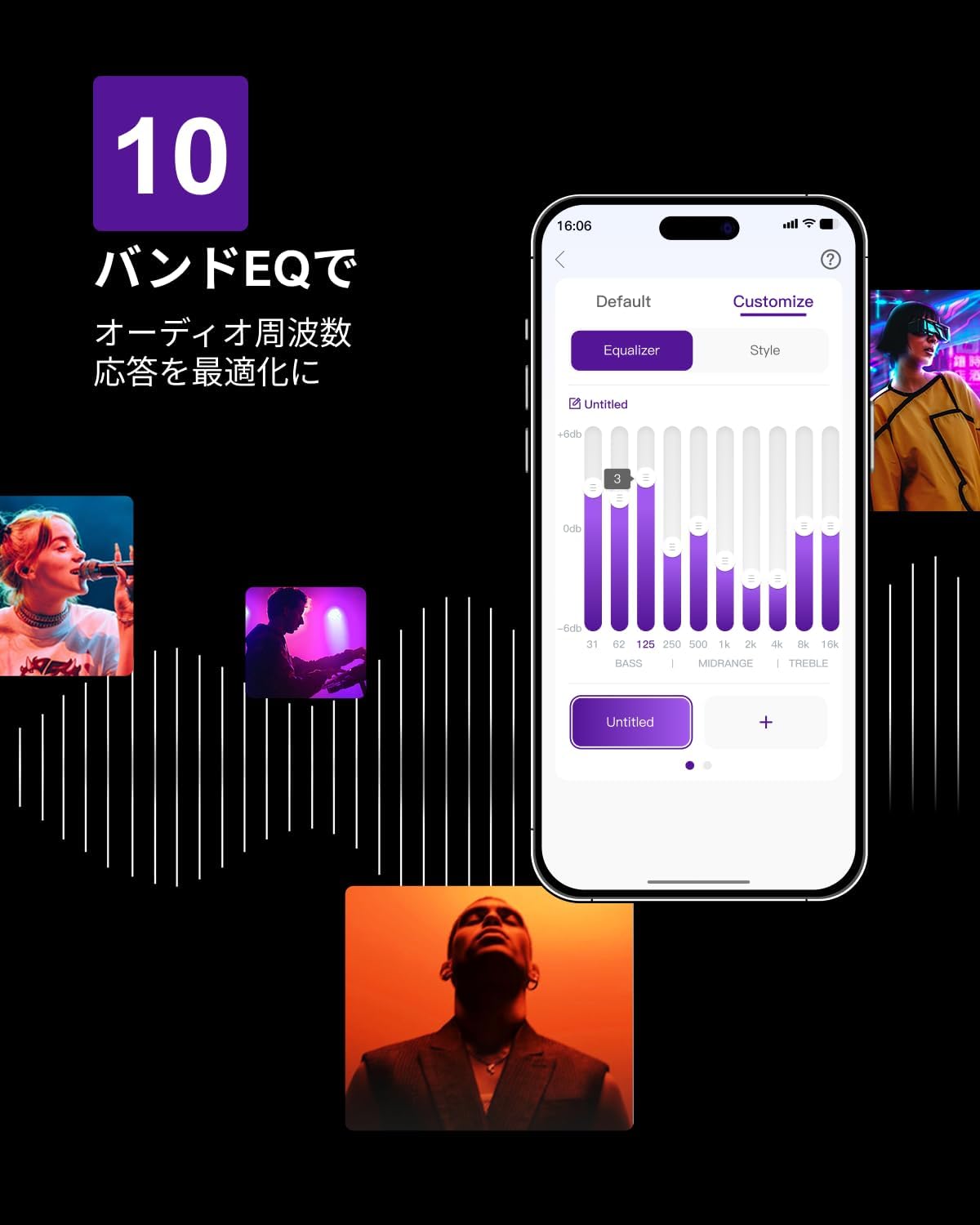
Figure 6.3: ULTIMEA mobile application interface.
7. Konserwacja
To ensure the longevity and optimal performance of your ULTIMEA Aura A60 soundbar system, follow these simple maintenance guidelines:
- Czyszczenie: Use a soft, dry cloth to wipe the surfaces of the soundbar, subwoofer, and speakers. Do not use liquid cleaners or abrasive materials, as they may damage the finish.
- Wentylacja: Ensure that all ventilation openings remain clear and unobstructed to prevent overheating.
- Składowanie: Jeśli przechowujesz system przez dłuższy okres czasu, odłącz go od zasilania i przechowuj w chłodnym, suchym miejscu, z dala od bezpośredniego światła słonecznego i ekstremalnych temperatur.
8. Rozwiązywanie Problemów
Jeśli masz problemy z systemem soundbar, zapoznaj się z poniższymi typowymi problemami i rozwiązaniami:
| Problem | Możliwa przyczyna | Rozwiązanie |
|---|---|---|
| Brak dźwięku z soundbara. | Incorrect input selected, volume too low, cables not connected properly. | Verify the correct input source. Increase volume. Check all cable connections (HDMI, Optical, AUX). Ensure the soundbar is powered on. |
| No sound from subwoofer/surround speakers. | Subwoofer/speakers not paired or powered on, volume too low. | Ensure subwoofer and surround speakers are powered on. They should automatically pair. If not, refer to the pairing instructions in the full manual (if available) or contact support. Increase their individual volume levels. |
| Zniekształcona lub słaba jakość dźwięku. | Incorrect audio settings, poor source quality, interference. | Adjust EQ settings or try different sound modes. Ensure the audio source is high quality. Check for nearby electronic devices causing interference. |
| Problemy z połączeniem Bluetooth. | Device out of range, not in pairing mode, interference. | Ensure the soundbar is in Bluetooth pairing mode. Move your device closer to the soundbar. Disconnect and re-pair the device. |
If the problem persists after trying these solutions, please contact ULTIMEA customer support.
9. Specyfikacje
| Funkcja | Szczegół |
|---|---|
| Marka | NAJLEPSZA A |
| Nazwa modelu | Aura A60 |
| Numer modelu | U2621 |
| Typ głośnika | Soundbar with 7.1ch Surround Sound |
| Technologia audio | Dolby Atmos, BassMX Technology |
| Łączność | HDMI eARC, Bluetooth, Optical, AUX, USB |
| Subwoofer | 4-inch Wired Subwoofer (integrated BassMX) |
| Głośniki Surround | 4 (2 wired front, 2 wireless rear) |
| Kontrola | Remote Control, ULTIMEA App |
| Kolor | Czarny |
| Wymiary (gł. x szer. x wys.) | 9 cm x 40 cm x 7 cm (Soundbar, approximate) |
| Kraj pochodzenia | Chiny |
10. Gwarancja i wsparcie
ULTIMEA is committed to providing high-quality products and customer satisfaction. Your Aura A60 U2621 soundbar system comes with comprehensive support.
10.1 Informacje o gwarancji
Specific warranty details may vary by region. Please refer to the warranty card included with your product or visit the official ULTIMEA webna tej stronie znajdziesz najbardziej aktualne warunki gwarancji.
10.2 Obsługa klienta
For any questions, technical assistance, or troubleshooting not covered in this manual, please contact our dedicated support team:
- 365-Day Support: Our expert staff is available year-round to assist you.
- Czat na żywo: Instant responses are available via live chat on our webstrona.
- Zwroty: We offer a 30-day return policy with free shipping for your peace of mind.

365-Day Expert Support

Instant Live Chat

30-dniowy bezpłatny zwrot
Aby uzyskać dalszą pomoc, odwiedź stronę ULTIMEA Brand Store.