
1. Wprowadzenie
This manual provides essential information for the safe and efficient use of your HP 17.3 Inch FHD Business Laptop. Please read this guide thoroughly before operating your device to ensure optimal performance and longevity. This laptop is designed for business and everyday computing tasks, offering a large display, robust performance, and portability.
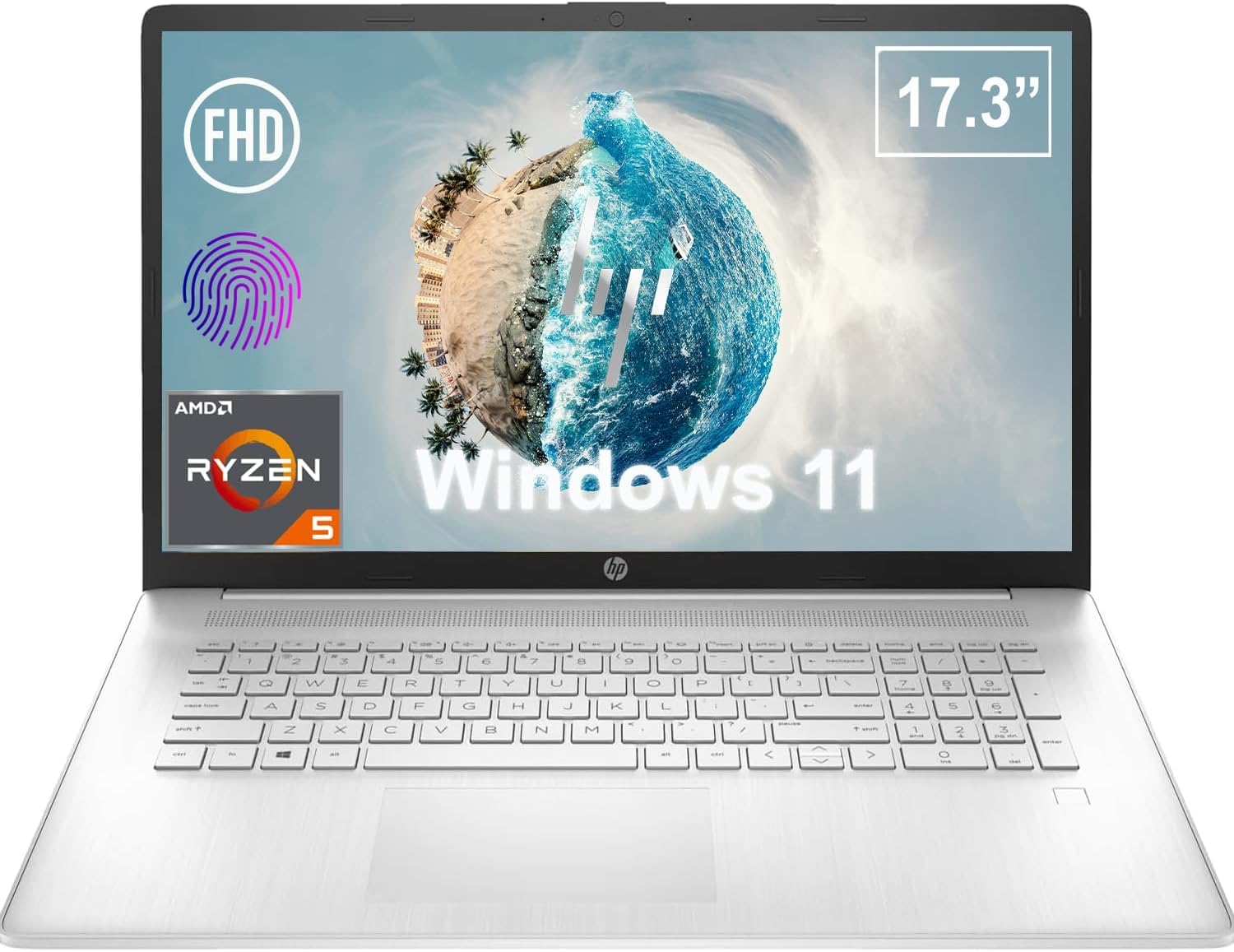
Rycina 1.1: Przód view of the HP 17.3 Inch FHD Business Laptop, showcasing the large display and keyboard.
2. Konfiguracja
2.1 Rozpakowanie i wstępna inspekcja
Ostrożnie wyjmij wszystkie elementy z opakowania. Sprawdź, czy znajdują się w nim następujące elementy:
- HP 17.3 Inch FHD Business Laptop
- Power Adapter (45 W Smart AC Power Adapter)
- Dokumentacja (niniejsza instrukcja, informacje o gwarancji)
Inspect the laptop and accessories for any signs of damage. If any items are missing or damaged, contact your retailer or HP support immediately.
2.2 Podłączanie zasilacza
Before first use, ensure the laptop is fully charged. Connect the power adapter to the AC smart pin port on the side of the laptop and then plug the adapter into a power outlet.
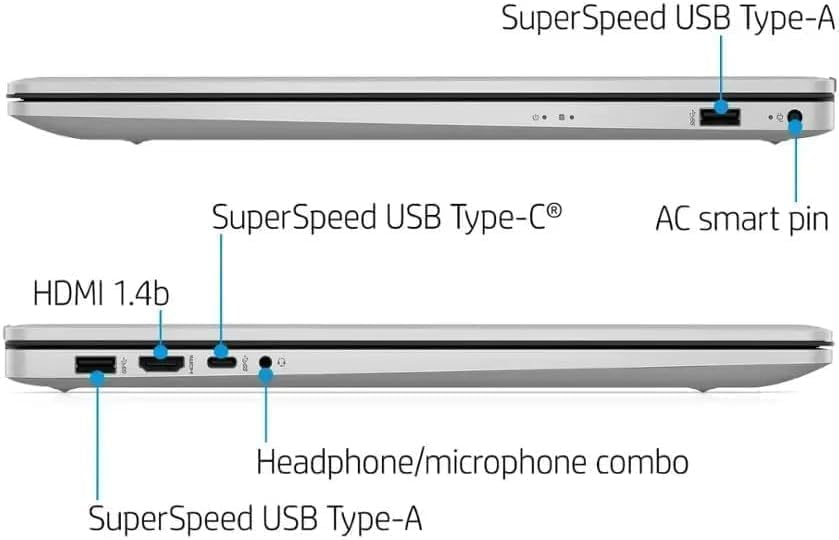
Rysunek 2.1: Strona view illustrating the location of the AC smart pin and other ports.
2.3 Pierwsze włączenie i konfiguracja systemu Windows
Press the power button to turn on the laptop. Follow the on-screen instructions to complete the Windows 11 Home setup process. This includes setting up your user account, network connection, and initial preferences.
3. Obsługa laptopa
3.1 Klawiatura i touchpad
The laptop features a full-size QWERTY keyboard with a 10-key number pad for efficient data entry. The integrated touchpad provides precise cursor control. Refer to the operating system's settings for customizing touchpad gestures and keyboard shortcuts.
3.2 Czytnik linii papilarnych
For enhanced security and convenient login, utilize the integrated fingerprint reader. Set up your fingerprints through Windows Hello in the Windows 11 settings.
3.3 Webkamera i mikrofony
The HP True Vision 720p HD Camera and integrated dual array digital microphones are located at the top of the display. These are suitable for video conferencing and online communication.
3.4 Łączność
- Wi-Fi: The laptop supports 802.11a/b/g/n/ac Wi-Fi for wireless internet access. Connect to available networks via the Windows network settings.
- Bluetooth: Bluetooth 5 allows for wireless connection to compatible devices such as headphones, mice, and keyboards. Enable and manage Bluetooth devices through Windows settings.
3.5 Ports and External Devices
Laptop wyposażony jest w szereg portów umożliwiających podłączenie urządzeń zewnętrznych:
- 1 x USB Type-C (5Gbps, Data Only): For connecting USB-C compatible devices and data transfer.
- 2 x USB Type-A (5Gbps): For connecting standard USB devices like external drives, mice, or keyboards.
- 1 x HDMI 1.4b: For connecting to external displays or projectors.
- 1 x Headphone/Microphone Combo: For connecting a headset with a single 3.5mm jack.
- 1 x AC Smart Pin: For connecting the power adapter.

Rysunek 3.1: Otwórz view of the laptop, highlighting the keyboard and touchpad area.
3.6 Zarządzanie baterią
The laptop is powered by a 3-Cell, 41 Wh Li-ion battery, offering up to 8 hours and 30 minutes of video playback. Use the provided 45 W Smart AC Power Adapter for charging. HP Fast Charge technology allows for quicker charging times.
4. Konserwacja
4.1 Czyszczenie laptopa
Aby zachować wygląd i funkcjonalność laptopa:
- Użyj miękkiej, niestrzępiącej się szmatki dampprzemyć wodą lub specjalnym środkiem do czyszczenia ekranów.
- Do czyszczenia klawiatury i obudowy należy używać miękkiej, suchej ściereczki. Unikać silnych środków chemicznych i materiałów ściernych.
- Przed czyszczeniem upewnij się, że laptop jest wyłączony i odłączony od zasilania.
4.2 Aktualizacje oprogramowania
Regularnie aktualizuj system operacyjny Windows i sterowniki, aby zapewnić optymalną wydajność, bezpieczeństwo i zgodność. Dostęp do usługi Windows Update można uzyskać w menu Ustawienia.
4.3 Security Software
The laptop comes preloaded with McAfee LiveSafe for security. Ensure this software is active and updated to protect against viruses and other threats.
5. Rozwiązywanie Problemów
W tej sekcji omówiono typowe problemy, jakie mogą wystąpić w laptopie HP.
5.1 Problemy z zasilaniem
- Laptop się nie włącza: Ensure the power adapter is securely connected to both the laptop and a working power outlet. Verify the battery is charged.
- Bateria nie ładuje się: Sprawdź zasilacz i kabel pod kątem uszkodzeń. Spróbuj użyć innego gniazdka elektrycznego.
5.2 Problemy z wyświetlaniem
- Brak obrazu na ekranie: Podłącz zewnętrzny monitor, aby sprawdzić, czy problem dotyczy wyświetlacza laptopa. Uruchom ponownie laptopa.
- Migotanie lub zniekształcenie obrazu: Zaktualizuj sterowniki graficzne. Dostosuj rozdzielczość ekranu i częstotliwość odświeżania w ustawieniach systemu Windows.
5.3 Problemy z łącznością
- Brak połączenia Wi-Fi: Ensure Wi-Fi is enabled. Restart your router and the laptop. Check network settings for correct password and configuration.
- Urządzenie Bluetooth nie łączy się: Ensure Bluetooth is enabled on both devices. Make sure the device is in pairing mode and within range.
W przypadku bardziej złożonych problemów należy skontaktować się z pomocą techniczną HP webodwiedź witrynę lub skontaktuj się z obsługą klienta.
6. Specyfikacje
| Funkcja | Szczegół |
|---|---|
| Marka | HP |
| Nazwa modelu | HP17 |
| Numer modelu | i5-1135G7 |
| Rozmiar ekranu | 17.3 cali |
| Typ wyświetlacza | IPS, Anti-Glare, LED |
| Rezolucja | 1920 x 1080 (FHD) |
| Częstotliwość odświeżania | 60 Hz |
| Edytor | AMD Ryzen 5 5500U (6 Cores, 12 Threads, up to 4.0 GHz Max Boost Clock) |
| Grafika | Zintegrowana karta graficzna AMD Radeon |
| Pamięć RAM | 32 GB DDR4-3200 MHz (Max 64 GB) |
| Składowanie | Dysk SSD PCIe NVMe M.2 o pojemności 1 TB |
| System operacyjny | Windows 11 Home, 64-bit, English |
| Łączność bezprzewodowa | Wi-Fi 802.11a/b/g/n/ac, Bluetooth 5 |
| Porty | 1x USB Type-C (5Gbps), 2x USB Type-A (5Gbps), 1x HDMI 1.4b, 1x Headphone/Microphone Combo, 1x AC Smart Pin |
| Webkrzywka | Kamera HP True Vision 720p HD |
| Audio | Dual Speakers, Integrated Dual Array Digital Microphones |
| Bateria | 3-Cell, 41 Wh Li-ion (Up to 8.5 hours video playback) |
| Zasilacz | 45 W Smart AC Power Adapter |
| Wymiary (szer. x gł. x wys.) | 40.07 x 25.78 x 2.06 cm (14.14"L x 9.31"W x 0.78"Th) |
| Waga | Od 2.07 kg |
| Cechy specjalne | Fingerprint Reader, Lightweight Design, HP Fast Charge |
7. Gwarancja i pomoc techniczna
7.1 Informacje o gwarancji
This HP laptop comes with a 1-year manufacturer's limited warranty. For detailed terms and conditions, please refer to the warranty documentation included with your product or visit the official HP support webstrona.
7.2 Obsługa klienta
If you encounter issues that cannot be resolved using the troubleshooting steps in this manual, please contact HP customer support. You can find contact information and additional resources on the official HP webstrona:
- Wsparcie HP Webstrona: wsparcie.hp.com
- Sklep HP: Sklep HP na Amazon