
Produkt ponadview
The Blaupunkt Bremen SQR 46 DAB Retro Car Stereo is a modern reinterpretation of the classic 1-DIN car radio from the 1980s. It combines vintage aesthetics with contemporary technology, offering a comprehensive in-car entertainment experience. This unit features Bluetooth connectivity, dual USB ports, SD card slot, AUX input, and AM/FM radio, along with DAB+ digital tuner capabilities. The package includes the receiver, a fully enclosed under-dash/overhead installation mounting kit, and a 22-inch radio antenna, providing a complete solution for various vehicle installations.
Co jest w pudełku
- Blaupunkt Bremen SQR 46 DAB Retro Car Stereo Receiver: The main head unit for audio playback and control.
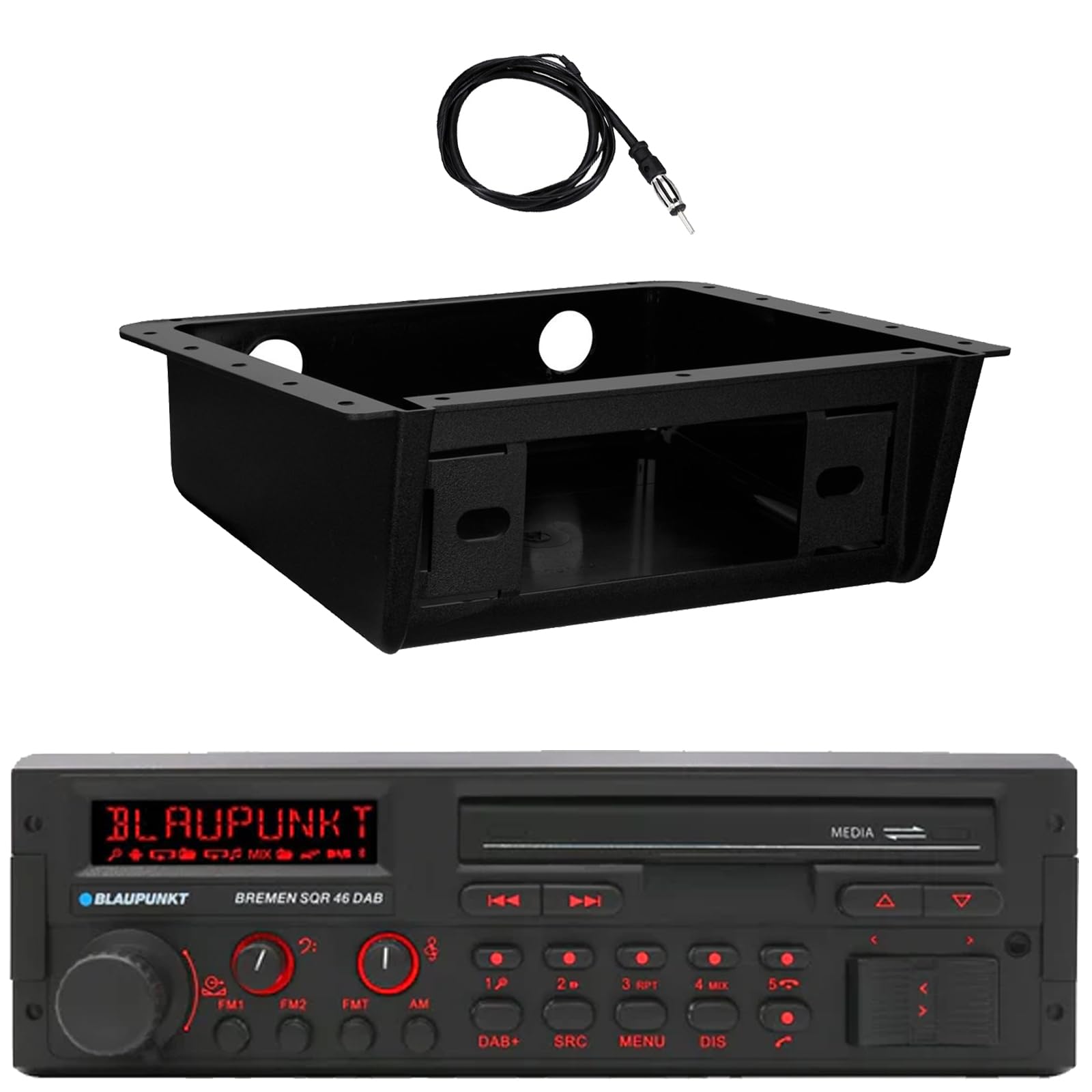
Obraz: Przód view of the Blaupunkt Bremen SQR 46 DAB car stereo receiver, showing the display, control knobs, and buttons.
- Fully Enclosed Under Dash/Overhead Installation Mounting Kit: A premium housing designed for secure installation of the receiver under the dashboard or overhead.

Image: Black, rectangular under-dash/overhead mounting kit, designed to house a single DIN car stereo.
- 22" Radio Antenna: A flexible marine-grade antenna for improved AM/FM radio reception.

Image: Coiled black wire antenna with a silver connector at one end.
Konfiguracja i instalacja
Proper installation is crucial for optimal performance. It is recommended that installation be performed by a qualified professional. This section provides general guidelines.
1. Montaż odbiornika
- Under Dash/Overhead Installation: The included mounting kit is designed to fully enclose the single DIN receiver. Secure the kit to a suitable flat surface under the dashboard or overhead using appropriate fasteners (not included).
- Insert the Blaupunkt Bremen SQR 46 receiver into the mounting kit. Ensure it is securely seated and locked into place.
- Alternatively, the unit can be installed in a standard single DIN opening in your vehicle's dashboard.
2. Połączenia okablowania
- Podłączenie zasilania: Connect the yellow wire to a constant 12V power source, the red wire to a switched 12V accessory power source, and the black wire to a chassis ground.
- Połączenia głośnikowe: Connect the speaker wires to your vehicle's speakers, ensuring correct polarity for each speaker.
- Połączenie antenowe: Connect the 22" radio antenna to the antenna input on the rear of the receiver. Route the antenna cable away from other wiring to minimize interference.
- Wejścia pomocnicze: If using external devices, connect them to the AUX-in port.
- Wyjścia RCA: Do podłączenia zewnętrznego amplifiers, use the RCA pre-outs.
3. Pierwsze włączenie zasilania
- After all connections are made, turn on your vehicle's ignition.
- Naciśnij przycisk zasilania na odbiorniku, aby go włączyć.
- Postępuj zgodnie ze wskazówkami wyświetlanymi na ekranie, aby wykonać konfigurację początkową, np. wybrać język lub ustawić zegar.
Instrukcja obsługi
Podstawowe sterowanie
- Przycisk zasilania: Naciśnij, aby włączyć lub wyłączyć urządzenie.
- Pokrętło głośności: Obróć, aby dostosować poziom głośności. Naciśnij, aby wyciszyć/wyłączyć wyciszenie.
- Przycisk SRC (Źródło): Press to cycle through available audio sources: AM, FM, DAB+, Bluetooth, USB, SD, AUX.
- Przycisk MENU: Dostęp do ustawień systemowych i regulacji dźwięku.
- DIS (Display) Button: Change display information or dim the display.
- Track/Tune Buttons (<< / >>): Use to skip tracks in media modes or tune radio frequencies.
Radio Operation (AM/FM/DAB+)
- Naciśnij SRC przycisk do AM, FM, Lub DAB+ jest zaznaczony.
- Użyj Track/Tune buttons to manually tune frequencies or seek for the next strong station.
- Zaprogramowane stacje: Press and hold numbered buttons (1-6) to save the current station as a preset. Press briefly to recall a saved station.
Działanie Bluetooth
- Łączenie w pary:
- Upewnij się, że Bluetooth jest włączony w Twoim urządzeniu mobilnym.
- Wybierać Bluetooth as the source on the receiver using the SRC przycisk.
- On your mobile device, search for available Bluetooth devices and select "Blaupunkt Bremen SQR 46".
- Potwierdź parowanie, jeśli zostaniesz o to poproszony.
- Strumieniowe przesyłanie dźwięku: Once paired, you can stream audio from your device. Use the Track/Tune buttons on the receiver to skip tracks.
- Rozmowy bez użycia rąk: When a call comes in, the unit will display caller information. Press the green call button to answer, or the red call button to reject/end.
Odtwarzanie z USB/karty SD
- Insert a USB drive into one of the USB ports or an SD card into the SD card slot.
- The unit will automatically switch to the USB or SD source and begin playback. If not, press the SRC przycisk, aby wybrać właściwe źródło.
- Użyj Track/Tune przyciski służące do nawigacji po utworach.
Wejście AUX
- Connect an external audio device (e.g., MP3 player) to the AUX-in port using a 3.5mm audio cable.
- Wybierać AUX jako źródło wykorzystujące SRC przycisk.
- Steruj odtwarzaniem z podłączonego urządzenia.
Ustawienia audio
- Naciśnij MENU button to access audio settings such as Bass, Treble, Balance, Fader, and Equalizer presets.
- Rotate the volume knob to adjust values and press it to confirm selections.
Konserwacja
- Czyszczenie urządzenia: Do przecierania panelu przedniego i wyświetlacza użyj miękkiej, suchej ściereczki. W przypadku uporczywych zabrudzeń delikatnie przetrzyj.ampPrzetrzyj szmatkę wodą. Unikaj stosowania silnych środków chemicznych, ściernych środków czyszczących i rozpuszczalników.
- Porty USB/SD: Utrzymuj gniazda USB i kart SD w czystości, bez kurzu i zanieczyszczeń.
- Opieka ogólna: Unikaj wystawiania urządzenia na działanie ekstremalnych temperatur, długotrwałego bezpośredniego światła słonecznego i nadmiernej wilgoci.
Rozwiązywanie problemów
| Problem | Możliwa przyczyna | Rozwiązanie |
|---|---|---|
| Brak zasilania | Nieprawidłowe okablowanie; Przepalony bezpiecznik; Wyłączony zapłon pojazdu. | Check power and ground connections. Verify vehicle fuse and unit fuse. Ensure vehicle ignition is on. |
| Brak dźwięku | Volume too low; Mute activated; Incorrect speaker wiring; Source not selected. | Zwiększ głośność. Wyłącz wyciszenie. Sprawdź połączenia głośników. Wybierz prawidłowe źródło dźwięku. |
| Bluetooth nie łączy się | Device not in pairing mode; Unit not in Bluetooth source; Interference. | Ensure Bluetooth is enabled on device and unit. Put device in pairing mode. Try re-pairing. Move closer to the unit. |
| Słaby odbiór radia | Antena nie jest podłączona; Antena jest uszkodzona; Obszar o słabym sygnale. | Check antenna connection. Inspect antenna for damage. Try tuning to a stronger station or moving to a different location. |
| USB/SD nie odtwarza się | Nieobsługiwane file format; Uszkodzony nośnik; Wybrano nieprawidłowe źródło. | Zapewnić files are in a supported format (e.g., MP3, WMA). Try a different USB drive/SD card. Select USB/SD source. |
Specyfikacje
| Funkcja | Szczegół |
|---|---|
| Marka | Blaupunkt |
| Numer modelu | Bremen SQR 46 |
| Technologia łączności | Pomocniczy, Bluetooth |
| Typ kontrolera | Naciśnij przycisk |
| Cechy specjalne | Built-In Bluetooth, USB, SD Card, AUX-in, DAB+ digital tuner |
| Kompatybilne urządzenia | Amplifier, Smartphones, USB drives, SD cards |
| Tryb wyjścia audio | Stereofoniczny |
| Typ wyjścia audio | RCA (6 channels) |
| Liczba jednostek | 1 (Odbiornik) |
| Zawarte komponenty | Receiver, Stereo Install Kit, Radio Antenna |
Informacje o gwarancji
This Blaupunkt Bremen SQR 46 DAB Retro Car Stereo comes with a 1-letnia gwarancja producenta. This warranty covers defects in materials and workmanship under normal use. Please retain your proof of purchase for warranty claims. For detailed terms and conditions, refer to the warranty card included with your product or visit the official Blaupunkt webstrona.
Obsługa klienta
For further assistance, technical support, or warranty inquiries, please contact Blaupunkt customer service. You can typically find contact information on the official Blaupunkt webstronie internetowej lub w dokumentacji dołączonej do produktu.
Urzędnik Webstrona: www.blaupunkt.com (Please note: This link is a general placeholder. Refer to your product's specific documentation for the most accurate support contact information.)