
1. Wprowadzenie
Dziękujemy za zakupasing the ELEPHAS BL128MINI Mini Projector. This manual provides essential information for setting up, operating, and maintaining your projector. Please read it thoroughly before use to ensure optimal performance and longevity of the device.
2. Zawartość opakowania
Sprawdź, czy w przesyłce znajdują się wszystkie elementy wymienione poniżej:
- 1 x ELEPHAS BL128MINI Projector
- 1 x Pilot zdalnego sterowania
- 1 x Instrukcja obsługi (ten dokument)
- 1 x kabel HDMI
- 1 x odłączany statyw
3. Koniec produktuview
3.1 Główne cechy
- Rozdzielczość Full HD 1080P: Supports 1920 x 1080 resolution for clear images.
- 24-bit True Color: Zapewnia żywe i dokładne kolory.
- Projekcja na dużym ekranie: Capable of projecting up to a 200-inch screen.
- Detachable Tripod: Provides stable placement and flexible positioning.
- Wbudowany głośnik HIFI: Offers integrated audio output.
- Wiele opcji łączności: Includes USB, HDMI, AV, and Audio ports.

Image 3.1: The ELEPHAS BL128MINI Projector offers 1080P Full HD resolution with 24-bit true color, an 8000:1 contrast ratio, and enhanced brightness for a vivid viewzdobywania doświadczenia.
3.2 Projector Ports and Controls
Familiarize yourself with the various ports and controls on your projector for proper connection and operation.

Image 3.2: Rear panel of the ELEPHAS BL128MINI Projector, highlighting DC power input, USB ports, HDMI port, AV port, and audio output. Compatible devices include Xbox, TV Stick, PC, Smartphone, USB drives, speakers, and headphones.
4. Konfiguracja
4.1 Połączenie zasilania
- Podłącz zasilacz do portu DC IN w projektorze.
- Podłącz zasilacz do gniazdka ściennego.
4.2 Montaż statywu
The included detachable tripod allows for stable placement on various surfaces.
- Znajdź otwór na śrubę mocującą statyw, znajdujący się na spodzie projektora.
- Przykręć statyw dokładnie do otworu montażowego.
- Adjust the tripod legs to achieve the desired height and angle for projection.

Image 4.2: The detachable tripod provides stability for the projector, whether placed on a desktop or uneven outdoor surfaces.
4.3 Umiejscowienie i odległość projekcji
Position the projector on a flat, stable surface. The optimal projection distance ranges from 3.3 to 9.8 feet for screen sizes between 50 and 200 inches.

Image 4.3: Recommended projection distances for achieving various screen sizes, from 50 to 200 inches.
5. Instrukcja obsługi
5.1 Włączanie/wyłączanie zasilania
- Włączanie: Naciśnij przycisk zasilania na projektorze lub pilocie.
- Wyłączone: Naciśnij ponownie przycisk zasilania. Projektor przejdzie w tryb czuwania.
5.2 Regulacja ostrości
Obróć pierścień ostrości na obiektywie projektora, aż wyświetlany obraz będzie wyraźny i ostry.
5.3 Wybór źródła sygnału wejściowego
Use the 'Source' button on the remote control or the projector to select the desired input source (HDMI, USB, AV).
5.4 Podłączanie urządzeń zewnętrznych
The projector supports various external devices:
- HDMI: Connect laptops, PCs, TV boxes, TV sticks, gaming consoles (e.g., Xbox), or other HDMI-enabled devices using the provided HDMI cable.
- USB: Aby odtwarzać multimedia, włóż dysk flash USB do portu USB files bezpośrednio.
- AV: W przypadku starszych urządzeń z wyjściem wideo kompozytowego należy użyć portu AV.
- Smartfony/tablety: For iOS and Android devices, an additional HDMI adapter (not included) is required for connection.
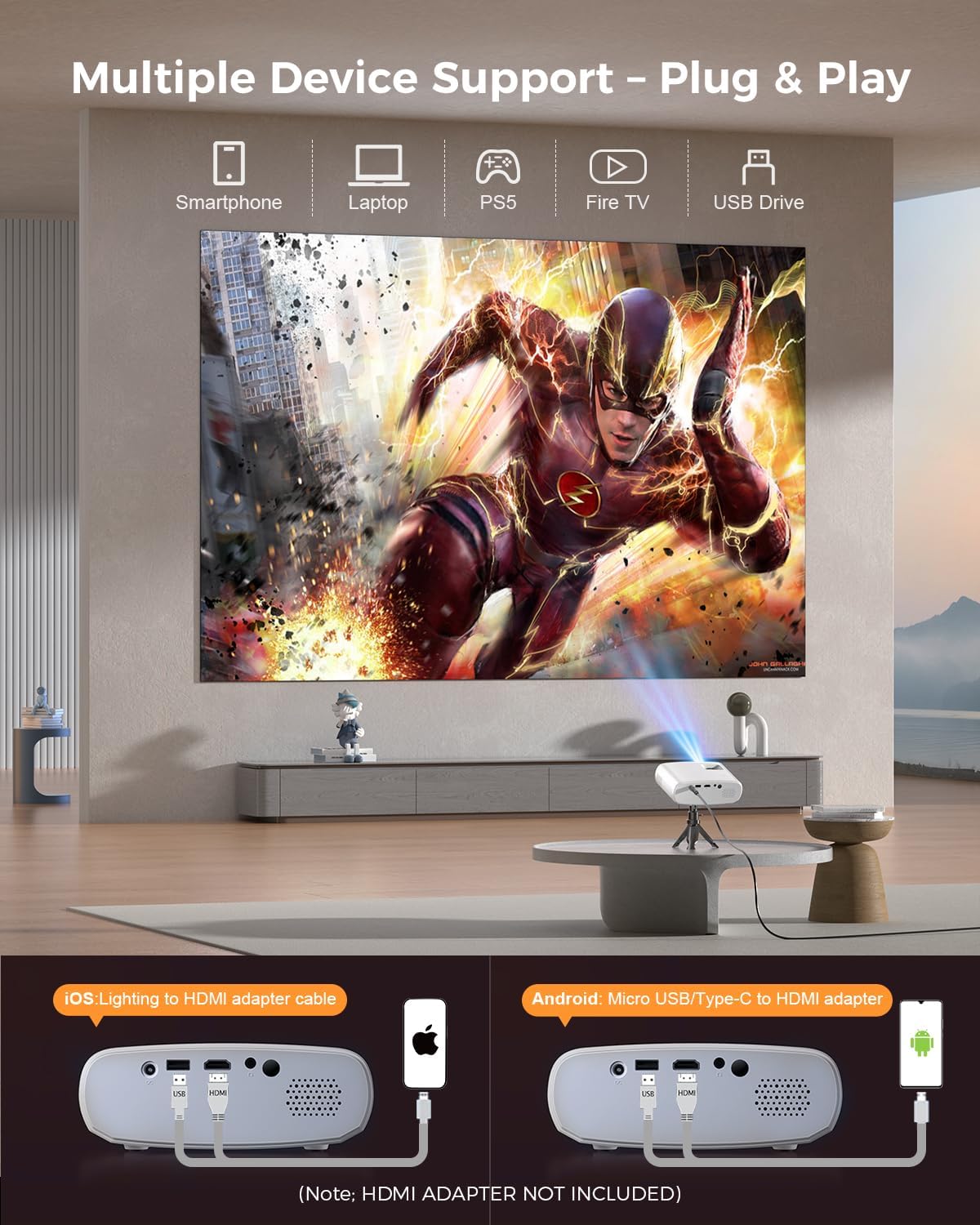
Image 5.4: The projector supports multiple devices via HDMI and USB. Note that an HDMI adapter is required for direct smartphone connection (not included).
5.5 Wyjście audio
The projector has a built-in HIFI speaker. For external audio, connect headphones or external speakers to the Audio Out port.
6. Konserwacja
6.1 Czyszczenie
- Obiektyw: Use a soft, lint-free cloth or lens cleaning paper. Avoid abrasive materials.
- Casing: Wytrzyj projektor casing with a soft, dry cloth. Do not use liquid cleaners or solvents.
- Wentylacja: Aby zapobiec przegrzaniu, należy upewnić się, że otwory wentylacyjne są czyste, bez kurzu i przeszkód.
6.2 Przechowywanie
When not in use, store the projector in a cool, dry place, away from direct sunlight and extreme temperatures. Use the original packaging or a protective bag to prevent dust accumulation.
7. Rozwiązywanie Problemów
| Problem | Możliwa przyczyna | Rozwiązanie |
|---|---|---|
| Brak wyświetlanego obrazu | Luźny kabel zasilający; Nieprawidłowe źródło sygnału; Urządzenie nie jest prawidłowo podłączone. | Sprawdź połączenie zasilania; Wybierz prawidłowe źródło sygnału wejściowego; Podłącz ponownie kabel HDMI/USB. |
| Obraz rozmazany | Nie ustawiono ostrości; Projektor znajduje się zbyt blisko/daleko od ekranu. | Wyreguluj pierścień ostrości; Wyreguluj odległość projekcji. |
| Brak dźwięku | Głośność jest zbyt niska; Wyciszono; Zewnętrzne urządzenie audio nie jest podłączone. | Zwiększ głośność; Włącz wyciszenie; Sprawdź zewnętrzne połączenia audio. |
| Pilot nie działa | Baterie są słabe/wyczerpane; przeszkoda między pilotem a projektorem. | Wymień baterie. Upewnij się, że odbiornik podczerwieni jest w zasięgu wzroku. |
| Cannot play Netflix/Hulu/Prime Video | HDCP copyright protection. | Use an external streaming device like Amazon Fire Stick or Roku Stick (not included). |
8. Specyfikacje
| Funkcja | Szczegół |
|---|---|
| Model | BL128MINI |
| Marka | SŁOŃ |
| Rozdzielczość wyświetlacza | 1920 x 1080 (1080P Full HD) |
| Technologia łączności | HDMI, USB, AV, wyjście audio |
| Cechy specjalne | HDMI Connectivity, Portable, Built-in Speakers, Detachable Tripod |
| Zalecane zastosowanie | Wewnątrz/na zewnątrz |
| Waga przedmiotu | 1.96 funta (ok. 0.89 kg) |
| Wymiary produktu | 6 x 4.4 x 2.4 cala (ok. 15.2 x 11.2 x 6.1 cm) |
9. Gwarancja i wsparcie
ELEPHAS projectors are certified with CE, FCC, and RoHS standards.
- Factory Support: We provide 3-years factory support for this product.
- Wsparcie techniczne: Dostępne jest dożywotnie wsparcie techniczne.
- Obsługa klienta: 24/7 professional service is provided.
- Zwroty: A 30-day return or exchange policy is in place.
For further assistance, please refer to the contact information provided on the product packaging or the official ELEPHAS webstrona.

Image 9.1: ELEPHAS offers comprehensive customer support, including 24/7 professional service, a 30-day return policy, and lifetime technical support.