
Wstęp
This manual provides comprehensive instructions for the INSIGNIA 4 ft Cat-6 Ethernet Cable (Grey). Designed for reliable and high-speed wired network connections, this cable is suitable for various applications including home, office, gaming, and streaming. Please read this manual carefully to ensure proper installation and optimal performance of your Ethernet cable.
Produkt ponadview
The INSIGNIA 4 ft Cat-6 Ethernet Cable (Grey) is engineered to deliver stable and fast internet connectivity. It features:
- Fast & Reliable Wired Internet Connection: Improves network stability for work, streaming, and gaming, offering smooth, consistent internet performance where Wi-Fi may be weak or unstable.
- High-Speed Cat-6 Standard: Supports data transfer rates up to 5 Gigabits Per Second, suitable for modern network demands.
- Trwała konstrukcja: Features corrosion-resistant RJ45 connectors and a robust cable design for long-lasting performance.
- Uniwersalna kompatybilność: Works with a wide range of devices including laptops, desktop PCs, gaming consoles (Xbox, PlayStation), smart TVs, routers, and streaming boxes.
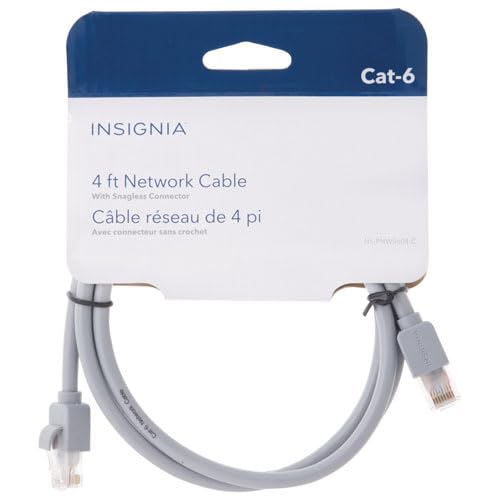
Image: Two RJ45 connectors of the INSIGNIA Cat-6 Ethernet cable. The connectors are grey with clear plastic clips, showing the internal wiring.
Instrukcje konfiguracji
Connecting your INSIGNIA Cat-6 Ethernet cable is a straightforward process. Follow these steps for a secure connection:
- Identyfikacja portów: Locate the Ethernet (RJ45) ports on your devices. These are typically rectangular with a small clip on one side. You will need one port on your internet source (e.g., router, modem) and one on your target device (e.g., computer, gaming console, smart TV).
- Połącz pierwszy koniec: Gently insert one end of the INSIGNIA Cat-6 Ethernet cable into an available Ethernet port on your router or modem. Ensure the clip clicks into place, indicating a secure connection.
- Podłącz drugi koniec: Insert the other end of the Ethernet cable into the Ethernet port on your target device. Again, ensure the clip clicks securely.
- Sprawdź połączenie: Most devices will automatically detect the wired connection. Look for an indicator light on the Ethernet port (if available) or check your device's network settings to confirm a successful wired connection.
Notatka: Do not force the connector into the port. If it does not fit easily, check the orientation of the connector and the port.
Instrukcja obsługi
Once connected, the INSIGNIA Cat-6 Ethernet cable operates passively, providing a direct data link between your devices. No additional software or drivers are typically required for its function.
- Automatyczne wykrywanie: Modern operating systems and network devices are designed to automatically detect and utilize a wired Ethernet connection when available.
- Priorytetyzacja: Wired connections are generally prioritized over wireless (Wi-Fi) connections by most devices due to their superior speed and stability.
- Wydajność: For optimal performance, ensure both connected devices support Gigabit Ethernet (1000 Mbps) or higher, to fully utilize the Cat-6 cable's capabilities.
Konserwacja
To ensure the longevity and optimal performance of your INSIGNIA Cat-6 Ethernet cable, follow these simple maintenance guidelines:
- Unikaj zginania: Do not excessively bend, crimp, or tightly coil the cable, as this can damage the internal wires and reduce performance.
- Chroń złącza: Keep the RJ45 connectors clean and free from dust or debris. Avoid pulling the cable by the wire; always grasp the connector when plugging or unplugging.
- Prawidłowe przechowywanie: When not in use, store the cable loosely coiled in a dry, cool place away from direct sunlight or extreme temperatures.
- Kontrola fizyczna: Periodically inspect the cable and connectors for any signs of wear, fraying, or damage. Replace the cable if significant damage is observed.
Rozwiązywanie problemów
If you encounter issues with your wired network connection, consider the following troubleshooting steps:
| Problem | Możliwe rozwiązanie |
|---|---|
| Brak połączenia internetowego. |
|
| Niska prędkość Internetu. |
|
| Przerywane połączenie. |
|
Specyfikacje
| Funkcja | Szczegół |
|---|---|
| Marka | INSIGNIA |
| Model | 4 ft Cat-6 Ethernet Cable (Grey) |
| Typ kabla | Ethernet (Cat-6) |
| Typ złącza | RJ45 (Male-to-Male) |
| Długość | 4 stóp |
| Szybkość przesyłu danych | Do 5 gigabitów na sekundę |
| Kompatybilne urządzenia | Laptop, Desktop PC, Router, Modem, Gaming Consoles (Xbox, PlayStation), Smart TVs |
| Waga przedmiotu | 70 gram |
| UPC | 600603276934 |
| ASIN | B0G2QXV9CG |
Gwarancja i wsparcie
This INSIGNIA product comes with a 30 dni ograniczonej gwarancji. For warranty claims or technical support, please refer to the manufacturer's official webOdwiedź witrynę lub skontaktuj się z działem obsługi klienta. Zachowaj paragon zakupu, aby skorzystać z gwarancji.
Producent: INSIGNIA
Aby uzyskać dalszą pomoc, odwiedź stronę INSIGNIA Store on Amazon.