
1. Wprowadzenie
Thank you for choosing the GEEKOM GT1 Mega Mini PC. This manual provides essential information for setting up, operating, maintaining, and troubleshooting your device. Please read it carefully before use and keep it for future reference.
The GEEKOM GT1 Mega is a high-performance mini PC equipped with the Intel Core Ultra 9 185H processor, Intel AI Boost (dedicated NPU), and integrated Intel Arc graphics. It is designed for demanding tasks such as AI applications, advanced multitasking, 4K video editing, photo retouching, virtualization, and professional software.
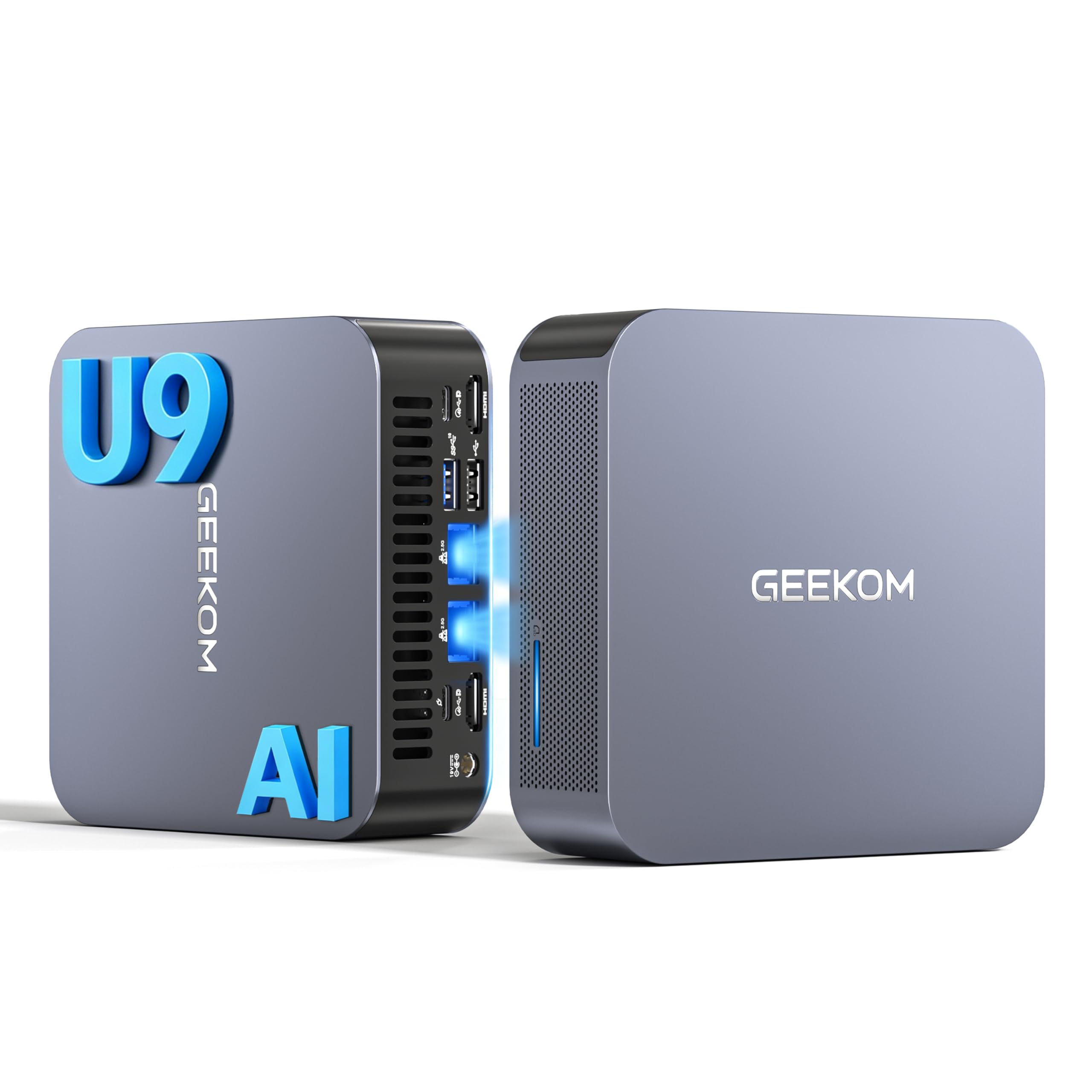
Obraz 1.1: Przód view of the GEEKOM GT1 Mega Mini PC.
2. Informacje dotyczące bezpieczeństwa
Aby zapobiec uszkodzeniu urządzenia lub obrażeniom ciała, należy przestrzegać poniższych wskazówek bezpieczeństwa:
- Używaj wyłącznie zasilacza dostarczonego z urządzeniem.
- Nie wystawiaj urządzenia na działanie wody, wilgoci ani ekstremalnych temperatur.
- Unikaj umieszczania urządzenia w bezpośrednim świetle słonecznym lub w pobliżu źródeł ciepła.
- Zapewnij odpowiednią wentylację, nie blokuj żadnych otworów wentylacyjnych.
- Nie próbuj samodzielnie otwierać ani naprawiać urządzenia. W celu uzyskania pomocy skontaktuj się z wykwalifikowanym personelem.
- Trzymaj urządzenie z dala od silnych pól magnetycznych.
3. Zawartość opakowania
Sprawdź, czy w przesyłce znajdują się wszystkie elementy:
- 1 x GEEKOM GT1 Mega Mini PC
- 1 x mocowanie VESA ze śrubami
- 1 x zasilacz
- 1 x kabel HDMI
- 1 x Instrukcja obsługi
- 1 x Karta z podziękowaniami

Image 3.1: Contents included in the GEEKOM GT1 Mega Mini PC package.
4. Koniec produktuview
4.1. Porty przednie i tylne
The GEEKOM GT1 Mega Mini PC offers a comprehensive set of ports for versatile connectivity:

Image 4.1: Diagram illustrating the front and rear ports of the GEEKOM GT1 Mega Mini PC.
- Porty przednie:
- 4 x USB 3.2 Gen2 Type-A (one with Always On power)
- Gniazdo słuchawkowe 1 x 3.5mm
- 1 x przycisk zasilania
- Porty tylne:
- 2 x USB4 (40 Gbps, eGPU compatible, one with power delivery)
- 2 x HDMI 2.0
- 2 x RJ45 2.5Gbps Ethernet Ports
- 1 x USB 3.2 Gen2 typu A
- 1 x USB 2.0 typu A
- 1 wejście prądu stałego
- 1 x Czytnik kart SD
- 1 x gniazdo blokady Kensington
4.2. Główne cechy
- Edytor: Intel Core Ultra 9 185H (16 Cores, 22 Threads, up to 5.1 GHz) with Intel AI Boost (NPU).
- Grafika: Integrated Intel Arc Graphics.
- Pamięć: 16GB DDR5 5600MHz dual-channel RAM (upgradable up to 128GB).
- Składowanie: 1TB NVMe PCIe Gen4 SSD (expandable up to 4TB).
- Sieć: Dual 2.5G Ethernet, WiFi 7, Bluetooth 5.4.
- Obsługa wyświetlania: Up to four 4K displays or one 8K display via USB4 and HDMI.
- Chłodzenie: IceBlast 2.0 advanced cooling system with dual copper heat pipes and high-efficiency fan.
- Podwozie: Premium metallic chassis, 0.78 L volume, withstands pressure up to 200 kg.
5. Konfiguracja
5.1. Połączenie początkowe
- Podłącz wyświetlacz: Connect your monitor(s) to the Mini PC using the HDMI or USB4 ports. The GT1 Mega supports up to four 4K displays or one 8K display.
- Podłącz urządzenia peryferyjne: Podłącz klawiaturę, mysz i inne urządzenia USB do dostępnych portów USB.
- Połącz sieć: For wired internet, connect an Ethernet cable to one of the 2.5G RJ45 ports. For wireless, ensure your WiFi network is available during initial setup.
- Podłącz zasilanie: Podłącz zasilacz do portu wejściowego DC w komputerze Mini PC, a następnie podłącz zasilacz do gniazdka elektrycznego.
5.2. Pierwsze uruchomienie
- Naciśnij przycisk zasilania znajdujący się z przodu komputera Mini PC.
- The device will boot into Windows 11 Pro. Follow the on-screen instructions to complete the initial Windows setup, including language, region, network connection, and user account creation.
- Once Windows is set up, it is recommended to check for and install any available system updates.

Obraz 5.1: Example of a multi-monitor setup with the GEEKOM GT1 Mega Mini PC.
6. Instrukcja obsługi
6.1. Włączanie/wyłączanie zasilania
- Włączanie: Naciśnij przycisk zasilania raz.
- Zamknięcie: Kliknij przycisk Start w systemie Windows, a następnie wybierz Zasilanie > Wyłącz.
- Uruchom ponownie: Kliknij przycisk Start w systemie Windows, a następnie wybierz Zasilanie > Uruchom ponownie.
- Spać: Kliknij przycisk Start w systemie Windows, a następnie wybierz Zasilanie > Uśpienie.
6.2. Łączność sieciowa
- Przewodowe (Ethernet): Connect an Ethernet cable to one of the two 2.5G RJ45 ports. The system will automatically detect the connection.
- Bezprzewodowa (Wi-Fi 7): W systemie Windows kliknij ikonę sieci na pasku zadań, wybierz swoją sieć Wi-Fi, wprowadź hasło i połącz się.
- Bluetooth 5.4: To pair Bluetooth devices, go to Windows Settings > Bluetooth & devices, turn on Bluetooth, and select 'Add device'.
6.3. Konfiguracja wyświetlacza
The Mini PC supports multiple displays. To configure them:
- Kliknij prawym przyciskiem myszy na pulpicie i wybierz „Ustawienia wyświetlania”.
- Windows will detect connected displays. You can arrange them, change resolution, and set display modes (Extend, Duplicate, Second screen only).
7. Konserwacja
7.1. Czyszczenie
- Regularnie czyść zewnętrzną część komputera Mini PC miękką, suchą ściereczką.
- Use compressed air to gently clear dust from the ventilation openings to maintain optimal cooling performance.
- Nie należy używać płynnych środków czyszczących ani materiałów ściernych.
7.2. Aktualizacje systemu
Keep your Windows operating system and drivers updated to ensure optimal performance and security:
- Go to Windows Settings > Windows Update to check for and install system updates.
- Odwiedź oficjalną stronę GEEKOM website for the latest driver updates for your GT1 Mega.
7.3. Hardware Upgrades
The GEEKOM GT1 Mega allows for memory and storage upgrades:
- BARAN: The device supports up to 128GB of DDR5 SODIMM memory.
- Dysk SSD: The 1TB NVMe PCIe Gen4 SSD can be expanded up to 4TB. An additional M.2 2242 SATA SSD slot is available for up to 2TB.
For detailed instructions on how to perform hardware upgrades, please refer to the comprehensive guide on the GEEKOM support website or consult a professional technician.

Image 7.1: Illustration of the GEEKOM GT1 Mega's upgradable DDR5 memory and SSD storage.

Obraz 7.2: Wybuch view of the GEEKOM GT1 Mega, highlighting the IceBlast 2.0 cooling system components.
8. Rozwiązywanie Problemów
If you encounter issues with your GEEKOM GT1 Mega, refer to the following common solutions:
| Problem | Możliwa przyczyna | Rozwiązanie |
|---|---|---|
| Brak zasilania | Zasilacz nie jest podłączony, gniazdko jest uszkodzone | Upewnij się, że zasilacz jest prawidłowo podłączony do komputera i sprawnego gniazdka elektrycznego. Spróbuj użyć innego gniazdka. |
| Brak wyświetlacza | Monitor not connected, incorrect input source, faulty cable | Check HDMI/USB4 cable connections. Ensure monitor is on and set to the correct input source. Try a different cable or monitor. |
| No internet (Wi-Fi) | Wi-Fi wyłączone, nieprawidłowe hasło, problem z routerem | Sprawdź ustawienia Wi-Fi w systemie Windows. Zweryfikuj hasło Wi-Fi. Uruchom ponownie router. |
| No internet (Ethernet) | Ethernet cable disconnected, network driver issue | Ensure Ethernet cable is securely connected. Check network adapter status in Device Manager. Update network drivers. |
| System jest powolny/nie odpowiada | Too many applications running, overheating, outdated drivers | Close unnecessary applications. Ensure proper ventilation. Update drivers and Windows. |
If the problem persists, please contact GEEKOM customer support for further assistance.
9. Specyfikacje
Detailed technical specifications for the GEEKOM GT1 Mega Mini PC:
| Funkcja | Specyfikacja |
|---|---|
| Marka | GEEKOM |
| Nazwa modelu | Mega GT1 |
| System operacyjny | Windows 11 Pro |
| Model procesora | Intel Core Ultra 9-185H |
| Prędkość procesora | 5.1 GHz (maksymalna częstotliwość turbo) |
| Grafika | Zintegrowana karta graficzna Intel Arc |
| BARAN | 16 GB DDR5 (5600MHz, expandable to 128 GB) |
| Składowanie | 1 TB NVMe PCIe Gen4 SSD (expandable to 4 TB) |
| Technologia dysków twardych | Dysk SSD |
| Łączność | 2x 2.5G Ethernet, Wi-Fi 7, Bluetooth 5.4 |
| Porty USB | 2x USB4 (40Gbps), 5x USB 3.2 Gen2 Type-A, 1x USB 2.0 Type-A |
| Wyjście wideo | 2x HDMI 2.0, 2x USB4 (DisplayPort 1.4) |
| Maksymalna rozdzielczość wyświetlacza | 8K (via USB4), 4K (via HDMI) |
| Wyjście audio | Gniazdo audio 3.5mm |
| Czytnik kart | Czytnik kart SD |
| Zasilacz | Type C/EF – 2 pins (European/Hybrid FR-DE plug) |
| Certyfikaty | CE, FCC, RoHS |

Image 9.1: GEEKOM GT1 Mega Mini PC certifications including CB, ROHS, FCC ID, EPR, CEC, UKCA, UL4200A.
10. Gwarancja i wsparcie
The GEEKOM GT1 Mega Mini PC comes with a 3-year manufacturer's warranty and professional technical support.
10.1. Informacje o gwarancji
Your device is covered by a 3-year warranty from the date of purchase, ensuring peace of mind against manufacturing defects. Please retain your proof of purchase for warranty claims.
10.2. Wsparcie techniczne
For any technical issues or support inquiries, please use one of the following methods:
- Contact Seller on Amazon: Log in to your Amazon account, navigate to 'Your Orders', and click 'Get Help' for assistance.
- Wsparcie e-mailowe: Send an email to the GEEKOM support team at pan.he@geekom.tw. Our team will respond as soon as possible.


