
1. Ważne instrukcje bezpieczeństwa
Przed użyciem urządzenia prosimy o dokładne zapoznanie się z instrukcją. Zachowaj instrukcję do wykorzystania w przyszłości.
- Nie stosować na zewnątrz ani na mokrych powierzchniach.
- Nie należy używać jako zabawki. Należy zachować szczególną ostrożność, gdy jest używany przez dzieci lub w ich pobliżu.
- Używaj wyłącznie zgodnie z opisem w niniejszej instrukcji. Używaj wyłącznie akcesoriów zalecanych przez producenta.
- Nie używaj z uszkodzonym przewodem lub wtyczką. Jeśli urządzenie nie działa prawidłowo, zostało upuszczone, uszkodzone, pozostawione na zewnątrz lub wpadło do wody, zwróć je do punktu serwisowego.
- Nie ciągnij ani nie przenoś za kabel, nie używaj kabla jako uchwytu, nie zamykaj drzwi na kablu ani nie ciągnij kabla wokół ostrych krawędzi lub narożników. Nie przejeżdżaj urządzeniem po kablu. Trzymaj kabel z dala od rozgrzanych powierzchni.
- Nie odłączaj, ciągnąc za przewód. Aby odłączyć, chwyć za wtyczkę, nie za przewód.
- Nie dotykaj wtyczki ani urządzenia mokrymi rękami.
- Nie wkładać żadnych przedmiotów do otworów. Nie używać z zablokowanymi otworami; utrzymywać w czystości, bez kurzu, kłaczków, włosów i wszystkiego, co może ograniczyć przepływ powietrza.
- Trzymaj włosy, luźne ubrania, palce i inne części ciała z dala od otworów i ruchomych części.
- Nie zbieraj palących się lub dymiących przedmiotów, np. papierosów, zapałek lub gorącego popiołu.
- Nie należy zbierać łatwopalnych lub wybuchowych cieczy, takich jak benzyna, ani używać urządzenia w miejscach, w których mogą one występować.
- Nie należy zbierać materiałów toksycznych (np. wybielacza chlorowego, amoniaku, środka do czyszczenia odpływów).
- Nie używać bez założonego pojemnika na kurz i/lub filtrów.
- Przed odłączeniem zasilania wyłącz wszystkie elementy sterujące.
- Zachowaj szczególną ostrożność podczas czyszczenia schodów.
- Do not use to pick up large debris or sharp objects as this may damage the vacuum.
2. Koniec produktuview
The Tikom V750 is a versatile cordless stick vacuum cleaner designed for efficient cleaning of various surfaces. It features a powerful motor, multiple suction modes, and a comprehensive filtration system.
Zawarte komponenty
W skład pakietu wchodzą następujące elementy:
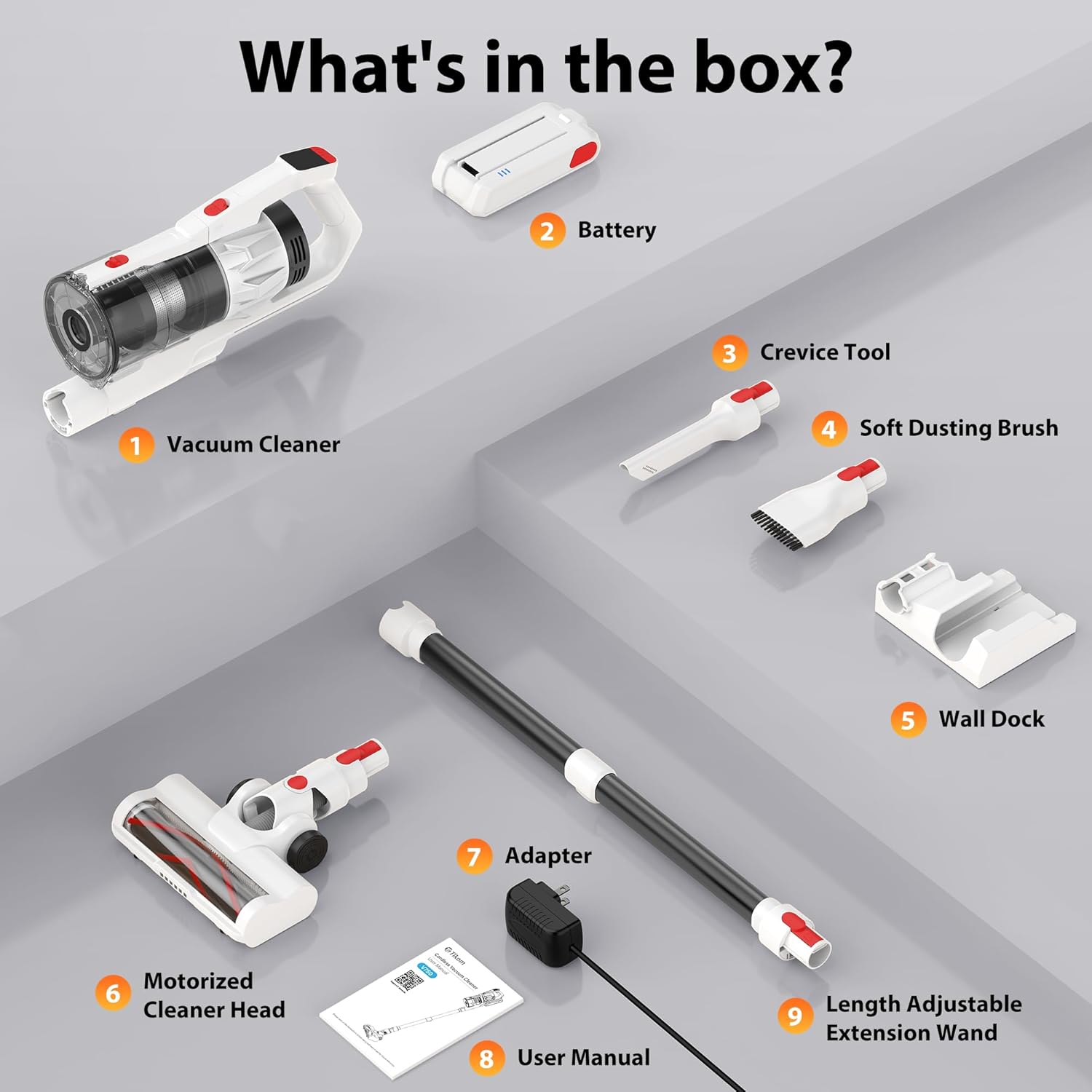
- Vacuum Cleaner Main Body
- Akumulator do ponownego ładowania
- Narzędzie do szczelin
- Miękka szczotka do kurzu
- Wall Dock (with 4 screws and plastic expansion anchors)
- Zmotoryzowana głowica czyszcząca
- Zasilacz/ładowarka
- Instrukcja obsługi
- Length Adjustable Extension Wand
- Filtr HEPA (wstępnie zainstalowany)
3. Instalacja i montaż
Początkowe ładowanie
Before first use, fully charge the battery. The detachable 7*2600 mAh battery can be charged in two ways:
- Directly on the vacuum: Podłącz zasilacz do portu ładowania w odkurzaczu.
- Niezależnie: Remove the battery from the vacuum and connect the power adapter directly to the battery.
A full charge typically takes 4-5 hours. The LED display will indicate charging status.

The battery provides approximately 50 minutes of runtime on low suction and 25 minutes on high suction.
Montaż odkurzacza
- Wsuń rurę przedłużającą do głównego korpusu odkurzacza, aż do momentu, gdy zatrzaśnie się pewnie.
- Attach the motorized cleaner head to the other end of the extension wand until it clicks.
- For handheld use, attach desired accessories (crevice tool or soft dusting brush) directly to the main vacuum body.
Instalacja naścienna
The included wall dock provides convenient storage and charging. Choose a suitable location near a power outlet. Use the provided screws and plastic expansion anchors to securely mount the dock to the wall. Ensure the vacuum cleaner cannot be started while the battery is charging on the wall mount for safety.

4. Instrukcja obsługi
Włączanie/wyłączanie i tryby ssania
Press the power button to turn the vacuum cleaner on or off. The Tikom V750 offers two suction levels:
- Niskie ssanie: Suitable for light cleaning and extending battery life.
- High Suction: Provides maximum power for stubborn dirt and debris.
Toggle between suction modes using the dedicated button on the handle.

Inteligentny wyświetlacz LED
The intuitive color LED display provides real-time information:
- Ikona poziomu naładowania baterii: Pokazuje poziom naładowania baterii.
- Suction Level Indicator: Displays current suction mode (Low/High).
- Malfunction Warnings: Alerts you to potential issues, such as a brush roll error.

Korzystanie z załączników i funkcji
The V750 comes with various attachments for versatile cleaning:

- Zmotoryzowana głowica czyszcząca: Ideal for floors and carpets. Features a 180° rotatable design and 6 LED lights for cleaning dark areas. The V-shaped roller brush is designed to prevent hair tangling.
- Miękka szczotka do kurzu: Use for delicate surfaces, furniture, and keyboards.
- Końcówka szczelinowa: Doskonale nadaje się do wąskich szczelin, narożników i trudno dostępnych miejsc.
- Przedłużacz: Connects the main body to the cleaner head or other tools for extended reach, allowing cleaning of high areas like ceilings or curtains.

The vacuum is suitable for various floor types, including hard floors and carpets.

5. Konserwacja
Regular maintenance ensures optimal performance and extends the life of your Tikom V750.
Opróżnianie pojemnika na kurz
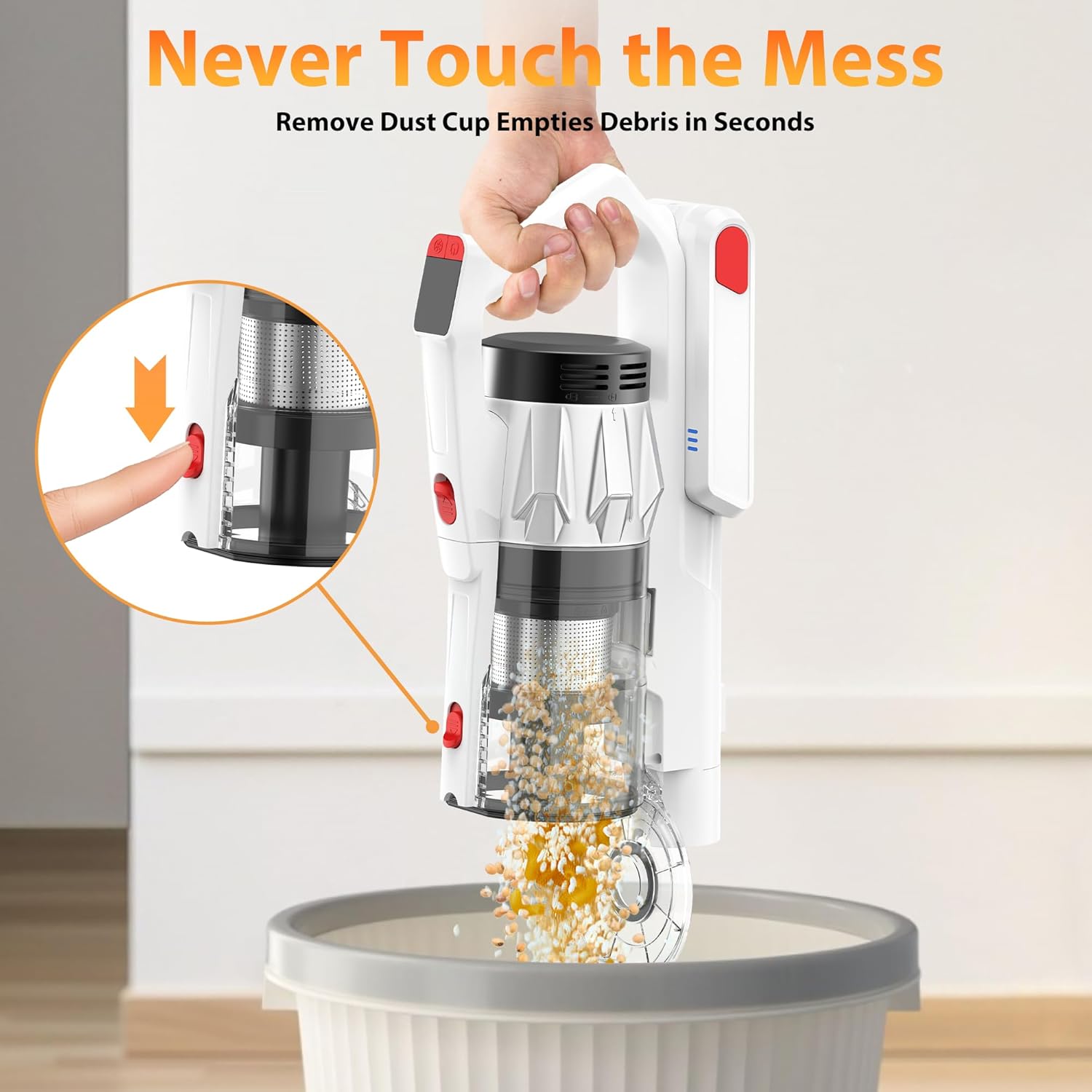
The 1.5L dust cup features a one-click pop-up lid for easy emptying. Position the dust cup over a trash bin and press the release button to open the lid and dispose of debris without touching it.
Czyszczenie filtrów
The Tikom V750 utilizes a 7-stage HEPA filtration system. The entire dust cup and HEPA filter are detachable and washable.
- Detach the dust cup from the main body.
- Wyjmij filtr HEPA i inne elementy filtra z pojemnika na kurz.
- Rinse the dust cup and filters under running water until clean.
- Allow all components to air-dry completely before reassembling. Do not use the vacuum with wet filters.

Czyszczenie wałka szczotkowego
The motorized cleaner head features an anti-tangle V-shaped roller brush. Periodically check the brush roll for tangled hair or debris. To clean:
- Turn off the vacuum and disconnect the cleaner head.
- Locate the brush roll release mechanism (usually a latch or button).
- Zdejmij rolkę szczotki.
- Use scissors or a brush to remove any tangled hair or fibers.
- Włóż ponownie szczotkę obrotową i zabezpiecz ją na miejscu.

6. Rozwiązywanie Problemów
Jeśli napotkasz problemy z urządzeniem Tikom V750, zapoznaj się z poniższymi typowymi problemami i ich rozwiązaniami:
| Problem | Możliwa przyczyna | Rozwiązanie |
|---|---|---|
| Odkurzacz się nie włącza | Akumulator nie jest naładowany lub nie został prawidłowo zainstalowany. | Sprawdź, czy akumulator jest całkowicie naładowany i pewnie zamocowany. |
| Niska moc ssania | Pojemnik na kurz jest pełny, filtry są zatkane lub wałek szczotkowy jest zablokowany. | Empty dust cup. Clean or replace filters. Remove any obstructions from the brush roll. |
| Szczotka rolkowa się nie obraca | Obstruction in brush roll, or brush roll error indicated on LED display. | Turn off vacuum and remove any tangled hair or debris from the brush roll. Check for damage. |
| Krótki czas pracy baterii | Battery not fully charged, or operating on high suction mode continuously. | Ensure battery is fully charged. Use low suction mode for longer runtime. Battery life naturally degrades over time. |
| Niezwykły hałas | Przeszkoda na drodze przepływu powietrza lub wałku szczotkowym. | Check and clear any blockages in the nozzle, wand, or dust cup. Clean the brush roll. |
If the problem persists after attempting these solutions, please contact Tikom customer support.
7. Specyfikacje
| Funkcja | Specyfikacja |
|---|---|
| Nazwa modelu | V750 |
| Marka | Tikom |
| Moc silnika | 500 W |
| Moc ssania | Do 45,000Pa |
| Typ baterii | 7*2600mAh litowo-jonowych (odłączanych) |
| Czas wykonania | Up to 50 minutes (Low suction), 25 minutes (High suction) |
| Czas ładowania | 4-5 godzin |
| Pojemność pojemnika na kurz | 1.5 litrów |
| System filtracji | 7-StagFiltracja HEPA |
| Cechy specjalne | LED Smart Display, Anti-Tangle V-Roller Brush, LED Headlights, Wall Dock, One-Click Dust Emptying |
| Zalecenia dotyczące powierzchni | All floors (Hard Floor, Carpet) |
| Waga przedmiotu | 5.5 funtów |
| Wymiary (dł. x szer. x wys.) | 10.3" dł. x 7.6" szer. x 17.1" wys. |
8. Gwarancja i wsparcie
For warranty information or technical support, please refer to the warranty card included with your product or contact Tikom customer service directly. You can typically find contact details on the official Tikom webstronie lub poprzez platformę zakupową.
Kontaktując się z pomocą techniczną, przygotuj numer modelu (V750) i datę zakupu.