
1. Wprowadzenie
Dziękujemy za zakupasing the DEPSTECH DS620-TL Triple Lens Endoscope Camera. This device is designed for visual inspection in hard-to-reach areas, featuring a 1080P triple-lens camera, a 5-inch IPS monitor, and an IP67 waterproof semi-rigid cable. This manual provides essential information for safe and effective use of your endoscope camera.
2. Koniec produktuview
2.1 Główne cechy
- 1080P Triple Lens Camera: Equipped with three cameras (front, side B, side C) for multi-angle inspection.
- 5-inch IPS Monitor: Provides clear, real-time images with excellent color reproduction.
- Sonda wodoodporna IP67: The 7.9mm diameter semi-rigid cable is waterproof, suitable for wet environments.
- Regulowane światła LED: Features 8+1+1 high-brightness LED chips with adjustable intensity for optimal illumination.
- 5M Semi-Rigid Cable: Offers flexibility and durability for navigating various spaces.
- Akumulator: Built-in battery provides approximately 2-3 hours of continuous operation.
2.2 Zawartość opakowania
Sprawdź, czy w przesyłce znajdują się wszystkie elementy:
- DEPSTECH DS620-TL Endoscope Camera
- Kabel ładujący typu C.
- Hook and Magnet Attachments
- Torba ze ściągaczem do przechowywania
- Instrukcja obsługi

Rysunek 2.2: Dołączone akcesoria i jednostka główna.
3. Informacje dotyczące bezpieczeństwa
- Nie należy używać urządzenia w otoczeniu, w którym występują gazy łatwopalne lub wybuchowe.
- Trzymaj urządzenie z dala od silnych pól elektromagnetycznych.
- Avoid direct exposure of the camera lens to strong light sources.
- Nie należy podejmować prób demontażu ani modyfikacji urządzenia. Naprawy powinny być wykonywane wyłącznie przez upoważniony personel.
- Przed użyciem należy upewnić się, że urządzenie jest całkowicie naładowane, aby uniknąć przerw w pracy podczas kontroli.
- Clean the probe and lens after each use, especially after contact with liquids or corrosive substances.
4. Konfiguracja
4.1 Ładowanie urządzenia
Connect the provided Type-C charging cable to the device's charging port and a suitable USB power adapter (not included). The charging indicator will show the charging status. A full charge typically takes 2-3 hours.
4.2 Wkładanie karty Micro SD
To save photos and videos, a Micro SD card (Class 10/Class 10 or higher, 8-32GB) is required (not included). Locate the Micro SD card slot on the side of the monitor unit and insert the card until it clicks into place.
4.3 Mocowanie akcesoriów
The endoscope comes with hook and magnet attachments. These can be screwed onto the tip of the camera probe for retrieving small objects or maneuvering in tight spaces.

Figure 4.3: Magnet and hook attachments for the probe.
5. Instrukcja obsługi
5.1 Włączanie/wyłączanie
Press and hold the power button (usually located on the side or front panel) for a few seconds to turn the device on. The screen will display the DEPSTECH logo. To power off, press and hold the power button again.

Figure 5.1: Monitor button layout and functions.
5.2 Switching Lenses
The DS620-TL features a triple-lens system. Press the lens switch button (often labeled with a camera icon or 'M') to cycle between Front Camera A, Side Camera B, and Side Camera C. This allows for comprehensive viewing without repositioning the probe.

Figure 5.2: Triple lens camera detail.
5.3 Regulacja jasności diod LED
Use the up/down arrow buttons on the monitor to adjust the brightness of the LED lights on the camera probe. There are multiple levels of brightness to suit different inspection environments.
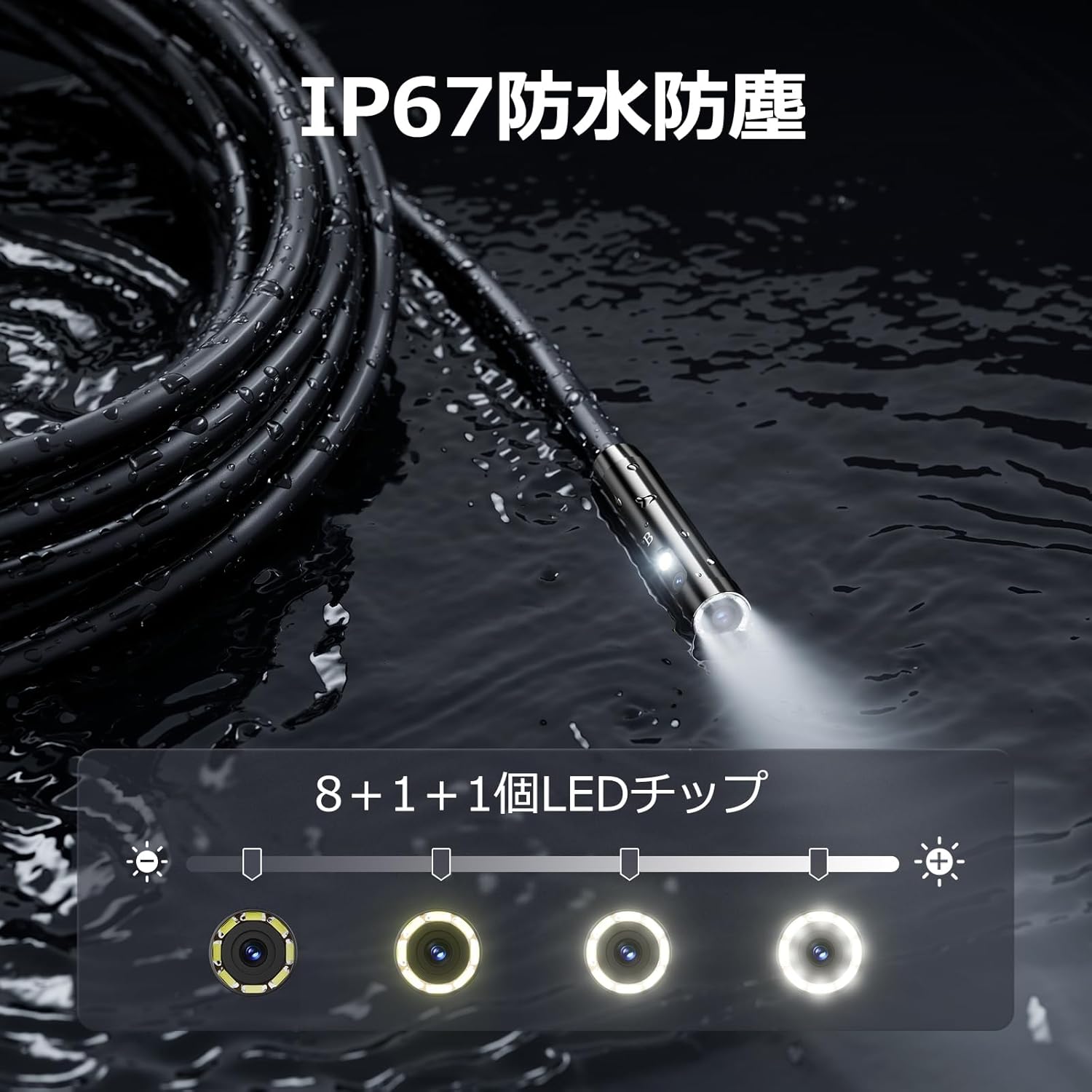
Figure 5.3: IP67 waterproof probe with adjustable LED illumination.
5.4 Robienie zdjęć i nagrywanie filmów
Press the photo/video button (usually a camera icon) to capture a still image. To record video, press and hold the photo/video button; press again to stop recording. Ensure a Micro SD card is inserted to save your media.

Figure 5.4: Monitor interface for photo and video capture.
5.5 Obrót ekranu
Press the screen rotation button (often a circular arrow icon) to rotate the image on the monitor by 180 degrees. This is useful when the probe is in an inverted position.
5.6 Zastosowania praktyczne
The DS620-TL is suitable for various tasks including home appliance maintenance, pipe inspection, wall wiring checks, and automotive repairs.

Figure 5.6: Various inspection scenarios for the endoscope.
5.7 Film demonstracyjny produktu
Video 5.7: A demonstration of the DEPSTECH DS620-TL endoscope camera in use, showcasinjego funkcji i zastosowań.
6. Konserwacja
6.1 Czyszczenie sondy i soczewki
After each use, especially in dirty or wet conditions, gently wipe the camera probe and lens with a soft, dry cloth. For stubborn dirt, a slightly damp Można użyć ściereczki, a następnie wysuszyć. Nie należy używać środków czyszczących ani rozpuszczalników o działaniu ściernym.
6.2 Przechowywanie
Store the endoscope camera in a cool, dry place, away from direct sunlight and extreme temperatures. Use the provided drawstring bag for protection. Ensure the cable is coiled neatly without sharp bends.
6.3 Pielęgnacja baterii
To prolong battery life, avoid fully discharging the device frequently. If storing for an extended period, charge the battery to approximately 50% every three months.
7. Rozwiązywanie Problemów
7.1 Brak obrazu na ekranie
- Sprawdź, czy urządzenie jest włączone i w pełni naładowane.
- Check if the camera cable is securely connected to the monitor unit.
- Adjust the LED brightness to ensure adequate lighting in the inspection area.
7.2 Cannot Record Photos/Videos
- Verify that a compatible Micro SD card (Class 10/Class 10 or higher, 8-32GB) is inserted correctly.
- Sprawdź, czy na karcie Micro SD jest wystarczająca ilość wolnego miejsca.
- Ensure the Micro SD card is not locked (read-only).
- Spróbuj sformatować kartę Micro SD (spowoduje to usunięcie wszystkich danych).
7.3 Urządzenie nie ładuje się
- Ensure the Type-C charging cable is properly connected to both the device and the power source.
- Try using a different USB power adapter or charging cable.
- Sprawdź port ładowania pod kątem zanieczyszczeń lub uszkodzeń.
If you encounter issues not listed here or if the problem persists, please contact DEPSTECH customer support.
8. Specyfikacje
| Funkcja | Specyfikacja |
|---|---|
| Marka | DEPSTECH |
| Nazwa modelu | DS620TL-JP |
| Kolor | Czarny |
| Poziom wodoodporności | IP67 |
| Typ nośnika | SD Memory Card (8-32GB, Class 10/Class 10 or higher recommended) |
| File Format | MP4, MOV, AVI, JPEG, RAW |
| Format przechwytywania wideo | MP4 |
| ViewTyp wyszukiwarki | IPS |
| Typ czujnika | CMOS |
| Rozdzielczość czujnika fotograficznego | 2.1 MP |
| Funkcja fokusu | Stały fokus |
| Autofokus | NIE |
| Średnia żywotność baterii | 2 godzin |
| Zawarte komponenty | Type-C Cable, Attachments, Storage Drawstring Bag |
| Gwarancja producenta | 2 lat |
| Kraj pochodzenia | Chiny |
9. Gwarancja i wsparcie
9.1 Gwarancja producenta
The DEPSTECH DS620-TL comes with a 24-month manufacturer warranty. Your order number serves as proof of purchase for warranty claims.
9.2 Obsługa klienta
For any inquiries, technical assistance, or warranty claims, please contact our dedicated support team:
- E-mail: support@depstech.com
- Czas reakcji: We aim to respond to all inquiries within 24 hours. For requests submitted on weekends or holidays, a response will be provided on the next business day.

Figure 9.2: DEPSTECH support details.