
1. Introduction to the iSG Box SE Smart Home Hub
The LinknLink iSG Box SE-Zigbee Bundle is an all-in-one smart home hub designed to consolidate your entire smart home ecosystem. It supports over 2,500 brands and major protocols including Matter, Zigbee, and Z-Wave, offering a unified interface for managing all your devices. This manual provides essential information for setting up, operating, and maintaining your iSG Box SE to ensure optimal performance and a seamless smart home experience.

Image: The iSG Box SE Smart Home Hub, illustrating its compatibility with Home Assistant, HomeKit Bridge, AI Agent, and multi-option control.
2. Co znajduje się w pudełku
Upon unboxing your LinknLink iSG Box SE-Zigbee Bundle, you should find the following components:
- iSG Box SE Smart Home Hub
- Pilot Bluetooth
- Kabel HDMI
- Zasilacz
- Krótki przewodnik użytkownika
- Pamięć USB Zigbee
3. Przewodnik konfiguracji
Follow these steps to set up your iSG Box SE Smart Home Hub:
- Podłącz zasilanie: Connect the provided Power Adapter to the iSG Box SE and plug it into a power outlet.
- Połączenie internetowe: Connect the iSG Box SE to your home network via Ethernet cable for a stable connection, or configure Wi-Fi during initial setup.
- HDMI Connection (Optional): If you wish to use the TV interface, connect the HDMI cable from the iSG Box SE to your television.
- Insert Zigbee USB Stick: Plug the included Zigbee USB stick into one of the available USB ports on the iSG Box SE. The hub will auto-detect and configure it instantly. (Note: A Z-Wave USB stick must be purchased separately if Z-Wave device support is desired).
- Konfiguracja wstępna: Follow the on-screen prompts on your TV (if connected) or use the LinknLink app on your mobile device to complete the initial setup.
Image: The iSG Box SE with a Zigbee USB stick inserted, highlighting the plug-and-play auto-configuration feature.
4. Główne cechy
- All-in-One Smart Hub & Versatile Control: Consolidate your entire smart home into one hub that supports over 2,500 brands and major protocols like Matter, Zigbee, and Z-Wave. Manage all devices through a unified interface via TV, mobile, and web apps, plus Google and Alexa voice commands.
- Pre-loaded with Home Assistant: Powered by Home Assistant, the hub offers advanced automations, deep customization, and full local operation. It comes pre-installed with HACS and popular integrations for expert users.
- Seamless Plug-and-Play for Zigbee & Z-Wave: Simply plug in any compatible USB stick (Zigbee included, Z-Wave sold separately) and the iSG Box SE will auto-detect and configure it instantly, requiring no manual setup.
- Seamless HomeKit Bridge Integration: Integrate any smart device with Apple HomeKit using the built-in bridge. Control third-party devices that lack official HomeKit support directly via the Apple Home app or Siri, without needing extra hardware.
- Local-First Architecture & Instant Response: Enjoy real-time control with a local-first system. Your smart home responds instantly and remains reliable even without an internet connection, eliminating cloud delays. All data stays within your home network for enhanced privacy and security.
- AI Home Agent: Interact with your smart home naturally. The AI Home Agent requires no learning curve or wake word, allowing continuous conversation. Use existing WhatsApp or Telegram chats to control devices or check temperatures, understanding various languages via text or voice.
- Lifetime Remote Access and Control: Manage your smart home from anywhere using the LinknLink app. This powerful smart home experience comes with no monthly or additional fees.
Video: An official product introduction video for the LinknLink iSG Box SE, showcasing its design and core functionalities.
5. Łączność i kompatybilność
The iSG Box SE is designed for broad compatibility and robust connectivity:
- Wireless Communication Standards: 802.11ac, 802.11ax (Wi-Fi 2.4G & 5G), Bluetooth 5.4.
- Technologia łączności: Zigbee, Z-Wave (via USB stick), Bluetooth, Ethernet.
- Protokoły inteligentnego domu: Matter, Zigbee, Z-Wave.
- Asystenci głosowi: Kompatybilny z Amazon Alexa i Asystentem Google.
- Apple HomeKit to platforma oparta na technologii Inteligentnego Komputera (IOS) oparta na technologii Inteligentnego Komputera (IOS). Built-in bridge for seamless integration with Apple HomeKit and Siri.
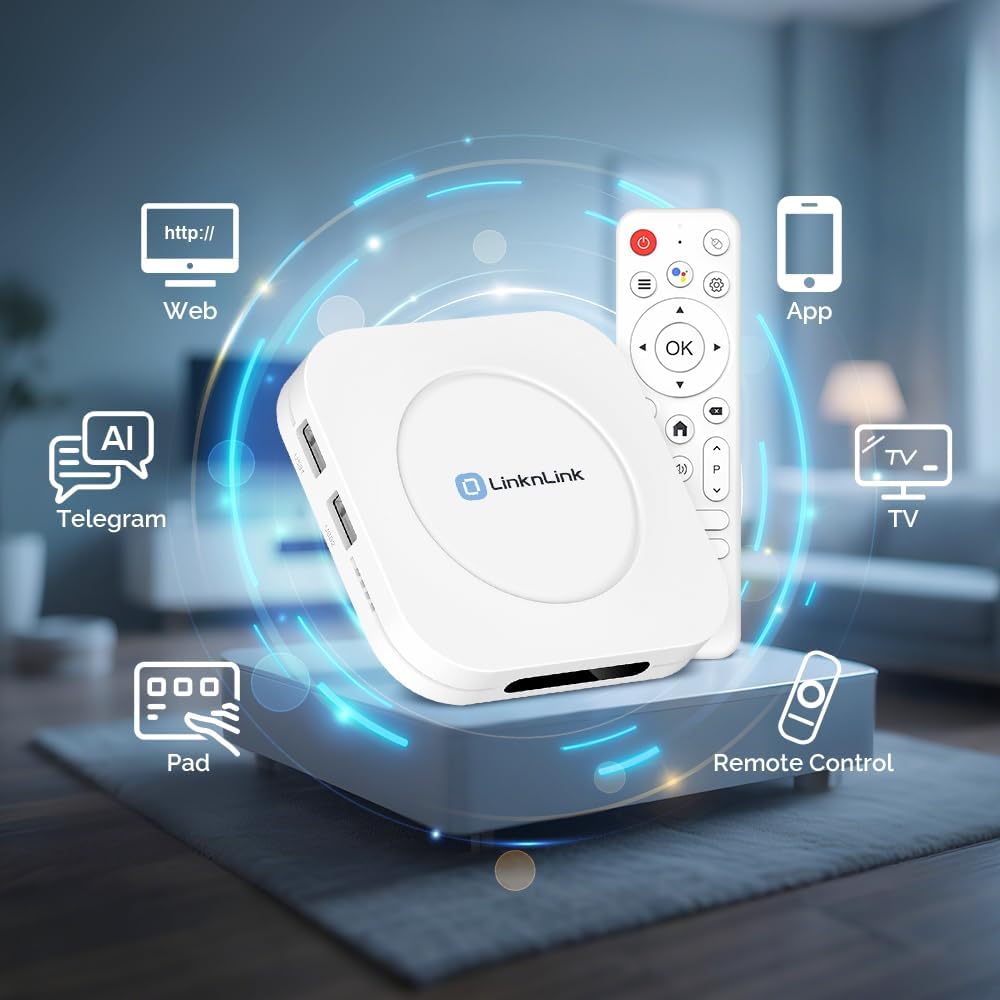
Image: The iSG Box SE demonstrating multiple control options including web interface, mobile app, TV, remote control, tablet, AI, and Telegram.
6. Operating the iSG Box SE
The iSG Box SE offers intuitive control and automation capabilities:
- LinknLink App: Use the dedicated LinknLink app on your mobile device for comprehensive control and management of all connected smart devices.
- Web Interfejs: Access the hub's full functionality through a web browser for detailed configuration and advanced automations.
- Sterowanie głosowe: Utilize Amazon Alexa or Google Assistant for hands-free control of your smart home devices.
- AI Home Agent: Engage with the AI Home Agent via WhatsApp or Telegram for natural language control and monitoring of your devices.
- Automatyzacje: Create custom automation routines within the LinknLink app or Home Assistant to automate tasks based on schedules, sensor triggers, or other conditions.

Image: A visual representation of the Apple HomeKit interface on a MacBook, iPad, and iPhone, demonstrating seamless integration with the iSG Box SE.
7. Konserwacja
To ensure the longevity and optimal performance of your iSG Box SE:
- Aktualizacje oprogramowania układowego: Regularly check for and install firmware updates through the LinknLink app or Home Assistant interface to benefit from new features, security enhancements, and bug fixes.
- Czystość: Utrzymuj urządzenie w czystości i zapobiegaj jego zakurzaniu. Do czyszczenia używaj miękkiej, suchej ściereczki.
- Umieszczenie: Ensure the hub is placed in a well-ventilated area, away from direct sunlight and sources of heat or moisture.
8. Rozwiązywanie Problemów
If you encounter issues with your iSG Box SE, consider the following:
- Problemy z łącznością: If the hub is not connecting to the internet or devices, check your network connection (Ethernet cable or Wi-Fi settings). Ensure the Zigbee/Z-Wave USB sticks are properly inserted.
- Urządzenie nie odpowiada: Verify that the device is powered on and within range of the hub. Check the device's battery status if applicable.
- Problemy z aplikacją: Ensure your LinknLink app is updated to the latest version. Try restarting the app or your mobile device.
- Hub Malfunction: If the hub is unresponsive, try power cycling it (unplug and replug after 30 seconds). If problems persist, consult the LinknLink support resources.
9. Specyfikacje
| Funkcja | Szczegół |
|---|---|
| Producent | LinknLink |
| Waga przedmiotu | 11.7 uncji |
| Wymiary produktu | 3.78 x 3.78 x 0.81 cala |
| Numer modelu przedmiotu | iSG Box SE |
| Kolor | Biały |
| System operacyjny | Android |
| Technologia łączności | Zigbee, Z-Wave, Bluetooth, Ethernet |
| Standard komunikacji bezprzewodowej | 802.11ac, 802.11ax |
| Cechy specjalne | Matter, Zigbee, Z-Wave, Home Assistant, HomeKit, Local Control, AI Home Agent |

Obraz: Szczegółowy view of the iSG Box SE's ports and internal specifications including 4GB RAM, 64GB On-Board Storage, Wi-Fi 2.4G & 5G, and Bluetooth 5.4.
10. Gwarancja i pomoc techniczna
For warranty information and customer support, please refer to the official LinknLink website or contact their customer service directly. The LinknLink app also provides resources and direct access to support for your iSG Box SE.