
1. Wprowadzenie i koniecview
The EPOS Impact 500 ANC Wireless Headset is engineered for professionals requiring clear communication and focus in diverse work environments. This on-ear Bluetooth headset integrates hybrid Active Noise Cancellation (ANC) to minimize distractions and features EPOS AI™ microphones for natural voice clarity during conversations. It offers versatile connectivity via dual USB-C and USB-A options, ensuring compatibility with various devices. Certified for Microsoft Teams Open Office and other UC platforms, it provides a seamless experience for remote and office collaboration. Key benefits include extended battery life, talk-through mode for quick interactions, and EPOS BrainAdapt™ technology designed to reduce listening fatigue.
2. Co znajduje się w pudełku
Upon unboxing your EPOS Impact 500 ANC Wireless Headset, you will find the following components:
- EPOS Impact 500 ANC Wireless Headset
- Kabel ładujący USB-C do USB-C (1.2 m)
- BTD 900c USB-C Dongle
- Przejściówka USB-C na USB-A
- Sustainable Carry Pouch
- Przewodnik bezpieczeństwa
- Arkusz zgodności
- Szybka porada

Image: All items included in the EPOS Impact 500 ANC Wireless Headset package.
3. Konfiguracja
3.1 Ładowanie zestawu słuchawkowego
Before initial use, fully charge your headset. Connect the provided USB-C to USB-C charging cable to the charging port on the headset and to a compatible USB-C power source. If your device only has USB-A ports, use the included USB-C to USB-A adapter with the charging cable. The LED indicator on the headset will show charging status.
3.2 Łączenie się z urządzeniem
The headset offers flexible connectivity options:
- Bezprzewodowy Bluetooth: Power on the headset. Activate Bluetooth on your device (laptop, tablet, smartphone). Put the headset into pairing mode (refer to the Quick Guide for specific button presses). Select "EPOS Impact 500" from your device's Bluetooth list.
- USB-C Dongle (BTD 900c): Insert the BTD 900c USB-C dongle directly into a USB-C port on your computer. The headset will automatically connect to the dongle. If your computer only has USB-A ports, attach the USB-C to USB-A adapter to the dongle before inserting it.
3.3 Regulacja zestawu słuchawkowego
Adjust the headband for a comfortable fit. The earcups are designed to rest gently on your ears. Position the boom microphone approximately 2-3 cm from the corner of your mouth for optimal voice pickup. The boom mic can be rotated up or down.

Image: The EPOS Impact 500 headset with its adjustable boom microphone.
4. Instrukcja obsługi
4.1 Podstawowe sterowanie
- Włączanie/wyłączanie: Use the dedicated power switch located on one of the earcups.
- Regulacja głośności: Use the volume up and down buttons on the earcup to control audio levels.
- Zarządzanie połączeniami: A multi-function button is available for answering/ending calls.
- Wycisz/wyłącz wyciszenie mikrofonu: Lift the boom microphone up to mute and lower it down to unmute.
4.2 Aktywna redukcja szumów (ANC)
The hybrid ANC feature can be activated to reduce background noise, allowing for greater focus during calls and work. Refer to the Quick Guide for specific button controls to toggle ANC on or off.
4.3 Talk-Through Mode
For quick conversations with colleagues without removing the headset, activate Talk-Through mode. This feature allows ambient sounds to pass through, enabling effortless interaction. Consult the Quick Guide for activation instructions.
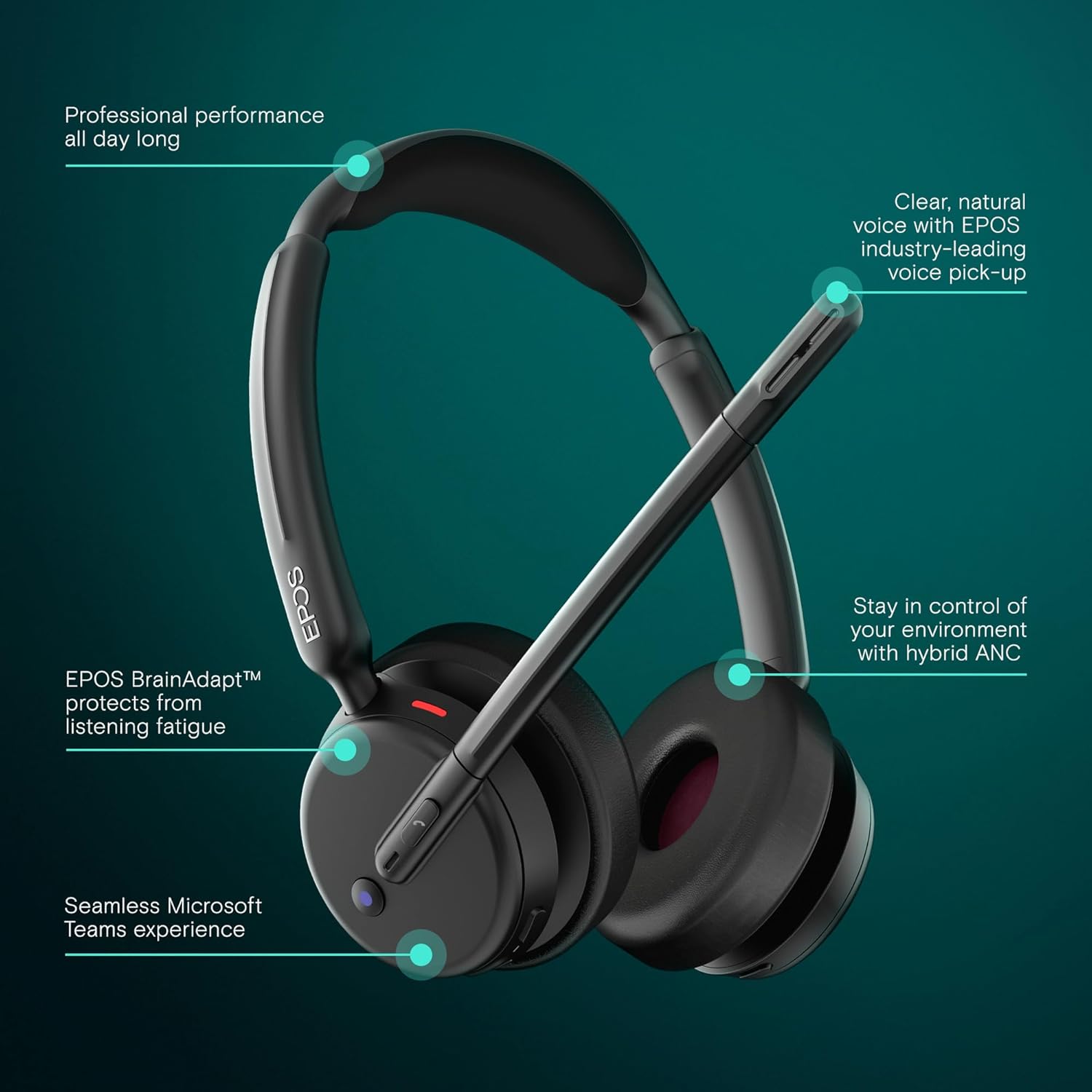
Image: Visual representation of the headset's main operational features.
5. Główne cechy
- Hybrydowa aktywna redukcja szumów: Adaptively reduces background noise for crystal-clear calls and enhanced focus.
- EPOS AI™ Voice Technology: Advanced microphones isolate your voice from surrounding noise, ensuring natural and professional-sounding calls.
- EPOS BrainAdapt™ Technology: Designed to protect your brain from fatigue caused by poor audio and noise, boosting focus and productivity during long calls.
- Microsoft Teams Certified & UC Compatible: Optimized for Microsoft Teams and compatible with leading Unified Communications platforms like Zoom and Google Meet for effortless collaboration.
- Seamless Dual Connectivity: Includes both USB-C and USB-A options with the BTD 900c dongle and adapter for instant plug-and-play connection to various devices.
- Dłuższa żywotność baterii: Offers up to 35 hours of talk time, supporting long hybrid workdays without frequent recharging.
- Lekka konstrukcja nauszna: Provides all-day comfort with soft leatherette cushions, minimizing listening fatigue.
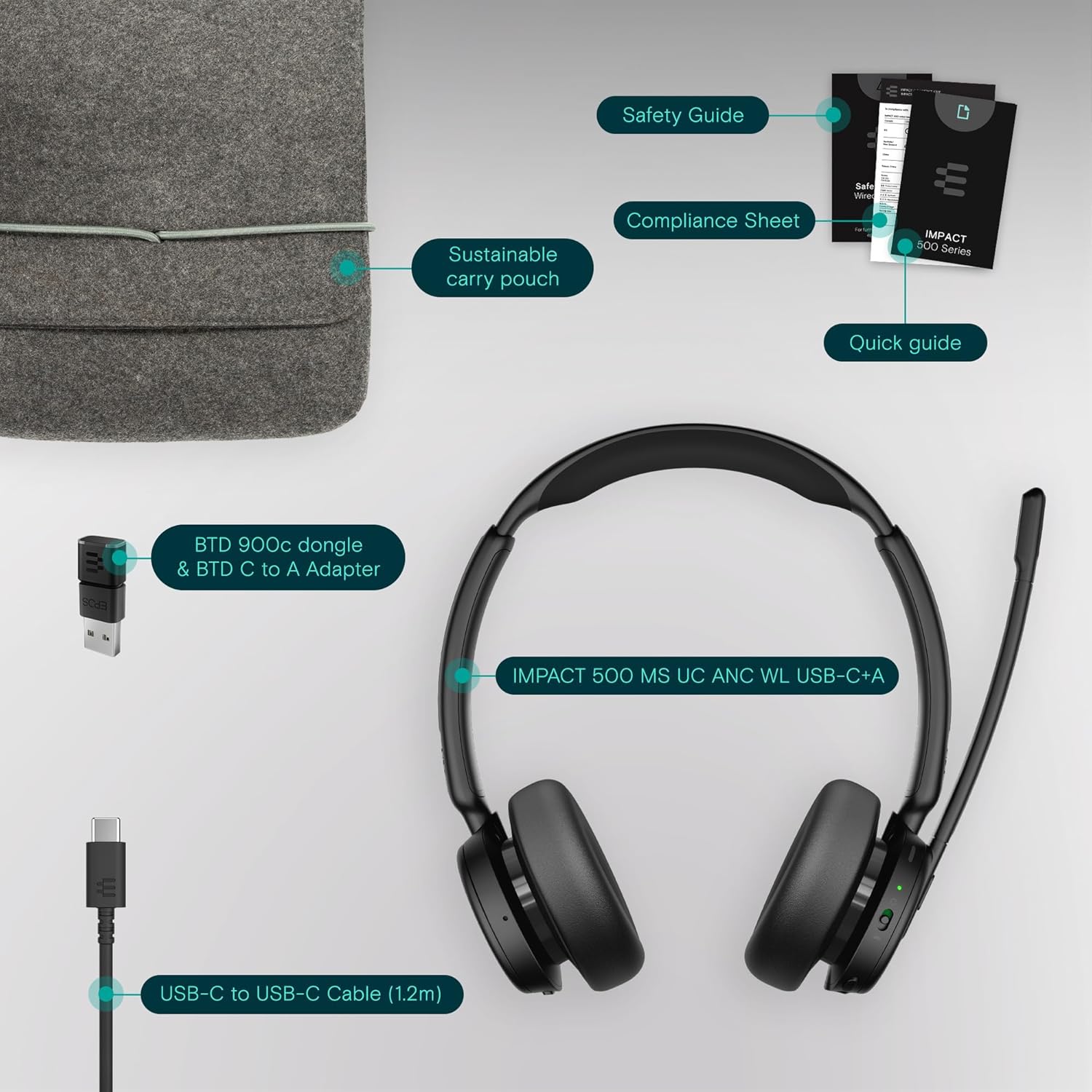
Image: User wearing the headset in a professional setting, highlighting comfort and clarity.
6. Konserwacja
To ensure the longevity and optimal performance of your EPOS Impact 500 ANC Wireless Headset, follow these maintenance guidelines:
- Czyszczenie: Do czyszczenia zestawu słuchawkowego należy używać miękkiej, suchej ściereczki. W przypadku nauszników należy je delikatnie przetrzeć lekko wilgotną szmatką.amp cloth if necessary, avoiding excessive moisture. Do not use harsh chemicals or abrasive materials.
- Składowanie: When not in use, store the headset in the provided sustainable carry pouch to protect it from dust, scratches, and impacts.
- Temperatura: Avoid exposing the headset to extreme temperatures (hot or cold) or direct sunlight for extended periods.
- Wilgoć: Trzymaj słuchawki z dala od wody i wilgoci.
7. Rozwiązywanie Problemów
Jeśli masz problemy ze swoim zestawem słuchawkowym, wypróbuj poniższe kroki rozwiązywania problemów:
- Brak zasilania: Ensure the headset is fully charged using the provided USB-C cable and a reliable power source.
- Brak dźwięku/niedziałający mikrofon:
- Check if the headset is properly paired with your device via Bluetooth or connected via the USB dongle.
- Verify that the headset is selected as the default audio input/output device in your computer's sound settings or communication application (e.g., Microsoft Teams, Zoom).
- Sprawdź, czy wysięgnik mikrofonu jest opuszczony i nie jest wyciszony.
- Uruchom ponownie urządzenie i zestaw słuchawkowy.
- Słaba jakość dźwięku:
- Move closer to your connected device to ensure a strong Bluetooth signal.
- Sprawdź, czy nie występują zakłócenia pochodzące od innych urządzeń bezprzewodowych.
- Upewnij się, że mikrofon jest prawidłowo umieszczony w pobliżu ust.
- ANC nie działa: Ensure the ANC feature is activated. Refer to the Quick Guide for specific controls.
- Connectivity Issues with Dongle: Try inserting the USB dongle into a different USB port on your computer. Ensure the dongle is fully inserted.
For further assistance, consult the comprehensive user manual available on the EPOS website or contact EPOS customer support.
8. Specyfikacje
| Funkcja | Szczegół |
|---|---|
| Marka | EPOS |
| Nazwa modelu | WPŁYW 500 |
| Numer modelu | 1001490 |
| Kolor | Czarny |
| Umieszczenie ucha | Na ucho |
| Kontrola hałasu | Hybrydowa redukcja szumów |
| Technologia łączności | Bezprzewodowy (Bluetooth) |
| Wersja Bluetooth | 5.0 |
| Metoda kontroli | Dotykać |
| Średnia żywotność baterii | 35 godzin |
| Waga przedmiotu | 391 gram |
| Materiał obudowy | Skóra syntetyczna |
| Zakres częstotliwości | 20 Hz - 20 000 Hz |
| Dodatkowe funkcje | Noise Cancellation, AI Voice Technology, BrainAdapt Technology |
| Kompatybilne urządzenia | Laptopy, komputery stacjonarne, tablety, telefony, inteligentne głośniki, telewizory, telefony komórkowe |
9. Gwarancja i wsparcie
The EPOS Impact 500 ANC Wireless Headset comes with a Roczna gwarancja producenta. For warranty claims, technical support, or additional product information, please visit the official EPOS webOdwiedź witrynę lub skontaktuj się z działem obsługi klienta. Zachowaj dowód zakupu, aby skorzystać z gwarancji.