
Wstęp
Thank you for choosing the MageGee AIR68 Wireless Hall Effect Gaming Keyboard. This manual provides detailed instructions for setting up, operating, maintaining, and troubleshooting your new device. Please read it carefully to ensure optimal performance and longevity.

Image: The MageGee AIR68 Wireless Hall Effect Gaming Keyboard, showcasing its compact 60% layout and RGB lighting.
Zawartość opakowania
Sprawdź, czy w przesyłce znajdują się wszystkie elementy:
- Magnetic Switch Keyboard (MageGee AIR68)
- 4 Poseidon Switches (Spare)
- Odbiornik USB 2.4G
- Kabel typu C
- 2 w 1 narzędzie do zdejmowania nakładek klawiszy i przełączników
- User Manual & User Guide

Image: A visual representation of the MageGee AIR68 keyboard and its included accessories, such as spare switches, USB receiver, Type-C cable, and keycap/switch puller.
Organizować coś
Początkowa aktywacja
For first-time use, locate the power switch underneath the Caps Lock key. Gently remove the Caps Lock keycap using the provided puller. Flip the switch downward to activate the keyboard.

Image: The MageGee AIR68 keyboard demonstrating its 60% ultra-compact layout, highlighting its space-saving design compared to a full-sized keyboard.

Obraz: Zbliżenie view of the MageGee AIR68 keyboard showing the location of the power switch beneath the Caps Lock key, with instructions to flip it downward for activation.
Opcje łączności
The MageGee AIR68 supports three connection modes: Bluetooth, 2.4GHz Wireless, and USB Type-C Wired.
- USB typu C przewodowy: Connect the keyboard directly to your computer using the provided Type-C cable. This mode offers an 8000Hz polling rate.
- Łączność bezprzewodowa 2.4 GHz: Plug the 2.4G USB receiver into an available USB port on your device. Press Fn + R on the keyboard to switch to 2.4GHz mode. This mode offers a 1000Hz polling rate.
- Bluetooth: Naciskać Fn + Q, Fn + W, Lub Fn + E to select one of three Bluetooth channels. The keyboard will enter pairing mode. Szukaj "MageGee AIR68" on your device's Bluetooth settings and connect. This mode offers a 1000Hz polling rate.

Image: Diagram illustrating the three connectivity modes (Bluetooth, 2.4GHz, USB-C) of the MageGee AIR68 keyboard and compatible devices like laptops, tablets, PCs, and phones.

Image: A close-up of the MageGee AIR68 keyboard showing the Type-C port and cable connected, emphasizing stable, lag-free wired performance and charging capability.
Instrukcja obsługi
Sterowanie podświetleniem RGB
The AIR68 features vibrant RGB backlighting and a unique lightbox. Use the following FN key combinations to adjust lighting effects:
- Fn + | \: Przełącz efekty świetlne.
- Fn + Enter: Switch lighting colors.
- Fn + In: Switch lightbox effects.
- Fn + P: Switch lightbox colors.
- Fn + BackSpace: Wyłącz podświetlenie.
- Fn + Strzałka w lewo: Zmniejsz prędkość podświetlenia.
- Fn + Strzałka w prawo: Zwiększ prędkość podświetlenia.
- Fn + Strzałka w górę: Zwiększ jasność podświetlenia.
- Fn + Strzałka w dół: Zmniejsz jasność podświetlenia.

Image: The MageGee AIR68 keyboard displaying various RGB backlight and lightbox effects, with key combinations for adjustment.

Obraz: Wielokrotny views of the MageGee AIR68 keyboard's lightbox, showcasing its adjustable and vibrant RGB lighting effects.
Adjustable Actuation and Rapid Trigger
The Hall Effect magnetic switches allow for precise actuation point adjustment and Rapid Trigger (RT) technology. The actuation point can be set between 0.1mm and 3.4mm with 0.01mm accuracy. Rapid Trigger enables instantaneous key activation and reset based on key movement, not a fixed point.
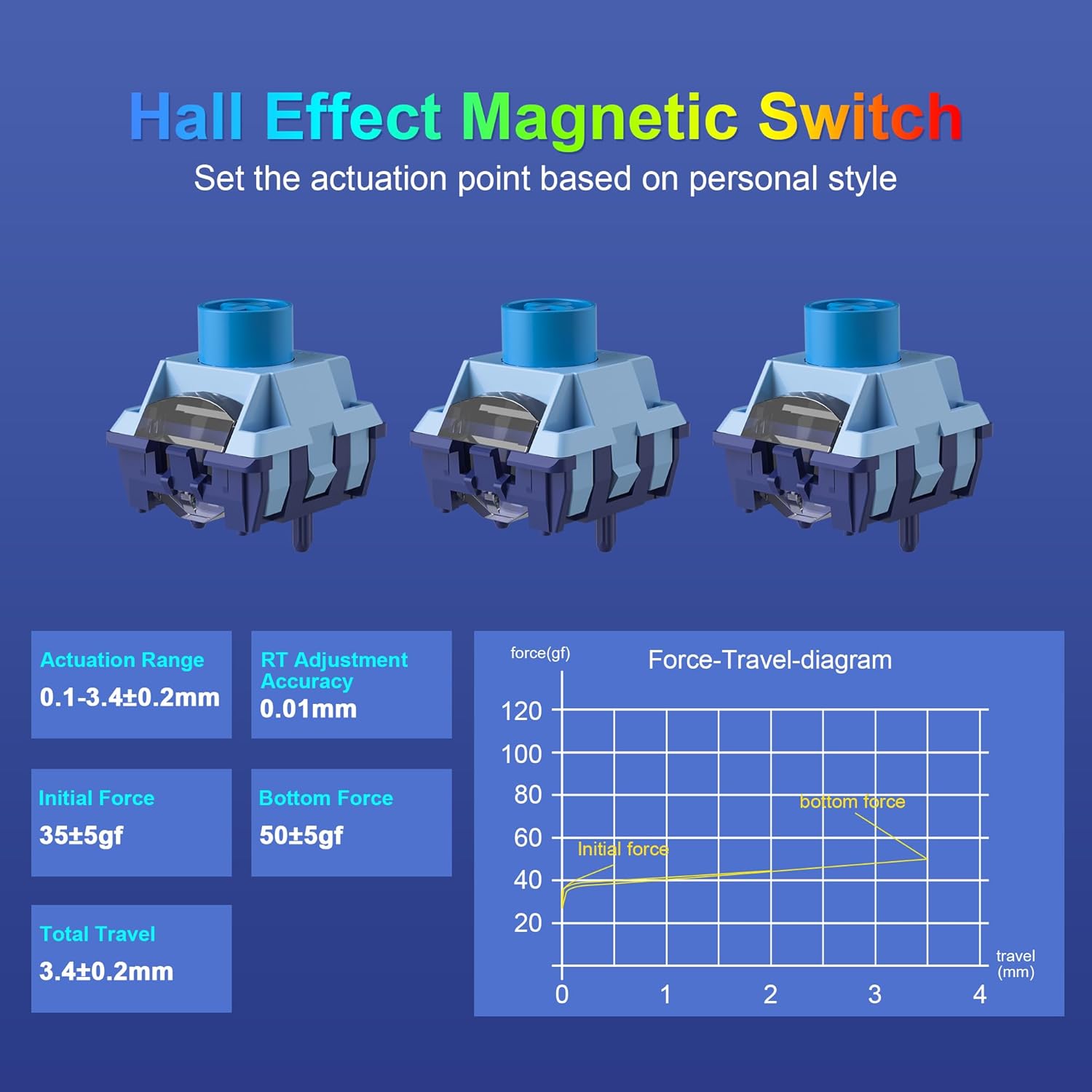
Image: A diagram illustrating the Hall Effect magnetic switches, showing actuation range, RT adjustment accuracy, initial force, bottom force, and total travel specifications, along with a force-travel diagram.

Image: A visual comparison between adjustable actuation points of magnetic switches and fixed actuation points of regular switches, highlighting the 0.01mm RT accuracy of the MageGee AIR68.
Advanced Gaming Functions (Software Required)
Utilize the dedicated MageGee AIR68 software (Windows compatible only) to unlock advanced features:
- DKS (Dynamic Keystroke): Assign multiple actions to a single key press based on pressure.
- MT (Press and Click): Configure keys for different actions on press and release.
- TGL (Toggle Switch): Toggle functions on/off with a single key.
- Snap Key (SOCD): Optimize directional inputs for fighting games.
- Makra niestandardowe: Create and assign complex key sequences.
- Zmiana przypisania klawiszy: Change key assignments.
- Efekty świetlne RGB: Fine-tune lighting patterns and colors.
- Regulacja punktu aktywacji: Precisely set individual key actuation points.
The software also allows for macro recording and sleep time adjustments.

Image: A screenshot of the MageGee AIR68 customization software interface, showing options for Rapid Trigger, Advanced Key Settings, Key Remap, Macro Recording & Editing, RGB Settings, and Sleep Time. Note: Software is Windows compatible only.

Image: An illustration of the MageGee AIR68 keyboard with icons representing advanced key functions like Dynamic Keystroke (DKS), Press and Click (MT), Toggle Switch (TGL), and Snap Key (SOCD), which are configurable via software.
Żywotność baterii
The keyboard is equipped with a 6000mAh rechargeable battery. To check the battery level, press Fn + Right ALT.
- With RGB lighting ON: Approximately 24 hours of use.
- With RGB lighting OFF: Approximately 300 hours of use.

Image: A graphic showing the 6000mAh battery capacity of the MageGee AIR68 keyboard, with estimated battery life of 24 hours with RGB on and 300 hours with RGB off. Instructions to check battery level (Fn+Right ALT) are also shown.
Konserwacja
Przełączniki z możliwością wymiany na gorąco
The MageGee AIR68 features a hot-swappable PCB, allowing you to easily remove and replace switches without soldering. Use the provided 2-in-1 keycap and switch puller for this process.
- Delikatnie zdejmij nakładkę klawisza za pomocą ściągacza do nakładek klawiszy.
- Use the switch puller to grasp the switch firmly and pull it straight up.
- Align the pins of the new switch with the holes on the PCB and press down gently until it clicks into place. Ensure the switch is seated correctly to avoid bending pins.
- Załóż z powrotem nakładkę klawisza.

Obraz: Zbliżenie view of the MageGee AIR68 keyboard demonstrating the hot-swappable feature, with a switch being removed using a switch puller. It also highlights the south-facing LEDs.

Obraz: Wybuch view of the MageGee AIR68 keyboard showing individual switches and keycaps, illustrating how switches can be easily removed and replaced.
Czyszczenie
To clean your keyboard, power it off and disconnect it from your device. Use a soft, lint-free cloth dampened with a small amount of water or a mild cleaning solution. For deeper cleaning, remove keycaps and use compressed air to clear debris from between switches.
Rozwiązywanie problemów
- Klawiatura nie odpowiada:
- Ensure the power switch under the Caps Lock key is in the ON position.
- Check the connection: For wired mode, ensure the Type-C cable is securely connected. For 2.4GHz, ensure the USB receiver is plugged in and the keyboard is in 2.4G mode (Fn+R). For Bluetooth, ensure it's paired and in the correct Bluetooth channel (Fn+Q/W/E).
- Jeśli bateria jest słaba, naładuj klawiaturę.
- Klawisze nie rejestrują się lub występują efekty ghostingu:
- The keyboard features N-key rollover, so ghosting should not occur. If keys are not registering, try reseating the switch using the switch puller.
- Ensure the keyboard firmware is up to date via the software.
- Oświetlenie RGB nie działa:
- Ensure the backlight is not turned off (Fn+BackSpace).
- Adjust brightness (Fn+Up/Down Arrow).
- Check settings in the MageGee software.
- Oprogramowanie nie wykrywa klawiatury:
- Ensure the keyboard is connected via USB Type-C cable. The software is only compatible with Windows.
- Uruchom ponownie oprogramowanie i/lub komputer.
Specyfikacje
| Funkcja | Szczegół |
|---|---|
| Marka | MageGee |
| Numer modelu | POWIETRZE68 |
| Technologia łączności | Bluetooth, 2.4G Wireless, USB Type-C Wired |
| Typ przełącznika | Hall Effect Magnetic Switch (MageGee Poseidon) |
| Zakres aktywacji | 0.1mm - 3.4mm (±0.2mm) |
| RT Adjustment Accuracy | 0.01mm |
| Współczynnik sondowania | 8000Hz (Wired), 1000Hz (Wireless) |
| Czas reakcji | 0.125 ms (8000 Hz) |
| Pojemność baterii | 6000mAh |
| Układ klawiatury | 60% Compact (68-key QWERTY) |
| Klawisze | Double-shot PBT, Shine-Through |
| Podświetlenie | RGB with Lightbox (South-facing LEDs) |
| Możliwość wymiany podczas pracy | Tak |
| Anty-ghosting | N-Key Rollover |
| Kompatybilne systemy operacyjne | Windows, Mac (Software Windows only) |
| Zawarte komponenty | Keyboard, 4 Spare Switches, 2.4G USB Receiver, Type-C Cable, 2-in-1 Puller, Manual |

Obraz: Ponadview graphic highlighting key features of the MageGee AIR68 keyboard, including magnetic switches, 8000Hz polling rate, 0.01mm accuracy, tri-mode connectivity, hot-swappable design, RGB backlight, 60% compact layout, and PBT keycaps.
Gwarancja
The MageGee AIR68 keyboard comes with a 1-letnia gwarancja from the date of purchase. This warranty covers manufacturing defects and workmanship. It does not cover damage caused by misuse, accidents, unauthorized modifications, or normal wear and tear. Please retain your proof of purchase for warranty claims.
Wsparcie
For further assistance, technical support, or to inquire about warranty services, please visit the official MageGee webodwiedź witrynę lub skontaktuj się z obsługą klienta. Możesz również zapoznać się z Sklep MageGee na Amazonie Aby uzyskać informacje o produkcie i jego aktualizacjach.

