
1. Wprowadzenie
The FOXWELL NT201 is an On-Board Diagnostics II (OBDII) and European On-Board Diagnostics (EOBD) scanner designed to diagnose engine-related issues in vehicles. This device allows users to read and clear diagnostic trouble codes (DTCs), view live data streams, perform I/M readiness tests, and more. This manual provides detailed instructions for the proper use and maintenance of your NT201 scanner and its accompanying portable carrying case.
2. Informacje dotyczące bezpieczeństwa
Podczas pracy przy pojeździe należy zawsze przestrzegać zasad bezpieczeństwa. Niewłaściwe użycie narzędzi diagnostycznych może prowadzić do obrażeń ciała lub uszkodzenia pojazdu. Prosimy o zapoznanie się z poniższymi wytycznymi i ich przestrzeganie:
- Upewnij się, że pojazd jest zaparkowany na równej powierzchni i ma zaciągnięty hamulec postojowy.
- Nosić odpowiednią ochronę oczu.
- Keep clothing, hair, hands, tools, and test equipment away from moving engine parts.
- Operate the vehicle in a well-ventilated area to prevent carbon monoxide poisoning.
- Nie podłączaj ani nie odłączaj sprzętu testowego, gdy zapłon jest włączony lub gdy silnik pracuje.
- Keep the scanner dry and clean. Avoid exposure to extreme temperatures.
3. Zawartość opakowania
Sprawdź, czy w przesyłce znajdują się wszystkie elementy:
- Jednostka skanująca OBD2 FOXWELL NT201
- Integrated OBDII Cable
- Przenośna torba transportowa
- Instrukcja obsługi (ten dokument)
4. Koniec produktuview
The NT201 scanner features a clear display and intuitive button layout for easy navigation and operation.

Rysunek 4.1: Przód view of the FOXWELL NT201 OBD2 Scanner. This image displays the scanner's screen, which shows 'I/M Readiness' status indicators, and the control buttons including ESC, UP, DOWN, and ENTER, along with the I/M readiness hotkey.
4.1. Układ urządzenia
- Wyświetlacz LCD: Shows test results, menu options, and operational information.
- Przycisk ESC: Exits current screen or returns to the previous menu.
- Przyciski GÓRA/DÓŁ: Navigates through menu options or data.
- Przycisk ENTER: Potwierdza wybór lub wchodzi do menu.
- I/M Readiness Hotkey: Provides quick access to the I/M Readiness status.
- Złącze OBDII: Connects the scanner to the vehicle's Data Link Connector (DLC).
5. Konfiguracja
To begin using your NT201 scanner, follow these steps:
- Znajdź 16-pinowe złącze łącza danych (DLC) pojazdu. Zazwyczaj znajduje się ono pod deską rozdzielczą po stronie kierowcy.
- Przekręć zapłon pojazdu do pozycji „ON” (silnik wyłączony).
- Plug the NT201's OBDII connector into the vehicle's DLC. The scanner will power on automatically.
- The scanner will perform a system check and display the main menu.
6. Instrukcja obsługi
6.1. Odczyt i kasowanie kodów błędów
This function allows you to retrieve Diagnostic Trouble Codes (DTCs) from the vehicle's engine control unit (ECU) and clear them after repairs.
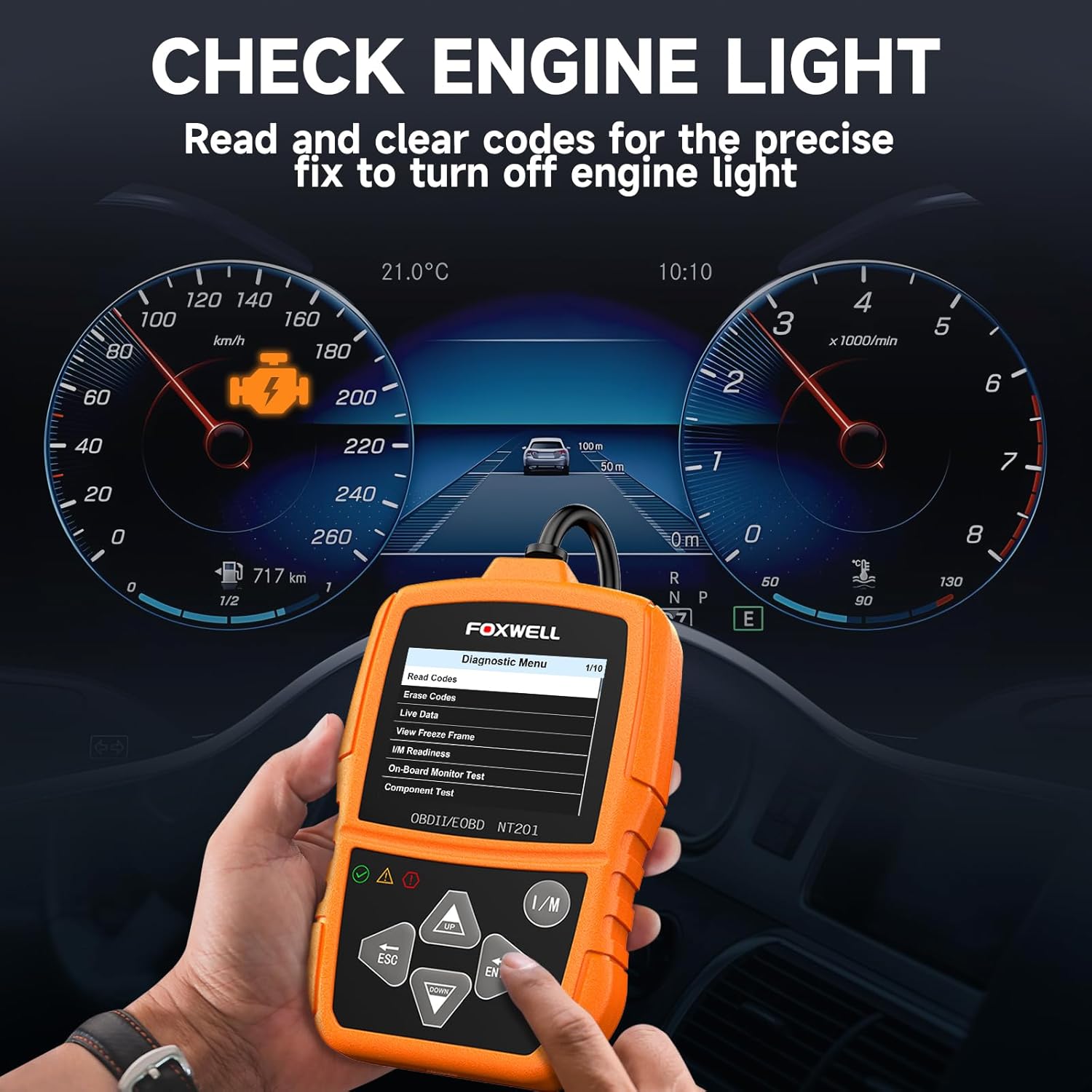
Rysunek 6.1: The FOXWELL NT201 scanner in use, displaying the diagnostic menu with 'Read Codes' highlighted. A vehicle dashboard is visible in the background, showing the check engine light illuminated.
- From the main menu, use the GÓRA/DÓŁ buttons to select "Diagnostic Menu" and press WCHODZIĆ.
- Wybierz „Odczytaj kody”, aby view current, pending, and permanent DTCs. The scanner will display the codes and their definitions.
- After addressing the underlying issue, select "Erase Codes" from the Diagnostic Menu and press WCHODZIĆ. Confirm the action when prompted. This will turn off the Malfunction Indicator Lamp (MIL) or 'Check Engine Light'.
6.2. Strumień danych na żywo
View real-time operational parameters of the vehicle's engine, such as engine RPM, vehicle speed, coolant temperature, and more.

Rysunek 6.2: The FOXWELL NT201 scanner displaying a live data stream. The screen shows various parameters like Engine RPM and Vehicle Speed Sensor data, presented both numerically and graphically, with a car interior visible in the background.
- From the Diagnostic Menu, select "Live Data" and press WCHODZIĆ.
- Możesz view data in text format or graphical format. Use the GÓRA/DÓŁ przyciski do przewijania parametrów.
- Naciskać WCHODZIĆ to select a parameter for detailed viewing or graphing.
6.3. Test gotowości I/M jednym klawiszem
Quickly check the vehicle's emission readiness status to determine if it's ready for an emissions test.

Rysunek 6.3: The FOXWELL NT201 scanner with its 'I/M' hotkey prominently displayed and highlighted, indicating its function for a quick smog check. An exhaust pipe is visible in the background, suggesting emissions testing.
- With the scanner connected and powered on, press the dedicated JESTEM klawisz skrótu.
- The scanner will display the status of various emission-related monitors (e.g., MIL, MIS, FUE, CCM, CAT, O2S, EGR).
- Green indicates the monitor has completed its test, Yellow indicates pending, and Red indicates not ready or a fault.
6.4. Test czujnika O2
This function retrieves O2 sensor monitor test results for the most recently completed tests from the vehicle's on-board computer. This helps in diagnosing fuel efficiency and emission-related issues.
- From the Diagnostic Menu, select "O2 Sensor Test" and press WCHODZIĆ.
- Postępuj zgodnie z instrukcjami wyświetlanymi na ekranie, aby view wyniki testu.
7. Konserwacja
7.1. Czyszczenie skanera
Użyj miękkiego, damp cloth to clean the scanner's exterior. Do not use abrasive cleaners or solvents. Keep the screen free of dust and smudges for optimal visibility.
7.2. Przechowywanie
When not in use, store the NT201 scanner in its portable carrying case to protect it from dust, moisture, and physical damage. Store in a cool, dry place away from direct sunlight.

Rysunek 7.1: An open portable carrying case designed for the FOXWELL NT201 scanner, showing the scanner and its cable neatly organized within the case's compartments. The case provides organized protection for the device.

Rysunek 7.2: A diagram illustrating the dimensions of the portable carrying case, showing its length, width, and height. This case is suitable for the FOXWELL NT201 and similar diagnostic tools.
8. Rozwiązywanie Problemów
Jeśli napotkasz problemy ze skanerem NT201, zapoznaj się z poniższymi typowymi problemami i ich rozwiązaniami:
| Problem | Możliwa przyczyna | Rozwiązanie |
|---|---|---|
| Skaner się nie włącza. | Luźne połączenie z DLC; Zapłon pojazdu nie jest włączony; Niski poziom akumulatora pojazdu. | Ensure the OBDII cable is securely connected. Turn vehicle ignition to 'ON'. Check vehicle battery voltage. |
| Błąd komunikacji z pojazdem. | Incorrect protocol; Faulty DLC; Vehicle not OBDII compliant. | Verify vehicle is OBDII compliant (1996 or newer for most regions). Check DLC for damage. Try on another compliant vehicle. |
| Obraz na ekranie jest słaby lub nieczytelny. | Environmental conditions; Screen damage. | Move to a better lit area. If damaged, contact support. |
9. Specyfikacje
- Wyświetlacz: Podświetlany wyświetlacz LCD
- Temperatura pracy: 0 do 60°C (32 do 140°F)
- Temperatura przechowywania: -20 do 70°C (-4 do 158°F)
- Zasilanie zewnętrzne: Zasilanie 8.0–18.0 V dostarczane z akumulatora pojazdu
- Obsługiwane protokoły: KWP2000, J1850 VPW, ISO9141, J1850 PWM, CAN
- Zgodność: Most 1996 and newer OBDII compliant vehicles (cars, light trucks, SUVs, minivans, hybrids). Does not support electric vehicles or 24V heavy-duty trucks.
10. Gwarancja i wsparcie
For warranty information or technical support, please refer to the FOXWELL official webOdwiedź stronę internetową lub skontaktuj się bezpośrednio z działem obsługi klienta. Zachowaj paragon zakupu na wypadek reklamacji.
FOXWELL Oficjalny Webstrona: www.foxwelltech.com


