
Wstęp
The NEEWER F4 4-inch Phone Vlog Selfie Monitor Screen is designed to enhance your mobile video recording and photography experience. It allows you to use your smartphone's high-quality rear camera for selfies and vlogging by mirroring your phone screen in real-time. This ensures accurate framing and improved content quality. This manual provides comprehensive instructions for optimal use of your device.
Informacje dotyczące bezpieczeństwa
- Trzymaj urządzenie z dala od wody i środowisk o wysokiej wilgotności.
- Unikaj wystawiania urządzenia na działanie ekstremalnych temperatur lub bezpośredniego światła słonecznego przez dłuższy czas.
- Nie próbuj samodzielnie demontować ani naprawiać urządzenia. Skontaktuj się z wykwalifikowanym personelem serwisowym.
- Use only the provided charging cable and a compatible power adapter (5V 2A recommended) to prevent damage.
- Handle the screen with care to avoid scratches or impact damage.
Zawartość opakowania
Sprawdź, czy w przesyłce znajdują się wszystkie elementy:
- 1 x Phone Selfie Monitor Screen
- 1 x Dual Sided Phone Clamp
- 1 x Bluetooth Remote
- 1 x kabel USB C na USB C.
- 1 x Drawstring Bag
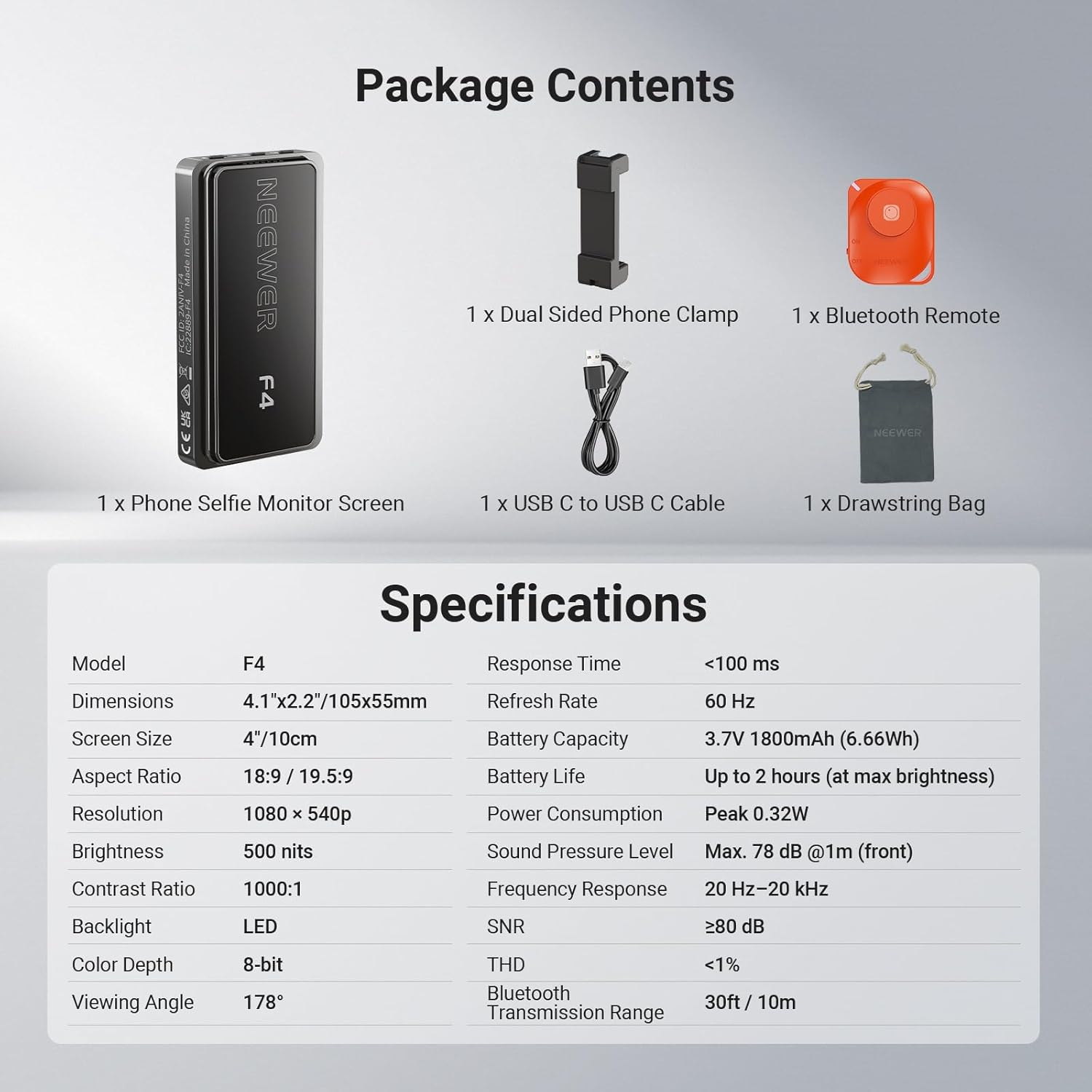
Image: Contents of the NEEWER F4 package, including the monitor, phone clamp, Bluetooth remote, USB-C cable, and drawstring bag.
Produkt ponadview
The NEEWER F4 monitor features a 4-inch HD display with 1080x540p resolution and 500 nits brightness for clear viewing. It includes a built-in speaker and an 1800mAh battery for up to 2 hours of continuous use. The device supports wireless screen mirroring and offers a 180° screen rotation function.

Obraz: Ponadview of the NEEWER F4 monitor highlighting its 4-inch display, 500 nits brightness, 1800mAh battery, built-in speaker, 1080x540 resolution, and Type-C charging port.
Organizować coś
1. Ładowanie monitora
Before initial use, fully charge the monitor. Connect the provided USB-C to USB-C cable to the monitor's Type-C port and a compatible USB power source (e.g., wall adapter, power bank, computer USB port). The charging indicator will show the charging status.

Image: The NEEWER F4 monitor connected to a USB-C charging cable, illustrating the charging process and battery capacity.
2. Attaching to Your Smartphone
The monitor comes with a dual-sided phone clamp that features a magnetic mount. This clamp securely attaches the monitor to the back of your smartphone.
- Attach the dual-sided phone clamp to your smartphone, ensuring a secure fit.
- Align the NEEWER F4 monitor with the magnetic area on the phone clamp. The magnets will secure the monitor in place.
- For additional accessories like a fill light or microphone, utilize the cold shoe slot integrated into the phone clamp. Insert the accessory's cold shoe base into this slot.

Image: Illustration of the NEEWER F4 monitor attaching to a smartphone via the magnetic phone clamp, and the cold shoe installation point for accessories.
3. Połączenie bezprzewodowe (przesyłanie obrazu na ekran)
The monitor connects wirelessly to your smartphone via screen mirroring technology.
- Dla iPhone'a:
- Switch the monitor's network mode button to the "W" (Wireless) mode.
- On your iPhone, go to Wi-Fi settings, search for the device's SSID (network name), and connect to it.
- Enable screen mirroring/projection on your iPhone and select the NEEWER F4 device.
- For Android Smartphones (excluding Google Pixel phones):
- Switch the monitor's network mode button to the "D" (Direct) mode.
- On your Android phone, turn on Wi-Fi.
- Enable screen mirroring/projection (often found as "Smart View," "Cast," "Wireless Display," etc.) and select the NEEWER F4 device.
Note: The NEEWER F4 is not compatible with Google Pixel phones for wireless mirroring.

Image: Step-by-step guide for connecting the NEEWER F4 monitor to both iPhone and Android devices via Wi-Fi screen mirroring.
Instrukcja obsługi
1. Basic Monitor Functions
- Włączanie/wyłączanie: Press and hold the Power button located on the side of the monitor.
- Obrót ekranu: A single click of the Power/Screen rotation button will rotate the display 180°, eliminating inverted images.
- Regulacja jasności: Use the Brightness Adjustment button to cycle through 3 brightness levels (30%, 65%, 100%) to suit your environment. The 500 nits brightness ensures clear viewing even in strong light.
- Przełącznik trybu sieciowego: Use the Network Mode Switch Button to toggle between "W" (Wireless for iPhone) and "D" (Direct for Android) modes.

Image: The NEEWER F4 monitor displaying real-time phone screen mirroring, highlighting its wireless capability and built-in speaker.

Image: Close-up of the NEEWER F4 monitor's side buttons (Power/Screen rotation, Brightness Adjustment, Network Mode Switch) and an illustration of 180° screen rotation.
2. Using the Bluetooth Remote (RT-116)
The included RT-116 Wireless Bluetooth Remote allows you to control your phone's camera functions remotely, such as taking photos or starting/stopping video recording.
- Ensure the remote has a battery installed (pre-installed).
- Włącz pilota.
- On your smartphone, enable Bluetooth and pair with the "RT-116" remote.
- Once paired, you can use the remote to trigger your phone's camera shutter or start/stop video recording from up to 33ft (10m) away.

Image: The NEEWER F4 monitor in use with a smartphone, accompanied by the RT-116 Wireless Bluetooth Remote, showing its transmission range and compatibility.
Konserwacja
- Czyść ekran miękką, niepozostawiającą włókien ściereczką. Nie używaj środków czyszczących ani rozpuszczalników o działaniu ściernym.
- Store the monitor in the provided drawstring bag when not in use to protect it from dust and scratches.
- Ensure the USB-C port is free from dust and debris to maintain proper charging.
- Unikaj upuszczania urządzenia i narażania go na silne uderzenia.
Rozwiązywanie problemów
| Problem | Możliwa przyczyna | Rozwiązanie |
|---|---|---|
| Monitor się nie włącza. | Niski poziom naładowania baterii lub przycisk zasilania nie został wciśnięty prawidłowo. | Charge the monitor fully. Press and hold the power button for a few seconds. |
| No screen mirroring/connection. | Incorrect network mode, Wi-Fi not enabled, or phone not compatible. | Ensure the monitor is in the correct "W" (iPhone) or "D" (Android) mode. Verify Wi-Fi is on and screen mirroring is enabled on your phone. Confirm your phone is not a Google Pixel device. |
| Screen image is inverted. | Screen rotation setting. | Press the Power/Screen rotation button once to flip the image 180°. |
| Pilot Bluetooth nie łączy się. | Remote off, low battery, or not paired. | Ensure the remote is turned on. Check/replace remote battery. Pair the remote via your phone's Bluetooth settings. |
| Krótki czas pracy baterii. | High brightness setting or continuous use. | Reduce screen brightness. Battery life is up to 2 hours at maximum brightness. Recharge as needed. |
Specyfikacje
| Funkcja | Szczegół |
|---|---|
| Model | F4 |
| Wymiary | 4.1" x 2.2" / 105 x 55mm |
| Rozmiar ekranu | 4 cali / 10 cm |
| Proporcje obrazu | 18:9 / 19.5:9 |
| Rezolucja | 1080x540p |
| Jasność | 500 nitów |
| Współczynnik kontrastu | 1000:1 |
| Podświetlenie | PROWADZONY |
| Głębia koloru | 8-bit |
| Viewing kąt | 178° |
| Czas reakcji | <100 ms |
| Częstotliwość odświeżania | 60 Hz |
| Pojemność baterii | 3.7 V 1800 mAh (6.66 Wh) |
| Żywotność baterii | Up to 2 hours (at max brightness) |
| Pobór mocy | Moc szczytowa 0.32 W |
| Poziom ciśnienia akustycznego | Max. 78 dB @1m (front) |
| Odpowiedź częstotliwościowa | 20 Hz – 20 kHz |
| SNR | ≥80 dB |
| THD | <1% |
| Zasięg transmisji Bluetooth | 30ft / 10m |
Gwarancja i wsparcie
The NEEWER F4 Selfie Monitor Screen comes with a 1-letnia gwarancja producenta. For warranty claims, technical support, or service inquiries, please contact NEEWER customer support through their official weblub u sprzedawcy, u którego produkt został zakupiony. Zachowaj dowód zakupu w celu potwierdzenia gwarancji.
For additional resources and product information, visit the official NEEWER store: Sklep NEEWER