
Wstęp
Thank you for choosing the Panana 37-inch Standing Desk Converter. This height-adjustable workstation is designed to transform your existing desk into an ergonomic sit-to-stand setup, promoting better posture and productivity. This manual provides essential information for safe assembly, operation, and maintenance of your new desk converter.

Image: The Panana Standing Desk Converter in use, showcasing its dual-level design with a laptop on the upper platform and a keyboard on the lower tray.
Informacje dotyczące bezpieczeństwa
- Przed montażem i użyciem należy uważnie przeczytać wszystkie instrukcje.
- Nie przekraczać maksymalnego udźwigu 33 funta (15 kg). Przeciążenie może spowodować niestabilność i uszkodzenia.
- Ensure the desk converter is placed on a stable, level surface.
- Keep hands and fingers clear of moving parts during height adjustment to prevent pinching.
- Distribute weight evenly on the desktop and keyboard tray.
- Do not allow children to operate or play with the desk converter.
- Regularly check all fasteners to ensure they are tight.
Zawartość opakowania
The Panana Standing Desk Converter arrives almost fully assembled. Please verify that all components are present and undamaged.
- Konwerter głównego biurka (wstępnie zmontowany)
- Tacka na klawiaturę
- Mounting Hardware for Keyboard Tray
- Instrukcja obsługi (ten dokument)
Konfiguracja i montaż
The Panana Standing Desk Converter requires minimal assembly. Follow these steps to prepare your workstation:
- Rozpakuj jednostkę: Carefully remove the main desk converter unit and the keyboard tray from its packaging.
- Zamontuj tackę na klawiaturę:
- Locate the pre-drilled holes on the underside of the main unit and on the keyboard tray.
- Align the keyboard tray with the attachment points.
- Secure the keyboard tray using the provided mounting hardware (screws). Ensure it is firmly attached.
- Position on Desk: Place the assembled desk converter on your existing desk. Ensure it is centered and stable.
- Arrange Equipment: Place your monitors, laptop, and other office essentials on the top platform. Position your keyboard and mouse on the lower tray.

Image: The desk converter highlighting its height-adjustable feature and ease of assembly.
Instrukcja obsługi
The Panana Standing Desk Converter features a gas spring lift system for smooth height adjustments.
- Regulacja wysokości:
- To raise the desk: Gently squeeze the adjustment levers located on the sides of the top platform. While holding the levers, lift the platform to your desired standing height. Release the levers to lock it in place.
- To lower the desk: Gently squeeze the adjustment levers. While holding the levers, apply slight downward pressure to lower the platform to your desired sitting height. Release the levers to lock it in place.
- Optimal Ergonomics:
- When standing, ensure your monitor is at eye level and your elbows are at a 90-degree angle when typing.
- When sitting, maintain good posture with your feet flat on the floor and your back supported.

Image: Illustration of the strong gas spring system enabling smooth height transitions.
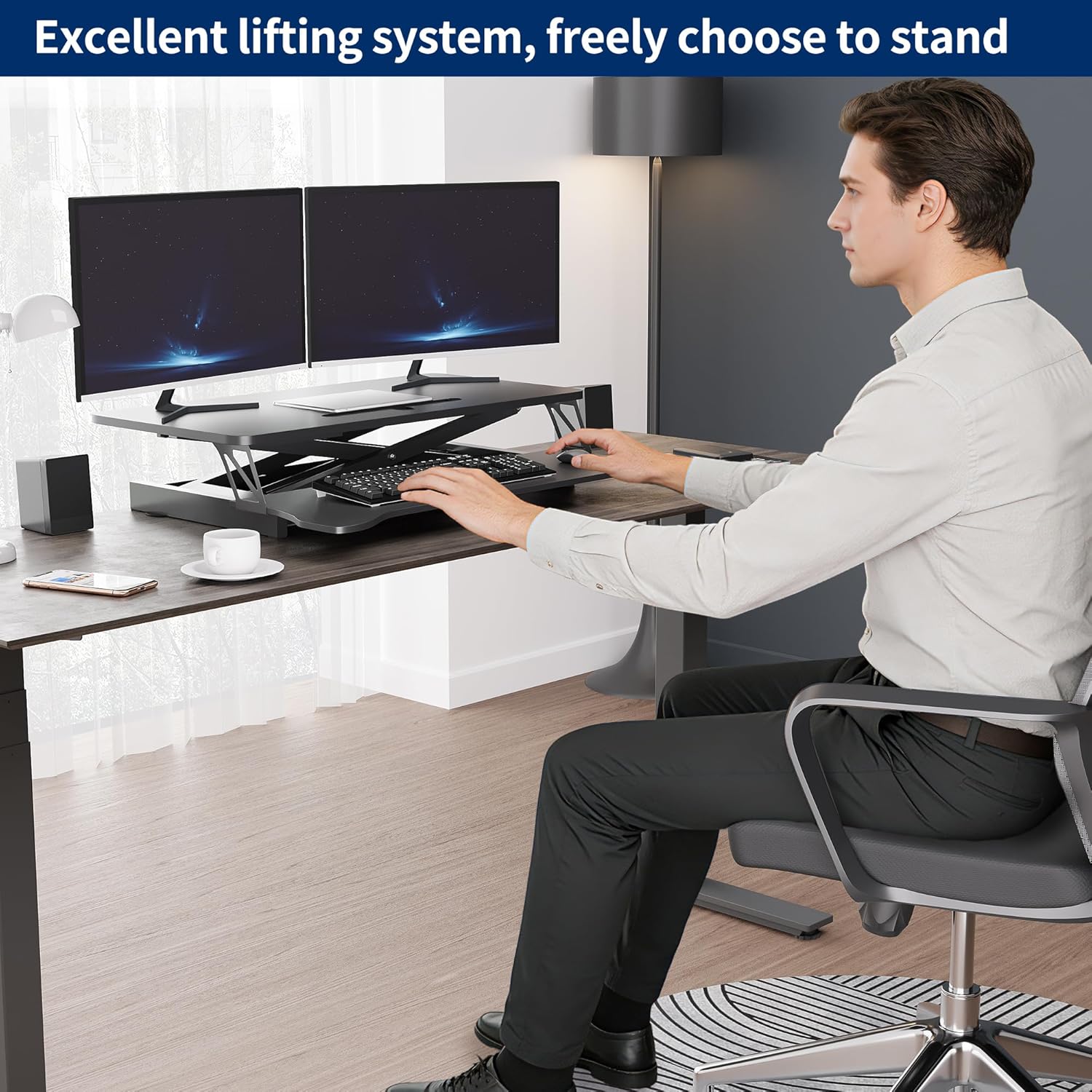
Image: User demonstrating the desk converter in a sitting position.

Image: The desk converter in a standing position, accommodating dual monitors and a laptop.
Konserwacja
To ensure the longevity and proper function of your Panana Standing Desk Converter, follow these simple maintenance guidelines:
- Czyszczenie: Przetrzyj powierzchnie suchą ściereczką. Unikaj środków czyszczących o działaniu ściernym i silnych środków chemicznych, które mogą uszkodzić wykończenie.
- Kontrola: Okresowo sprawdzaj wszystkie śruby i połączenia, aby upewnić się, że są dobrze dokręcone. W razie potrzeby dokręć luźne elementy mocujące.
- Ruch: Ensure the gas spring mechanism operates smoothly. If you notice any stiffness, ensure no obstructions are present.
Rozwiązywanie problemów
| Problem | Możliwa przyczyna | Rozwiązanie |
|---|---|---|
| Desk is difficult to raise or lower. |
|
|
| Biurko wydaje się niestabilne lub chwiejne. |
|
|
| Keyboard tray is loose. |
|
|
Specyfikacje
| Marka: | Panana |
| Nazwa modelu: | Konwerter biurka stojącego |
| Numer modelu: | BOCDLYXMJ |
| Kolor: | Czarny |
| Rozmiar: | 37 cali |
| Wymiary produktu (gł. x szer. x wys.): | 39.9 cm x 94 cm x 50.8 cm (15.7 cm x 37 cm x 20 cm) |
| Zakres regulacji wysokości: | 5.1 cala do 20 cali (13 cm do 50.8 cm) |
| Nośność: | Do 33 funtów (15 kg) |
| Tworzywo: | Drewno konstrukcyjne, stal stopowa |
| Cechy: | Adjustable Height, Keyboard Tray Included, Monitor Stand, Gas Spring Lift System |
| Wymagany montaż: | Tak (minimalnie) |
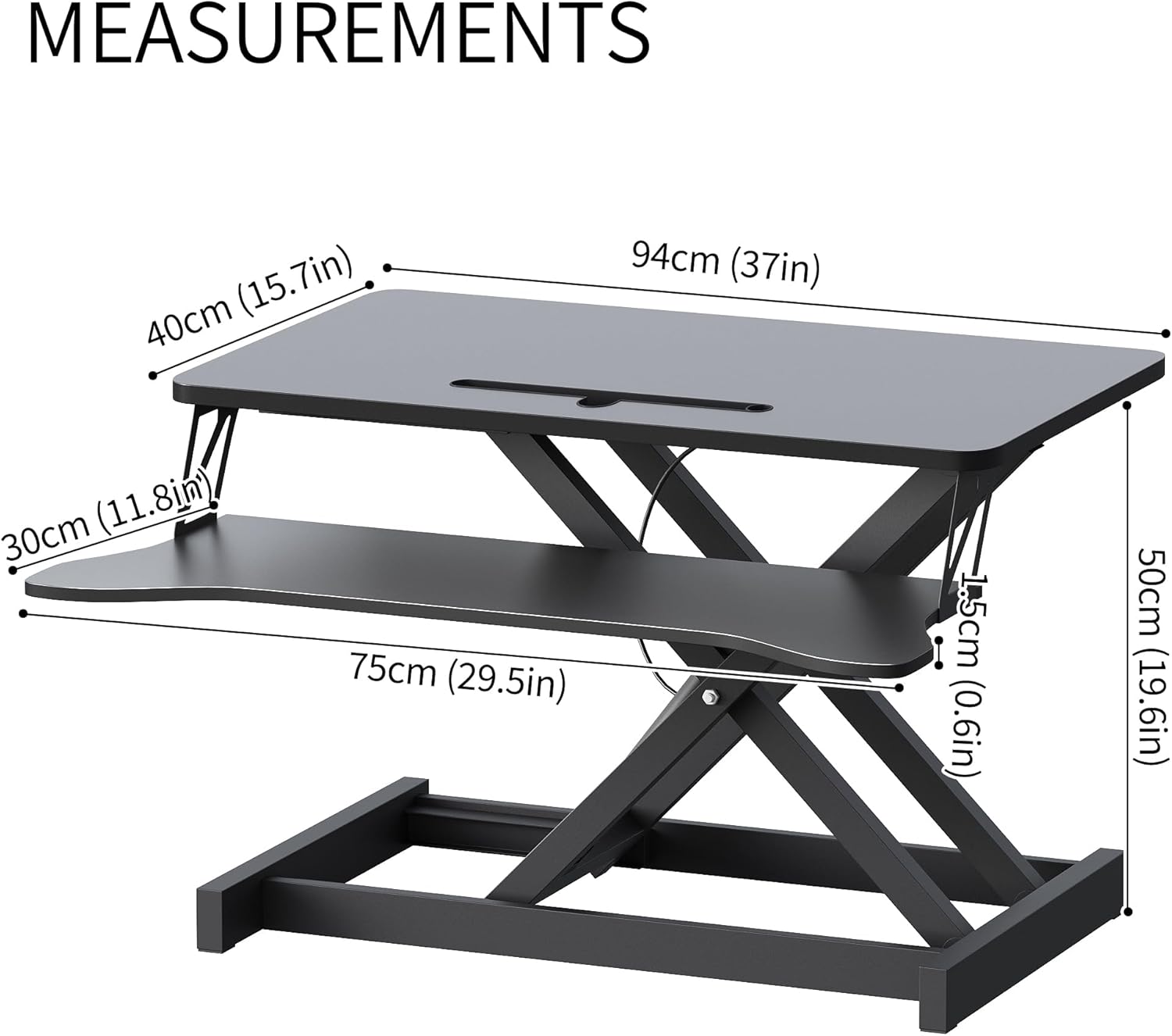
Image: Detailed measurements of the desk converter's dimensions.

Image: Visual representation of the desk converter's quality features, including rounded corners, sturdy metal bracket, smooth tabletop, and stable non-slip pads.
Gwarancja i wsparcie
Panana is committed to providing high-quality products. For specific warranty information or technical support, please refer to the warranty card included with your purchase or contact Panana customer service through the retailer where the product was purchased.
Proszę zachować dowód zakupu na wypadek ewentualnych roszczeń gwarancyjnych.