
1. Wprowadzenie
Dziękujemy za zakupasing the KJK Trail Camera, Model 201-NC-06. This camera is designed for reliable outdoor and indoor monitoring, capturing high-quality 2.7K video and 36MP still images. Its robust, battery-powered, and IP66 waterproof design makes it suitable for various applications, from wildlife observation to home security.
2. Funkcje produktu
- Obrazowanie w wysokiej rozdzielczości: Captures crisp 2.7K Full HD video and clear 36-megapixel still images.
- Szybka prędkość spustu: Features an ultra-high 0.1-second trigger speed to ensure no movement is missed.
- Szeroki kąt detekcji: Equipped with a 130° PIR (Passive Infrared) motion detection sensor, covering a broad area.
- Rozszerzony zasięg wykrywania: Detects motion up to 22 meters (approximately 72 feet).
- Low-Glow Infrared Night Vision: Integrated infrared lights enable clear photo and video capture even in complete darkness without disturbing wildlife.
- Trwałe i odporne na warunki atmosferyczne: IP66 rated for waterproof and dustproof performance, suitable for harsh outdoor environments.
- Zasilanie bateryjne: Operates on AA batteries (4 included), eliminating the need for complex wiring and allowing flexible placement.
- Wbudowany mikrofon: Nagrywa czysty dźwięk z obrazem footage.
- Wszechstronne tryby nagrywania: Supports video mode, still image mode, and a combination of both.
- Składowanie: Supports up to 128GB MicroSD flash memory.
3. Zawartość opakowania
Sprawdź przesyłkę, aby upewnić się, że znajdują się w niej wszystkie elementy:
- KJK Trail Camera (Model 201-NC-06)
- 4 baterie AA
- Pasek montażowy
- Kabel USB
- Instrukcja obsługi
- Note: A MicroSD card may be included depending on the specific product package. Please verify your purchase details.

Image: KJK Trail Camera 201-NC-06 shown with included accessories like batteries and a memory card.
4. Przewodnik konfiguracji
- Zainstaluj baterie: Open the camera's battery compartment and insert the 4 AA batteries, ensuring correct polarity.
- Włóż kartę MicroSD: Insert a MicroSD card (up to 128GB, Class 10 or higher recommended) into the designated slot. Ensure it is inserted correctly until it clicks into place.
- Włączanie: Switch the camera to the "SETUP" position. The LCD screen will light up, allowing you to configure settings.
- Ustawienia początkowe:
- Set Date and Time: Navigate through the menu to set the current date and time.
- Select Language: Choose your preferred language.
- Choose Recording Mode: Select between Video, Photo, or Photo+Video mode.
- Adjust PIR Sensitivity: Set the sensitivity of the motion sensor based on your environment.
- Montaż kamery:
The camera can be mounted using the included strap, placed on a flat surface, or secured with screws. Ensure the camera is positioned to capture the desired area without obstructions.

Image: Various mounting options for the KJK Trail Camera, including strap, flat surface, and screw mounting.
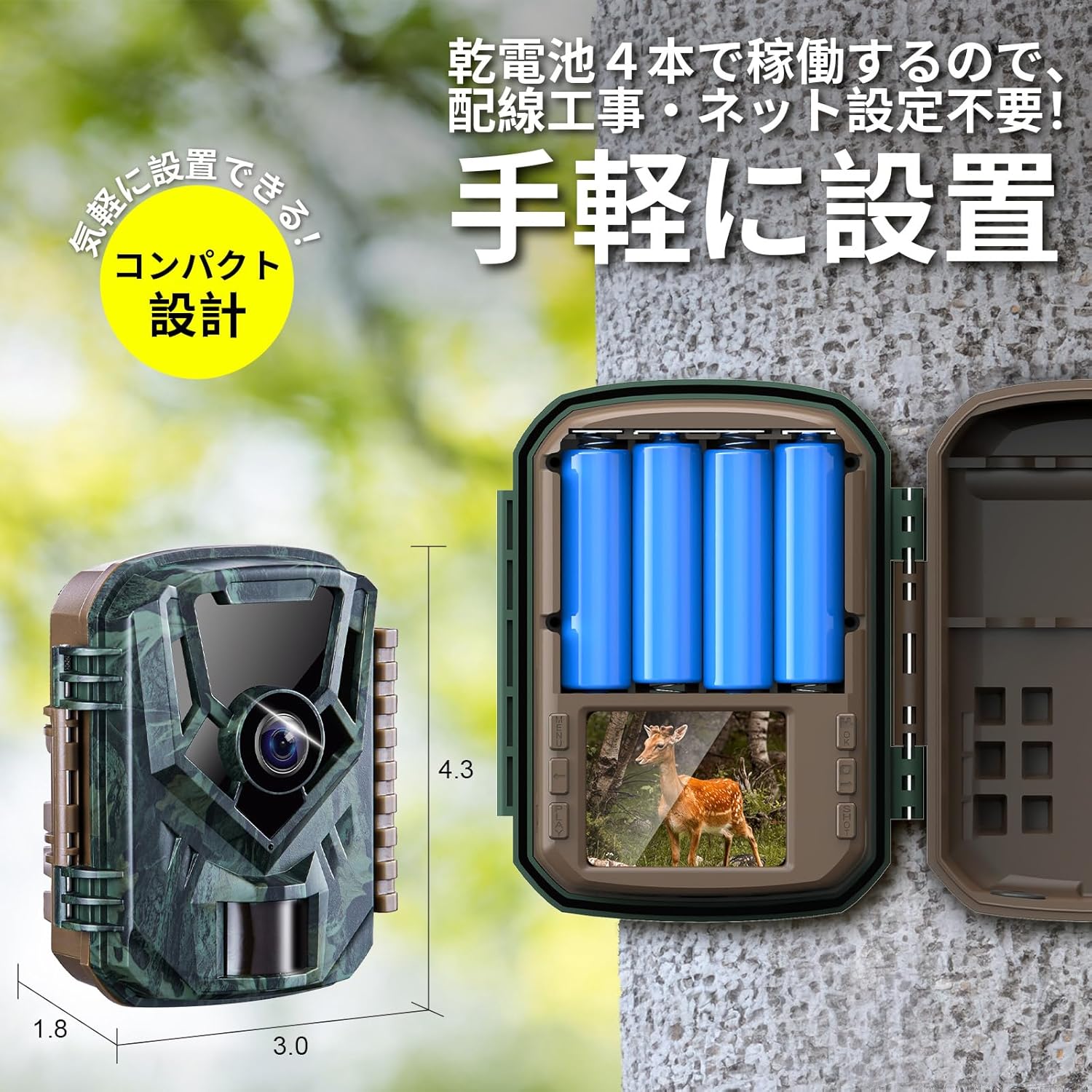
Image: The KJK Trail Camera with its battery compartment open, showing the slots for AA batteries.
5. Instrukcja obsługi
5.1. Podstawowa obsługa
- Zmiana trybu: Use the mode switch to toggle between OFF, SETUP, and ON modes.
- OFF: Wyłącza kamerę.
- USTAWIAĆ: Allows access to the menu for settings configuration and viewnagrany files.
- NA: Activates the camera for motion-triggered recording. The LCD screen will turn off after a few seconds, and the camera will enter monitoring mode.
- Detekcja ruchu PIR: In ON mode, the camera will automatically detect motion within its 130° detection angle and up to 22 meters, then trigger recording (photo or video) within 0.1 seconds.
- Widzenie nocne: The camera automatically switches to low-glow infrared night vision in low-light conditions, capturing clear black and white images/videos.

Image: Diagram illustrating the 130-degree detection angle and 22-meter detection range of the PIR motion sensor.

Image: The camera's infrared LEDs for night vision and its automatic day/night mode switching capability.
5.2. Tryby nagrywania
Kamera oferuje trzy tryby nagrywania:
- Tryb wideo: Nagrywa klipy wideo po wykryciu ruchu.
- Still Image Mode: Captures a series of still images when motion is detected.
- Tryb zdjęć i wideo: Rejestruje nieruchomy obraz, a następnie klip wideo po wykryciu ruchu.

Image: Visual representation of the three available recording modes: video, still image, and combined photo+video.
5.3. Viewwchodzenie Files
Możesz view nagrany files in three ways:
- Przed kamerą: Switch to SETUP mode and use the navigation buttons to browse and play back files on the built-in LCD screen.
- Za pomocą kabla USB: Connect the camera to a computer using the provided USB cable. The camera will appear as a removable disk, allowing you to access and transfer files.
- Korzystanie z czytnika kart: Remove the MicroSD card from the camera and insert it into a card reader connected to a computer to access files bezpośrednio.

Image: Depiction of three methods to view nagrany files: directly on the camera, via USB connection to a PC, or using a MicroSD card reader.
6. Konserwacja
- Wymiana baterii: Replace all 4 AA batteries when the low battery indicator appears on the screen or when performance degrades. Always use fresh batteries of the same type.
- Zarządzanie kartami MicroSD: Regularly check the MicroSD card for available space. Format the card periodically to maintain optimal performance and prevent data corruption. Back up important files przed formatowaniem.
- Czyszczenie:
- Przetrzyj korpus aparatu miękką ściereczką.amp płótno.
- Clean the lens and PIR sensor window gently with a microfiber cloth to ensure clear images and accurate detection. Do not use abrasive cleaners.
- Składowanie: When not in use for extended periods, remove the batteries and store the camera in a cool, dry place away from direct sunlight.
7. Rozwiązywanie Problemów
| Problem | Możliwa przyczyna | Rozwiązanie |
|---|---|---|
| Kamera się nie włącza. |
|
|
| Camera is not recording. |
|
|
| Słaba jakość obrazu/wideo. |
|
|
| PIR sensor not detecting motion through glass. | PIR sensors cannot detect motion through glass or other transparent barriers. | Position the camera outdoors or in a location where the PIR sensor has a clear line of sight to the detection area. |
8. Specyfikacje
| Model | 201-NC-06 |
| Marka | KJK |
| Rozdzielczość wideo | 2.7K FullHD |
| Rozdzielczość zdjęć | 36 megapiksela |
| Szybkość wyzwalania | 0.1 sekund |
| Kąt wykrywania PIR | 130° |
| Odległość wykrywania PIR | Do 22 metrów (72 stóp) |
| Wizja nocna | Low-Glow Infrared LEDs |
| Stopień wodoodporności | IP66 |
| Źródło zasilania | 4 baterie AA |
| Składowanie | MicroSD card, up to 128GB |
| Wymiary (dł. x szer. x wys.) | 7 x 11 x 16 cm (ok. 2.76 x 4.33 x 6.3 cala) |
| Tworzywo | Plastikowy |
| Kolor | Zielony (kamuflaż) |

Image: A summary of the camera's key specifications and features, including 2.7K video, 36MP photos, 0.1s trigger, IP66, 130° sensor, 22m IR range, built-in mic, and MicroSD support.
9. Gwarancja i wsparcie
The KJK Trail Camera Model 201-NC-06 comes with a 12-miesięczna gwarancja from the date of purchase. If you encounter any issues or have questions regarding your product, please do not hesitate to contact our customer support team. We are committed to providing assistance and ensuring your satisfaction.
For support, please refer to the contact information provided with your purchase or visit the official KJK webstrona.