
Wstęp
Welcome to the user manual for your new Lenovo LOQ 15IRX10 Gaming Laptop. This guide provides essential information for setting up, operating, maintaining, and troubleshooting your device. The Lenovo LOQ 15IRX10 is a high-performance gaming laptop featuring a 15.6" FHD IPS 144Hz display, a 13th Generation Intel Core i7-13650HX processor, NVIDIA GeForce RTX 5050 graphics, 24GB DDR5 RAM, and a 1TB NVMe M.2 SSD, running on Windows 11 Home.
Please read this manual thoroughly to ensure proper use and to maximize the lifespan and performance of your laptop.
Co jest w pudełku
Upon unboxing your Lenovo LOQ 15IRX10 Gaming Laptop, please verify that all the following items are included:
- Lenovo LOQ 15IRX10 Gaming Laptop
- Zasilacz sieciowy 245 W
- MST 32GB USB Drive
- Quick Start Guide (if applicable, not explicitly listed but common)
Jeśli brakuje któregokolwiek z elementów lub jest on uszkodzony, należy natychmiast skontaktować się ze sprzedawcą lub działem pomocy technicznej Lenovo.
Organizować coś
1. Pierwsze włączenie i ładowanie
Before first use, it is recommended to fully charge your laptop's battery.
- Connect the 245W AC adapter to the power input port on your laptop.
- Podłącz zasilacz sieciowy do gniazdka elektrycznego.
- Naciśnij przycisk zasilania, aby włączyć laptopa.

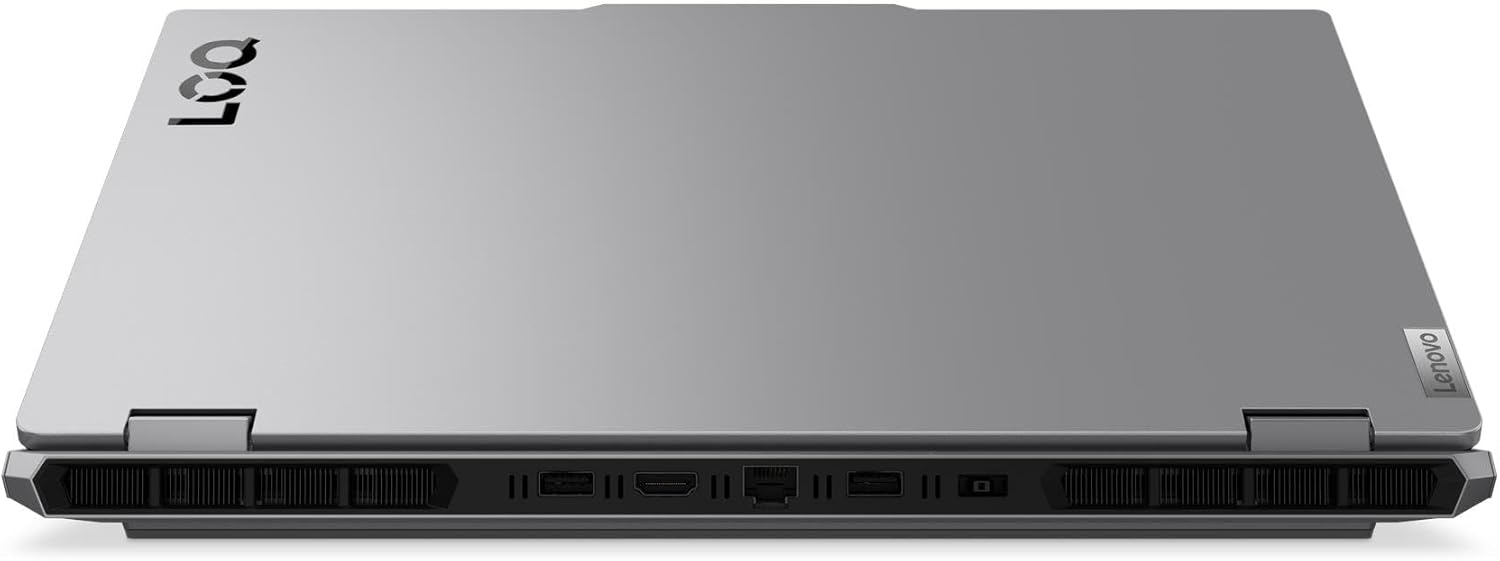
Obraz: Tył view of the Lenovo LOQ 15IRX10 laptop showing the power input and other ports.
2. Konfiguracja systemu Windows 11 Home
Follow the on-screen instructions to complete the initial setup of Windows 11 Home. This includes selecting your region, language, connecting to a network, and creating a user account.
3. Łączenie z siecią
Your laptop supports Wi-Fi 6 and Gigabit Ethernet.
- Wi-Fi: During Windows setup or later, click the Wi-Fi icon in the taskbar, select your network, and enter the password.
- Ethernet: Podłącz kabel Ethernet routera lub modemu do portu RJ-45 w laptopie.
Obraz: Tył view of the laptop highlighting the RJ-45 Ethernet port.
4. Podłączanie urządzeń peryferyjnych
Connect external devices such as a mouse, keyboard, or external display.
- Urządzenia USB: Use the USB 3.2 Gen 1 Type-A ports or the USB 3.2 Gen 2 Type-C port.
- Wyświetlacz zewnętrzny: Connect an external monitor using the HDMI v2.1 port or the USB 3.2 Gen 2 Type-C port (which supports DisplayPort).
- Urządzenia audio: Use the Headphone/Microphone Combo Jack for headsets.
Obraz: Lewa strona view of the laptop showing USB-C, USB-A, and audio jack ports.
Obraz: Tył view of the laptop highlighting the HDMI port.
Obsługa laptopa
Klawiatura i touchpad
Your Lenovo LOQ 15IRX10 features a full-size keyboard with a numeric keypad and white backlighting for comfortable typing in various lighting conditions. The touchpad supports multi-touch gestures for intuitive navigation.

Obraz: widok z góry view of the laptop showing the keyboard and touchpad.
Wyświetlacz
The 15.6-inch Full HD (1920 x 1080) IPS Anti-Glare display offers a 144Hz refresh rate for smooth visuals, especially during gaming. Adjust brightness using the function keys (Fn + F5/F6) or through Windows display settings.
Audio
The laptop is equipped with stereo speakers (2W x2) optimized with Nahimic Audio for an immersive sound experience. Adjust volume using the function keys (Fn + F1/F2/F3) or Windows sound settings.
Zarządzanie baterią
The 4-cell, 60 Wh battery provides up to 6 hours of average usage. For optimal battery life:
- Keep the AC adapter connected during intensive tasks like gaming.
- Utilize Windows power saving modes when not gaming.
- Unikaj ekstremalnych temperatur.
The laptop supports Super Rapid Charge, allowing it to charge from 0% to 30% in approximately 10 minutes.
Konserwacja
Czyszczenie laptopa
- Ekran: Delikatnie użyj miękkiej, niestrzępiącej się szmatki dampSpryskaj wodą lub płynem do czyszczenia ekranów. Nie rozpylaj płynu bezpośrednio na ekran.
- Klawiatura i obudowa: Użyj miękkiej, suchej ściereczki. W przypadku uporczywych zabrudzeń, delikatnie przetrzyj.amp Można użyć ściereczki nasączonej łagodnym roztworem mydła, upewniając się, że żaden płyn nie dostanie się do otworów.
- Wentylatory: Periodically clean dust from the cooling vents using compressed air to ensure proper airflow and prevent overheating.
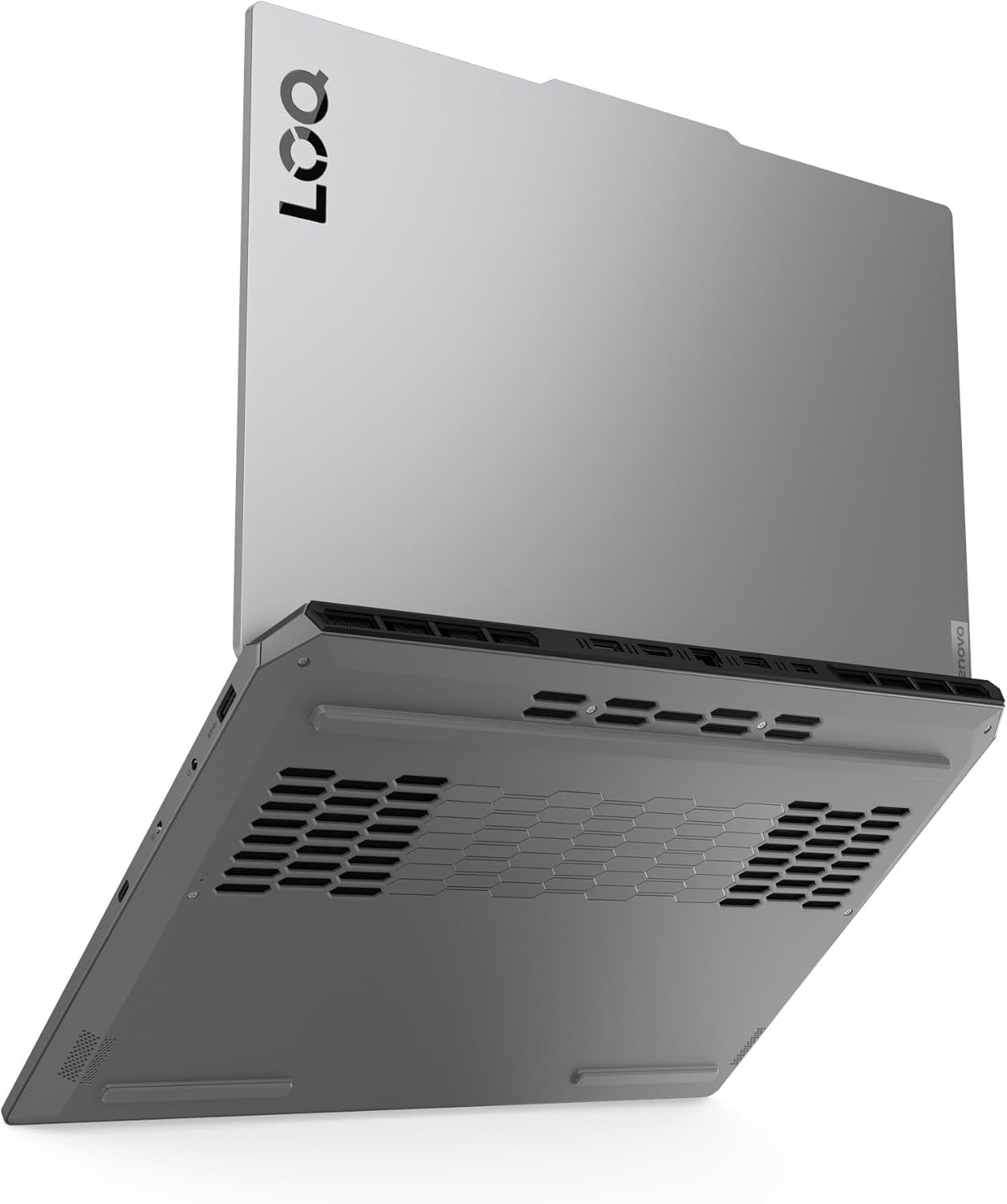
Obraz: Dół view of the laptop, illustrating the ventilation grilles for cooling.
Aktualizacje oprogramowania
Regularly update your operating system, drivers, and applications to ensure optimal performance, security, and compatibility.
- Aktualizacje systemu Windows: Idź do Ustawienia > Windows Update.
- Aktualizacje sterowników: Sprawdź oficjalne wsparcie Lenovo website for the latest drivers for your model. NVIDIA graphics drivers should be updated regularly through GeForce Experience or NVIDIA's webstrona.
Zarządzanie magazynem
Periodically manage your 1TB NVMe M.2 SSD to maintain performance.
- Usuń niepotrzebne filei aplikacji.
- Use Windows Disk Cleanup or Storage Sense to free up space.
- Consider backing up important data to an external drive or cloud storage.
Rozwiązywanie problemów
This section addresses common issues you might encounter. For more complex problems, refer to the Lenovo support webodwiedź witrynę lub skontaktuj się z pomocą techniczną.
Brak zasilania / Laptop się nie włącza
- Upewnij się, że zasilacz sieciowy jest prawidłowo podłączony do laptopa i do sprawnego gniazdka elektrycznego.
- Sprawdź, czy gniazdko elektryczne działa prawidłowo, podłączając do niego inne urządzenie.
- Jeśli akumulator jest całkowicie rozładowany, należy ładować go przez co najmniej 30 minut przed próbą włączenia urządzenia.
Problemy z wyświetlaniem
- Pusty ekran: Ensure the laptop is powered on. Try connecting an external monitor to check if the issue is with the laptop's display or the graphics output.
- Nieprawidłowa rozdzielczość/częstotliwość odświeżania: Adjust display settings in Windows (Ustawienia > System > Wyświetlacz). Ensure graphics drivers are up to date.
Problemy z łącznością sieciową
- Wi-Fi: Check if Wi-Fi is enabled in Windows settings. Restart your router/modem. Ensure you are connecting to the correct network with the right password.
- Ethernet: Verify the Ethernet cable is properly connected. Check network adapter settings in Windows.
Podświetlenie klawiatury
The Lenovo LOQ 15IRX10 features a white backlit keyboard. If the backlight is not working, ensure it is enabled using the dedicated function key (often Fn + Spacebar or a specific F-key, refer to your keyboard's icons). This model does not support multi-color (RGB) backlighting.
Specyfikacje
Detailed technical specifications for the Lenovo LOQ 15IRX10 Gaming Laptop:
| Funkcja | Specyfikacja |
|---|---|
| Nazwa modelu | LOQ15IRX10 |
| Edytor | 13th Gen Intel Core i7-13650HX (14-Core, up to 4.9 GHz) |
| Grafika | NVIDIA GeForce RTX 5050 8 GB GDDR6 |
| Wyświetlacz | 15.6" FHD (1920 x 1080) IPS Anti-Glare, 144Hz, 300 nits, 100% sRGB, G-SYNC |
| BARAN | 24 GB DDR5 4800 MHz |
| Składowanie | Dysk SSD NVMe M.1 o pojemności 2 TB |
| System operacyjny | Windows 11 Home |
| Klawiatura | Fullsize Backlit Keyboard with Numpad (White Backlight) |
| Webkrzywka | 5.0MP with E Shutter |
| Audio | Stereo speakers, 2W x2, optimized with Nahimic Audio |
| Łączność bezprzewodowa | Realtek RTL8852BE Wi-Fi 6 (2x2), Bluetooth 5.2 |
| Porty |
|
| Bateria | 4 ogniwa 60 Wh (średni czas użytkowania do 6 godzin) |
| Zasilacz | Zasilacz sieciowy 245 W |
| Wymiary (dł. x szer. x wys.) | 14.17" x 10.19" x 0.94" (360 mm x 259 mm x 23.9 mm) |
| Waga | 5.29 funta (2.4 kg) |
| Kolor | Luna Szary |
Gwarancja i wsparcie
Your Lenovo LOQ 15IRX10 Gaming Laptop comes with a standard manufacturer's warranty. For specific warranty terms and conditions, please refer to the warranty documentation included with your product or visit the official Lenovo support webstrona.
Wsparcie techniczne
Aby uzyskać pomoc techniczną, pobrać sterowniki lub uzyskać więcej informacji, odwiedź oficjalną stronę pomocy technicznej Lenovo webstrona: support.lenovo.com. You will need your laptop's serial number, which can usually be found on a sticker on the bottom of the device or within the system information in Windows.
Plany ochrony
Extended protection plans may be available for purchase to cover your device beyond the standard warranty period. These plans often include accidental damage protection and extended service. Please check with your retailer or Lenovo for available options.
- 2-letni plan ochrony
- 4-letni plan ochrony
- Complete Protect (opcja rozliczeń miesięcznych)