
1. Koniec produktuview
The TYPONOS D820 is a compact and portable thermal printer designed for various printing needs, from home and school to travel and office use. It supports wireless Bluetooth connectivity and USB connection, offering flexibility and convenience. This inkless printer utilizes thermal paper, eliminating the need for ink cartridges.
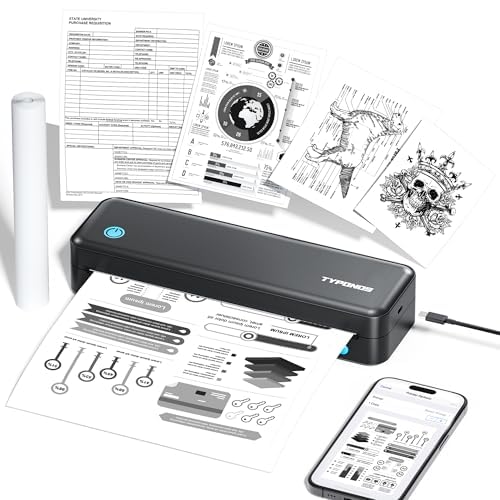
Figure 1: TYPONOS D820 Wireless Bluetooth Printer
2. Główne cechy
- Druk termiczny bez użycia atramentu: Eliminates the need for ink cartridges, reducing maintenance and cost.
- Połączenie bezprzewodowe: Connects via Bluetooth for convenient printing from mobile devices.
- Łączność USB: Supports USB connection for printing from computers (Windows/Mac).
- Przenośna konstrukcja: Compact and lightweight (2.16 pounds, 10.98 x 4.13 x 2.7 inches) for easy transport.
- Wszechstronne wsparcie papieru: Compatible with thermal paper rolls, supporting various print sizes up to Letter (8.5 x 11 inches).
- Wysoka rozdzielczość: Offers a maximum black and white print resolution of 203 dots per inch.
- Zintegrowana bateria: Includes a 9V battery for portable use.
3. Konfiguracja
3.1. Rozpakowanie i wstępna inspekcja
Carefully remove the printer and all accessories from the packaging. Inspect the device for any signs of damage. Ensure all components listed in the packing list are present.
3.2. Ładowanie papieru termicznego
The D820 printer uses thermal paper rolls. To load paper:
- Open the printer cover by gently pressing the release buttons on the sides.
- Włóż rolkę papieru termicznego do przeznaczonego gniazda, upewniając się, że strona do zadrukowania jest skierowana do góry.
- Wyciągnij mały kawałek papieru poza krawędź tnącą.
- Close the printer cover until it clicks securely into place.
Video 1: Demonstrates loading thermal paper into the TYPONOS D820 Portable Printer.
3.3. Łączenie się z urządzeniem
The D820 offers both Bluetooth and USB connectivity.
3.3.1. Bluetooth Connection (Android/iOS)
- Ensure the printer is powered on (the power button will illuminate).
- Włącz Bluetooth na swoim urządzeniu mobilnym.
- Open the dedicated TYPONOS printing application (download from your device's app store).
- Within the app, search for available Bluetooth devices and select "TYPONOS D820".
- Postępuj zgodnie ze wskazówkami wyświetlanymi na ekranie, aby dokończyć proces parowania.
3.3.2. USB Connection (Windows/Mac)
- Podłącz drukarkę do komputera za pomocą dostarczonego kabla USB.
- Włącz drukarkę.
- Install the printer drivers from the included CD or download them from the official TYPONOS webstrona.
- Once drivers are installed, the printer should be recognized by your operating system.
4. Instrukcja obsługi
4.1. Drukowanie strony testowej
After successful driver installation (for USB) or app connection (for Bluetooth), it is recommended to print a test page to confirm functionality.
- For USB connection: Access your computer's printer settings, locate the D820 printer, and select the option to print a test page.
- For Bluetooth connection: The mobile app typically includes a test print function in its settings.
Video 2: Shows the TYPONOS Portable Thermal Printer in operation, printing a document.
4.2. General Printing
To print documents or images:
- Ensure the printer is connected to your device and has thermal paper loaded.
- Otwórz dokument lub obraz, który chcesz wydrukować, na komputerze lub urządzeniu mobilnym.
- Wybierz opcję drukowania (zwykle File > Print or a print icon).
- Choose "TYPONOS D820" as your printer.
- Adjust print settings such as paper size (e.g., Letter), orientation, and quality as needed.
- Click "Print". The document will feed through the printer and emerge from the front slot.
- Tear off the printed document using the serrated edge on the printer.
5. Konserwacja
- Czyszczenie: Regularly wipe the exterior of the printer with a soft, dry cloth. For the print head, use a lint-free cloth lightly dampened with isopropyl alcohol. Ensure the printer is off and disconnected from power before cleaning.
- Wymiana papieru: Replace thermal paper rolls as needed. Always use high-quality thermal paper to ensure optimal print quality and printer longevity.
- Pielęgnacja baterii: Charge the printer's internal battery regularly. Avoid completely draining the battery frequently to prolong its lifespan.
- Składowanie: Przechowuj drukarkę w chłodnym, suchym miejscu, z dala od bezpośredniego światła słonecznego i ekstremalnych temperatur.
6. Rozwiązywanie Problemów
| Problem | Możliwa przyczyna | Rozwiązanie |
|---|---|---|
| Drukarka się nie włącza | Low battery or power cable issue. | Charge the printer. Ensure the power cable is securely connected. |
| Połączenie Bluetooth jest niestabilne lub nie działa | Interference, device too far, or app issue. | Ensure devices are within range. Restart Bluetooth on both devices. Re-pair the printer. Update the mobile app. |
| Zacięcie papieru | Nieprawidłowe załadowanie papieru lub obcy przedmiot. | Power off the printer. Carefully open the cover and remove any jammed paper. Reload paper correctly. |
| Blurry or faint print | Low quality thermal paper, dirty print head, or print density settings. | Use recommended thermal paper. Clean the print head. Adjust print density settings in the app/driver. |
| Paper not feeding straight | Paper misaligned during loading. | Ensure the paper roll is centered and properly aligned within the paper guides when loading. |
7. Specifications (Model: D820)
| Funkcja | Szczegół |
|---|---|
| Marka | TYPONOS |
| Seria modeli | D820 |
| Typ atramentu do drukarki | Termiczny (bezatramentowy) |
| Media drukowane | Papier termiczny |
| Obsługiwane rozmiary nośników | List (8.5 x 11 cali) |
| Maksymalna pojemność arkuszy wejściowych | 4 sheets (roll-fed) |
| Maksymalna prędkość kopiowania (czarno-białe) | 4 stron na milion |
| Maksymalna rozdzielczość wydruku czarno-białego | 203 punktów na cal |
| Interfejs sprzętowy | USB, Bluetooth |
| Łączna liczba portów USB | 1 |
| Wymiary produktu | 10.98 x 4.13 x 2.7 cala |
| Waga przedmiotu | 2.16 funta |
| Baterie | Wymagana 1 bateria 9 V (w zestawie) |
| Kolor | Czarny |
| Zgodność z inteligentnym domem | Smart Home Compatible |
8. Gwarancja i wsparcie
For warranty information, technical support, or to purchase accessories and replacement thermal paper, please visit the official TYPONOS store or contact customer service.