
Thermal Master P3
Instrukcja obsługi kamery termowizyjnej Thermal Master P3
Model: P3
1. Wprowadzenie
The Thermal Master P3 is a versatile thermal imaging camera designed for a wide range of applications, including PCB inspection, industrial maintenance, and home inspections. This compact device connects directly to your iOS or Android smartphone, transforming it into a powerful thermal analysis tool. Featuring an 8mm manual macro lens, 512x384 X³IR resolution, and a broad temperature detection range, the P3 provides precise and detailed thermal insights. This manual will guide you through the setup, operation, and maintenance of your Thermal Master P3.

Figure 1: Thermal Master P3 Thermal Camera
2. Zawartość opakowania
Sprawdź, czy w przesyłce znajdują się wszystkie elementy wymienione poniżej:
- Thermal Master P3 Thermal Camera ×1
- EVA Case ×1
- 50cm Extensive Cable ×1
- USB C to Lightning Adapter ×1
- Instrukcja obsługi (ten dokument)
- Karta gwarancyjna
- Szybki przewodnik

Figure 2: Thermal Master P3 Package Contents
3. Konfiguracja i połączenie
3.1 Instalacja aplikacji
The Thermal Master P3 requires the Mistrz tymczasowy application to function. Download the app from your device's respective app store:
- Dla urządzeń z systemem iOS: Szukaj 'Temp Master' on the Apple App Store.
- Dla urządzeń z systemem Android: Szukaj 'Temp Master' on the Google Play Store.
Note: For Android devices, ensure that 'OTG' (On-The-Go) is enabled in your phone's settings if the app does not respond upon connection. On most phones, OTG is enabled by default.

Figure 3: Temp Master App Download
3.2 Connecting the P3
The Thermal Master P3 is designed for wide compatibility:
- For Android and newer iPhones (iPhone 15/16 series): Connect the P3 directly to your device's native Type-C port.
- For other iOS devices (iPhone 14/13/12/11/XR/X/8 series): Use the included Lightning adapter to connect the P3 to your device.
- For Windows devices or inspecting tight spaces: Utilize the 19-inch extension cable for flexible connection.

Figure 4: Device Compatibility and Connection Methods
4. Operating Your Thermal Master P3
4.1 Podstawowa obsługa
The P3 operates on a plug-and-play basis, drawing power directly from your connected device. No internal battery or charging is required. Simply connect the device, open the Temp Master app, and begin your thermal analysis.
The 8mm manual focus lens allows you to adjust the focus for clear thermal images, from macro inspections of small components to mid-range scanning up to 80 meters.

Figure 5: Manual Focus and Range Capabilities
4.2 Thermal Imaging Features
Resolution and Sensitivity
The P3 utilizes RazorX and X³ imaging algorithms to achieve a 512x384 resolution from a 256x192 sensor. Its high-sensitivity core detects temperature variations as small as 0.035°C, enabling the detection of 1mA current leaks.
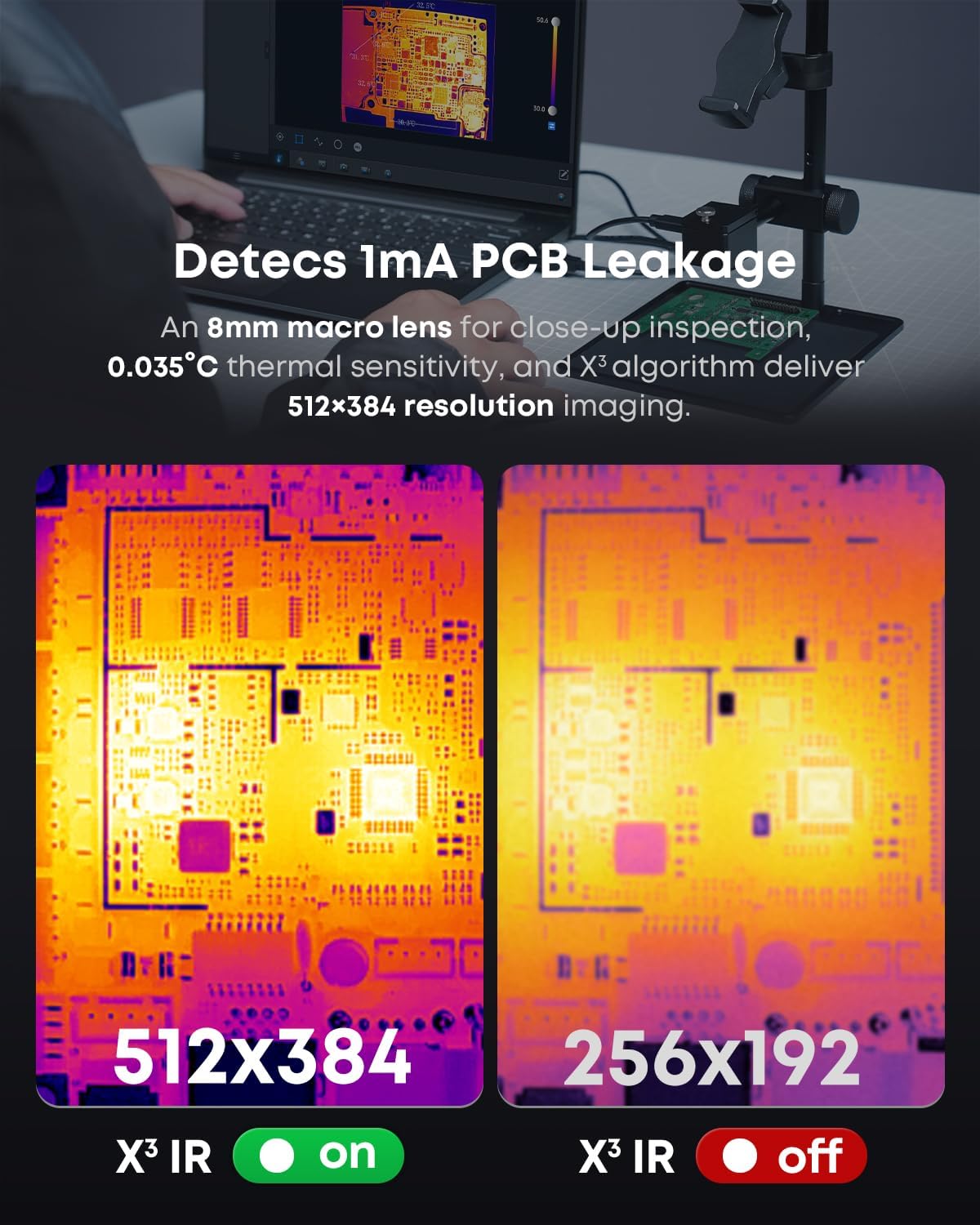
Figure 6: X³IR Resolution Comparison
Pomiar temperatury
The P3 offers a temperature detection range of -4°F to 1112°F (-20°C to 600°C) with an accuracy of ±3.6°F (±2°C) using IQ+ Precision Temp Measurement. The app provides various measurement modes, including points, lines, and areas, allowing for detailed analysis. You can also fine-tune measurements by adjusting environmental factors like emissivity, ambient temperature, and measurement distance.

Figure 7: Precision Temperature Measurement
Visual Customization
The Temp Master app offers 12 professional color palettes to visualize temperature distribution clearly. The Isotherm feature helps you quickly identify specific temperature ranges for fast diagnostics.

Figure 8: 12-Color Palette Options
Zoom and Refresh Rate
Benefit from 15x digital zoom to bring distant targets into clear view. A 25Hz refresh rate ensures smooth, real-time thermal imaging.
Zaawansowane funkcje
The Temp Master app includes intelligent features such as high/low temperature alarms, picture-in-picture mode, and automatic temperature point tracking. It also supports a 3D Thermal View, which helps turn hot spots into precise locations for targeted repairs.

Figure 9: 3D Thermal View
4.3 Analiza danych i raportowanie
The Temp Master app provides free professional data analysis tools. You can quickly analyze captured photos and videos, and generate detailed reports in minutes. This includes 2D and 3D editing capabilities, and PC compatibility for comprehensive analysis.

Figure 10: Free Professional Data Analysis
Video 1: User Guide for Thermal Master P3 - This video provides a visual walkthrough of the Thermal Master P3's features and app interface, demonstrating its ease of use and various functionalities.
Video 2: Thermal Master P3, the PCB Master - This video showcases the Thermal Master P3's capabilities specifically for PCB inspection, highlighting its precision and utility in identifying minute current leakages and thermal anomalies on circuit boards.
5. Pielęgnacja i konserwacja
To ensure the longevity and optimal performance of your Thermal Master P3, follow these maintenance guidelines:
- Czyszczenie: Gently wipe the lens and device body with a soft, dry, lint-free cloth. Avoid using abrasive cleaners or solvents.
- Składowanie: Store the P3 in its provided EVA case when not in use to protect it from dust, moisture, and physical damage.
- Obsługiwanie: Handle the device with care. Avoid dropping it or exposing it to extreme temperatures or humidity.

Figure 11: Built to Last - Durability Testing
6. Rozwiązywanie Problemów
Oto kilka typowych problemów i ich rozwiązań:
- Q1: Why is the Temp Master app not responding when plugged in?
A: a) Verify that 'OTG' is enabled in your phone's Settings. On most phones, OTG is enabled by default and ready to use. b) Install the Temp Master app and grant all required permissions. c) Reconnect your item. If issues persist, contact our after-sales team. - Q2: What should I do in the event of a blurry screen?
A: Refresh the images by tapping the Shutter icon. - Q3: Can the camera detect objects under water, outside windows?
A: No. Thermal imaging detects surface-level heat, which is blocked or reflected by water, glass, and fabrics. - Q4: Why do I always hear a 'click' sound?
A: This is the shutter sound of the thermal camera to maintain image clarity. You can temporarily disable it by following: Setting → Image Setting → Automatic shutter.

Rysunek 12: Często zadawane pytania dotyczące rozwiązywania problemów
7. Specyfikacje techniczne
| Funkcja | Specyfikacja |
|---|---|
| Model | P3 |
| Producent | Mistrz termiczny |
| Rezolucja | 512×384 X³IR (from 256×192 sensor) |
| Czułość termiczna (NETD) | 0.035°C (35mk) |
| Zakres temperatur | -4°F do 1112°F (-20°C do 600°C) |
| Dokładność | ±3.6°F (±2%) |
| Obiektyw | 8mm Macro & Manual Focus Lens |
| Pole View | 40°x30° |
| Zoom cyfrowy | 15x |
| Częstotliwość odświeżania | 25 Hz |
| Zgodność | iOS (via Type-C or Lightning adapter), Android (via Type-C), Windows (via extension cable) |
| Pobór mocy | 0.32W (5-8 hours usage from device) |
| Waga przedmiotu | 10.5 uncji |
| Wymiary opakowania | 5.91 x 4.33 x 2.13 cala |
8. Gwarancja i wsparcie
Thermal Master is committed to providing reliable products and excellent customer service:
- Bezpłatne zwroty: Skorzystaj z 30-dniowej możliwości bezpłatnego zwrotu.
- Wymiana: No-hassle replacement for any quality problem within 2 years.
- Serwis i wsparcie: Benefit from lifetime service and professional technical support.
For further assistance or inquiries, please refer to the contact information provided on your warranty card or visit the official Thermal Master webstrona.

Figure 13: Thermal Master Reliability & Service