
Wstęp
Dziękujemy za zakupasing the DreamSky Sunrise Alarm Clock Radio, Model DS236. This device combines a sunrise simulation alarm, FM radio, Bluetooth speaker, and a dimmable RGB night light to enhance your waking and sleeping experience. This manual provides detailed instructions for setup, operation, and maintenance to ensure optimal performance and longevity of your product. Please read it thoroughly and retain it for future reference.
Informacje dotyczące bezpieczeństwa
Aby zapewnić bezpieczną obsługę i zapobiec uszkodzeniom, należy przestrzegać następujących środków ostrożności:
- Use only the provided DC adapter for power.
- Nie wystawiaj urządzenia na działanie wody, wilgoci ani ekstremalnych temperatur.
- Unikaj upuszczania i narażania urządzenia na silne uderzenia.
- Trzymaj urządzenie z dala od źródeł ciepła, takich jak grzejniki, kratki wentylacyjne, piece lub inne urządzenia (w tym amp(lifiers) wytwarzające ciepło.
- Do not attempt to disassemble or modify the device. Refer all servicing to qualified service personnel.
- Clean the device with a soft, dry cloth only. Do not use liquid or aerosol cleaners.
Zawartość opakowania
Proszę sprawdzić, czy w paczce znajdują się następujące elementy:
- DreamSky Sunrise Alarm Clock Radio (Model DS236)
- Zasilacz prądu stałego
- Instrukcja obsługi
Produkt ponadview
Familiarize yourself with the various parts and controls of your DreamSky Sunrise Alarm Clock Radio.

Rysunek 1: Przód view of the DreamSky Sunrise Alarm Clock Radio, highlighting its dimensions (6.6 inches wide, 6.9 inches high) and key features such as Sunrise, Alarm, Custom Snooze, USB Port, Bluetooth, FM Radio, Night Light, and Timer.
Przyciski i porty sterujące:
- Sunrise Button: Activates and sets sunrise simulation.
- Alarm 1 Set / Alarm 2 Set Buttons: Configures individual alarms.
- Przycisk światła: Controls night light and RGB color modes.
- Przycisk timera: Ustawia timer automatycznego wyłączania.
- Snooze / Play/Pause / Rotate Wheel: Multi-function button for snooze, media control, and value adjustment.
- Przyciski głośności +/-: Dostosowuje głośność dźwięku.
- Przycisk FM: Activates and controls FM radio.
- Przycisk ustawień wstępnych: Saves and recalls FM radio presets.
- Dimmer / Time Set Button: Adjusts display brightness and enters time setting mode.
- Port wyjściowy USB: Do ładowania urządzeń zewnętrznych.
- Port wejściowy DC: Łączy się z zasilaczem.
- Antena: Do odbioru radia FM.
Organizować coś
1. Podłączenie zasilania
Connect the provided DC power adapter to the "INPUT" port on the back of the alarm clock and plug the adapter into a standard wall outlet. The clock display will light up.
Wideo: Demonstrates how to set the time on the DreamSky Sunrise Clock. This video shows the initial setup and adjustment of time settings.
2. Ustawienie czasu początkowego
- Naciśnij i przytrzymaj DIMMER / TIME SET button for 2 seconds to enter time set mode. The hour digits will flash.
- Obróć DRZEMKA wheel to adjust the hour. Press DRZEMKA aby potwierdzić.
- Cyfry minut zaczną migać. Obróć DRZEMKA wheel to adjust the minutes. Press DRZEMKA aby potwierdzić.
- The day of the week will flash. Rotate the DRZEMKA wheel to set the day. Press DRZEMKA aby zapisać i wyjść.
Wskazówka: The clock supports 12H/24H format. You can switch between formats during the initial hour setting by pressing the DRZEMKA button after setting the hour but before setting the minutes.
Instrukcja obsługi
Ustawianie alarmów (Alarm 1 i Alarm 2)
The DreamSky Sunrise Alarm Clock allows you to set two independent alarms. The setup process is identical for both.
Wideo: Illustrates the steps to set an alarm on the DreamSky Sunrise Clock, including time and alarm sound selection.
- Naciśnij i przytrzymaj USTAWIENIE ALARMU 1 or USTAWIENIE ALARMU 2 button for 2 seconds to enter alarm set mode. The hour digits will flash.
- Obróć DRZEMKA wheel to set the hour. Press DRZEMKA aby potwierdzić.
- Cyfry minut zaczną migać. Obróć DRZEMKA wheel to set the minutes. Press DRZEMKA aby potwierdzić.
- The alarm sound code (S01-S08 or OFF) will flash. Rotate the DRZEMKA wheel to select your desired alarm sound (S01-S07 for built-in sounds, S08 for FM radio, OFF for light-only alarm). Press DRZEMKA aby potwierdzić.
- If a sound alarm (S01-S08) is selected, the alarm volume (U01-U16) will flash. Rotate the DRZEMKA wheel to set the volume. Press DRZEMKA aby potwierdzić.
- The alarm mode (1-7 for Mon-Sun, 1-5 for Weekday, 6-7 for Weekend) will flash. Rotate the DRZEMKA wheel to set the alarm mode. Press DRZEMKA aby zapisać i wyjść.
Notatka: If S08 (FM radio) is selected, the alarm will play the last station listened to when the alarm goes off.
Funkcja drzemki
Gdy zabrzmi alarm, naciśnij przycisk DRZEMKA button to activate snooze. The alarm will pause for a set duration and sound again afterward.
- Naciśnij i przytrzymaj DRZEMKA button for 2 seconds to enter snooze set mode. The snooze duration (5-30 minutes) will flash.
- Obróć DRZEMKA wheel to set the desired snooze duration. Press DRZEMKA aby potwierdzić.
- The sunrise light ON/OFF setting during snooze will flash. Rotate the DRZEMKA wheel to select ON or OFF. Press DRZEMKA aby zapisać i wyjść.
To stop an alarm: Naciśnij USTAWIENIE ALARMU 1 or USTAWIENIE ALARMU 2 przycisk. Alternatywnie, naciśnij i przytrzymaj DRZEMKA button for 3 seconds. If no operation is performed, the alarm will automatically turn off after 30 minutes.
Sunrise Light Simulation
The sunrise alarm clock simulates the sun rising gradually to wake you up naturally.
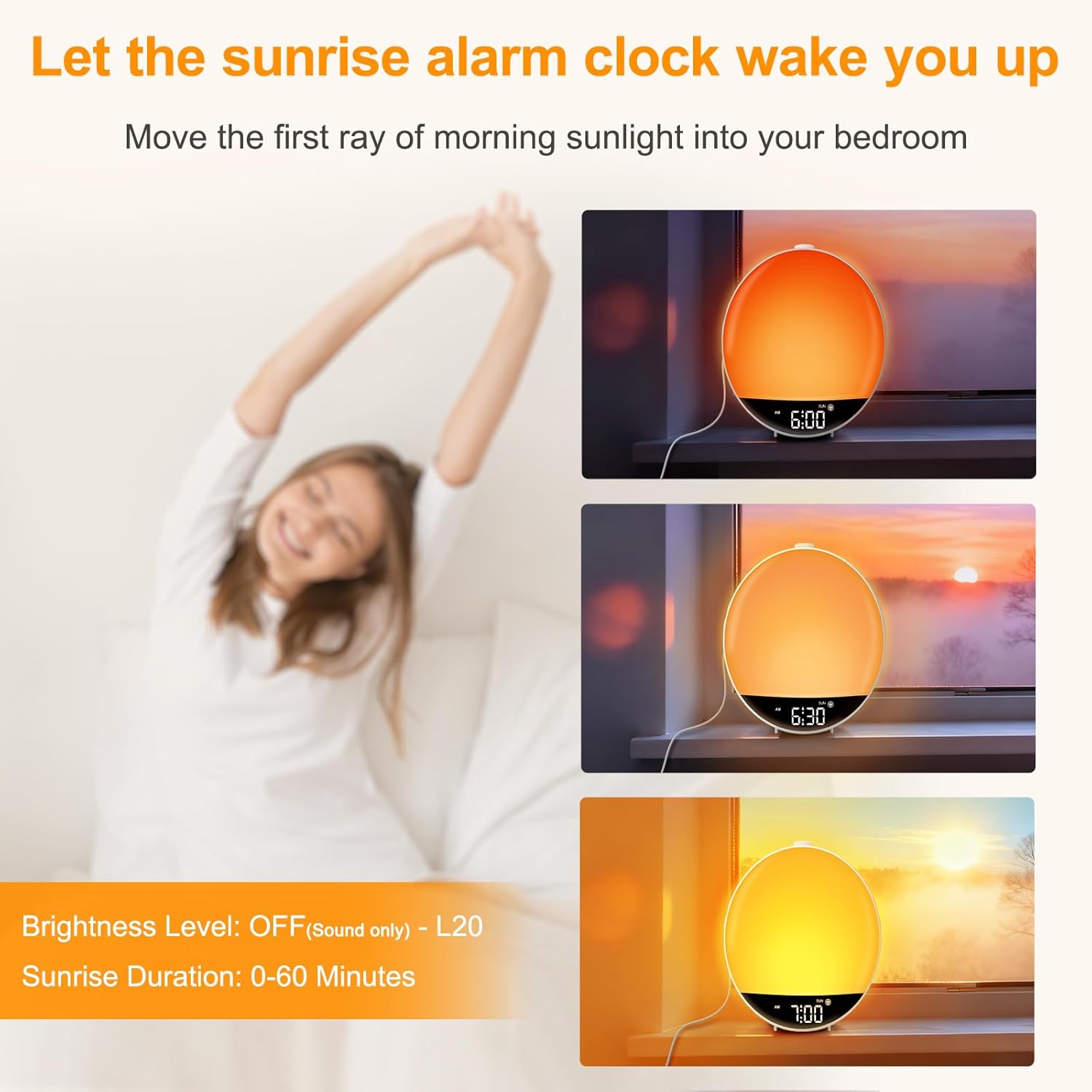
Rysunek 2: The sunrise simulation feature, showing the light gradually increasing in brightness over time to mimic a natural sunrise.
- Naciśnij WSCHÓD SŁOŃCA button to enter set mode. The sunrise duration (0-60 minutes) will flash.
- Obróć DRZEMKA wheel to set the desired duration (e.g., 30 minutes). Press DRZEMKA aby potwierdzić.
- The light brightness level (OFF-L20) will flash. Rotate the DRZEMKA wheel to set the maximum brightness. Press DRZEMKA aby zapisać i wyjść.
Notatka: If OFF is selected for brightness, the alarm will go off with sound only.
Night Light and RGB Color Light
The clock features a dimmable night light and 15 RGB color modes to create a desired ambiance.
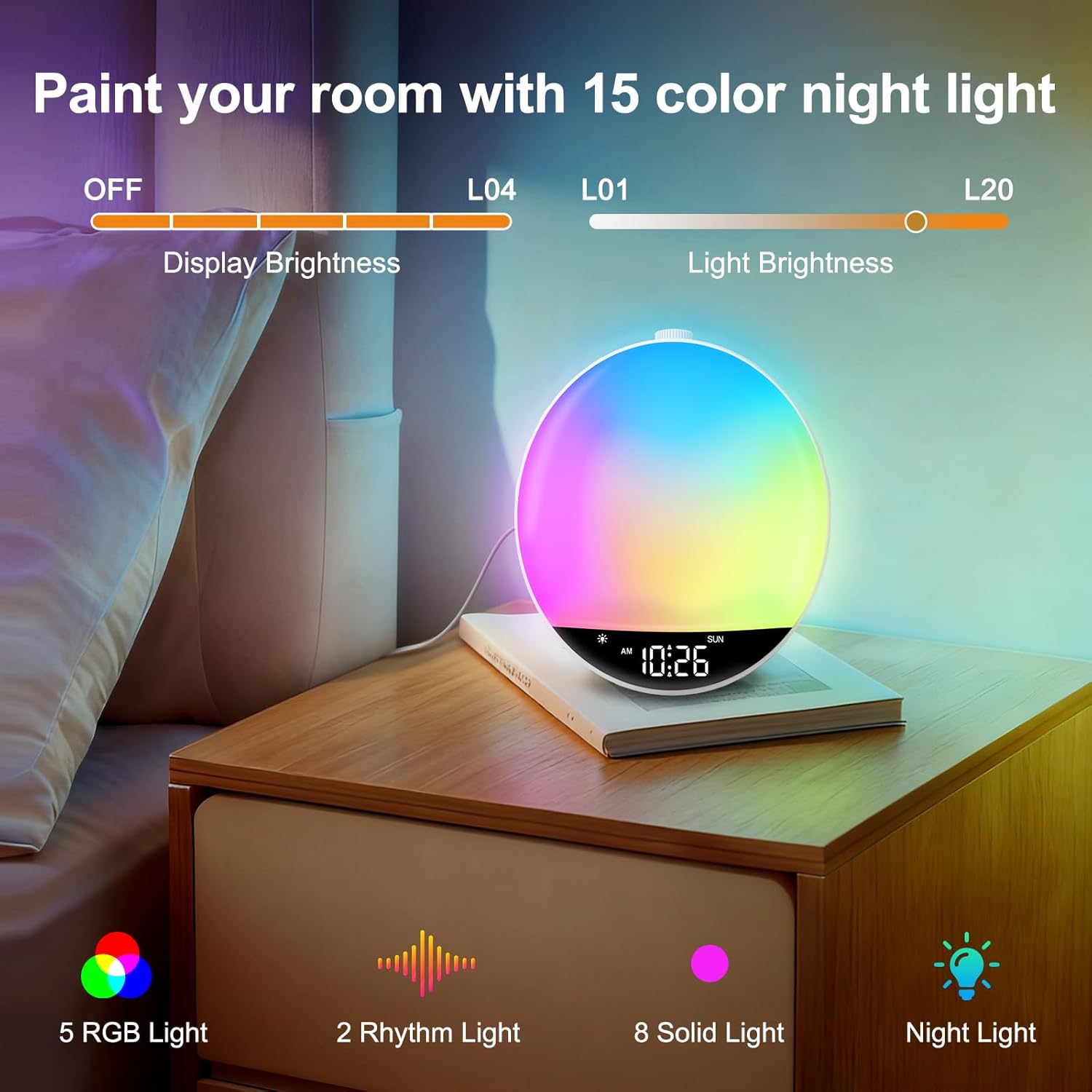
Rysunek 3: The RGB night light feature, showing the clock illuminating a room with multiple color options and adjustable brightness.
- Naciśnij ŚWIATŁO przycisk, aby włączyć lampkę nocną.
- Naciśnij ŚWIATŁO button repeatedly to cycle through the 15 color modes (5 RGB lights, 2 rhythm lights, 8 solid lights).
- Obróć DRZEMKA wheel to adjust the light brightness (L01-L20).
- Naciśnij i przytrzymaj ŚWIATŁO button for 2 seconds to turn off the color light.
Notatka: The night light cannot be turned on in Bluetooth mode.
Obsługa radia FM
Enjoy your favorite FM radio stations with clear reception.
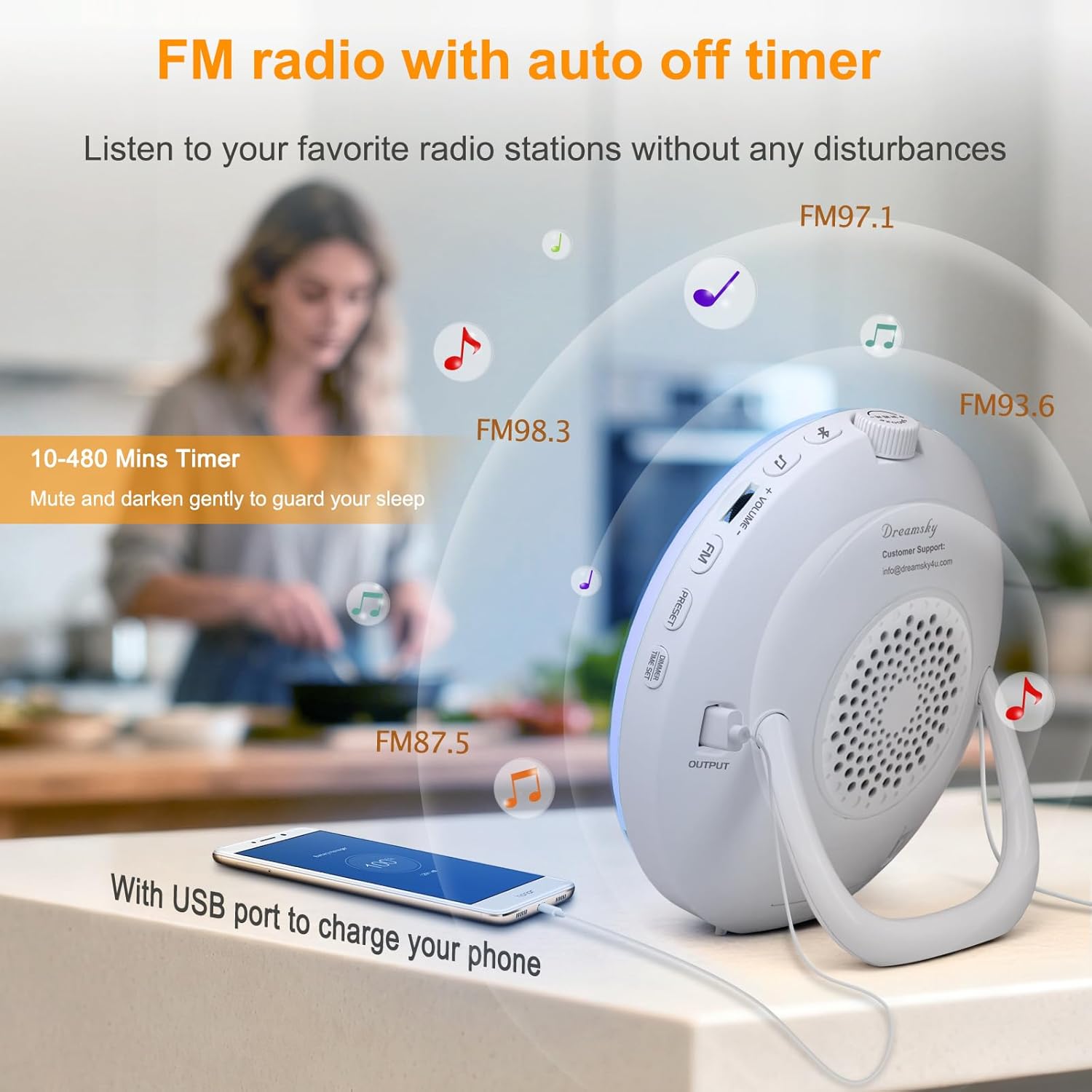
Rysunek 4: The FM radio feature, showing various frequencies and the USB charging port in use.
- Uncoil the antenna at the back of the clock for best reception.
- Naciśnij FM przycisk, aby włączyć radio FM.
- Obróć DRZEMKA wheel to manually tune to a radio station.
- To auto-tune and save stations: Press and hold the FM button for 2 seconds. The clock will scan and save available stations automatically.
- To listen to saved presets: Press the USTAWIENIE WSTĘPNE button to cycle through saved stations (P01-P20).
- Dostosuj głośność za pomocą GŁOŚNOŚĆ +/- pikolak.
- Naciśnij FM Naciśnij przycisk ponownie, aby wyłączyć radio.
Bluetooth Connectivity and Auto Time Sync
Connect your smartphone or other Bluetooth devices to play audio and automatically synchronize the time.
Wideo: Demonstrates how to connect a device via Bluetooth to the DreamSky Sunrise Clock, including the auto time sync feature.
- Naciśnij Bluetooth button to turn on Bluetooth. The Bluetooth icon will flash on the display, indicating pairing mode.
- On your smartphone, enable Bluetooth and search for "DS236" in the list of available devices. Select it to initiate pairing.
- Once successfully paired, a voice prompt "connected" will be played, and the Bluetooth icon will remain steady. The clock's time will automatically synchronize with your phone's time.
- Użyj DRZEMKA button to play/pause audio. Rotate the DRZEMKA wheel to skip tracks.
- Dostosuj głośność za pomocą GŁOŚNOŚĆ +/- buttons or your phone's volume controls.
- Naciśnij i przytrzymaj Bluetooth button for 2 seconds to turn off Bluetooth.
To clear pairing history: Naciśnij i przytrzymaj Bluetooth przycisk i DRZEMKA button together for 3 seconds. A "disconnected" prompt will be played, and the Bluetooth icon will flash.
Port ładowania USB
The clock includes a USB-A output port (5V/1A) on the back to charge your smartphone or other electronic gadgets.
- Connect your device's USB charging cable to the USB output port on the clock.
- Ładowanie rozpocznie się automatycznie.
Notatka: It is not recommended to charge high-power electronic products such as tablets or hair dryers using this port.
Auto-Off Timer (Sleep Timer)
Set a timer for the light and/or sound to gradually decrease and turn off, helping you fall asleep.
- Naciśnij REGULATOR CZASOWY button to turn on the countdown timer. The countdown time (10 MIN/20 MIN...) will flash.
- While the countdown time flashes, rotate the DRZEMKA wheel to set the desired countdown time (10-480 minutes optional).
- Naciśnij REGULATOR CZASOWY button repeatedly to set the countdown time.
- Naciśnij i przytrzymaj REGULATOR CZASOWY button for 2 seconds to turn off the timer.
At time keeping mode: Naciśnij REGULATOR CZASOWY button once to check the remaining countdown time.
Wyświetl regulację jasności
Adjust the brightness of the clock's digital display.
- At time keeping mode, press the DIMMER / TIME SET button to adjust display brightness. There are 5 levels of brightness (L01-L04 and OFF).
Konserwacja
- Czyszczenie: Przetrzyj urządzenie miękką, suchą ściereczką. Nie używaj środków czyszczących o właściwościach ściernych ani rozpuszczalników.
- Składowanie: Jeśli przechowujesz urządzenie przez dłuższy czas, odłącz je od źródła zasilania.
- Battery (Not Included): The clock is powered by adapter only. Batteries (2 x AAA alkaline, not supplied) only work for storing the clock setting during power outage. Replace batteries when needed to maintain settings during power interruptions.
Rozwiązywanie problemów
| Problem | Możliwe rozwiązanie |
|---|---|
| Alarm did not go off. |
|
| Clock time does not synchronize with phone. |
|
| Odbiór radia FM jest słaby. |
|
| Port ładowania USB nie działa. |
|
Specyfikacje
- Model: DS236
- Marka: Niebo marzeń
- Wymiary: 6.6" szer. x 6.9" wys.
- Źródło zasilania: Corded Electric (DC Adapter)
- Tworzywo: Plastikowy
- Typ wyświetlacza: Cyfrowy
- Łączność: Bluetooth, radio FM
- Wyjście USB: 5V/1A (for charging)
- Czas trwania wschodu słońca: 0-60 minut (regulowane)
- Jasność światła: 20 levels (L01-L20)
- Jasność wyświetlacza: 5 levels (L01-L04, OFF)
- Dźwięki alarmowe: 8 (7 built-in sounds, 1 FM radio)
- Głośność alarmu: 16 levels (U01-U16)
- Czas drzemki: 5-30 minut (regulowane)
- Lampka nocna RGB: 15 trybów kolorów
- Wyłącznik czasowy: 10-480 minut (regulowane)
Gwarancja i wsparcie
DreamSky provides a 1-year replacement warranty for this product. For any questions, concerns, or need of assistance, please contact our customer service center:
- E-mail: info@dreamsky4u.com
- Okres gwarancji: 1 rok od daty zakupu.
Proszę zachować paragon jako dowód zakupu na wypadek reklamacji.
