
H24-2201-B
Generic H24-2201-B 39.4" Drawer Computer Desk with USB Charger User Manual
Model: H24-2201-B
Wstęp
This manual provides essential information for the assembly, operation, and maintenance of your Generic H24-2201-B 39.4" Drawer Computer Desk with USB Charger. Please read these instructions carefully before assembly and use to ensure safe and efficient operation.
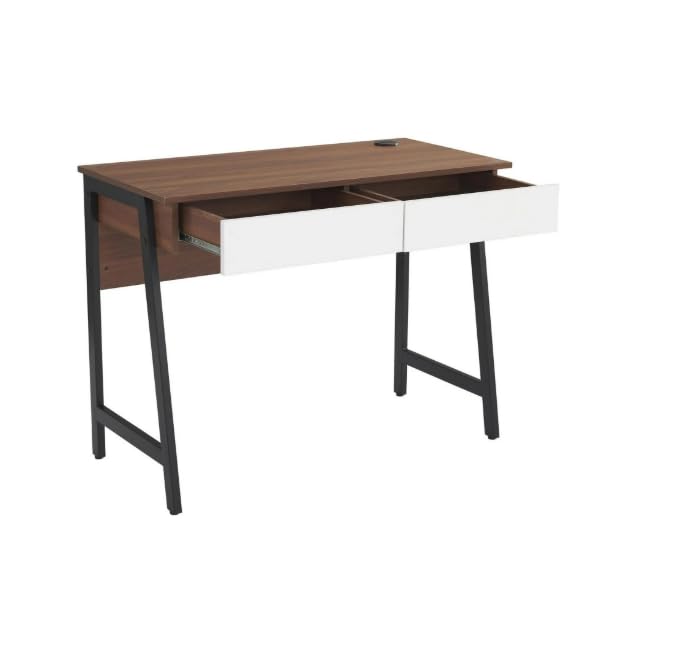
Image: The Generic H24-2201-B computer desk in walnut finish, featuring two white drawers and sturdy black metal legs. This image provides an overall view of the desk's design and dimensions.
Informacje dotyczące bezpieczeństwa
It is crucial to follow all safety guidelines to prevent injury or damage to the product. Please observe the following:
- Zawsze montuj biurko zgodnie z dołączoną instrukcją.
- Nie przekraczać dopuszczalnego limitu wagowego 88 funty (40 kg). Overloading can compromise the desk's stability and structural integrity.
- Ensure the desk is placed on a stable, level surface to prevent tipping.
- Keep the desk away from direct heat sources, open flames, and excessive moisture.
- Avoid placing heavy objects on the edges of the desk to prevent damage or instability.
- Okresowo sprawdzaj wszystkie elementy mocujące, aby mieć pewność, że są dobrze dokręcone.
Zawartość opakowania
Przed rozpoczęciem montażu należy sprawdzić, czy wszystkie wymienione poniżej elementy są obecne i nieuszkodzone. W przypadku braku lub uszkodzenia jakiejkolwiek części prosimy o kontakt z obsługą klienta.
- 1 x Desk Top (with integrated USB charger)
- 2 x Drawer Units
- 2 x Metal Leg Frames
- 1 x Panel tylny
- Sprzęt montażowy (śruby, nakrętki, klucz imbusowy itp.)
- Instrukcja obsługi
Note: All necessary assembly tools are included.
Konfiguracja i montaż
Assembly is required for this desk. It is recommended that dwie osoby assemble the desk to ensure stability and ease of construction. Please follow the steps below carefully.
- Rozpakuj komponenty: Ostrożnie wyjmij wszystkie części z opakowania i rozłóż je na czystej, miękkiej powierzchni (np. kocu lub dywanie), aby zapobiec zarysowaniom.
- Zamontuj ramy nóg: Secure the metal leg frames to the underside of the desk top using the provided screws and Allen wrench. Ensure all connections are tight.
- Montaż szuflad: Assemble the two drawer units according to their individual instructions. Once assembled, slide them into the designated slots under the desk top. Ensure the smooth sliding rails are properly aligned.
- Zamontuj panel tylny: Secure the back panel to the rear of the desk structure. This adds stability and finishes the desk's appearance.
- Kontrola końcowa: Once assembled, gently lift and move the desk to its desired location. Verify that all screws are tightened and the desk is stable.
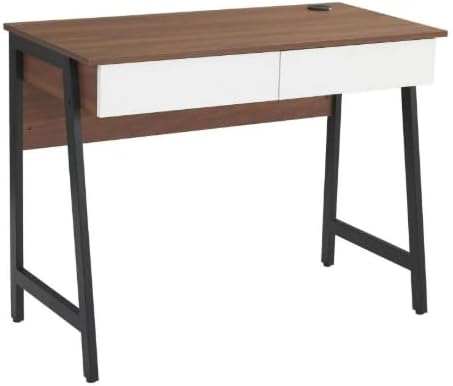
Obraz: Zmontowany view of the computer desk, highlighting the integration of the desk top, drawers, and metal leg structure. This image can serve as a visual reference during assembly.
Instrukcja obsługi
Korzystanie z portu ładowania USB
Your desk is equipped with a built-in USB charging port for convenient device charging.
- Podłącz zasilanie: Ensure the desk's power cord (if applicable, usually from the USB hub) is securely plugged into a functional wall outlet.
- Urządzenia podłączane: Connect your USB-compatible devices (e.g., smartphones, tablets, smartwatches) to the USB ports located on the desk surface.
- Wskaźnik ładowania: Your device should indicate that it is charging. If not, check the power connection and the USB cable.

Obraz: szczegółowy view of the circular USB charging hub embedded in the desk's surface. It features three USB ports, allowing multiple devices to be charged simultaneously.
Korzystanie z szuflad do przechowywania
The two integrated drawers provide convenient storage for your office supplies and personal items.
- Otwarcie/zamknięcie: Gently pull the drawer handle to open and push to close. The smooth sliding rails ensure easy operation.
- Limit wagowy: Avoid overloading the drawers to ensure smooth operation and prevent damage to the drawer slides.
Konserwacja
Właściwa pielęgnacja przedłuży żywotność i pozwoli zachować piękny wygląd Twojego biurka.
- Czyszczenie: Wyczyść za pomocą reklamyamp szmatką. W przypadku uporczywych zabrudzeń użyj łagodnego roztworu mydła i natychmiast osusz czystą szmatką.
- Unikaj silnych środków chemicznych: Do not use abrasive cleaners, strong detergents, or solvents, as these can damage the wood grain laminate finish.
- Wycieki: Promptly wipe up any spills to prevent water damage or staining. The scratch-resistant and waterproof finish offers protection, but immediate cleaning is recommended.
- Elementy złączne: Okresowo sprawdzaj i dokręcaj wszystkie śruby i nakrętki, aby mieć pewność, że biurko pozostanie stabilne.
Rozwiązywanie problemów
Jeśli napotkasz jakiekolwiek problemy z biurkiem, zapoznaj się z poniższymi typowymi problemami i ich rozwiązaniami:
- Biurko się chwieje:
- Sprawdź, czy wszystkie śruby i nakrętki montażowe są mocno dokręcone.
- Verify the desk is placed on a level surface. Adjust floor glides if present, or use shims if necessary.
- Szuflady nie wysuwają się płynnie:
- Sprawdź, czy w prowadnicach szuflad nie ma przeszkód.
- Upewnij się, że szuflady nie są przeciążone.
- Sprawdź, czy prowadnice szuflad zostały prawidłowo zamontowane podczas montażu.
- Porty USB nie ładują się:
- Confirm the desk's power cord (for the USB hub) is firmly plugged into a working electrical outlet.
- Try a different USB cable or device to rule out cable/device issues.
- Ensure the USB hub connection within the desk is secure (if accessible).
Specyfikacje
| Numer modelu | H24-2201-B |
| Marka | Ogólny |
| Wymiary (gł. x szer. x wys.) | 48 cm (gł. x szer. x wys.) x 76 cm (18.9 cm (gł.) x 39.4 cm (szer.) x 29.9 cm (wys.) |
| Waga | 37.4 funtów (17 kg) |
| Tworzywo | MDF, PB, Metal |
| Rodzaj wykończenia | Wood Grain Laminate |
| Kolor | Walnut (with white drawers) |
| Maksymalna nośność | 88 funtów (40 kg) |
| Liczba szuflad | 2 |
| Cechy specjalne | Built-in USB Charging Port, Scratch-Resistant & Waterproof Surface, Smooth Drawer Operation, Space-Saving Design |
| Wymagany montaż | Tak (Zalecane 2 osobom) |
| Dołączone narzędzia montażowe | Tak |
Gwarancja i wsparcie
Informacje o gwarancji: Warranty is not included with this product. Please contact the seller directly for any warranty-related inquiries or support.
Obsługa klienta: For any questions, missing parts, or assistance with assembly or operation, please contact the seller directly via Amazon messaging. Provide your order number and a detailed description of the issue for prompt assistance.
Manufacturer Contact Information: Not applicable. Please contact the seller directly via Amazon messaging.
Ask a question about this manual
Ask about setup, troubleshooting, compatibility, parts, safety, or missing instructions. Manuals+ will review the question and use this page’s manual context to help answer it.