
Wstęp
This manual provides comprehensive instructions for the setup, operation, and maintenance of your WallarGe Atomic Digital Wall Clock. This clock features automatic time synchronization via the WWVB signal, a large display, indoor temperature and humidity monitoring, and an optional backlight. Please read this manual thoroughly before use to ensure proper functionality and longevity of your device.
Zawartość opakowania
- WallarGe Atomic Digital Wall Clock
- Instrukcja obsługi
Produkt ponadview

Przód view of the WallarGe Atomic Digital Wall Clock, displaying time, date, day, indoor temperature, and humidity. The atomic signal icon and time zone map are also visible.
Funkcje wyświetlacza
- Large Time Display: Shows current time in AM/PM or 24-hour format.
- Date and Day: Displays month, date, and day of the week.
- Temperatura wewnętrzna: Shows temperature in Fahrenheit (°F) or Celsius (°C).
- Wilgotność wewnętrzna: Displays relative humidity percentage.
- Wskaźnik sygnału atomowego: Icon indicating successful WWVB signal reception.
- Wskaźnik DST: Wskazuje, czy czas letni jest aktywny.
- Time Zone Indicator: Displays the selected time zone (e.g., PST, MST, CST, EST, AKST, HST).
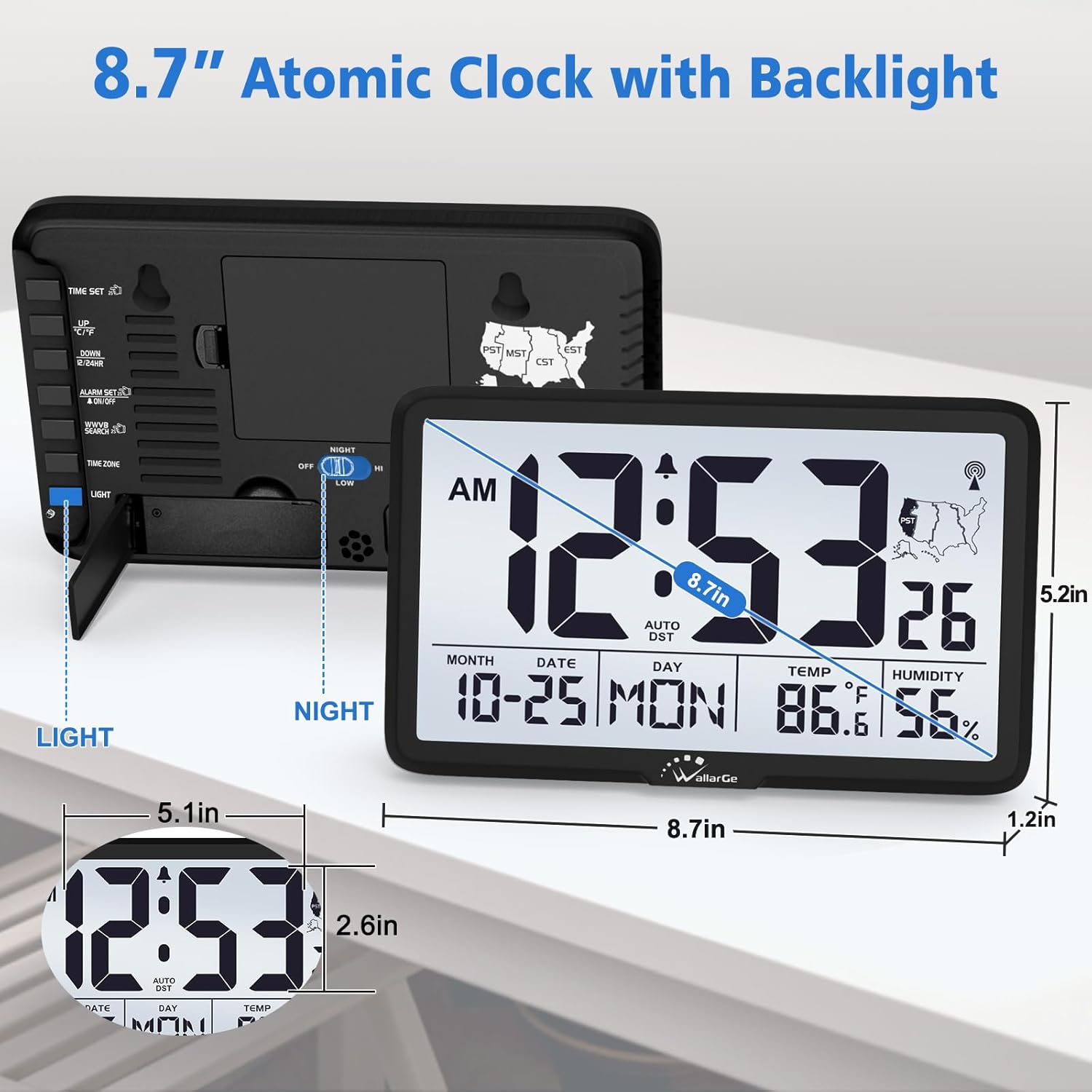
Tył view of the WallarGe Atomic Digital Wall Clock, showing the battery compartment, kickstand, and various control buttons and switches.
Button Functions (Rear Panel)
- USTAWIENIE CZASU: Used to manually set time and date.
- UP / DST: Adjusts values up during manual setting; toggles DST on/off.
- DÓŁ / °C/°F: Adjusts values down during manual setting; switches temperature unit.
- ALARM WŁ./WYŁ.: Aktywuje lub dezaktywuje funkcję alarmu.
- WWVB SEARCH: Initiates manual search for the atomic time signal.
- STREFA CZASOWA: Selects the desired time zone.
- ŚWIATŁO: Activates a 30-second backlight.
- NIGHT Switch (OFF/LOW/HIGH): Controls the automatic night light intensity.
Organizować coś
1. Instalacja baterii
- Otwórz pokrywę komory baterii z tyłu zegara.
- Insert 4 new AA alkaline batteries (not included), ensuring correct polarity (+/-).
- Zamknij pokrywę komory baterii.
2. Początkowa synchronizacja czasu atomowego

A visual guide illustrating the three steps for initial setup: installing batteries, waiting for WWVB signal reception, and automatic time update.
Upon battery installation, the clock will automatically begin searching for the WWVB atomic time signal. This process may take up to 10 minutes. During signal reception, the backlight will be temporarily disabled to prevent interference. Once the signal is received, the time and date will update automatically.
If the clock does not synchronize within 10 minutes, press the WYSZUKIWANIE WWVB button to initiate a manual search. Ensure the clock is placed near a window for optimal signal reception.
3. Manual Time Zone Setting
The clock supports six time zones: EST, CST, MST, PST, AKST, and HST. To set your time zone:
- Naciśnij STREFA CZASOWA button repeatedly until your desired time zone is displayed.
- The clock will automatically adjust the time according to the selected zone.
4. Ustawienie czasu letniego (DST)
The clock is designed to automatically adjust for Daylight Saving Time. To enable or disable this feature:
- Naciśnij UP / DST przycisk.
- Toggle between AUTO DST ON or OFF. Select OFF if your region does not observe DST.
Instrukcja obsługi
1. Działanie podświetlenia

Illustration of the clock's dual lighting modes: a short, bright 30-second backlight activated by the LIGHT button, and a soft night light with OFF, LOW, and HIGH settings controlled by the NIGHT switch.
- Short Backlight: Naciśnij ŚWIATŁO button on the back of the clock for a brief, bright 30-second illumination of the display.
- Automatyczne światło nocne: Użyj NOC switch to select the desired intensity (OFF, LOW, HIGH) for continuous, soft illumination in dark environments.
2. Wyświetlacz temperatury i wilgotności
- To switch the temperature unit between Fahrenheit (°F) and Celsius (°C), press the DÓŁ / °C/°F przycisk.
- The humidity display is always in percentagmi (%).
3. Time Format
- Aby przełączać się między formatem czasu 12-godzinnym (AM/PM) i 24-godzinnym (wojskowym), naciśnij przycisk USTAWIENIE CZASU button repeatedly until the desired format appears.
4. Funkcja alarmu
- The clock includes an alarm function. To activate or deactivate the alarm, press the WŁĄCZANIE / WYŁĄCZANIE ALARMU przycisk.
- For detailed instructions on setting the alarm time, please refer to the specific instructions provided in the physical manual.
Umiejscowienie i montaż

The WallarGe clock can be either wall-mounted for a streamlined appearance or placed on a tabletop using its integrated kickstand for portable convenience.
- Umiejscowienie blatu: Extend the integrated kickstand on the back of the clock to place it on any flat surface, such as a desk or shelf.
- Montaż na ścianie: Use the keyhole slots on the back of the clock to securely mount it on a wall. Ensure appropriate hardware (screws, anchors) is used for your wall type.
Konserwacja
- Wymiana baterii: Replace all 4 AA batteries when the display dims or functions become erratic. Always use new, high-quality alkaline batteries.
- Czyszczenie: Wipe the clock's surface with a soft, dry cloth. Avoid using abrasive cleaners or solvents, which may damage the display or casing.
- Składowanie: Jeśli zegar nie będzie przechowywany przez dłuższy czas, należy wyjąć baterie, aby zapobiec ich wyciekaniu.
Rozwiązywanie problemów
| Problem | Możliwa przyczyna | Rozwiązanie |
|---|---|---|
| Brak wyświetlacza lub wyświetlacz jest przyciemniony | Rozładowane lub nieprawidłowo zainstalowane baterie. | Wymień baterie na nowe baterie alkaliczne AA, zwracając uwagę na prawidłową biegunowość. |
| Clock does not synchronize with atomic time (WWVB) | Weak signal due to location or interference. | Move the clock closer to a window. Press the WYSZUKIWANIE WWVB button to manually initiate signal reception. Avoid placing near electronic devices that may cause interference. |
| Wyświetlany jest nieprawidłowy czas | Incorrect time zone selected or DST setting. | Verify the correct time zone is selected using the STREFA CZASOWA button. Check the DST setting with the UP / DST przycisk. |
| Temperature/Humidity readings seem inaccurate | Clock placed near heat/cold sources or in an area with poor air circulation. | Relocate the clock to a central area away from direct sunlight, vents, or appliances. Allow time for readings to stabilize. |
Specyfikacje
| Funkcja | Szczegół |
|---|---|
| Marka | WallarGe |
| Model | B0FV7YWF52 |
| Typ wyświetlacza | Cyfrowy |
| Źródło zasilania | 4 baterie AA (brak w zestawie) |
| Cechy specjalne | Atomic Clock, Alarm, Indoor Temperature, Date, Day of the Week, Backlight, Auto DST, 6 Time Zones |
| Wymiary produktu | Wymiary 21.84 x 3.81 x 13.21 cm |
| Waga przedmiotu | 458 gramów |
Gwarancja i wsparcie
WallarGe products are designed for reliability and performance. For warranty information or technical support, please refer to the documentation included with your purchase or contact WallarGe customer service through their official channels. Keep your purchase receipt as proof of purchase for warranty claims.