
Wstęp
Dziękujemy za zakupasing the LG 43QNED70A 43 inch Class 70A Series QNED AI 4K Smart TV. This manual provides essential information for the safe and efficient use of your television. Please read it thoroughly before operating the product and retain it for future reference.
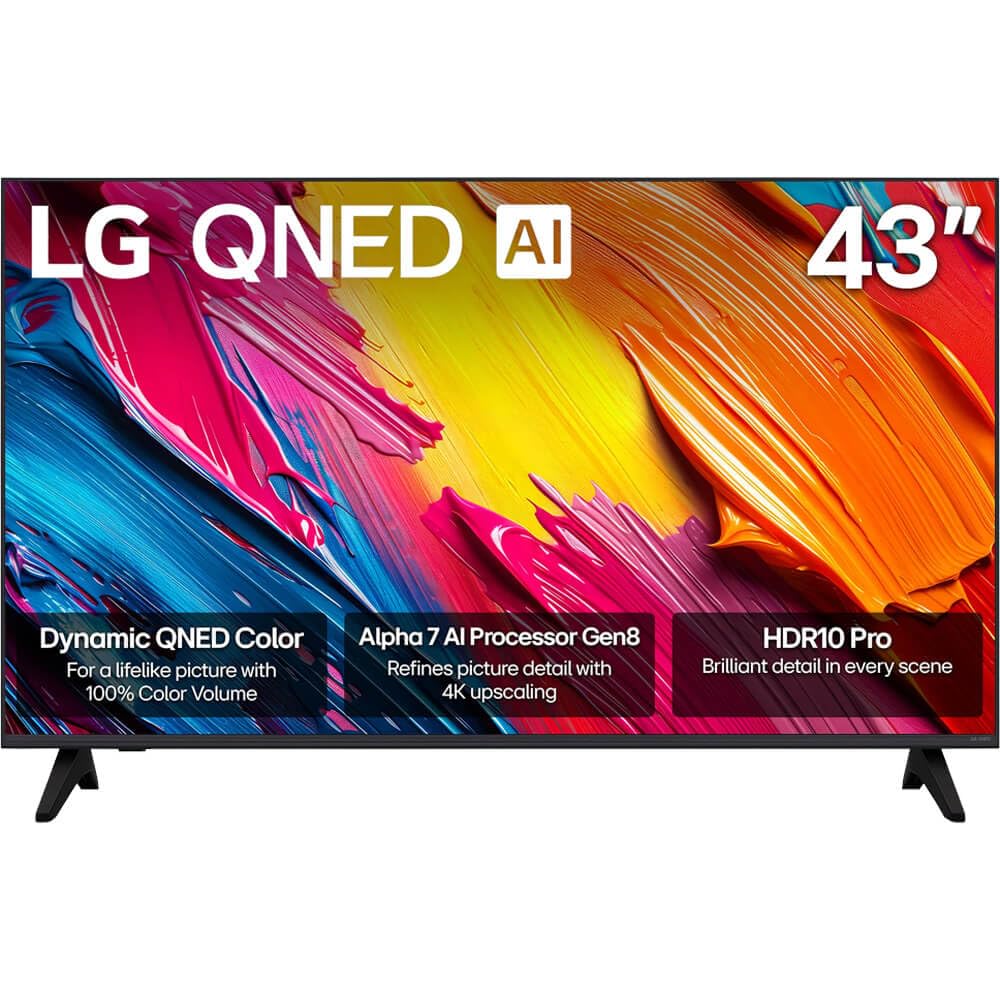
Rycina 1: Przód view of the LG 43QNED70A Smart TV.
Informacje dotyczące bezpieczeństwa
Before using your TV, please read these safety instructions carefully to prevent damage and ensure safe operation.
- Źródło zasilania: Podłącz telewizor do gniazdka sieciowego AC 100-240 V, 50/60 Hz. Nie przeciążaj gniazdek ściennych.
- Wentylacja: Zapewnij odpowiednią wentylację wokół telewizora. Nie blokuj otworów wentylacyjnych.
- Woda i wilgoć: Nie wystawiaj telewizora na działanie deszczu ani wilgoci. Nie umieszczaj na telewizorze przedmiotów wypełnionych płynami.
- Czyszczenie: Odłącz telewizor od zasilania przed czyszczeniem. Użyj miękkiej, suchej ściereczki. Unikaj płynnych środków czyszczących.
- Umieszczenie: Ustaw telewizor na stabilnej, równej powierzchni. Unikaj umieszczania go w bezpośrednim świetle słonecznym lub w pobliżu źródeł ciepła.
- Dzieci: Pilnuj, aby dzieci nie wspinały się na telewizor lub stojak.
- Serwisowanie: Nie próbuj samodzielnie naprawiać telewizora. Wszelkie naprawy zlecaj wykwalifikowanemu personelowi serwisowemu.
Zawartość opakowania
Sprawdź, czy w pudełku z produktem znajdują się wszystkie elementy:
- LG 43QNED70A 43 inch QNED AI 4K Smart TV
- AI Magic Remote Control
- Przewód zasilający
- Stojak pod telewizor (2 sztuki) i śruby
- Instrukcja obsługi (ten dokument)
- Batteries for Remote Control (AA or AAA, depending on region)
Organizować coś
1. Physical Setup (Stand Installation or Wall Mounting)
Before installing the TV, ensure the power cord is disconnected. Place the TV face down on a soft cloth or cushion to protect the screen.
Montaż stojaka:
- Dopasuj dwa elementy podstawy do odpowiednich otworów na spodzie telewizora.
- Przymocuj podstawki za pomocą dołączonych śrub. Upewnij się, że są mocno dokręcone.
- Carefully lift the TV to an upright position on a stable surface.
Montaż na ścianie:
This TV supports VESA mount standard 200 x 200 mm. Wall mounting requires a compatible wall mount bracket (sold separately) and professional installation. Refer to the wall mount bracket's instructions for proper installation.
2. Podłączanie urządzeń zewnętrznych
Your LG 43QNED70A TV provides various ports for connecting external devices such as Blu-ray players, game consoles, soundbars, and USB storage devices.

Rysunek 2: Tył view telewizora z portami wejściowymi.
- Porty HDMI: Connect high-definition devices like Blu-ray players or game consoles. This model has 1 HDMI port.
- Porty USB: Connect USB storage devices for media playback. This model has 1 USB 3.0 port.
- Wejście audio (RCA): For connecting older audio devices.
- Port Ethernet: Do przewodowego połączenia internetowego.
After connecting devices, ensure all cables are securely fastened.
3. Pierwsze włączenie i konfiguracja sieci
- Podłącz przewód zasilający do telewizora, a następnie do gniazdka ściennego.
- Naciśnij przycisk zasilania na pilocie lub telewizorze, aby go włączyć.
- Follow the on-screen instructions for the initial setup, which includes language selection, country, and network connection.
- For network setup, you can choose between Wi-Fi or a wired Ethernet connection. Follow the prompts to connect to your home network.
Operacyjny
1. AI Magic Remote Control Overview
The AI Magic Remote allows for intuitive control of your TV with point-and-click, scrolling, and voice commands.

Figure 3: LG AI Magic Remote Control.

Figure 4: Key features of the AI Magic Remote.
- Przycisk zasilania: Włącza lub wyłącza telewizor.
- Przycisk AI: Activates AI features for search and recommendations.
- Scroll Wheel (OK Button): Umożliwia nawigację po menu i potwierdzanie wyborów.
- Przyciski kierunkowe: Moves cursor or navigates menus.
- Przycisk Home: Dostęp do webEkran główny OS Smart TV.
- Przyciski głośności/kanału: Adjusts volume and changes channels.
- Przyciski usługi przesyłania strumieniowego: Quick access to popular streaming apps like Netflix, Prime Video, Disney+, and LG Channels.
2. Funkcje Smart TV (webSystem operacyjny)
Your LG QNED AI 4K Smart TV runs on webOS, providing a user-friendly interface for accessing content and applications.
- AI Search & Recommendations: Use voice commands or the AI button to search for content, get personalized recommendations, and control smart home devices.
- Usługi przesyłania strumieniowego: Access a wide range of popular streaming applications directly from the home screen.
- Kanały LG: Enjoy free access to a variety of streaming channels provided by LG.
3. Ustawienia obrazu i dźwięku
Zoptymalizuj swoje viewwykorzystując zaawansowane technologie obrazu i dźwięku.

Figure 5: Dynamic QNED Color technology for enhanced color reproduction.

Figure 6: The α7 AI Processor Gen8 enhances brightness, sound, and picture detail.

Figure 7: HDR10 Pro delivers a dramatic visual experience by enhancing colors.

Figure 8: 4K Super Upscaling transforms regular content into sharper 4K definition.
- Tryb obrazu: Select from various preset picture modes (e.g., Vivid, Standard, Cinema, Game, Filmmaker Mode) or customize settings like brightness, contrast, and color.
- Tryb dźwięku: Choose sound presets (e.g., Standard, Cinema, Clear Voice) or adjust equalizer settings. The TV also supports immersive sound with LG Soundbars.
- AI Picture Pro / AI Sound Pro: The α7 AI Processor Gen8 automatically optimizes picture and sound based on content and environment.
- Dynamiczne mapowanie tonów: Enhances HDR content for optimal brightness and contrast.
Konserwacja
1. Cleaning the Screen and Cabinet
Aby zachować wygląd i wydajność telewizora:
- Ekran: Delikatnie przetrzyj ekran miękką, suchą ściereczką z mikrofibry. W przypadku uporczywych zabrudzeń delikatnie przetrzyj.ampPrzetrzyj ściereczkę wodą lub specjalnym środkiem do czyszczenia ekranów (nie spryskuj bezpośrednio ekranu).
- Gabinet: Przetrzyj obudowę miękką, suchą ściereczką. Unikaj stosowania środków czyszczących o właściwościach ściernych, wosków i rozpuszczalników.
- Zawsze odłączaj telewizor od zasilania przed czyszczeniem.
2. Aktualizacje oprogramowania
LG regularly releases software updates to improve performance and add new features. Ensure your TV is connected to the internet to receive these updates.
- Przejdź do Ustawienia > Wszystkie ustawienia > Ogólne > Informacje o tym telewizorze > Sprawdź dostępność aktualizacji.
- Postępuj zgodnie z instrukcjami wyświetlanymi na ekranie, aby pobrać i zainstalować dostępne aktualizacje.
Rozwiązywanie problemów
Jeśli masz problemy z telewizorem, zapoznaj się z poniższymi typowymi problemami i ich rozwiązaniami:
| Problem | Możliwe rozwiązanie |
|---|---|
| Brak zasilania / Telewizor nie włącza się | Sprawdź, czy przewód zasilający jest prawidłowo podłączony do telewizora i gniazdka ściennego. Spróbuj użyć innego gniazdka. Upewnij się, że baterie w pilocie nie są rozładowane. |
| Brak obrazu, ale dźwięk jest | Sprawdź źródło sygnału wejściowego. Upewnij się, że urządzenia zewnętrzne są włączone i prawidłowo podłączone. Wypróbuj inny kabel HDMI. |
| Brak dźwięku, ale obraz jest | Check the volume level. Ensure the TV is not muted. Check audio output settings (e.g., internal speakers, external soundbar). |
| Pilot nie działa | Replace the batteries. Ensure there are no obstructions between the remote and the TV. Re-pair the AI Magic Remote if necessary (refer to the on-screen guide). |
| Niska jakość obrazu | Check the input source resolution. Adjust picture settings (brightness, contrast, sharpness). Ensure the antenna/cable connection is secure. |
| Nie można połączyć się z siecią Wi-Fi | Upewnij się, że router Wi-Fi jest włączony i działa. Wprowadź ponownie hasło Wi-Fi. Spróbuj ponownie uruchomić telewizor i router. |
Jeśli po wypróbowaniu tych rozwiązań problem nadal występuje, skontaktuj się z obsługą klienta LG.
Specyfikacje
Detailed technical specifications for the LG 43QNED70A Smart TV:
| Funkcja | Specyfikacja |
|---|---|
| Nazwa modelu | 43QNED70A |
| Rozmiar ekranu | 43 cali |
| Technologia wyświetlania | QNED |
| Rezolucja | 4K (3840x2160) |
| Częstotliwość odświeżania | 120 Hz |
| Proporcje obrazu | 16:9 |
| Edytor | Procesor AI a7 Gen8 |
| Picture Quality Enhancement | Dynamic Tone Mapping, HDR10 Pro |
| Display Backlight Technology | Self-Luminous |
| Obsługiwane usługi internetowe | Netflix, YouTube, Amazon Prime, etc. |
| Kolor | Czarny |
| Rok modelowy | 2025 |
| Wszystkie porty HDMI | 1 |
| Total USB 3.0 Ports | 1 |
| Wejście audio | USB, RCA |
| Metoda kontroli | Zdalny |
| Standard mocowania VESA | 200x200mm |
| Producent | LG |
Gwarancja i wsparcie
Your LG 43QNED70A TV comes with a limited warranty. Please refer to the warranty card included in your package for specific terms and conditions, including coverage duration and limitations.
For technical support, service, or warranty claims, please contact LG Customer Service:
- Webstrona: Odwiedź oficjalną stronę LG webwitryna zawierająca zasoby pomocy technicznej, odpowiedzi na często zadawane pytania i informacje kontaktowe. www.lg.com/us/support
- Telefon: Refer to your warranty card or the LG webodwiedź naszą stronę internetową, aby znaleźć odpowiedni numer telefonu obsługi klienta w Twoim regionie.
When contacting support, please have your TV's model number (43QNED70A) and serial number ready.