
1. Wprowadzenie
This manual provides detailed instructions for the safe and efficient use of your Surfans F20 Pro Android Hi-Res Music Player. Please read this manual thoroughly before operating the device and retain it for future reference.
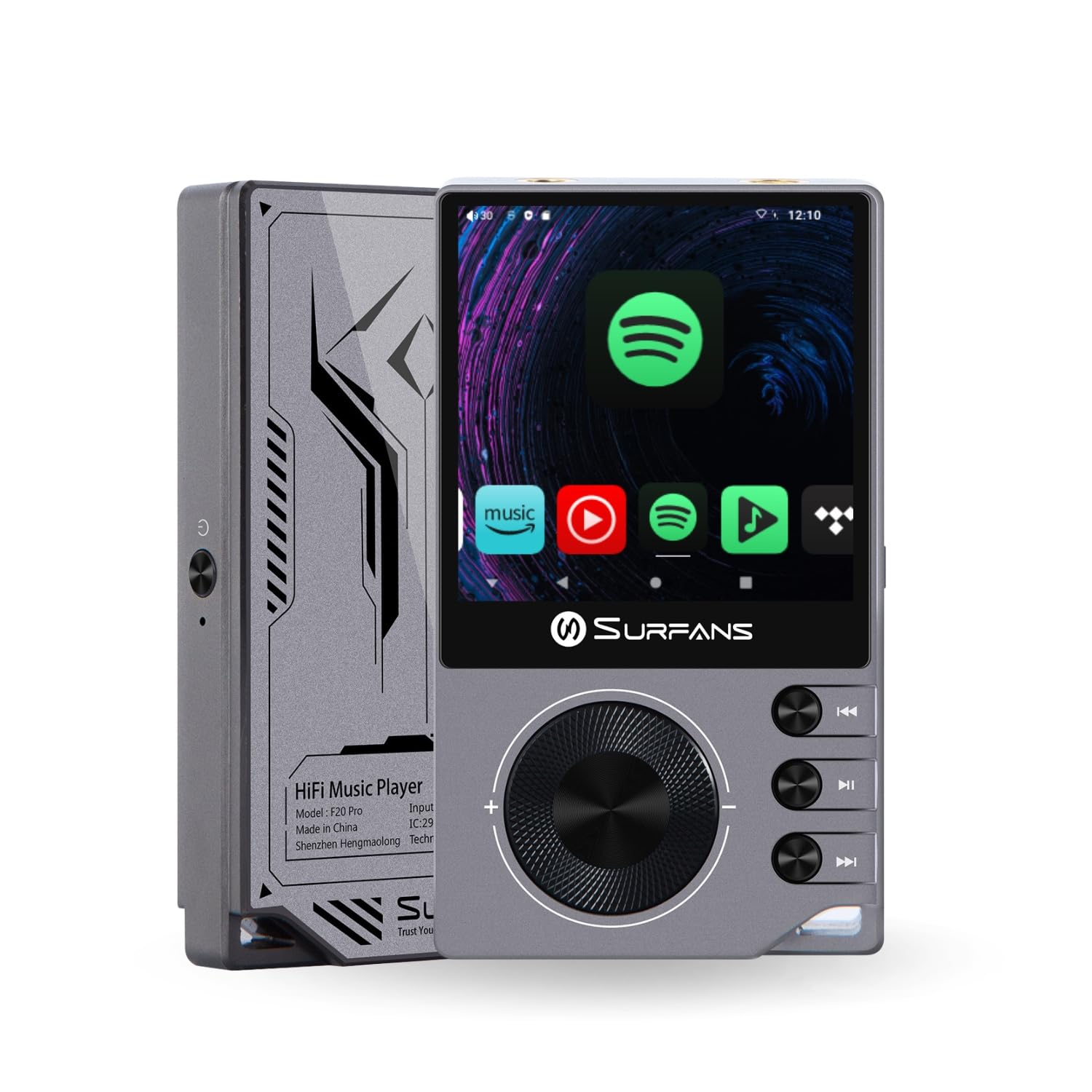
The Surfans F20 Pro Hi-Res Music Player, showcasindzięki kompaktowej konstrukcji i interfejsowi dotykowemu.
2. Zawartość opakowania
Sprawdź, czy w opakowaniu znajdują się wszystkie elementy:
- Surfans F20 Pro Hi-Res Music Player
- Kabel USB typu C.
- 32 GB MicroSD Memory Card (pre-installed or separate)
- Etui ochronne
- Instrukcja obsługi (ten dokument)
3. Urządzenie ponadview
Familiarize yourself with the physical components and ports of your F20 Pro player.

Przód i tył view of the Surfans F20 Pro, highlighting its robust CNC metal chassis and button layout.
3.1. Główne cechy
- Dual ESS9018Q2M DACs: For high-fidelity audio processing.
- Octa-Core Android 12 System: Enables streaming app compatibility and smooth operation.
- 3.5mm Single-Ended & 4.4mm Balanced Outputs: Versatile headphone connectivity.
- Bluetooth 5.0 z LDAC: High-quality wireless audio transmission.
- Dwuzakresowe Wi-Fi (2.4 GHz i 5 GHz): For stable internet connectivity.
- Możliwość rozbudowy pamięci masowej: Supports up to 1TB via MicroSD card.
- 2.7-calowy ekran dotykowy: Intuicyjny interfejs użytkownika.
4. Konfiguracja
4.1. Ładowanie urządzenia
Before first use, fully charge the F20 Pro. Connect the included USB Type-C cable to the device's charging port and a compatible USB power adapter (not included) or computer USB port. The charging indicator will show the charging status.
4.2. Wkładanie karty MicroSD
The F20 Pro supports MicroSD cards up to 1TB for expanded storage. Locate the MicroSD card slot on the side of the device. Gently insert the card until it clicks into place. To remove, push the card in again until it springs out.
4.3. Pierwsze włączenie zasilania
Press and hold the power button until the screen illuminates. Follow the on-screen prompts to complete the initial setup, including language selection and Wi-Fi connection.
4.4. Łączenie z Wi-Fi
Przejdź do Ustawienia > Sieć i internet > Wi-Fi. Select your desired network and enter the password if prompted. The F20 Pro supports both 2.4GHz and 5GHz Wi-Fi bands.

The Surfans F20 Pro demonstrating its dual-band Wi-Fi capability for fast and stable connections.
4.5. Parowanie Bluetooth
Aby podłączyć słuchawki lub głośniki Bluetooth:
- Upewnij się, że Twoje urządzenie Bluetooth jest w trybie parowania.
- On the F20 Pro, go to Ustawienia > Połączone urządzenia > Sparuj nowe urządzenie.
- Select your device from the list and confirm pairing.

An illustration of the Bluetooth 5.0 chip, indicating support for high-resolution wireless audio codecs like LDAC.
5. Obsługa urządzenia
5.1. Podstawowa nawigacja
The F20 Pro features a 2.7-inch touchscreen for navigation. Swipe to scroll, tap to select, and use the physical buttons for quick controls:
- Przycisk zasilania: Power on/off, screen on/off.
- Koło głośności: Dostosowuje głośność wyjścia audio.
- Przyciski sterowania odtwarzaniem: Odtwórz/Pauza, Następny utwór, Poprzedni utwór.
5.2. Odtwarzanie muzyki
The F20 Pro supports various audio formats including DSD512, 192kHz/24bit, FLAC, WAV, WMA, M4A, MP3, MP2, and AAC.
5.2.1. Lokalny Files
Przenieś muzykę files to the device's internal storage or MicroSD card via USB connection to a computer. Use the pre-installed music player application to browse and play your library.
5.2.2. Aplikacje do strumieniowania
The Android 12 operating system allows installation of streaming apps like Spotify, Apple Music, Tidal, or YouTube. Connect to Wi-Fi and download apps from the Google Play Store or other compatible sources.

The Surfans F20 Pro's screen showing various streaming application icons, demonstrating its Android capabilities.
5.3. Headphone Connections
The device offers both single-ended and balanced audio outputs.
- Wyjście 3.5 mm Single-Ended: Standard headphone jack (125mW/32Ω).
- Wyjście zbalansowane 4.4 mm: For enhanced audio performance with compatible headphones (500mW/32Ω).

Z bliska view of the 3.5mm single-ended and 4.4mm balanced audio output ports on the Surfans F20 Pro.
6. Konserwacja
6.1. Czyszczenie
Use a soft, dry, lint-free cloth to clean the device. Avoid using abrasive cleaners or solvents, which may damage the surface.
6.2. Aktualizacje oprogramowania
Periodically check for software updates to ensure optimal performance and access to new features. Updates can typically be found in Ustawienia > System > Aktualizacja systemu.
6.3. Pielęgnacja baterii
Aby przedłużyć żywotność baterii, unikaj częstego całkowitego rozładowywania urządzenia. Przechowuj urządzenie w chłodnym, suchym miejscu, gdy nie jest używane przez dłuższy czas.

Wewnętrzny view of battery cells, representing the long-lasting battery capacity of the F20 Pro.
7. Rozwiązywanie Problemów
If you encounter issues with your F20 Pro, refer to the following common problems and solutions:
| Problem | Możliwa przyczyna | Rozwiązanie |
|---|---|---|
| Urządzenie nie włącza się | Niski poziom baterii; Awaria systemu | Naładuj urządzenie; naciśnij i przytrzymaj przycisk zasilania przez 10–15 sekund, aby wymusić ponowne uruchomienie. |
| Brak dźwięku | Volume too low; Incorrect output selected; Faulty headphones | Increase volume; Check headphone connection; Test with different headphones. |
| Nie można połączyć się z siecią Wi-Fi | Nieprawidłowe hasło; Poza zasięgiem; Problem z routerem | Verify password; Move closer to router; Restart router. |
| Niska wydajność/awarie aplikacji | Zbyt wiele uruchomionych aplikacji; Mało pamięci; Nieaktualne oprogramowanie | Close background apps; Free up storage; Check for system updates. |
8. Specyfikacje
Detailed technical specifications for the Surfans F20 Pro:
| Funkcja | Szczegół |
|---|---|
| Marka | Surfans |
| Nazwa modelu | F20 PRO |
| Układy DAC | Dual ESS9018Q2M |
| Op-Amps | Dual OPA1612 |
| System operacyjny | Android 12 |
| BARAN | 3 GB |
| Pamięć wewnętrzna | 32 GB |
| Możliwość rozbudowy pamięci masowej | Do 1 TB za pomocą karty MicroSD |
| Rozmiar ekranu | 2.73 cali |
| Łączność | Aux, Bluetooth 5.0 (LDAC), USB Type-C, Wi-Fi (2.4GHz & 5GHz) |
| Wyjścia audio | 3.5mm Single-Ended (125mW/32Ω), 4.4mm Balanced (500mW/32Ω) |
| Obsługiwane formaty audio | DSD512, 192kHz/24bit, FLAC, WAV, WMA, M4A, MP3, MP2, AAC |
| Kolor | Szary |

An illustration of the dual ESS9018K2M DAC chips, central to the F20 Pro's high-resolution audio capabilities.
9. Informacje o gwarancji
The Surfans F20 Pro comes with a 1-letnia gwarancja od daty zakupu. Niniejsza gwarancja obejmuje wady produkcyjne i wykonawcze przy normalnym użytkowaniu. Nie obejmuje uszkodzeń spowodowanych niewłaściwym użytkowaniem, wypadkami, nieautoryzowanymi modyfikacjami ani normalnym zużyciem. Prosimy zachować dowód zakupu na potrzeby roszczeń gwarancyjnych.
10. Obsługa klienta
For further assistance, technical support, or warranty inquiries, please contact Surfans customer service through the official website or your retailer. You may also find additional resources and FAQs online.