
1. Wprowadzenie
The AJAZZ AKP03 Macro Keypad Stream Controller is a versatile device designed to enhance productivity and streamline workflows for gamers, streamers, and professionals. Featuring six programmable keys with LCD displays, three physical knobs, and three toggle switches, it offers extensive customization options for various tasks.
This manual provides detailed instructions for setting up, operating, and maintaining your AKP03 device, ensuring optimal performance and user experience.
2. Funkcje produktu
- Six Programmable Macro Keys: Customizable LCD displays for single or continuous actions.
- Three Physical Knobs: For precise control over various functions.
- Three Toggle Switches: Additional control options.
- Obsługa jednym kliknięciem: Instant execution of macro commands, text input, application launches, and media control.
- Intuitive Driver Software: Drag-and-drop functionality for easy key assignment and property configuration.
- Szeroka kompatybilność: Seamless integration with platforms like Streamlabs, Twitch, YouTube, and various software applications on Windows and Mac.
- Removable 40° Stand: Provides an ergonomic viewing angle and stable placement.

Rysunek 2.1: Koniecview of the AJAZZ AKP03 Macro Keypad, highlighting its programmable buttons, toggle switches, and scroll wheels.
3. Zawartość opakowania
Sprawdź, czy w przesyłce znajdują się wszystkie elementy:
- AJAZZ AKP03 Macro Keypad Stream Controller
- Kabel USB-C do USB-A
- Removable 40° Stand
- Instrukcja obsługi (ten dokument)
4. Konfiguracja
4.1 połączenie fizyczne
- Attach the removable 40° stand to the bottom of the AKP03 for an ergonomic angle, if desired.
- Connect the provided USB-C cable to the USB-C port on the AKP03.
- Podłącz koniec USB-A kabla do wolnego portu USB w komputerze (PC lub Mac).
- Urządzenie włączy się automatycznie.

Figure 4.1: Attaching the removable 40° stand to the AKP03.
4.2 Instalacja oprogramowania
To unlock the full customization capabilities of your AKP03, you must install the dedicated driver software.
- Otwórz swój web browser and navigate to the official AJAZZ webstrona: www.a-jazz.com.
- Locate the 'Driver Download' section.
- Szukaj 'AKP03' or browse for the corresponding driver for your model.
- Download the driver software compatible with your operating system (Windows or macOS).
- Uruchom instalator i postępuj zgodnie z instrukcjami wyświetlanymi na ekranie, aby zakończyć instalację.
- Jeśli zostaniesz o to poproszony, uruchom ponownie komputer.
Video 4.1: Demonstrates the software installation process and initial setup for the AJAZZ Macro Keypad.
5. Instrukcja obsługi
5.1 Customizing Keys and Knobs
The AKP03's driver software provides a user-friendly interface for customization:
- Launch the 'Stream Dock AJAZZ' software from your desktop or applications folder.
- The software will display a visual representation of your AKP03.
- To assign an action, drag and drop a desired function (e.g., launch application, media control, macro command) from the software's library onto one of the six programmable keys.
- For knobs, select the knob in the software and assign functions such as volume control, scrolling, or zooming.
- You can configure properties for each assigned action, including specific file ścieżki, web URLs, or macro sequences.
- The LCD displays on the keys will update to show the assigned icon or text.
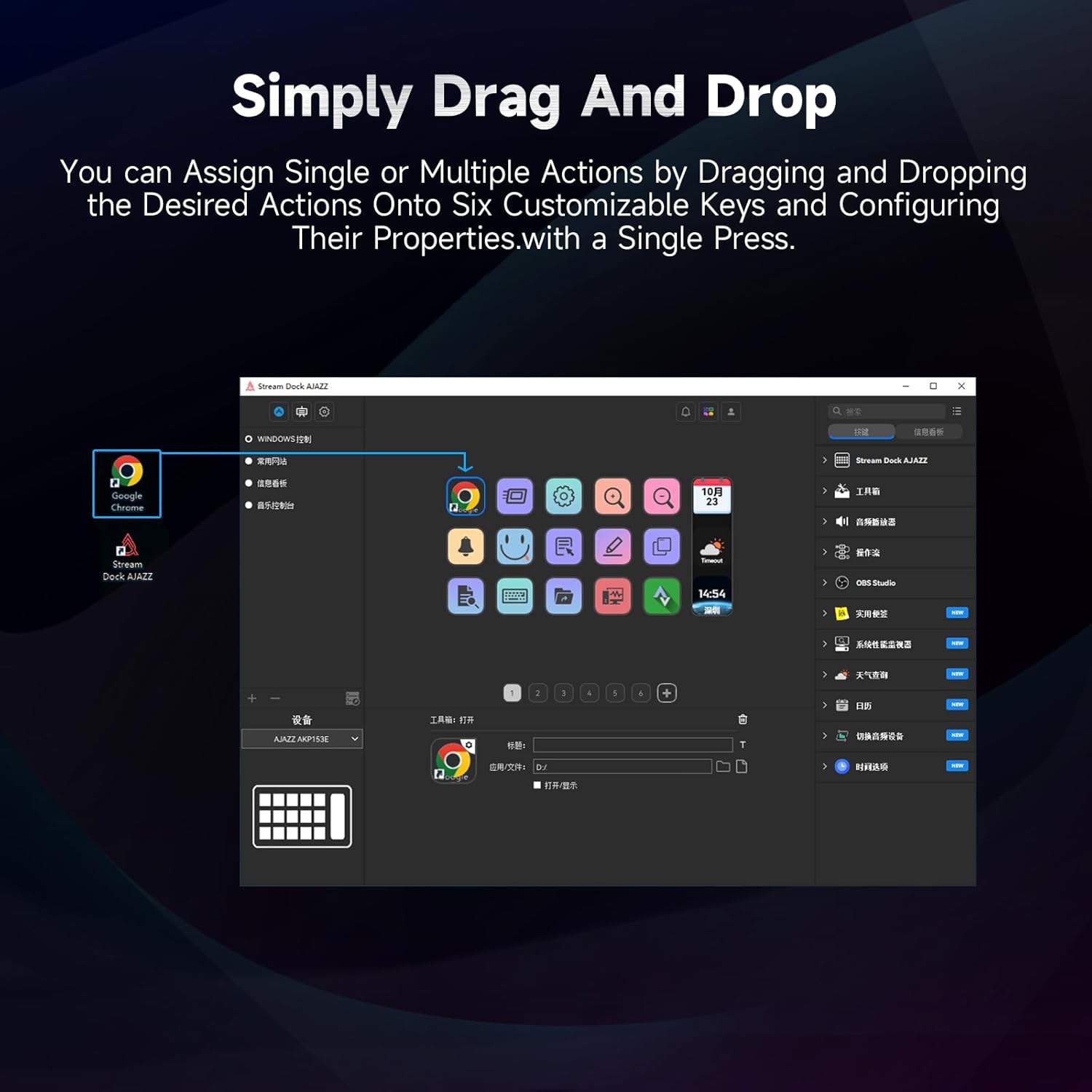
Figure 5.1: Customizing keys using the drag-and-drop interface in the AJAZZ software.
Video 5.1: Demonstration of assigning actions to keys for launching web pages and software with a single click.
5.2 Using Profiles and Pages
The software supports multiple profiles and pages, allowing you to switch between different sets of key assignments for various applications or tasks.
- Utwórz nowego profesjonalistęfiles for specific games, editing software, or streaming setups.
- W każdym profile, you can create multiple pages of key assignments, accessible by navigating through the device's buttons or software interface.
- The AKP03 automatically switches to the relevant profile when a linked application is in focus.
Video 5.2: Illustrates the multi-functional capabilities and profile switching of the AKP03 for various tasks.
6. Konserwacja
To ensure the longevity and optimal performance of your AJAZZ AKP03, follow these maintenance guidelines:
- Czyszczenie: Use a soft, dry cloth to wipe the surface of the device. Avoid abrasive cleaners or solvents.
- Składowanie: Przechowywać urządzenie w chłodnym i suchym miejscu, z dala od bezpośredniego światła słonecznego i ekstremalnych temperatur.
- Pielęgnacja kabli: Aby zapobiec uszkodzeniom, nie należy nadmiernie zginać ani skręcać kabla USB.
- Aktualizacje oprogramowania: Regularnie sprawdzaj AJAZZ webwitryna z aktualizacjami oprogramowania i oprogramowania sprzętowego, zapewniająca kompatybilność i dostęp do nowych funkcji.
7. Rozwiązywanie Problemów
If you encounter issues with your AKP03, refer to the following common troubleshooting steps:
- Urządzenie nierozpoznane:
- Ensure the USB cable is securely connected to both the AKP03 and your computer.
- Spróbuj podłączyć do innego portu USB.
- Uruchom ponownie komputer.
- Verify that the driver software is correctly installed and up to date.
- Klawisze nie reagują:
- Check the software to ensure keys are properly assigned and the correct profile jest aktywny.
- Ensure the driver software is running in the background.
- Problemy z oprogramowaniem:
- Zainstaluj ponownie oprogramowanie sterownika.
- Check for software updates on the AJAZZ webstrona.
8. Specyfikacje
| Funkcja | Szczegół |
|---|---|
| Marka | AJAZZ |
| Nazwa modelu | AKP03 |
| Kompatybilne urządzenia | komputer osobisty, laptop |
| Typ kontrolera | Klawiatura |
| Technologia łączności | USB-C |
| Ilość przycisków | 6 Programmable Keys (with LCD displays), 3 Physical Knobs, 3 Toggle Switches |
| Waga przedmiotu | 0.32 kilograma |
| Pozycja Wymiary (dł. x szer. x wys.) | 5 x 3 x 2 cala |
| Źródło zasilania | Elektryczny przewodowy |
9. Gwarancja i wsparcie
9.1 Informacje o gwarancji
The AJAZZ AKP03 Macro Keypad Stream Controller comes with a 1-roczna ograniczona gwarancja od daty zakupu. Niniejsza gwarancja obejmuje wady produkcyjne i usterki powstałe w wyniku normalnego użytkowania. Nie obejmuje ona uszkodzeń spowodowanych niewłaściwym użytkowaniem, wypadkami, nieautoryzowanymi modyfikacjami lub nieprawidłową instalacją.
Proszę zachować dowód zakupu na potrzeby roszczeń gwarancyjnych.
9.2 Obsługa klienta
For technical assistance, troubleshooting, or warranty inquiries, please contact AJAZZ customer support:
- Webstrona: www.a-jazz.com (Refer to the 'Support' or 'Contact Us' section)
- E-mail: [Insert Customer Support Email, if available]
- Telefon: [Insert Customer Support Phone Number, if available]
Nasz zespół wsparcia jest do Państwa dyspozycji i chętnie odpowie na wszelkie pytania lub wątpliwości dotyczące Państwa produktu.