
1. Wprowadzenie
This manual provides detailed instructions for the installation, operation, and maintenance of your GOHHDL Android 15 Car Radio Stereo. This unit is specifically designed for Ford Fusion Mondeo models from 2013 to 2019, offering advanced features such as Wireless CarPlay, Android Auto, GPS navigation, Bluetooth connectivity, FM/RDS radio, DSP EQ, Steering Wheel Control (SWC), and support for a backup camera.
Przed instalacją i użyciem należy dokładnie przeczytać tę instrukcję, aby mieć pewność, że urządzenie działa prawidłowo i zapewnić sobie jak najlepsze wrażenia z jazdy.
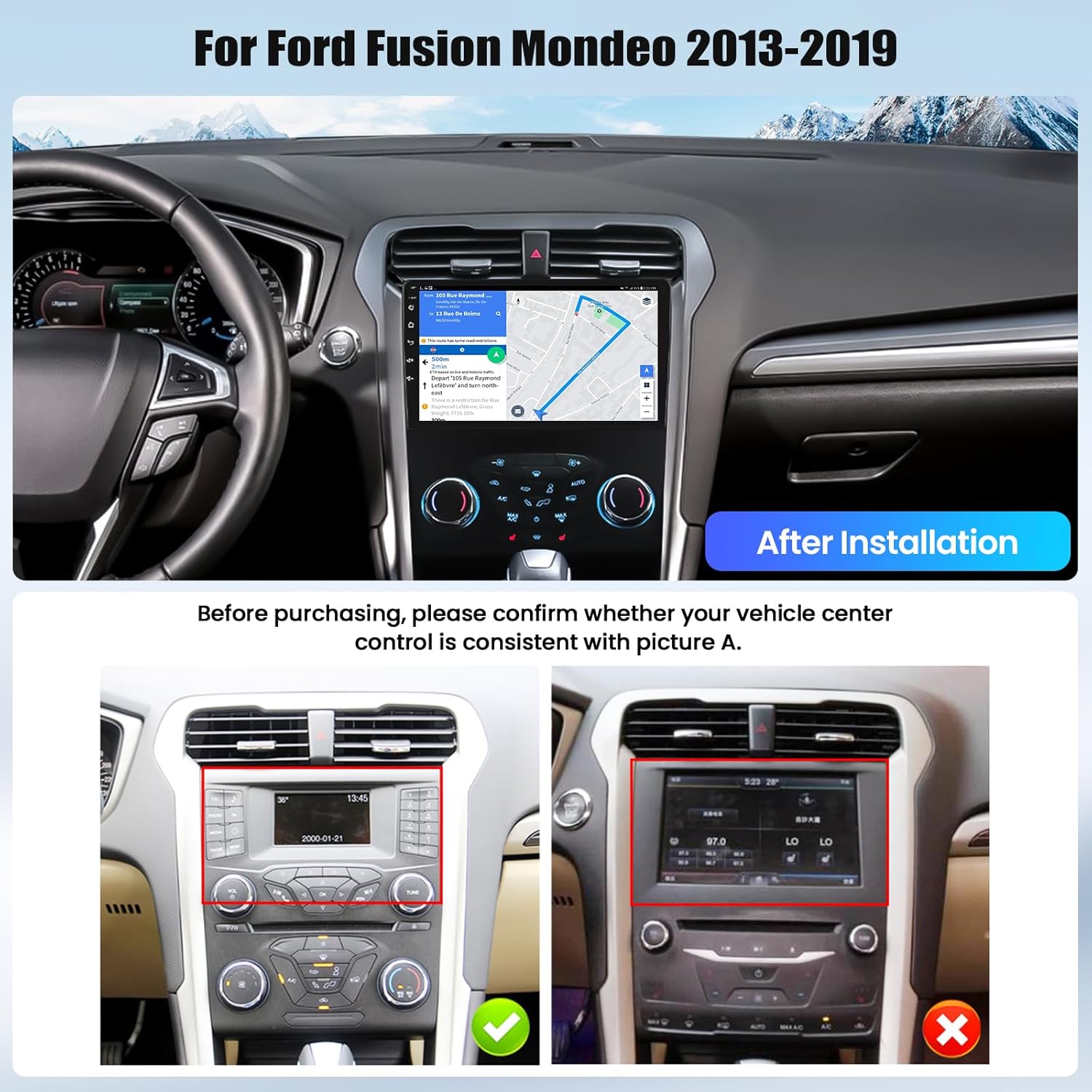
Image 1.1: GOHHDL Android 15 Car Radio Stereo installed in a Ford Fusion Mondeo dashboard, showing the integrated display and controls.
2. Konfiguracja i instalacja
2.1 Sprawdzenie zgodności
Before proceeding with installation, verify that your vehicle's center console matches the compatible configuration. This unit is designed for Ford Fusion Mondeo models manufactured between 2013 and 2019.
Image 2.1: Visual guide for checking vehicle center control consistency before installation. Ensure your vehicle's original setup matches the 'Before Installation' image for proper fitment.
2.2 Lista rzeczy do spakowania
Przed rozpoczęciem instalacji należy upewnić się, że wszystkie elementy są obecne:
- Main Head Unit (Car Radio Stereo)
- Kabel zasilający
- Kable wejściowe/wyjściowe RCA
- Kabel wejściowy kamery cofania
- Kable USB (wiele)
- Antena GPS
- Radio Antenna
- Dekoder Canbus
- Mikrofon
- Kamera tylna (kamera cofania AHD)
- Narzędzie instalacyjne
- Instrukcja obsługi
- Części montażowe

Rysunek 2.2: Szczegółowy view of the car radio dimensions and a comprehensive list of included accessories for installation.
2.3 Ogólne wskazówki dotyczące instalacji
Installation typically involves removing the original car radio, connecting the new unit using the provided wiring harnesses, and securing it in place. Due to the complexity of automotive electronics, professional installation is highly recommended. Incorrect wiring can damage the unit or your vehicle's electrical system.
Notatka: Some vehicle models may require specific adapters or modifications for full functionality, especially concerning OEM cameras or steering wheel controls. If you encounter difficulties with the original car's circuit board or connections, consult a professional installer or GOHHDL technical support.
3. Instrukcja obsługi
3.1 Bezprzewodowy CarPlay i Android Auto
The unit supports both Wireless CarPlay for iOS devices and Wireless Android Auto for Android devices. This allows seamless integration of your smartphone's key features, including navigation, music, and messaging, directly onto the car stereo display.
- Połączenie: Connect your smartphone via Bluetooth and WiFi to enable wireless CarPlay or Android Auto.
- Sterowanie głosowe: Utilize voice commands (Siri or Google Assistant) to operate apps and control the stereo.
- Android Auto App: For Android phones, ensure the Android Auto application is installed on your device.

Image 3.1: Display showing the user interface for Wireless CarPlay, Android Auto, and Mirror Link, enabling smartphone integration.
3.2 GPS Navigation and WiFi/Hotspot
The car stereo features a built-in GPS module for navigation. It comes with Google Maps pre-installed, and you can download other navigation apps from the Play Store.
- Nawigacja online: Connect to WiFi or a mobile hotspot to access real-time traffic conditions and online maps.
- Nawigacja offline: Download map data for offline use, allowing navigation without an internet connection.
- Instalacja aplikacji: Use the WiFi/Hotspot connection to download and install various applications like Spotify and YouTube.
- Podzielony ekran: Utilize the split-screen function to run two applications simultaneously, such as navigation and music.

Image 3.2: Demonstrates the GPS navigation capabilities, including online map access and offline map downloads, alongside WiFi hotspot functionality for app downloads and online browsing.
3.3 Bluetooth i radio FM/RDS
Enjoy hands-free communication and high-quality audio with the integrated Bluetooth and FM/RDS radio features.
- Bluetooth: Built-in Bluetooth with microphone supports hands-free calls, music streaming, and automatic phone book loading.
- Radio FM/RDS: High-quality FM/RDS radio with automatic channel search. Frequencies range from 87.5-108 FM. You can preset up to 18 favorite stations for quick access to news, traffic, and music.

Image 3.3: User interfaces for Bluetooth connectivity, including hands-free calling, and the FM/RDS radio tuner with station presets.
3.4 DSP EQ (cyfrowy korektor dźwięku)
Customize your audio experience with the built-in DSP tuning technology and customizable EQ settings.
- Regulacja dźwięku: Adjust frequency, AE, and choose from 32-band or 10-band EQ settings to enhance your listening experience.
- Efekty dźwiękowe: Select various popular sound effects to achieve optimal car audio quality.

Image 3.4: The DSP EQ interface, illustrating the range of sound customization options available to fine-tune audio output.
3.5 Reversing Display and Backup Camera
Enhance safety and convenience with the reversing display and included AHD backup camera.
- Automatyczny wyświetlacz: When the vehicle is shifted into reverse gear, the stereo automatically displays the backup camera feed.
- Szeroki kąt: The included backup camera provides a 170° wide-angle view.
- 360° Panoramic Imaging: The unit supports 360° panoramic imaging (requires dedicated cameras, not included) to eliminate blind spots and provide seamless visibility.

Image 3.5: The reversing display showing the backup camera view with parking guidelines, and an illustration of steering wheel control buttons.
3.6 Sterowanie z kierownicy (SWC)
The unit supports integration with your vehicle's original steering wheel buttons, allowing for convenient control of the car audio system without taking your hands off the wheel.
- Funkcjonalność: Control volume, track skipping, answer/end calls, and switch functions directly from your steering wheel.
- Organizować coś: Refer to the unit's settings menu for configuring steering wheel controls if they do not function automatically after installation.

Image 3.6: A visual guide demonstrating the process of setting up and utilizing steering wheel controls for the car stereo.
4. Specyfikacje
| Funkcja | Specyfikacja |
|---|---|
| Marka | GOHHDL |
| Nazwa modelu | GOHHDL Car Radio Stereo |
| Rozmiar ekranu | 9 cali |
| System operacyjny | Android 15 |
| Edytor | 8-rdzeniowy |
| Pamięć (RAM) | 6 GB |
| Pamięć masowa (ROM) | 128 GB |
| Technologia łączności | Bluetooth, WiFi |
| Cechy specjalne | Wireless CarPlay, Android Auto, GPS, Mirror Link, FM RDS, DSP EQ, SWC, Backup Camera Support |
| Typ mapy | Worldwide (Google Maps pre-installed) |
| Wprowadzanie danych przez interfejs użytkownika | Mikrofon, ekran dotykowy |
| Metoda kontroli | Aplikacja, dotyk, głos |
| Waga przedmiotu | 2.04 kilograma |
5. Rozwiązywanie Problemów
This section addresses common issues you might encounter with your car radio stereo.
5.1 Brak dźwięku lub słaba jakość dźwięku
- Sprawdź połączenia: Ensure all audio cables (RCA, speaker wires) are securely connected.
- Ustawienia korektora: Verify DSP EQ settings are not configured to an extreme or muted state.
- Poziomy głośności: Confirm volume is not set to minimum on both the unit and your connected device.
5.2 Unit Freezes or Becomes Unresponsive
- Miękki reset: Press and hold the power button for 10-15 seconds until the unit restarts.
- Przywrócenie ustawień fabrycznych: If soft reset fails, a factory reset may resolve persistent freezing. Navigate to System Settings > Factory Settings (password: 8888) > Factory Reset. Note: This will erase all user data and settings.
5.3 OEM Camera Not Working
- Okablowanie: Ensure the backup camera input cable is correctly connected.
- Ustawienia: Access the factory settings (password: 8888) to change the backup camera source if needed.
- Adapter: Some OEM cameras may require a specific adapter harness not included with the unit. Consult a professional installer.
5.4 Steering Wheel Controls Not Functioning
- Podłączenie magistrali Canbus: Verify the Canbus decoder is correctly installed and connected.
- Programowanie: Access the SWC learning function in the unit's settings to program the buttons.
5.5 Radio Antenna Issues / No Reception
- Połączenie antenowe: Ensure the radio antenna is securely connected to the unit.
- Adapter: Confirm that any necessary antenna adapters are correctly installed and compatible.
6. Konserwacja
Proper maintenance ensures the longevity and optimal performance of your GOHHDL car radio stereo.
- Czyszczenie ekranu: Delikatnie przetrzyj ekran dotykowy miękką, niepozostawiającą włókien ściereczką. Unikaj środków czyszczących o działaniu ściernym i silnych środków chemicznych, które mogłyby uszkodzić wyświetlacz.
- Aktualizacje oprogramowania: Periodically check for available software updates through the unit's system settings or the manufacturer's webAktualizacje mogą poprawić wydajność witryny, dodać nowe funkcje i naprawić błędy.
- Warunki środowiskowe: Unikaj wystawiania urządzenia na działanie ekstremalnych temperatur, długotrwałego bezpośredniego światła słonecznego i nadmiernej wilgoci.
- Zarządzanie kablami: Ensure all cables are neatly routed and secured to prevent damage from vibration or accidental snagging.
7. Gwarancja i wsparcie
GOHHDL is committed to providing quality products and customer satisfaction.
- Gwarancja: Ten produkt jest dostarczany z 12-miesięczna gwarancja wymiany od daty zakupu.
- Gwarancja zwrotu pieniędzy: A 30-dniowa gwarancja zwrotu pieniędzy jest oferowane dla Twojego spokoju ducha.
- Wsparcie techniczne: GOHHDL provides dożywotnie wsparcie techniczne dla wszystkich swoich produktów.
- Skontaktuj się z pomocą techniczną: For technical assistance or warranty claims, please contact GOHHDL technical support via email at gohhdltechsupport@yeah.net. Online replies are typically provided within 18 hours.

Image 7.1: GOHHDL customer support is available to assist with any product-related inquiries or issues.