
Wstęp
This manual provides detailed instructions for the safe and effective operation of your YIYEIE Digital Torque Adapter, Model Y0095-98. Please read this manual thoroughly before using the device to ensure proper function and to prevent damage or injury. Keep this manual for future reference.
Informacje dotyczące bezpieczeństwa
- Always wear appropriate personal protective equipment, such as safety glasses, when using torque tools.
- Ensure the adapter is securely attached to your drive tool and socket before applying torque.
- Do not exceed the maximum torque capacity of the adapter (12.5-250 Ft-lb / 17-340 Nm).
- Avoid dropping the device, as this may affect its accuracy and functionality.
- When installing batteries, ensure correct polarity. Remove batteries if the device will not be used for an extended period to prevent leakage and potential damage.
- Keep the device away from water, extreme temperatures, and corrosive substances.
Zawartość opakowania
Sprawdź, czy w przesyłce znajdują się wszystkie elementy:
- YIYEIE Digital Torque Adapter (Model Y0095-98)
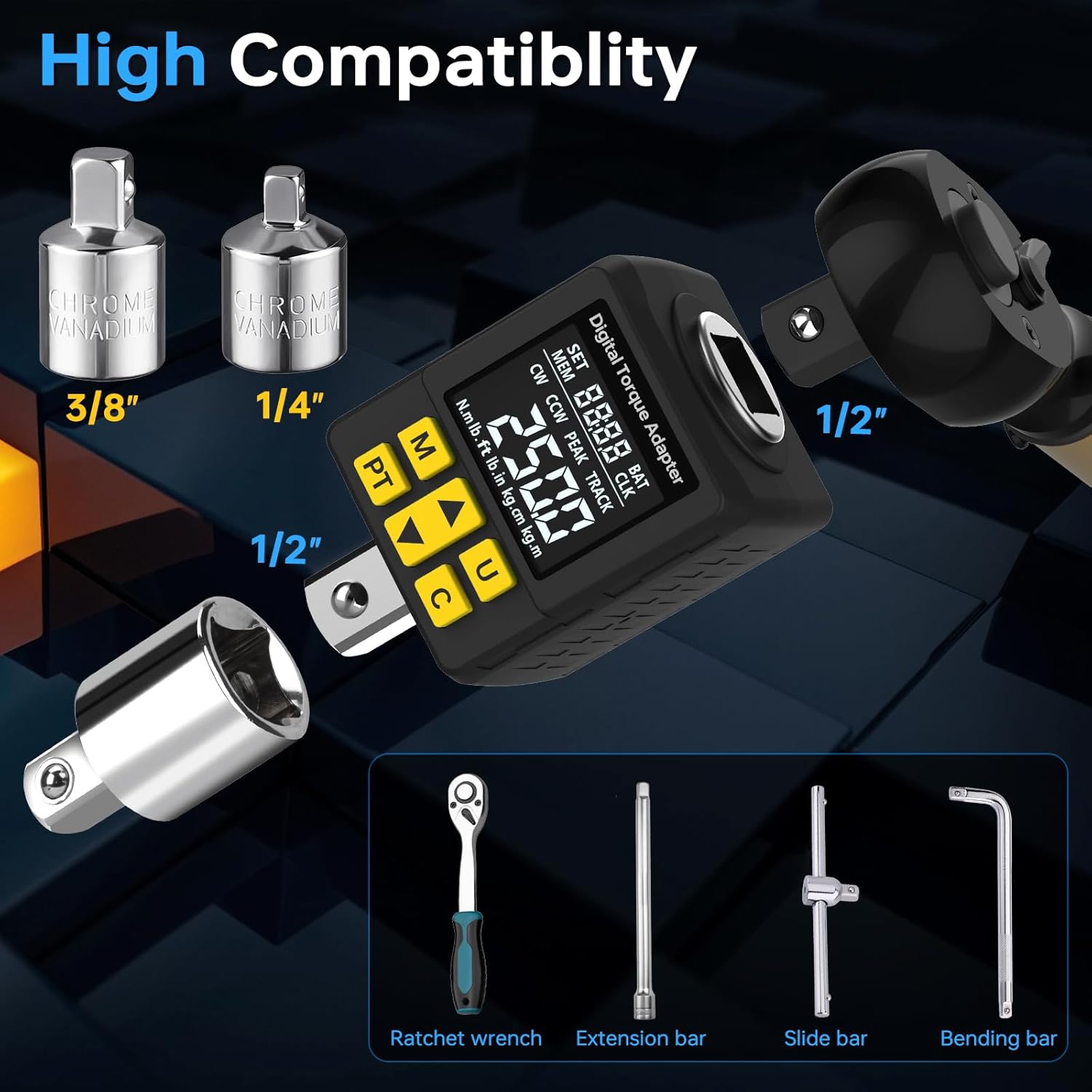
- 1/2" Adapter to 1/4" Adapter
- 1/2" Adapter to 3/8" Adapter
- Etui do przechowywania
- Instrukcja obsługi
- Baterie (alkaliczne)
- Small Screwdriver for battery compartment

Produkt ponadview
The YIYEIE Digital Torque Adapter converts any standard ratchet or breaker bar into a precision digital torque wrench. It features a clear digital display, multiple measurement units, and audible/visual alerts for reaching target torque values.
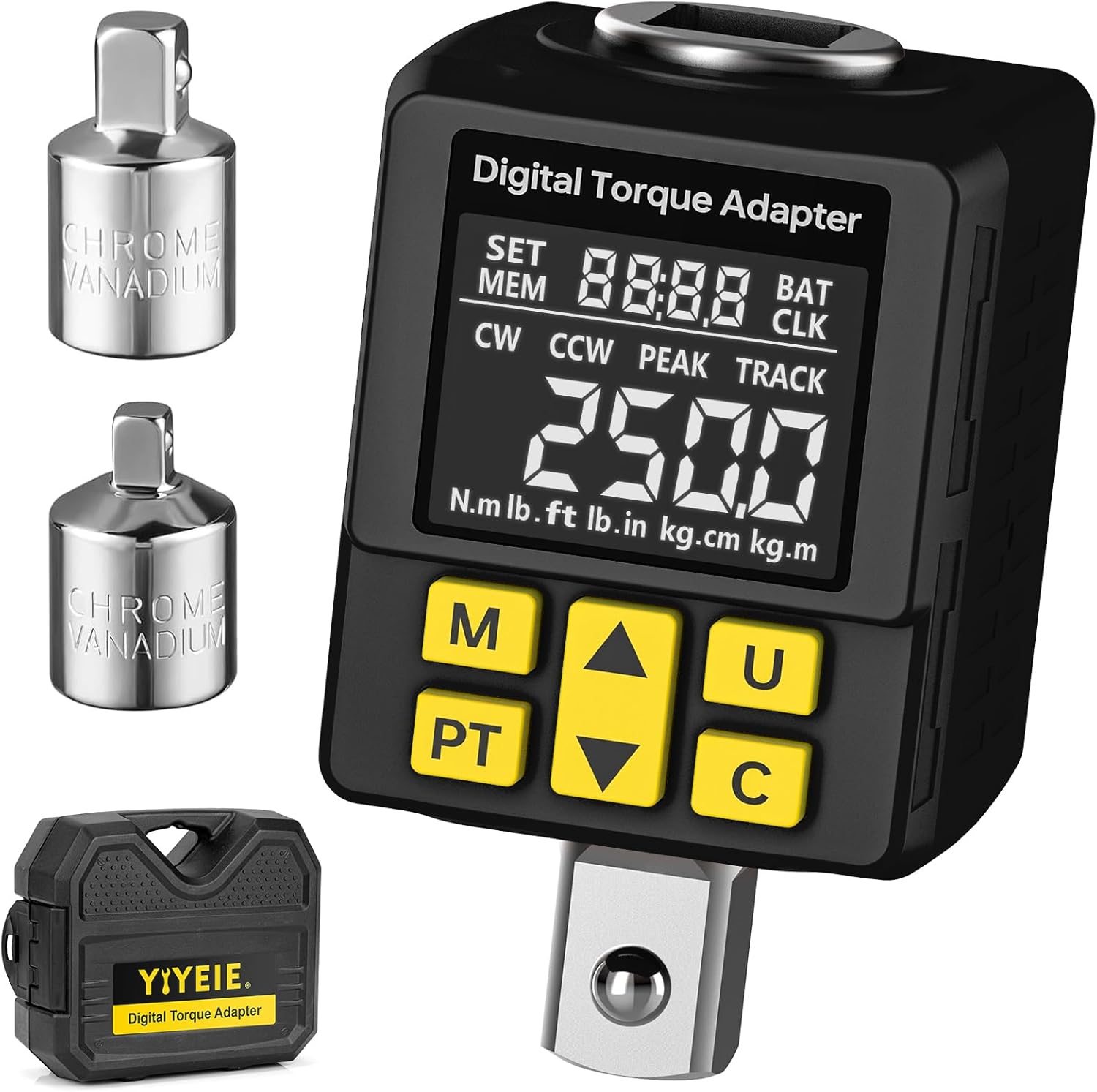
Główne cechy:
- Zakres momentu obrotowego: 12.5-250 Ft-lb / 17-340 Nm
- Dokładność: ±2%
- Rozmiar dysku: 1/2-Inch (with 1/4" and 3/8" adapters included)
- Jednostki miary: N.m, lb.ft, lb.in, kg.cm, kg.m
- Tryby pracy: Peak Hold (PEAK) and Track (TRACK)
- Alerty: Buzzer and LCD color alarm (Green, Blue, Red)
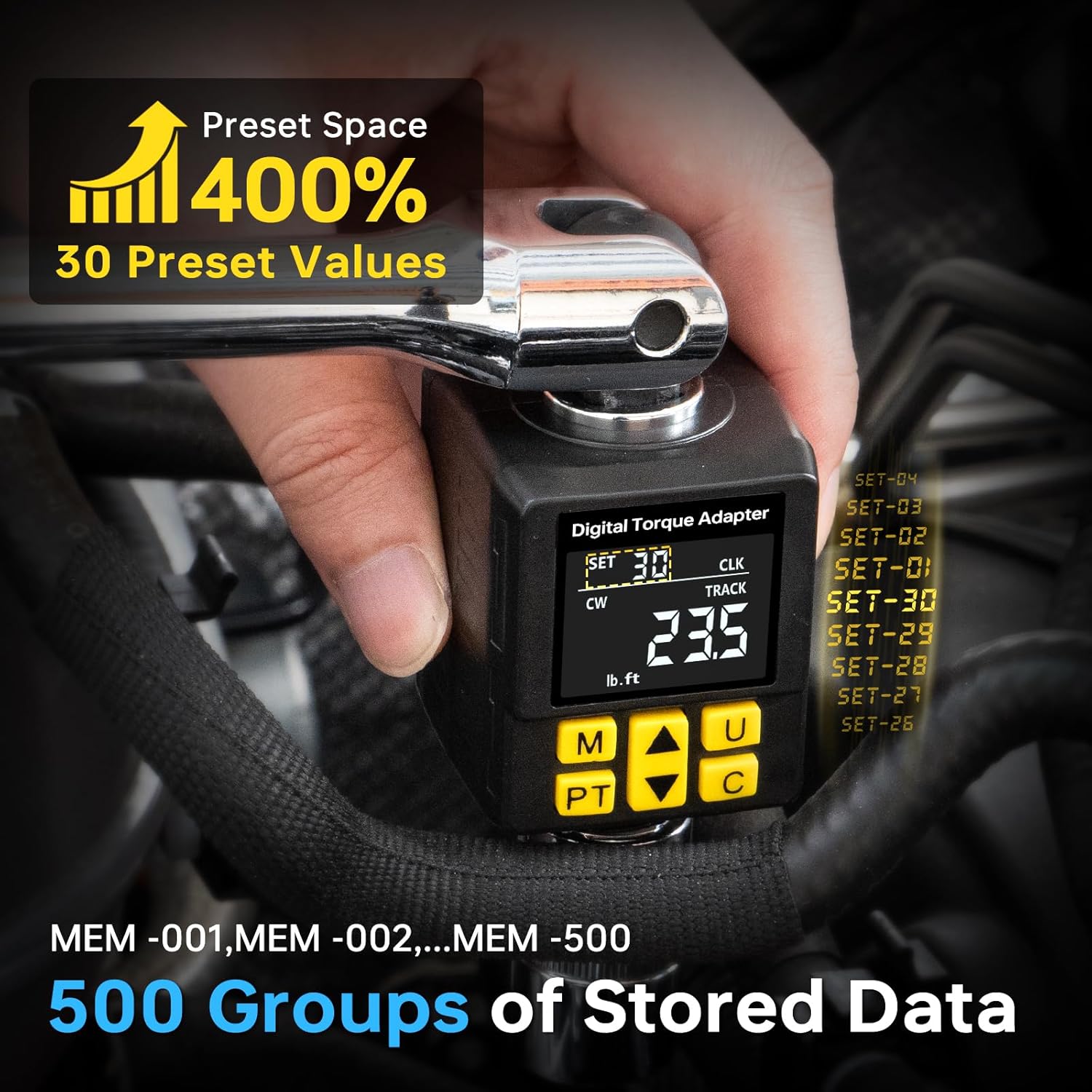
- Przechowywanie danych: 30 Preset Values, 500 Groups of Stored Data

Funkcje przycisków:
- Przycisk M (Pamięć): Torque save confirmation / Stored data query.
- PT (Mode Switch) Button: Switches between Peak Hold and Track modes.
- Przycisk strzałki w górę: Increases value / Navigates up.
- Przycisk strzałki w dół: Decreases value / Navigates down.
- U (Unit) Button: Switches torque units.
- C (Power/Clear/Confirm) Button: Power on/off / Clear current reading / Confirm selection.
Organizować coś
1. Instalacja baterii:
- Locate the battery compartment cover on the back of the adapter.
- Use the provided small screwdriver to open the battery compartment.
- Włóż baterie, zwracając uwagę na prawidłową polaryzację (+/-).
- Zamknij pokrywę komory baterii i zabezpiecz ją śrubą.
2. Attaching to a Drive Tool:
The adapter has a 1/2-inch square drive. It can be used with a 1/2-inch ratchet or breaker bar. For smaller drive sizes, use the included 1/4-inch or 3/8-inch adapters.
Instrukcja obsługi
1. Włączanie/wyłączanie zasilania:
- Aby włączyć, naciśnij C przycisk.
- Aby wyłączyć, naciśnij i przytrzymaj C Naciśnij przycisk przez kilka sekund. Urządzenie wyłączy się automatycznie po pewnym okresie bezczynności.
2. Wybór jednostki:
Naciśnij U button to cycle through the available torque units: N.m, lb.ft, lb.in, kg.cm, kg.m.

3. Mode Selection (Peak Hold / Track):
Naciśnij PT button to switch between Peak Hold (PEAK) and Track (TRACK) modes.
- Peak Hold (PEAK) Mode: Displays the maximum torque value applied during the tightening process. The display will hold this maximum value until reset.
- Track (TRACK) Mode: Wyświetla wartość momentu obrotowego w czasie rzeczywistym w trakcie jego stosowania.

4. Setting Target Torque (Preset Mode):
To set a target torque value (P Mode), follow these steps:
- Włącz urządzenie.
- Naciśnij PT button until "PtOP" (Preset Torque Operation) or "P Mode" is displayed.
- Use the Up and Down arrow keys to adjust the desired target torque value.
- Naciśnij C przycisk aby potwierdzić ustawienie.
Video Guide: Torque Measurement Operation
Video: This video demonstrates how to power on the device, switch to torque measurement mode, select units, set a target torque value in P Mode, and interpret the alarm prompts during torque application.
5. Torque Application and Alerts:
When applying torque in Preset Mode, the adapter provides visual and audible alerts:
- Green Light / Slow Beep: Torque is below 80% of the target value.
- Blue Light / Quicker Beep: Torque is between 80% and 99% of the target value.
- Red Light / Constant Beep: Torque has reached 100% of the target value. Stop applying force immediately.

Video Guide: Smart Color Screen Alert
Video: This video demonstrates the smart color screen alerts and audible feedback as torque is applied, showing the display changing from green to blue to red as the target torque is approached and reached.
6. Memory and Data Storage:
The adapter can store up to 500 groups of data and allows for 30 preset values.
- To save a torque reading, press the M button after a measurement.
- To access stored data, press and hold the M button. Use the Up and Down arrow keys to navigate through the stored memory slots (MEM-001 to MEM-500).
- To set or recall one of the 30 preset values, use the PT button to enter preset mode, then use the Up/Down arrows to select a preset.
7. Tire Pressure Measurement (If Applicable):
While primarily a torque adapter, this device may also offer tire pressure measurement functionality. If your model supports this, follow these steps:
- Włącz urządzenie.
- Naciśnij PT I C buttons simultaneously to switch to tire pressure measurement mode. The display will show tire pressure units (e.g., psi, kpa).
- To change tire pressure units, press the PT I M buttons simultaneously to cycle through kpa, bar, psi, kg/cm².
- Connect the adapter to the tire valve core and press down firmly to get a reading.
Video Guide: Tire Pressure Measurement Operation
Video: This video demonstrates how to switch the device to tire pressure measurement mode, select different pressure units, and take a tire pressure reading.
Konserwacja
- Czyszczenie: Przetrzyj urządzenie miękką, suchą ściereczką. Nie używaj środków czyszczących o właściwościach ściernych ani rozpuszczalników.
- Składowanie: Store the adapter in its protective case in a dry, cool place when not in use. Remove batteries if storing for extended periods.
- Kalibrowanie: This device is factory calibrated. For professional applications requiring certified calibration, consult a specialized service provider. User calibration is not recommended.
Rozwiązywanie problemów
| Problem | Możliwa przyczyna | Rozwiązanie |
|---|---|---|
| Urządzenie nie włącza się. | Rozładowane lub nieprawidłowo zainstalowane baterie. | Sprawdź biegunowość baterii. Wymień baterie na nowe. |
| Niedokładne odczyty. | Adapter not properly seated, device dropped, or needs calibration. | Ensure secure connection. Avoid dropping. If issues persist, professional calibration may be required. |
| Buttons unresponsive or difficult to navigate. | Complex user interface or temporary software glitch. | Zapoznaj się z „Produktem Over”view" and "Operating Instructions" sections for detailed button functions. Power cycle the device (turn off and on). |
| Wyświetlacz jest przyciemniony lub migocze. | Niski poziom naładowania baterii. | Wymień baterie. |
Specyfikacje
| Funkcja | Szczegół |
|---|---|
| Numer modelu | Y0095-98 |
| Zakres momentu obrotowego | 12.5-250 Ft-lb / 17-340 Nm |
| Dokładność | ±2% |
| Rozmiar dysku | 1/2-Inch Square Drive |
| Jednostki miary | N.m, lb.ft, lb.in, kg.cm, kg.m |
| Tryby pracy | Peak Hold (PEAK), Track (TRACK) |
| Przechowywanie danych | 30 Preset Values, 500 Groups of Stored Data |
| Źródło zasilania | Baterie alkaliczne (w zestawie) |
| Waga przedmiotu | 531 gramów |
| Wymiary | 15.49 x 12.8 x 6.4 cm (wymiary paczki) |
Gwarancja i wsparcie
For warranty information, technical support, or service inquiries, please refer to the product packaging or contact YIYEIE customer service through the retailer where the product was purchased. Keep your purchase receipt as proof of purchase.