
1. Wprowadzenie
Thank you for choosing the Fenge G04B211-FR Monitor Stand Riser. This product is designed to elevate your monitor or laptop to an ergonomic viewing height, reducing neck and eye strain. It also provides additional storage space to help organize your workspace. This manual provides detailed instructions for assembly, operation, and maintenance to ensure safe and efficient use of your new monitor stand.
2. Informacje dotyczące bezpieczeństwa
- Przed montażem upewnij się, że wszystkie elementy są kompletne i nieuszkodzone. Nie używaj, jeśli brakuje którejkolwiek części lub jest ona uszkodzona.
- Aby zapobiec zarysowaniom, należy zamontować urządzenie na miękkiej i czystej powierzchni.
- Nie przekraczać maksymalnego udźwigu 75 kg (165 funtów).
- Place the monitor stand on a stable, level surface to prevent tipping.
- Małe części należy trzymać z dala od dzieci, aby uniknąć ryzyka zadławienia.
- Aby zapobiec uszkodzeniom, nie należy stawiać bezpośrednio na powierzchni gorących przedmiotów.
3. Zawartość opakowania
Sprawdź, czy w opakowaniu znajdują się wszystkie poniższe elementy:
- Main Monitor Stand Sections (L-shaped and straight sections)
- Storage Drawers (if applicable to your configuration)
- Assembly Hardware (screws, connectors, Allen key)
- Instrukcja obsługi
4. Instrukcja montażu
The Fenge G04B211-FR monitor stand riser is designed for flexible assembly, allowing for various configurations to suit your workspace. Follow these general steps for assembly:
4.1. Rozpakowanie i przygotowanie
Carefully remove all components from the packaging. Lay them out on a soft, flat surface to prevent damage. Identify each part according to the included parts list (if provided in the physical manual).
4.2. Connecting the Sections
The stand consists of modular sections that can be connected to form different shapes (e.g., straight, L-shape). Align the connecting points of the desired sections and secure them using the provided screws and connectors. Ensure all connections are tight and stable.

Figure 4.2.1: Illustration of connecting the modular sections during assembly.
4.3. Installing Drawers and Shelves
If your configuration includes drawers or additional shelves, slide them into their designated slots. Ensure they move smoothly and are properly seated.
4.4. Final Placement and Stability Check
Once assembled, place the monitor stand on your desk. Gently push down on various parts of the stand to ensure it is stable and does not wobble. Adjust connections if necessary.

Rysunek 4.4.1: Example of a compact, single-tier assembly style.

Rysunek 4.4.2: Example of an L-shaped assembly style for corner desks.

Rysunek 4.4.3: Example of a straight, extended assembly style for multiple devices.
5. Instrukcja obsługi
Using your Fenge G04B211-FR monitor stand riser is straightforward:
- Umieszczenie: Position your monitor(s) or laptop(s) on the top surface of the stand. Ensure the weight is evenly distributed and does not exceed the maximum capacity.
- Ergonomia: Adjust your seating position so that the top of your screen is at or slightly below eye level. This helps maintain a neutral neck posture.
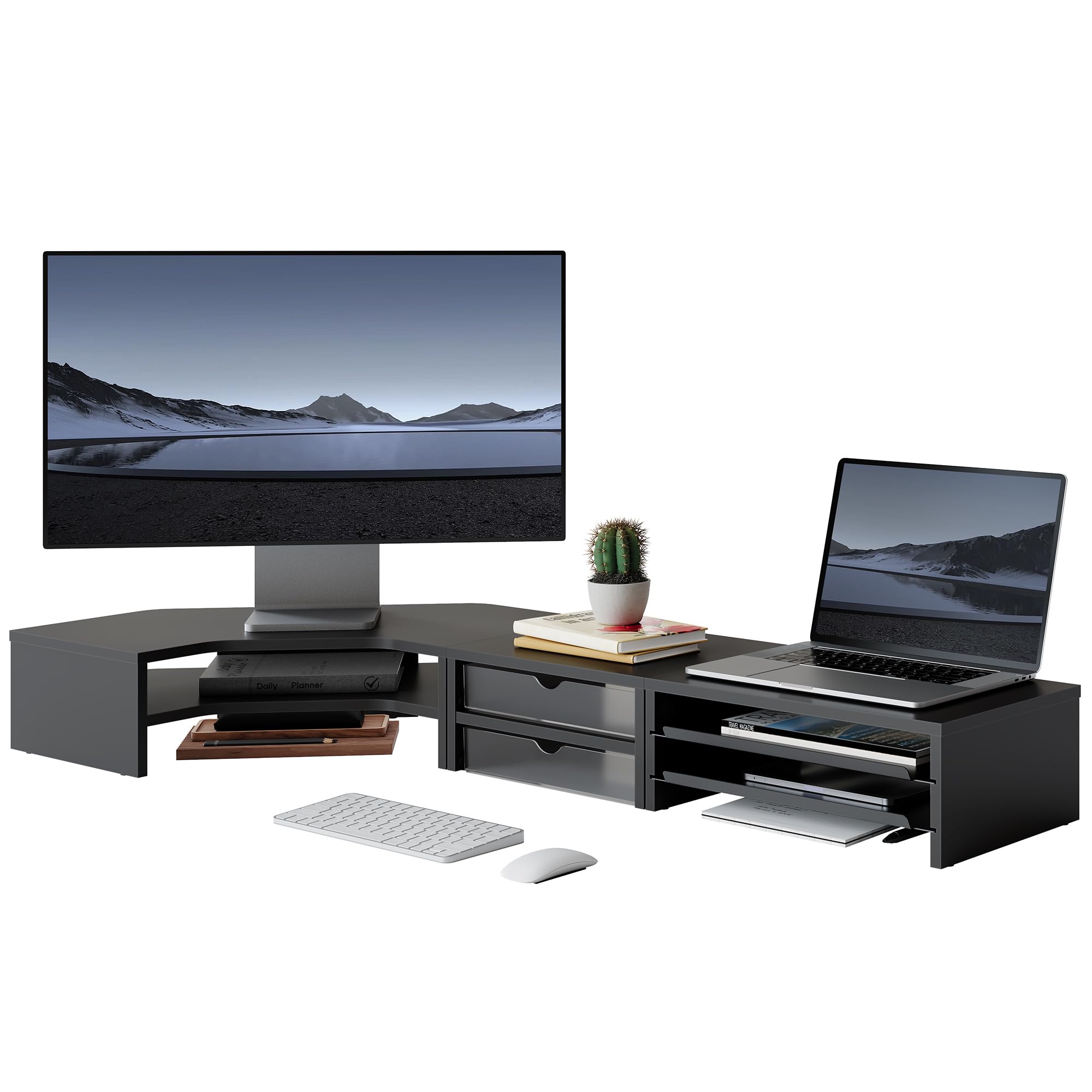
- Składowanie: Utilize the integrated drawers and open shelves for storing office supplies, documents, keyboards, mice, or other small items to keep your desk tidy.

Figure 5.1: Monitor stand in use, supporting a monitor and laptop.

Figure 5.2: Monitor stand configured to support two monitors.

Rysunek 5.3: Szczegółowy view of the storage drawers and shelves.
6. Konserwacja
To ensure the longevity and appearance of your monitor stand, follow these maintenance guidelines:
- Czyszczenie: Przetrzyj powierzchnie miękką, damp szmatką. Unikaj stosowania silnych środków chemicznych lub ściernych środków czyszczących, ponieważ mogą one uszkodzić wykończenie.
- Zasypka: Regularly dust the stand to prevent accumulation, especially in the storage compartments.
- Kontrola: Okresowo sprawdzaj wszystkie śruby i połączenia, aby upewnić się, że są dobrze dokręcone. W razie potrzeby dokręć.
- Unikaj wilgoci: Keep the stand away from excessive moisture or direct sunlight to prevent warping or discoloration.
7. Rozwiązywanie Problemów
If you encounter any issues with your Fenge G04B211-FR monitor stand, refer to the following common solutions:
- Chwiejność/niestabilność: Ensure all screws are fully tightened. Verify that the stand is placed on a flat, even surface.
- Przyklejanie się szuflad: Check for any obstructions in the drawer slides. Ensure the stand is level.
- Brakujące części: If any parts were missing upon arrival, please contact customer support immediately.
8. Specyfikacje
Rysunek 8.1: Wymiary i nośność produktu.
| Funkcja | Szczegół |
|---|---|
| Numer modelu | G04B211-FR |
| Wymiary (dł. x szer. x wys.) | 111.3 x 46.2 x 13.4 cm (43.8 x 18.2 x 5.3 cala) |
| Waga przedmiotu | 8.4 kilogramów (18.5 funty) |
| Maksymalna ładowność | 75 kilogramów (165 funty) |
| Kolor | Czarny |
| Tworzywo | Not specified, typically wood composite/MDF with metal accents |
| Wymagany montaż | Tak |
| Liczba poziomów | 2 |
| Kształt | L-Shape (modular for various configurations) |
9. Gwarancja i wsparcie
For warranty information, technical support, or to inquire about replacement parts, please contact Fenge customer service through the retailer's platform or the official Fenge website. Please have your model number (G04B211-FR) and purchase date available when contacting support.