
Wstęp
Welcome to the user manual for your Samsung QN65QN990FFXZA 65 Inch QN990F Neo QLED 8K TV. This document provides essential information for setting up, operating, maintaining, and troubleshooting your television. Please read these instructions carefully to ensure proper use and to maximize your viewzdobywania doświadczenia.

Rycina 1: Przód view of the Samsung QN65QN990FFXZA 65 Inch QN990F Neo QLED 8K TV.
Organizować coś
1. Rozpakowanie i ustawienie
- Ostrożnie wyjmij telewizor i wszystkie akcesoria z opakowania.
- Place the TV on a stable, flat surface or mount it on a wall using a VESA 400mm x 300mm compatible mount. Ensure adequate ventilation around the TV.
2. Connecting the Wireless One Connect Box
The Samsung QN990F utilizes a Wireless One Connect Box to manage all external connections, reducing cable clutter around the TV. Connect all your devices to this box.

Figure 2: Wireless One Connect Box for streamlined connections.
3. Połączenia urządzeń zewnętrznych
Connect your external devices (e.g., Blu-ray player, game console, soundbar) to the Wireless One Connect Box using the appropriate ports.

Figure 3: Detailed diagram of the Wireless One Connect Box ports.
- Kabel/ANT: Connect for over-the-air antenna or cable TV signals.
- USB-A: Standardowy prostokątny port do zasilania i odtwarzania multimediów.
- EX-Link: Port serwisowy Samsung do zewnętrznego sterowania i diagnostyki.
- HDMI 1, 2, 4: Transmits high-definition video and audio from external devices. Supports 8K@120Hz / 4K@240Hz for Gaming.
- HDMI 3 (eARC): Enhanced audio return for high-quality sound and advanced formats. Supports 8K@120Hz / 4K@240Hz for Gaming.
- Ethernet: Przewodowe połączenie internetowe umożliwiające strumieniowanie, aktualizacje i korzystanie z inteligentnych funkcji.
- Wyjście audio (optyczne): Zapewnia wysokiej jakości dźwięk cyfrowy w soundbarach i odbiornikach.
- Moc: Connects the power cable to the Wireless One Connect Box.
4. Podłączenie zasilania
- Connect the power cable to the Wireless One Connect Box, then plug it into a wall outlet.
- Ensure the TV is properly connected to the One Connect Box.
Instrukcja obsługi
1. Konfiguracja początkowa i funkcje inteligentne
Upon first power-on, the TV will guide you through the initial setup process, including network connection, channel scanning, and smart feature configuration. The TV runs on the One UI Tizen operating system.
- Procesor NQ8 AI Gen3: This processor optimizes content for enhanced viewing.
- Skalowanie AI 8K Pro: Lower resolution content is automatically upscaled to near 8K clarity.

Figure 4: 8K AI Upscaling Pro enhances content to near 8K resolution.
2. Poprawa jakości obrazu
- Bez efektu olśnienia: This technology minimizes reflections on the screen, improving visibility in bright environments.
- Neo Quantum HDR 8K+: Experience enhanced contrast and color depth.
- Quantum Matrix Technology Pro: Precise light control for detailed images.
- Ultra Viewkąt ing: Maintains picture quality from various viewzajmowania stanowisk.
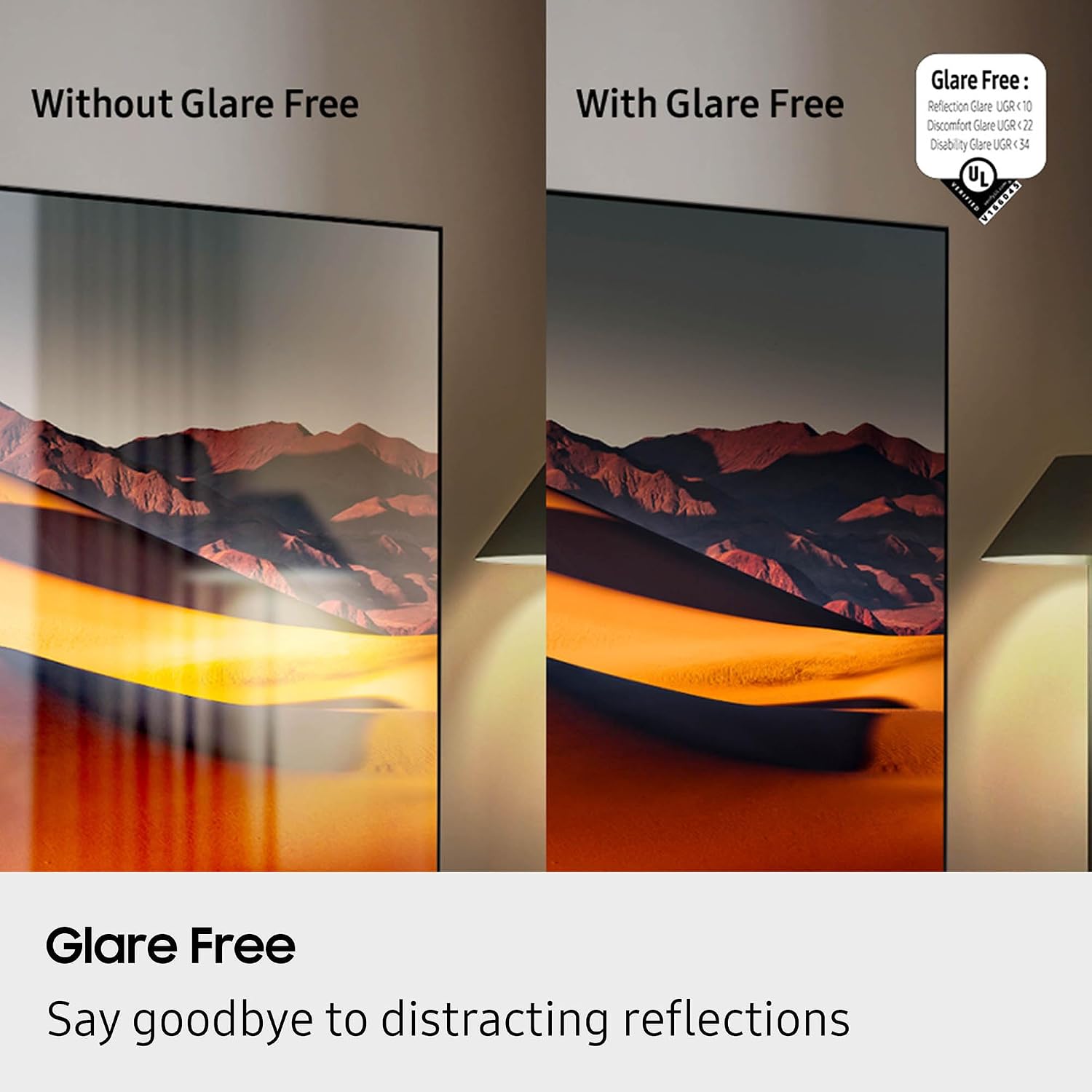
Figure 5: Glare Free technology reduces screen reflections.
3. Funkcje audio
- Dolby Atmos: Zapewnia wciągający, wielowymiarowy dźwięk.
- Q-Symfonia: Synchronizes TV speakers with compatible Samsung soundbars for a richer audio experience.
- AVA Pro (Active Voice Amplifier Pro): Poprawia klarowność dialogów w hałaśliwym otoczeniu.
- Adaptacyjny dźwięk Pro: Optymalizuje dźwięk na podstawie treści i akustyki pomieszczenia.
- Dźwięk przestrzenny 6.2.4-kanałowy: Integrated speaker system for a comprehensive audio field.
4. Funkcje gier
- Centrum gier: Uzyskaj dostęp do usług gier w chmurze i gier konsolowych bezpośrednio z poziomu telewizora.
- 120Hz Refresh Rate & VRR FreeSync Premium Pro: Ensures smooth, tear-free gaming.

Figure 6: Samsung Gaming Hub for integrated gaming experience.
5. Oficjalny film o produkcie
Video 1: An informational overview of the Samsung QN990F Series TV features and capabilities.
Konserwacja
1. Czyszczenie ekranu
To clean your TV screen, use a soft, lint-free cloth. For stubborn marks, a non-ammonia and alcohol-free screen cleaning solution is recommended.

Figure 7: Recommended screen cleaning solution for display screens.
- Apply cleaning solution to the cloth, not directly to the screen.
- Delikatnie przetrzyj ekran, aby usunąć kurz, brud i odciski palców.
- Unikaj ostrych środków chemicznych i materiałów ściernych.
2. Aktualizacje oprogramowania
Periodically check for and install software updates to ensure optimal performance and access to the latest features. This can usually be done through the TV's settings menu under "Support" or "Software Update."
Rozwiązywanie problemów
Jeśli masz problemy z telewizorem, zapoznaj się z poniższymi typowymi procedurami rozwiązywania problemów.
Brak zasilania / brak obrazu
- Ensure the power cable is securely connected to both the One Connect Box and the wall outlet.
- Verify the One Connect Box is properly connected to the TV.
- Sprawdź, czy gniazdko ścienne działa, podłączając do niego inne urządzenie.
- Naciśnij przycisk zasilania na pilocie lub na samym telewizorze.
Brak dźwięku
- Check the volume level on both the TV and any connected audio devices (soundbar, receiver).
- Sprawdź, czy telewizor nie jest wyciszony.
- Verify audio cables are correctly connected to the One Connect Box.
- If using external audio, check the audio output settings on the TV.
Słaba jakość obrazu
- Check the source resolution. While 8K AI Upscaling Pro enhances content, native 8K content will provide the best quality.
- Zmień ustawienia obrazu (jasność, kontrast, ostrość, kolor) w menu telewizora.
- Sprawdź, czy wszystkie kable wideo są solidnie podłączone i nie są uszkodzone.
- If using an antenna, check antenna positioning and signal strength.
Pilot nie działa
- Wymień baterie w pilocie.
- Upewnij się, że między pilotem a telewizorem nie ma żadnych przeszkód.
- Try re-pairing the remote control with the TV if it's a Bluetooth remote (refer to the TV's on-screen guide for pairing instructions).
Specyfikacje
| Funkcja | Specyfikacja |
|---|---|
| Nazwa modelu | QN65QN990FFXZA |
| Rozmiar ekranu | 65 cali |
| Technologia wyświetlania | NeoQLED-y |
| Rezolucja | 8K |
| Częstotliwość odświeżania | 120 Hz |
| Edytor | Procesor NQ8 AI Gen3 |
| Technologia Upscalingu | 8K AI Upscaling Pro |
| System operacyjny | Jeden interfejs użytkownika Tizen |
| Łączność | HDMI x 5, USB-A x 3, USB-C x 1, Ethernet, RF, Wireless One Connect, Bluetooth, Wi-Fi |
| Tryb wyjścia audio | Dźwięk przestrzenny (6.2.4-kanałowy) |
| Integrated Surround Sound | Dolby Atmos |
| Obsługiwany format HDR | HDR10+, HDR10 |
| Wymiary produktu (Gł. x Szer. x Wys.) | 10.5" gł. x 56.4" szer. x 35.1" wys. |
| Waga przedmiotu | 66.6 funtów |
| Standard mocowania VESA | 400mm x 300mm |
| Kolor | Czarny grafit |
Gwarancja i wsparcie
Gwarancja producenta
Your Samsung QN65QN990FFXZA 65 Inch QN990F Neo QLED 8K TV comes with a full 1-year manufacturer's warranty. This warranty covers defects in materials and workmanship under normal use. Please retain your proof of purchase for warranty claims.
Obsługa klienta
For technical assistance, troubleshooting beyond this manual, or warranty service, please contact Samsung Customer Support. Refer to the official Samsung website or your product registration documents for the most current contact information.
- Wsparcie online: Odwiedź oficjalną pomoc techniczną firmy Samsung webstrona.
- Wsparcie telefoniczne: Contact the Samsung customer service hotline.


