
1. Wprowadzenie
This manual provides comprehensive instructions for the Akozon PL to E Mount Lens Adapter, designed to facilitate the use of PL mount cinema lenses on Sony NEX E-mount mirrorless cameras. This adapter ensures a secure and precise mechanical connection, expanding your camera's lens compatibility and creative possibilities.
Key features of this adapter include:
- Solidna konstrukcja: Made from durable and lightweight aluminum alloy for longevity.
- Inżynieria precyzyjna: Ensures a seamless, gap-free connection for optimal focus and to prevent dark corners.
- Konstrukcja chroniąca przed kurzem: Features a rubber seal to protect against dust and impurities, and an internal threaded cutout to reduce stray light.
- Zamek zabezpieczający: A rotating latch and handle design securely locks the lens in place, preventing movement during use.
- Zdejmowany uchwyt statywu: Includes a 1/4-inch screw mount to support heavier lenses, reducing strain on the camera body.
2. Zawartość opakowania
- 1 x Akozon PL to E Mount Lens Adapter
3. Konfiguracja i instalacja
Follow these steps to correctly attach the lens adapter to your camera and lens:
- Przygotuj swój sprzęt: Ensure both your camera and lens are powered off. Remove any existing lens or body caps from your camera and lens.
- Attach Adapter to Camera: Align the red dot or indicator on the lens adapter with the corresponding mark on your Sony E-mount camera body. Gently insert the adapter into the camera mount and rotate it clockwise until it clicks securely into place. Do not force the adapter.
- Attach PL Lens to Adapter: Align the PL mount lens with the PL mount side of the adapter. Insert the lens and rotate it until the security latch on the adapter engages, locking the lens firmly.
- Using the Tripod Mount: If using a heavy PL lens, attach a tripod or monopod to the 1/4-inch screw thread on the adapter's removable tripod foot. This helps balance the setup and reduces strain on the camera's mount.

Figure 3.1: The Akozon PL to E Mount Lens Adapter positioned next to a Sony E-mount camera body, illustrating the relative size and how the adapter connects to the camera.
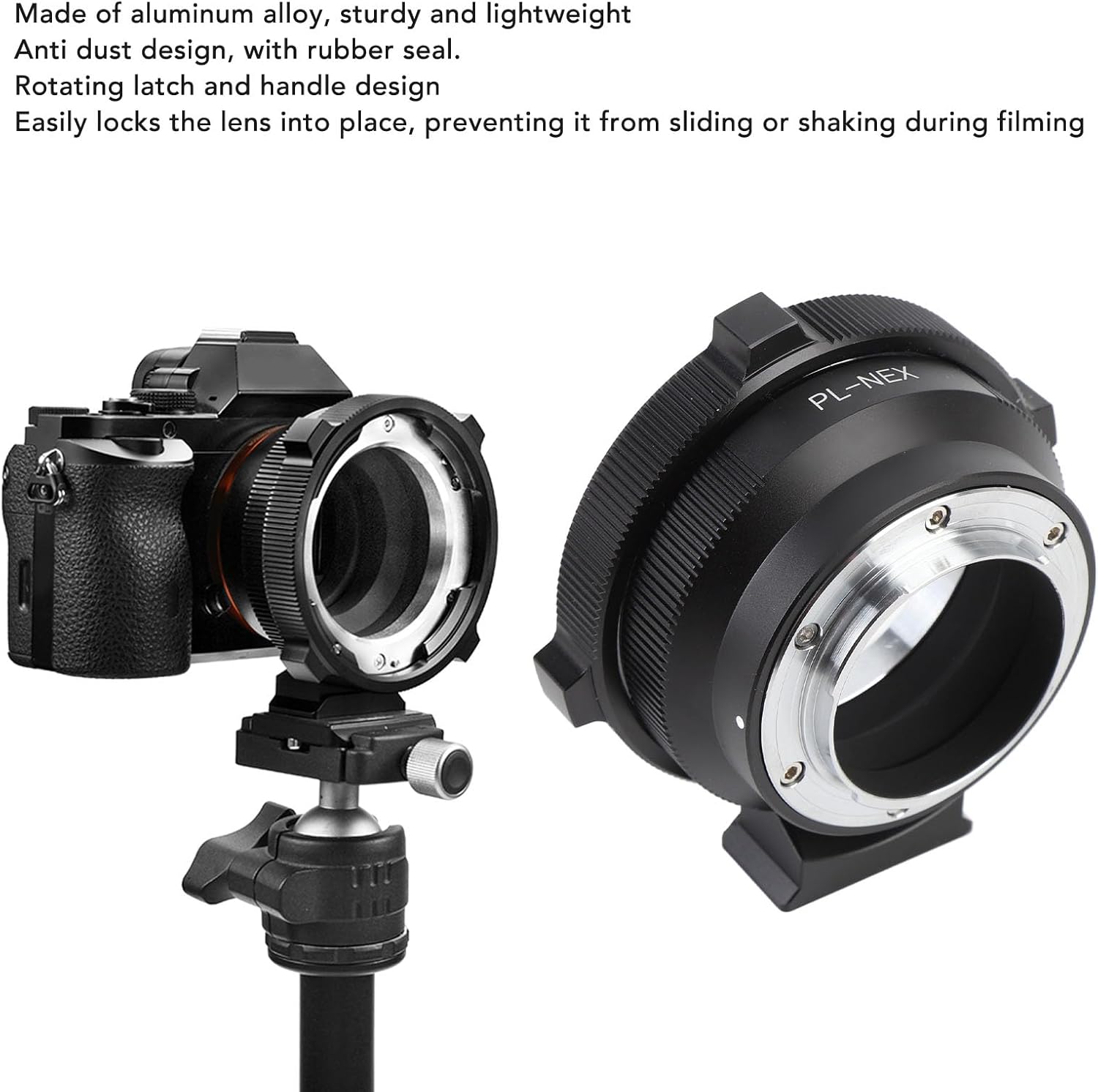
Figure 3.2: The Akozon PL to E Mount Lens Adapter shown with its removable 1/4-inch tripod mount, attached to a camera body, demonstrating its ability to support heavier lenses.
4. Instrukcja obsługi
This is a mechanical lens adapter. It does not support electronic communication between the lens and the camera. Therefore, the following operational considerations apply:
- Ręczne ustawianie ostrości: All focusing must be performed manually using the focus ring on your PL mount lens.
- Manual Aperture Control: If your PL lens has a manual aperture ring, you will control the aperture directly on the lens. If your PL lens does not have a manual aperture ring, the aperture will be fixed at its widest setting.
- Ustawienia ekspozycji: You will need to adjust your camera's exposure settings (ISO, shutter speed) manually or use aperture-priority mode (if available and the lens has a manual aperture ring) to achieve correct exposure.
- Ustawienia aparatu: Ensure your camera is set to 'Shoot without lens' or a similar setting, as it will not detect an electronically connected lens.
5. Konserwacja i pielęgnacja
Proper maintenance ensures the longevity and optimal performance of your lens adapter:
- Czyszczenie: Use a clean, dry, lint-free cloth to wipe the exterior of the adapter. For stubborn smudges, a slightly damp Można użyć ściereczki, a następnie natychmiast wysuszyć. Unikać stosowania silnych środków chemicznych i materiałów ściernych.
- Ochrona przed kurzem: The adapter features a rubber seal to prevent dust and impurities from entering. Regularly inspect and clean the mounting surfaces to maintain this protection.
- Składowanie: When not in use, store the adapter in a dry, dust-free environment, ideally with front and rear caps attached to prevent dust accumulation on the internal surfaces.
- Obsługiwanie: Always handle the adapter by its body. Avoid touching the mounting surfaces directly to prevent transferring oils or dirt.
6. Rozwiązywanie Problemów
If you encounter issues with your Akozon PL to E Mount Lens Adapter, refer to the following common problems and solutions:
- Lens or Adapter Not Mounting:
- Ensure correct alignment of the mounting marks on the adapter, camera, and lens.
- Check for any obstructions or debris on the mounting surfaces.
- Do not force the components; if resistance is met, re-align and try again.
- Loose Connection / Wobbly Lens:
- Verify that the adapter is fully rotated and clicked into place on the camera body.
- Ensure the PL lens's security latch on the adapter is fully engaged.
- Dark Corners or Vignetting:
- While the adapter is designed to prevent this, ensure the lens is fully seated and there are no gaps.
- Check if the issue persists with different lenses or if it's a characteristic of the specific PL lens being used.
- Stray Light / Flare:
- The internal threaded cutout design helps reduce stray light. Ensure the adapter's interior is clean and free of reflective particles.
- Consider using a lens hood with your PL lens to further minimize flare.
7. Specyfikacje
| Typ przedmiotu | Adapter mocowania obiektywu |
| Tworzywo | Stop aluminium + ABS |
| Kompatybilny obiektyw | PL Mount Lenses |
| Zgodny aparat | Sony NEX Series Cameras (e.g., NEX C3, NEX 5C, A9, A7, A7S, A7SII, A7RII, A7III, A7RIII, A7SIII, A6500, A6300, A6000, A5100, A5000, A3500) |
| Numer modelu | Akozonrp29fnq60d |
| Wymiary opakowania | Wymiary 9 x 9 x 5 cm |
| Waga paczki | 359 gramów |
8. Informacje o gwarancji
All Akozon products come with a standard 120-day warranty. This warranty period commences on the original shipping date of the product. The warranty covers all products and conditions as outlined in the original manufacturer's warranty documentation.
Please note that the warranty does not cover certain conditions, including but not limited to:
- Produkty zgubione lub skradzione.
- Water-damaged products.
- Damage resulting from disregard of customer guidelines or misuse.
9. Obsługa klienta
For further assistance, technical support, or warranty claims, please contact Akozon customer service through your original point of purchase or visit the official Akozon webwitryna do informacji kontaktowych.